p.1 #1 · Help/suggestions with processing this Landscape RAW file
Hello,
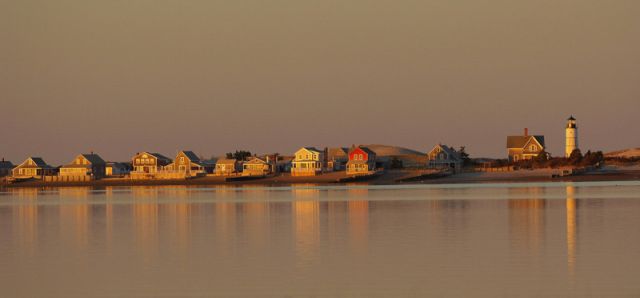
I have an image I took a few years back that I'm hoping to be able to print as a 20x40 canvas wrap print as a gift for my parents. The issue I have is that I'm horrible at post processing and I do not have the ability to upsize an image. The photo was taken with a 12 megapixel Nikon D2xs and while a portion of the file is going to be cropped off to fit the 20x40 format I think there is still enough of a file left to get what I want out of it. It's not the greatest landscape ever shot but it is of a special place on Cape Cod near where I grew up and near my parents home so I'm hoping I can do something with it. I have posted a quickly processed copy of the image below and there is a better sample on my web site www.jackcarrollphotography.com. I'm not sure how to post a RAW file or where I can do that. I tried on my zenflio site but they will not accept RAW files. Thank you for your suggestions and assistance.
p.1 #2 · Help/suggestions with processing this Landscape RAW file
A couple of thoughts: Will Zenfolio let you upload a TIFF? Do you use Photoshop? There's a plug-in, Perfect Resize, from a third-party software vendor, that will do a better job of up-sizing than Photoshop's built-in methods.
p.1 #3 · Help/suggestions with processing this Landscape RAW file
Hi Ernie,
Zenfolio does allow for Tiff files. However when I tried to upload the image they have a max file size of 36 MB and according to what it says my file is 70MB. I do not own Photoshop. I generally process using Capture NX or some basic adjustments in lightroom 3.
Jack
Nov 14, 2012 at 08:46 AM
Guest
Guest
p.1 #4 · Help/suggestions with processing this Landscape RAW file
looking at the scene, what exactly do you wish to accomplish? it looks fine as is.
p.1 #5 · Help/suggestions with processing this Landscape RAW file
This reminds me of the view from Barnstable Beach on Cape Cod. I love the warm light and reflections and think that this will make a beautiful print. My only suggestion would be to level the horizon line with a little rotation.
p.1 #8 · Help/suggestions with processing this Landscape RAW file
I really like the masking in LR4. Then maybe just a little extra photoshop. I think the photo looks pretty darn good as is but you have a slight green cast in parts of the sky but it's minimal. The canvas will mask a good amount of loss of resolution. You could sell this to your local tourism but I wouldn't do that if it's going on your parents wall.
p.1 #10 · Help/suggestions with processing this Landscape RAW file
Lightroom will handle the resizing, output (print) sharpening, all color corrections and cropping.
Just export your RAW as an 8 bit TIFF, Adobe RGB, no compression, sized at 20x40 @ either 240 or 300 ppi resolution, with output sharpening for either matte or glossy to a folder on your hard drive.
Right click with your RAW selected and choose Export/Export which will bring up the Export Dialogue Box. Here is where you can choose all the settings above.
While not as sophisticated as Photoshop or some of the third party sharpening plug-ins, it will give you just what you need.
I would make one small suggestion: the horizon needs leveling. on a pano of this type, at this size, it will be very apparent to viewers that it is slightly tilted to the left.
p.1 #11 · Help/suggestions with processing this Landscape RAW file
The one thing you never told us is the file size and what the resolution is at your given image size in inches. First thing to try is resizing simply by using the Image Size window without resampling. See what resolution you get when at 20 x 40. You can be as low as 150 and still get a decent print at that size, especially on canvas. If below that I would then suggest up-rezzing.