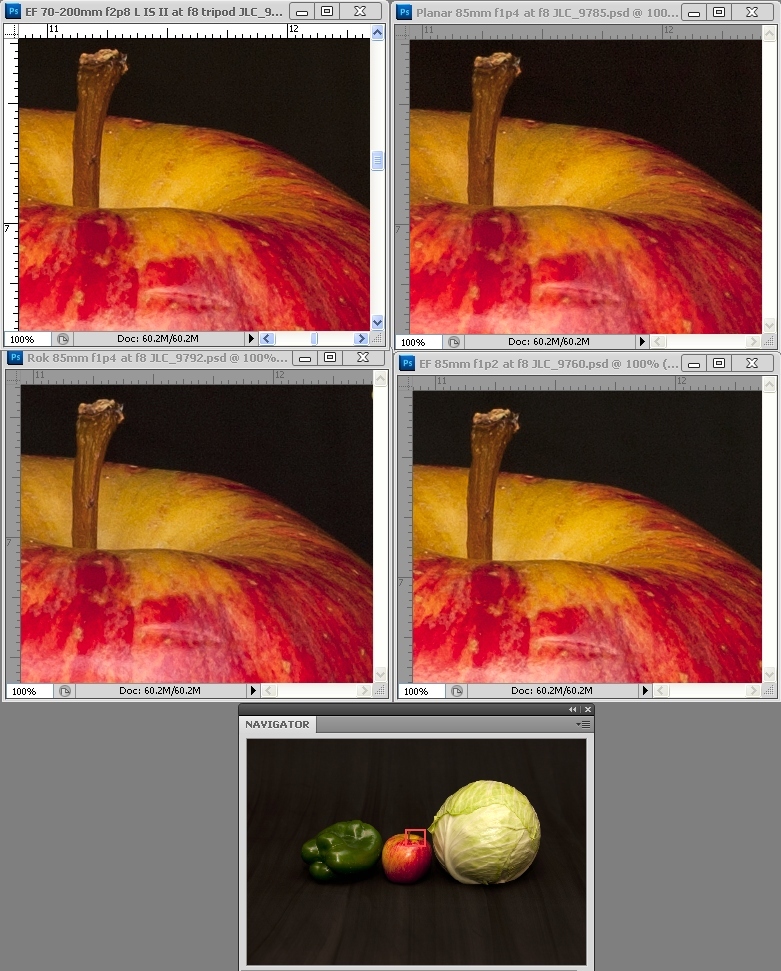
In common lingo it is a crop which is being displayed at 100% without resizing, such that it is showing actual pixels of the starting image.
So if you take your 6000x4000 image and take a 800x600 section of it and then display it at 800x600 then this is a 100% crop. On the other hand if you take a 2400x1800 crop of the image and then downsize that crop to 800x600 to display then it is not a 100% crop.
Each pixel of the original is displayed as an individual pixel in the presentation - no upsizing or downsizing. Because such an image would be far too large to display on monitors in its entirety, it is typically cropped and only a section of the original is displayed.
Here's an example from some 1DsIII 85mm f/8 test shots I did a while ago. The top four panels are 100% crops of the part of the full image that's outlined by the red square in the bottom "Navigator" view of the entire image. I find the easiest way to capture a 100% crop, is to show it at 100% on the screen, i.e. one camera pixel = one screen pixel (more or less), and copy the 100% image with a screen shot. Since going to Win 7, I do it like this: (i) open in PS CS6, (ii) push ^Alt-0 (control-alt-zero) or ^1 (control-numeral_one) to show it at "actual pixels", (iii) push the PrtScn key; (iv) open IrfanView, (v) paste, ^V, crop (because it captures the whole screen), and (vi) save.