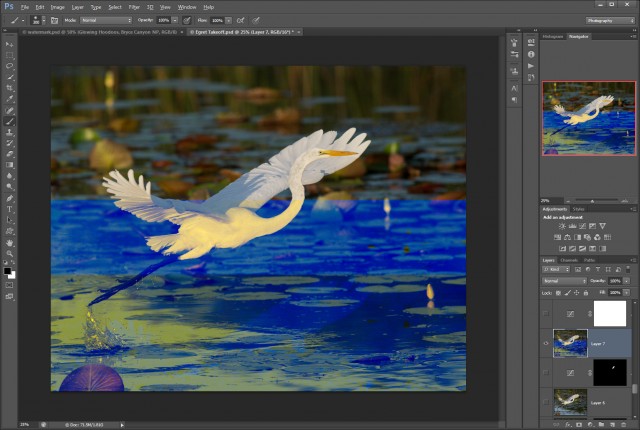
Ok, does anyone have any clue what would cause the problem below? It's like photoshop is randomly corrupting layers as I save. Most of the time it saves OK, but sometimes when I go open up a file I get the result below on one of the layers. Any ideas? Thanks in advance!
Steve, that is definitely bizarre. I've never seen anything like it, but I'll bet if you post this over at the official Adobe PS forum, one of the PS experts -- or even someone from Adobe itself -- will be able to help you.
By the way, you captured a very nice image! Love the splash of water as the feet lift off.
Peter - it's just in normal mode, nothing special. Weird huh?
After I posted this I double checked to make sure it was current and there was a patch from 13 to 13.0.11 or something. I didn't see anything in the update info about this type of problem, but it's worth a shot. I may just go ahead and post over at adobe and see what happens.
Steve, can you open the file ok in another program - either the psd file or just the original raw file ? Make sure that the other program generates a new image from the raw data and does not just display the built-in thumbnail. Maybe there is a data corruption in there somewhere.
Yup, tried it. The RAW is just fine, but the PS file is messed up on both my PC and MAC. I'm actually starting to lean towards the idea that maybe I have a disk problem and parts of the file are getting corrupted during the save process.
Your image shows the classic signs of data corruption. A single bit failure somewhere in the system. It's very unlikely (I've never seen a case) that this is caused by software. It's usually caused by hardware. The most common example is a failure in memory cards, either in the card itself, the card reader, or the cables, or the pin connectors in the camera or card reader.
Your case sounds like a failure in your hard disk, or perhaps in your memory. Those types of failures can be intermittent. Usually start out intermittent and then get worse. Often temperature related. OK on a cold start, but starts getting worse as things heat up. Sometimes a cooling fan will die inside the computer. Might keep working for days or even weeks, depending on room temp. Disk or memory can run "hot" for a long time, but eventually breaks down.
You can try utilities to check your disk and memory and internal temps. Google for those, there are many freewares available. Might be a good idea to take your system into a pro shop and have them run diagnostics.
And really a good idea to backup everything ASAP, because the system might go belly up at any time.
Thanks Redcrown, It's starting to sound like that may be the issue. I'm always 100% backed up, so no worries there. I'll have to figure out if it's memory related or HDD related.
But beware of backups. I had a old XP system die about a year ago. Heat related failure of the disks. It was a hand-me-down I had set up for my wife and then ignored. Discovered she never turned it off (or cleaned the vents). She let it run 24/7 with dust clogged fan intakes.
Had to buy a new system, and when restoring the user data I discovered errors going back 2 generations. The backup was backing up bad data.
Luckily I had a month old off-site backup and was able to recover almost everything.
redcrown wrote:
But beware of backups. I had a old XP system die about a year ago. Heat related failure of the disks. It was a hand-me-down I had set up for my wife and then ignored. Discovered she never turned it off (or cleaned the vents). She let it run 24/7 with dust clogged fan intakes.
Had to buy a new system, and when restoring the user data I discovered errors going back 2 generations. The backup was backing up bad data.
Luckily I had a month old off-site backup and was able to recover almost everything.
2 sets of backups, plus my data (photos) are on a separate drive(s) in the PC.
BTW - Ran that memory test and I think we have a winner. Looks like my first two banks are giving me trouble. Odd that both are - I wonder if it's a MOBO problem. I'll swamp the memory around and find out.
Funny thing is that bad ram was the very first thought I had, but I haven't heard of bad ram for so long it seems like it never happens. It has to be at least a dozen years since I've run into that personally. Brings back very very bad memories - memories of pulling sticks out, putting different combinations in til the culprit showed. What a pain in the ass.
After memtest, turns out ram was bad. 4 identical sticks, 2 bad, 2 perfect. Swapped them out to different banks, tired it every which way, the two good sticks always tested perfect, the two bad were always bad. New RAM is on the way
Good that you found the bad memory, but what caused it to go bad? Maybe a one-time static charge, power surge, etc. But maybe overheating. Before you put in new memory, I"d monitor internal temps, check fans, dirty heat sinks, clogged vents.
redcrown wrote:
Good that you found the bad memory, but what caused it to go bad? Maybe a one-time static charge, power surge, etc. But maybe overheating. Before you put in new memory, I"d monitor internal temps, check fans, dirty heat sinks, clogged vents.
I'm leaning towards static / surge, but I'll check the temps (I have a non-contact thermometer) and make sure all the vents are clear (they seemed to be when I was in it, honestly didn't do a real good examination though). All the fans are spinning for sure.
It measures and reports lots of stuff, including all temps. Don't know how accurate it is by using the on-board sensors, but a lot of hardware gurus swear by it. I got led to it by a tech friend who works in a local repair shop. They charge $75 for a "diagnostic" fee on any sick computer that comes in. He told me the hardware diagnostic is done by this program only.
Of course they also do virus scans, registry scans, and other stuff for the $75.