ben egbert wrote:
Rusty, first of all this is a great explanation.
You've just "ratted" on yourself as having an equally twisted mind.
Another thing that is of concern for me is that that portions of the image ... besides exposure & WB / color variance associated with mixed lighting ... have a variance in the specular light areas vs. the diffuse light areas. But one more piece of the puzzle to try to balance / contend with.
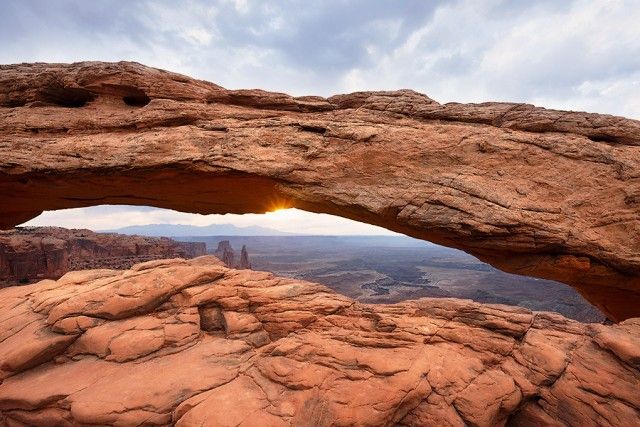
Newhaven ... maybe some additional tweaks on bright / contrast / etc. ... I think you've gotten some respectable balance to it and plausible colors . Now if it can be rendered to "pop" a bit more (suffering from the soft lighting). If the clouds we see are any indication of the sky overhead ... it is "ultra-soft" and "not quite so blue" as they will be "less blue" than a clear overhead sky would be.
Newhaven's with a little boost ... I think he's got it headed in the right direction.
RustyBug wrote:
You've just "ratted" on yourself as having an equally twisted mind.
Another thing that is of concern for me is that that portions of the image ... besides exposure & WB / color variance associated with mixed lighting ... have a variance in the specular light areas vs. the diffuse light areas. But one more piece of the puzzle to try to balance / contend with.
Newhaven ... maybe some additional tweaks on bright / contrast / etc. ... I think you've gotten some respectable balance to it and plausible colors . Now if it can be rendered to "pop" a bit more (suffering from the soft lighting). If the clouds we see are any indication of the sky overhead ... it is "ultra-soft" and "not quite so blue" as they will be "less blue" than a clear overhead sky would be.
Newhaven's with a little boost ... I think he's got it headed in the right direction....Show more →
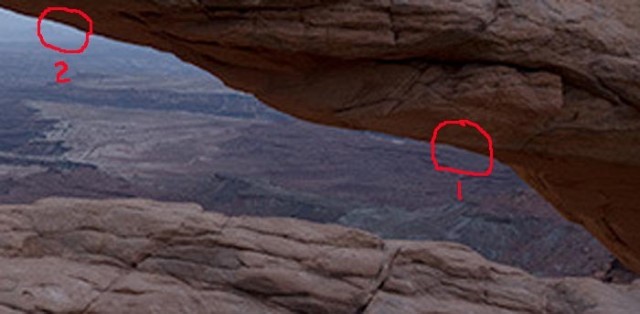
Allow me to illustrate that a selection followed by a significant change to darken does not need to add a halo:
Starting from a section of your dark sooc image with two areas circled and no selections or changes. Notice that the circled area labeled "1" shows no white outline. The area labled "2" shows a one wide light colored pixel band between the light and dark zones. This is no doubt due to the sharpening applied in creating the jpeg. (The camera applies sharpening when creating the jpeg. This one pixel band ought *not* be there in the raw image, at least not until a program such as ARC adds some sharpening. The light band is a method sharpening uses to increase edge contrast to create the illusion of greater sharpness.
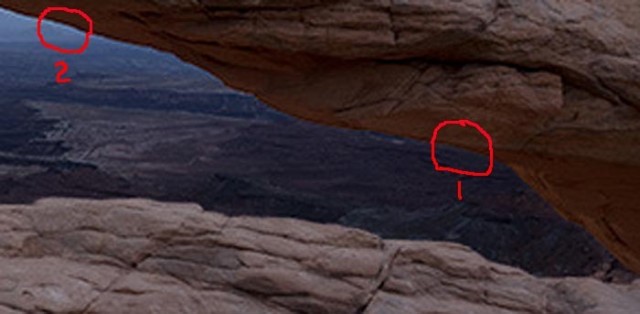
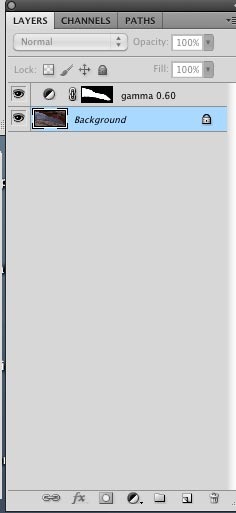
In the second example, I selected the inner area and applied an exposure layer to the inside using a selection to define the area to receive a 0.60 gamma change to darken the distance by increasing the gamma contrast effect. Notice that area "1" shows absolutely no light band. It wasn't in the original and it isn't in the selection modified zone edge. Notice that the light edge band in area "2" looks more obvious because the area beyond the band in the selected area is darker. Now if you put these images in Photoshop and use the eye-dropper on the pixels in the band of the before and after images, you will see that the band RGB values haven't changed at all. They became not noticeable because they stayed the same and the light area next to them became darker. If the one pixel wide band bothers you, the solution is to start with an unsharpened image that doesn't have the pixel wide sharpening artifact band to start with once everything else it right, you can then sharpen appropriately.
No selection or gamma change - note light sharpening edge in area 2.
Inside selected and 0.60 gamma bump applied. See explanation above.
AuntiPode wrote:
Allow me to illustrate that a selection followed by a significant change to darken does not need to add a halo:
Starting from a section of your dark sooc image with two areas circled and no selections or changes. Notice that the circled area labeled "1" shows no white outline. The area labled "2" shows a one wide light colored pixel band between the light and dark zones. This is no doubt due to the sharpening applied in creating the jpeg. (The camera applies sharpening when creating the jpeg. This one pixel band ought *not* be there in the raw image, at least not until a program such as ARC adds some sharpening. The light band is a method sharpening uses to increase edge contrast to create the illusion of greater sharpness.
In the second example, I selected the inner area and applied an exposure layer to the inside using a selection to define the area to receive a 0.60 gamma change to darken the distance by increasing the gamma contrast effect. Notice that area "1" shows absolutely no light band. It wasn't in the original and it isn't in the selection modified zone edge. Notice that the light edge band in area "2" looks more obvious because the area beyond the band in the selected area is darker. Now if you put these images in Photoshop and use the eye-dropper on the pixels in the band of the before and after images, you will see that the band RGB values haven't changed at all. They became not noticeable because they stayed the same and the light area next to them became darker. If the one pixel wide band bothers you, the solution is to start with an unsharpened image that doesn't have the pixel wide sharpening artifact band to start with once everything else it right, you can then sharpen appropriately.
That band would not bother me, I like to sharpen in ACR but the radius is only 0.6. The one you see is from downsizing. I shoot raws and no jpg, too hard to sync up with both the way I do file handling.
So the question is how you did the selection and how did you refine edges? I would probably use the magic wand to select the inner area or perhaps Topaz Remask. But then I am lost when it comes to refine edge. I have learned refine edge in the past, but with such poor results that I did not do it frequently enough to memorize the steps.
JDillonPhotog wrote:
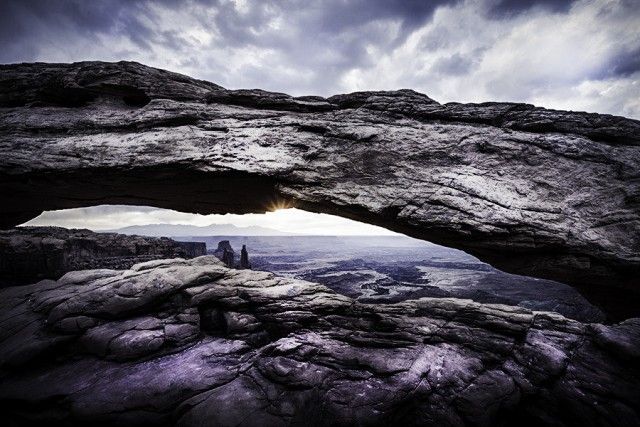
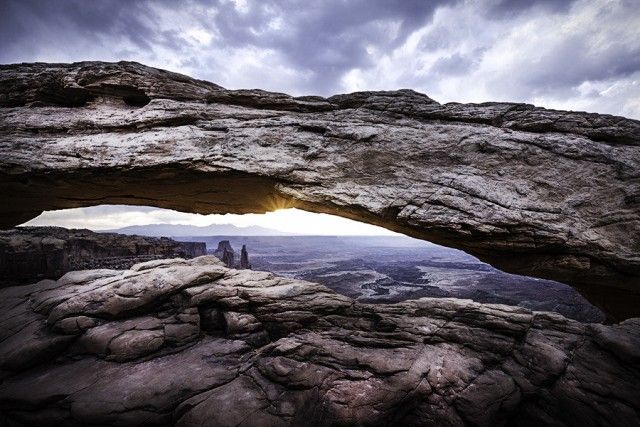
First edit is a Lower Saturated Image- and the Second is more of a Natural color with a few burns in Photoshop.
Thanks for this, both have a dramatic look for sure. The second image is probably closer to what I saw,a although without the very dark lower area.
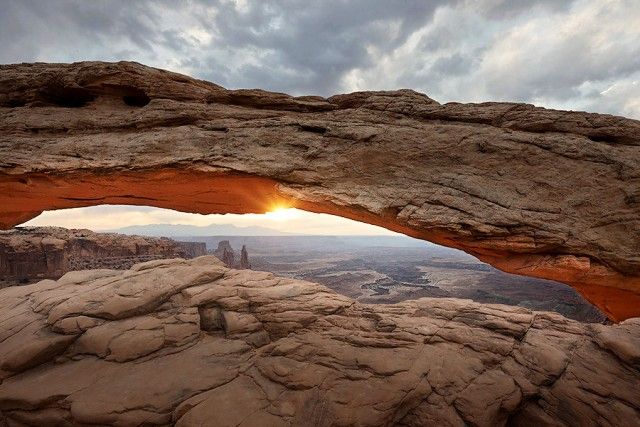
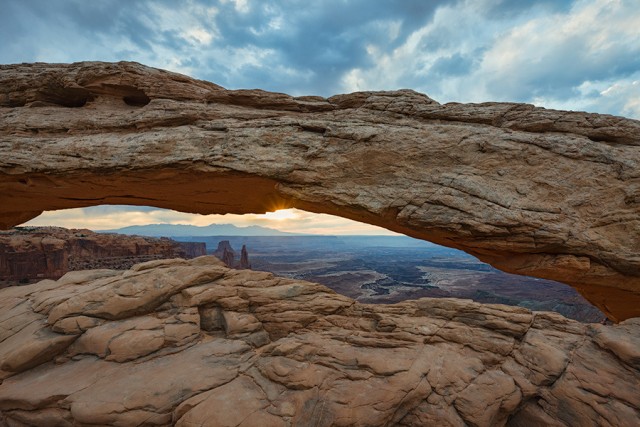
I suppose this whole post was about saving a vacation as usual. I had a specific image in mind when I booked my room. Heck it's on my bucket list. But that image was doomed when I got there and found my spot already occupied and the glow producing sun blocked by low clouds on the horizon.
After looking at a hundred or so Mesa Arch shots on line, I can see that almost none meet my goals, I would need to buy Tom Tills version in his Moab Gallery.
I am not an arch lover to start with. I prefer the big slabs of cliff. To me there are far prettier places to photagraph. The red glow is what makes this place worth going for.
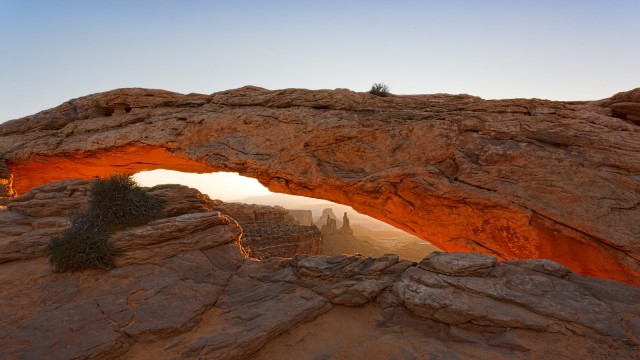
Here is one I took in 2008. I don't like the narrow arch opening that is the result of being forced to shoot from the extreme right side and I don't like the weed and the bare sky and the lack of a sunburst. As you can see, the sun was totally out of the picture from this angle.
I think I am content to leave this image on my wall and forget about Mesa Arch.
No way to suggest a one-size-fits-all selection refinement recipe that I know. But, frankly, Ben, I couldn't get a halo with any reasonable selection for that image. I rarely encounter an image that needs anything fancy with selection to avoid a halo. I'm mystified that you encounter this frequently. I don't. The best selection method will vary by image. For some images a hardish edge will work best. For those I fiddle with the edge detect to temper the hardness of the edge selection. I try the smart option, but it rarely improves the selection edge, but it's easy to click on and off to check. For this image I used the quick select and refine edge using edge detect. Anything from 0.3 pixels to 1.2 pixels seemed to work. Didn't try anything more extreme, but within that range nothing caused a halo with even rather large exposure layer gamma changes. You can use the adjust edge sliders to feather (blend and contrast) the soften the edge transitions, if useful, and use the shift edge to expand/contract the transition to adjust the positioning of the selection edge. When I don't want a hard edged transition, I mostly use the feather slider. I use the various sliders empirically. (I frequently feather. I often you the lasso and heavy feathering to lighten and darken areas.) I play with the sliders and observe the effects. To judge the effects I expand the image (command+ on the Mac) to observe the edges transitions.
AuntiPode wrote:
No way to suggest a one-size-fits-all selection refinement recipe that I know. But, frankly, Ben, I couldn't get a halo with any reasonable selection for that image. I rarely encounter an image that needs anything fancy with selection to avoid a halo. I'm mystified that you encounter this frequently. I don't. The best selection method will vary by image. For some images a hardish edge will work best. For those I fiddle with the edge detect to temper the hardness of the edge selection. I try the smart option, but it rarely improves the selection edge, but it's easy to click on and off to check. For this image I used the quick select and refine edge using edge detect. Anything from 0.3 pixels to 1.2 pixels seemed to work. Didn't try anything more extreme, but within that range nothing caused a halo with even rather large exposure layer gamma changes. You can use the adjust edge sliders to feather (blend and contrast) the soften the edge transitions, if useful, and use the shift edge to expand/contract the transition to adjust the positioning of the selection edge. When I don't want a hard edged transition, I mostly use the feather slider. I use the various sliders empirically. (I frequently feather. I often you the lasso and heavy feathering to lighten and darken areas.) I play with the sliders and observe the effects. To judge the effects I expand the image (command+ on the Mac) to observe the edges transitions....Show more →
Thanks Aunti. I plan to try to get the same results you did. Have some minor medical issues today so no time, but just wanted to say I appreciate your explanation. I have often wanted masks and always found the results poor. It is not halos so much as abrupt transistitions. If I get one I will show it. I have sort of relied more on using brushes of gradient type masks.
Hi Rusty, this looks pretty realistic. I think my 2008 image is pretty close but of course in brighter light. When the sky is dark, you can expose better for the near stuff. In bright light, the near stuff gets darker.
In this version, I would probably make the foreground rocks just a tad darker than the arch face.
After reading all replies and looking at various versions, I decided on a semi authentic version.
I started with the dark version which was pretty close to the natural illumination.
I used the white cloud for WB, but then faded toward blue because the clouds were probably blue as Rusty says. I also played with tint to get the rocks as I recall them.
Then I also use Karens mask suggestions to let me lighten the under arch (no halo or artifact observed).
Just a bit of Topaz and curves and here you are. Nothing great just fairly realistic of what was there.
Honestly, I think you're taking WAY too much time and effort trying to transmogrify the image into something it is not. You've photochopped it to the point that it doesn't remotely resemble the original scene. Why? So that it looks the way it 'should?' The way someone ELSE'S image looked?
Given the original's flat color, I think Bean's B/W is the best of the bunch.
Personally, I'd stop somewhere around here:
Local curve slope tweaks, sat boost, and a hint of large radius USM and cropping some of the sky, so that it doesn't overwhelm the image.
Greg Campbell wrote:
Honestly, I think you're taking WAY too much time and effort trying to transmogrify the image into something it is not. You've photochopped it to the point that it doesn't remotely resemble the original scene. Why? So that it looks the way it 'should?' The way someone ELSE'S image looked?
Given the original's flat color, I think Bean's B/W is the best of the bunch.
Personally, I'd stop somewhere around here: http://dl.dropbox.com/u/60092457/718337tweak.jpg
Local curve slope tweaks, sat boost, and a hint of large radius USM and cropping some of the sky, so that it doesn't overwhelm the image.
Guess you missed the one I did just above. I think it is about as true the scene as I will be getting and I have already said I should not try to push the scene where it was not. I think my colors are more accurate as well.
But Mesa Arch without the glow is just another arch.


 . Now if it can be rendered to "pop" a bit more (suffering from the soft lighting). If the clouds we see are any indication of the sky overhead ... it is "ultra-soft" and "not quite so blue" as they will be "less blue" than a clear overhead sky would be.