p.14 #1 · Sigma DP2 Merrill: Have any of you tried it?
I think the more interesting comparison would be between the Sony RX1 and one of the DPM's at base ISO. For one third the price, I'm betting the Merrill would come out pretty darn well as a specialty tool, perhaps even besting the rX1.
There are two main things going on here: first, an overall shift from magenta to green tones going from the center to the edges; second, a non-uniform mottling/splotching/banding of the color tint. I don't think either effect is severe enough to be annoying in "normal" pictures; nonetheless, it's something to be aware of (and maybe try to correct for) in shots where you care about accurately reproducing very fine color gradients....Show more →
What were the processing settings you used for this torture test of the gray card out of curiosity?
p.14 #3 · Sigma DP2 Merrill: Have any of you tried it?
sebboh wrote:
um, i don't think anyone really expects the rx100 to outperform the dp2m at low iso.
...........I am not sure so many are aware of the qualities of the Merrill
the rx100 is just a smaller, cheaper, more versatile camera. the dp2m is obviously a better imager (just on specs alone) in optimal shooting conditions. the rx100 can be used more easily in a lot more situations while still providing very good image quality. i don't really view them as competing cameras at all. completely different markets.
p.14 #4 · Sigma DP2 Merrill: Have any of you tried it?
Tariq Gibran wrote:
I think the more interesting comparison would be between the Sony RX1 and one of the DPM's at base ISO. For one third the price, I'm betting the Merrill would come out pretty darn well as a specialty tool, perhaps even besting the rX1.
I still do not think so many people are aware of the qualitties of the Merrill, but yes this will be a very interesting comparison (at base iso)
p.14 #5 · Sigma DP2 Merrill: Have any of you tried it?
Tariq Gibran wrote:
What were the processing settings you used for this torture test of the gray card out of curiosity?
Working on a TIFF/16 imported into Aperture, I turned up the "saturation" and "vibrancy" sliders to the maximum, then used "levels" to stretch the exposure range to cover the whole output range (set the black point and white point to match the dimmest and brightest part of the card).
There[/url] are two main things going on here: first, an overall shift from magenta to green tones going from the center to the edges; second, a non-uniform mottling/splotching/banding of the color tint. I don't think either effect is severe enough to be annoying in "normal" pictures; nonetheless, it's something to be aware of (and maybe try to correct for) in shots where you care about accurately reproducing very fine color gradients....Show more →
Tariq Gibran wrote:
What were the processing settings you used for this torture test of the gray card out of curiosity?
mpmendenhall wrote:
Working on a TIFF/16 imported into Aperture, I turned up the "saturation" and "vibrancy" sliders to the maximum, then used "levels" to stretch the exposure range to cover the whole output range (set the black point and white point to match the dimmest and brightest part of the card).
Hey, that's an interesting test. Have you tried this with other cameras? What were the results with them?
The 5D sensor color shifts have a different characteristic, following the sensor edges and side-to-side variation rather than a radial dependence (so color shift in this case is not correlated with light angle from the lens, though this could also be lens dependent). Color "blotching" is present with a finer-grained structure. The overall color variations, based on looking at the a,b channels in Lab color space, appears to be roughly half that of the DP2M; perceptually, the 5Dc gray card shot looks a bit more uniform and neutral to me.
Perhaps people with access to other camera bodies can post their results here? I'd be interested in seeing how newer sensor tech than the venerable 5Dc behaves (Canon 5DII/III and current Sony/Nikon sensors).
p.14 #8 · Sigma DP2 Merrill: Have any of you tried it?
mpmendenhall wrote:
Working on a TIFF/16 imported into Aperture, I turned up the "saturation" and "vibrancy" sliders to the maximum, then used "levels" to stretch the exposure range to cover the whole output range (set the black point and white point to match the dimmest and brightest part of the card).
Thanks. I'm already seeing much more neutral color from this DP1M than I ever expected just using "Sunlight" and "Neutral" in the Sigma software. I'm also seeing really smooth tonal gradations which allow for really nice B&W conversions - much better than I saw with the Sony NEX-7 for instance. For the right applications, I'm quite impressed.
This is one of my typical, boring test subjects for landscape detail and color, here taken with the above settings and the DP1M. 100% crop follows. Sharpening was -1 in Sigma Photo Pro (-2 would be off).
p.14 #9 · Sigma DP2 Merrill: Have any of you tried it?
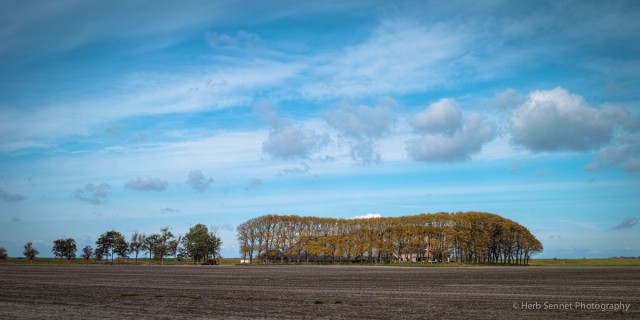
Untill now it was fun to explore the boundaries of the DP2 Merill regarding resolution, sharpness and color.
Now back to the basics. First the color. Two images. One with Sigma Photo Pro Neutral setting. The next
one imported into Lightroom and adjusted as follows:
p.14 #10 · Sigma DP2 Merrill: Have any of you tried it?
With the previous learned workflow regarding sharpening, color and other corrections I reworked a previous image accordingly. The Sigma files deserve this extra effort I think. However I would love to work them directly in Lightroom or Aperture or Capture One to name my top three.
p.14 #11 · Sigma DP2 Merrill: Have any of you tried it?
Herb1911 wrote:
Correction for Chromatic aberration in Sigma Photo Pro.
Do not correct CA in SPP with the automatic profile. It will make CA worse.
If you see still any CA in Lightroom after importing the tiffs then correct it here.
The screendump shows on the left the wrong corrected SPP and right the uncorrected Lightroom version.
p.14 #12 · Sigma DP2 Merrill: Have any of you tried it?
Tariq Gibran wrote:
I noticed that as well. Pretty odd.
Thanks Tariq.
There is even more. If you select the RGB colorspace in your camera the file info will still show sRGB.
Do not know yet if the colorspace is faulty or the name. The brilliance of engineering is all in Dick Merill's Foveon sensor. The rest is average work at best with lots of surprises.
Also worth mentioning is the heavy noise reduction going on at default SPP setting. Together with high levels of sharpening.
p.14 #13 · Sigma DP2 Merrill: Have any of you tried it?
Blotchines purple and green.
The best way to reduce them sofar for me in Lightroom (besides staying at base ISO):
1. check Remove Chromatic Aberration
together with
2. increase color noise reduction with care
and
3. reduce saturation sliders Aqua and Blue with care not to remove these colors from your image
(so not the purple and green sliders as you might think)
All used special noise reduction software has no to very limited effect.
One thing about the histogram in the camera and in SPP. Both are very misleading. When it looks you have hit
the upper limit you will have 1 stop+ to play with in Lightroom / Photoshop. This histogram is probably based on a rendered jpg but nonetheless way off.
As I have the impression sofar that underexposing will have a negative effect on the blotchines we will have to do some exposure bracketing.
p.14 #14 · Sigma DP2 Merrill: Have any of you tried it?
Herb1911 wrote:
Thanks Tariq.
There is even more. If you select the RGB colorspace in your camera the file info will still show sRGB.
Do not know yet if the colorspace is faulty or the name. The brilliance of engineering is all in Dick Merill's Foveon sensor. The rest is average work at best with lots of surprises.
Also worth mentioning is the heavy noise reduction going on at default SPP setting. Together with high levels of sharpening.
Enjoy your Merill,
Herb
Hmm. I set up the DP1M in camera color space as AdobeRGB and that seems to stick through processing in Sigma Photo.
Yes, the sharpening at 0 is very high. I think -2 is probably off. I have not played around with the NR at all yet.
p.14 #17 · Sigma DP2 Merrill: Have any of you tried it?
sculptormic wrote:
Thanks a lot Herb! Very helpfull.
Michiel
Hey Michiel,
Would you mind trying my settings once? Just see how it works out for one of your famous
Amsterdam shots.
Please note that my basic color / tone curve preset gives a rather soft image as a start.
Some boost of black, white, clarity and vibrancy is required from here on.
At first colors might look strange but after a while you might realize they are more real.
But in the end it doesn't matter. You, the artist, will decide how your image will look:-)
p.14 #18 · Sigma DP2 Merrill: Have any of you tried it?
@Herb1911: I appreciated your complicated efforts to make a DP2M image to look real, but it might cause a frustation to many new users.A previous posted by you Pic showed color shift,do not know from original or from PP.
I am also a Foveon shooter, and I want you all avoid this fault .
p.14 #19 · Sigma DP2 Merrill: Have any of you tried it?
contas wrote:
@Herb1911: I appreciated your complicated efforts to make a DP2M image to look real, but it might cause a frustation to many new users.A previous posted by you Pic showed color shift,do not know from original or from PP.
I am also a Foveon shooter, and I want you all avoid this fault .


 Nice work and nice photo.