Fred Miranda wrote:
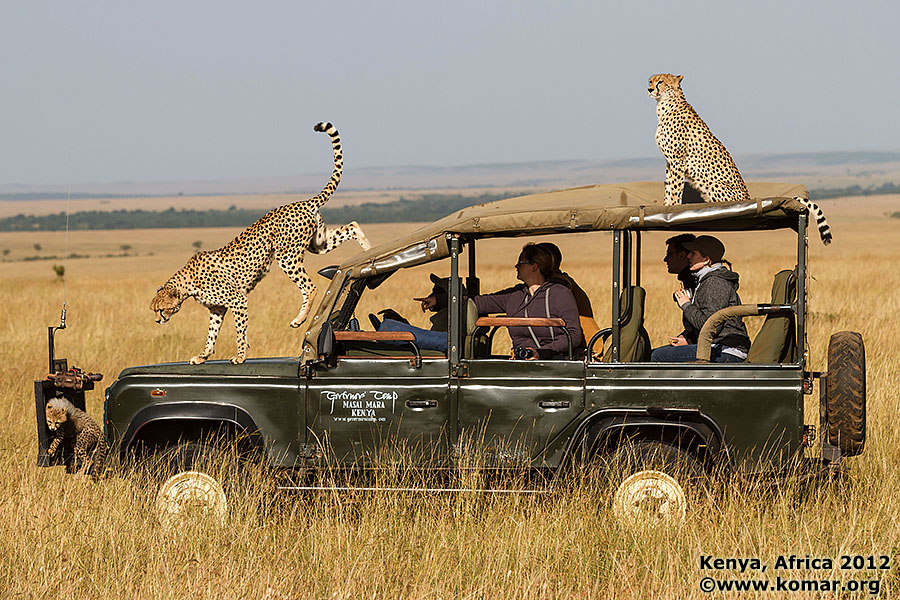
Regarding the cheetah - here's what happened:
It was just another sunny California day. I was hanging out in the backyard, and thought I noticed a wild cheetah approaching. I whipped out the camera, fired off some shots as the ferocious animal lunged towards me. Luckily… I had the a lens camouflage on and was able to distract the beast long enough for me to high-tail it back inside to safety.
--
BTW, here is a tip I use quite often. Although it didn't make it into my review, I still wanted to share it with you. (It also works on the Canon 5D Mark III)
It's about registering an AF point on the TOP RIGHT of the viewfinder around the rule of thirds area and then using the AE Lock Button (*) button to call it. Once that point is registered, you use the multi-controller to manually select an AF point in the opposite location (TOP LEFT) but this time use the "AF-ON" button to call it. It becomes very intuitive as the "AF-ON" located on the left calls the "top left AF point" and the AE Lock Button (*) on the right, calls the "top right AF point".
Here are the steps: (Check the images below)<ol><li>Register an AF point to the "TOP RIGHT". (around the rule of thirds area)
This is done by pressing and holding the "AF point selection button" and pressing the ISO button. You will hear a "beep" to confirm that you have successfully registered your AF point.
<li>If you have already set the the "AF-ON" button as the "Metering and AF start" button, you may skip this step. Otherwise follow these instructions:
Go to camera "Operation" (C.Fn5)
Select Custom Controls
Select the "AF-ON" button
Select "Metering and AF start".
Press the "Set" button
<li>Set the AE Lock Button (*) as an extra "Metering and AF start" button. When you do this, you will have 2 "Metering and AF start" buttons on the back of your camera. On your right, you will have the normal "AF-ON" button and on the left the new "*" button acting as an extra "Metering and AF start" button. Follow these steps:
Go to camera "Operation" (C.Fn5)
Select Custom Controls
Select the "AE Lock button"
Click on "Metering and AF start" and press the "INFO" button
Select "Registered AF point"
Press the "Set" button twice.</li></ol>Alternatively, (on the 1DX only) you could use the "M-Fn2" button instead of the "*" button for this purpose. This will come in handy if you need to leave the "*" button available to lock metering. ...Show more →
I did this on my 7D when it first came out, but use * button for my centre point and AF-ON for either off-centre point or to quickly switch to say spot AF at the centre. Also do the same thing on my 5D III
I was surprised that compared to the 5D III the resolution difference was as noticeable as it appeared to be. That suggests that the right solution for a Canon high MP camera might not be to out-pixel the D800, but instead to add about 5-6 MP beyond the 5D III, and try to find a sweet spot using slightly larger pixels than the Nikon. Of course, if Canon can come up with Nikon-like dynamic range, then the highest resolution that supports clean ISO 800 and less would maybe be the right way to go for a landscape camera, at least for me. I would settle pretty happily for clean ISO 400.
splathrop wrote:
I was surprised that compared to the 5D III the resolution difference was as noticeable as it appeared to be. That suggests that the right solution for a Canon high MP camera might not be to out-pixel the D800, but instead to add about 5-6 MP beyond the 5D III, and try to find a sweet spot using slightly larger pixels than the Nikon. Of course, if Canon can come up with Nikon-like dynamic range, then the highest resolution that supports clean ISO 800 and less would maybe be the right way to go for a landscape camera, at least for me. I would settle pretty happily for clean ISO 400....Show more →
That's what I said when it came out, 27-28MP would have been nice while maintaining 6fps. Also even if such a camera were noisier at the pixel level, down-rezzing it to 22MP would give you very similar noise as the 5D III and slightly better detail. D800 is pretty similar to 5D III for noise up to around ISO 6400.
Pixel Perfect wrote:
That's what I said when it came out, 27-28MP would have been nice while maintaining 6fps. Also even if such a camera were noisier at the pixel level, down-rezzing it to 22MP would give you very similar noise as the 5D III and slightly better detail. D800 is pretty similar to 5D III for noise up to around ISO 6400.
Hi Whayne,
It really depends on what you need. I wanted a FF camera with 10+ fps, and sufficient resolution for most purposes, to shot alongside my 1DIV. The 1DX is perfect for this. It sounds like you're waiting for the 1DsX.
Fred Miranda wrote:
Regarding the cheetah - here's what happened:
It was just another sunny California day. I was hanging out in the backyard, and thought I noticed a wild cheetah approaching. I whipped out the camera, fired off some shots as the ferocious animal lunged towards me. Luckily… I had the a lens camouflage on and was able to distract the beast long enough for me to high-tail it back inside to safety. .
Those cheetahs (plural - gotta improve on your story Fred!)) must have had a good vantage point to find you even with your lens camouflage ... ;-)
Alek Komarnits wrote:
Those cheetahs (plural - gotta improve on your story Fred!)) must have had a good vantage point to find you even with your lens camouflage ... ;-)
I love that shot. I'm planning a trip to Africa next year. I'm still deciding which country is the best place to start...Either east (Kenya and Tanzania) or South Africa...This would be my first trip there. Any advice would be greatly appreciated.
It really depends on what you need. I wanted a FF camera with 10+ fps, and sufficient resolution for most purposes, to shot alongside my 1DIV. The 1DX is perfect for this. It sounds like you're waiting for the 1DsX.
Jim
To me 1D X does not have sufficient resolution for most purposes, especially not wildlife/birding or even landscape although it's not too bad for that. But unless you own an 800L it's going to be crop city in a lot of situations and you'll be losing a lot of it's advantages. The 1D IV has a 27MP FF resolution which is what I had hoped they would do. But alas this camera was about one thing only, beating the D3s in every area, which is why we see large compromise on resolution to achieve fps, and noise targets. Of course they did not know how the D4 would perform. I would have easily given up 2fps to see resolution at least equal the 5D III's.
Anyway 5D III is IMO 85% of the camera for ~50% of the price, so I can't see myself getting a 1D X as I already have 1D IV. My great hope is the new AF in a crop camera eg 7D II and then 1D X will be entirely irrelevant to me.
Fred Miranda wrote:
I love that shot. I'm planning a trip to Africa next year. I'm still deciding which country is the best place to start...Either east (Kenya and Tanzania) or South Africa...This would be my first trip there. Any advice would be greatly appreciated.
I appreciate the compliment Fred, especially coming from someone like you ... and hopefully my attempt at levity provided a few smiles - having Cheetah in your 1DX review was over-the-top hilarious. BTW, having actually shot a (successful) Cheetah hunt a few days earlier than that shot above, it ain't easy ... but I was generally pleased what I got with the 7D and 70-200/2.8v2+2xTC shooting into mid-day sun with tall grass. Would have loved to have had the 1DX and the 200-400/F4 ... perhaps you can arrange that for me next time?!? ;-)
Thanks for the great review Fred. This was the part I enjoyed the most:
"Do you remember Y2K? That's when Canon came out with the previous 500mm lens. It was 1999, twelve years ago when people thought the world would come to a crashing halt in the year 2000. Now in 2012 the Mayan calendar is scheduled to end, total destruction is feared and Canon comes out with a new 500 mm. Coincidence? "
After using a 1dx for a couple of weeks my review would be simply this, "I get more keepers than with my 1d4".
Pixel Perfect wrote
Anyway 5D III is IMO 85% of the camera for ~50% of the price, so I can't see myself getting a 1D X as I already have 1D IV. My great hope is the new AF in a crop camera eg 7D II and then 1D X will be entirely irrelevant to me.
Let's hope we will see an AF system similar to the one on the Canon 5D III on a crop camera soon.
Stoffer wrote
I know I'm answering myself, but Fred Miranda just open up for the EOS-1D X reviews. Thanks!
ragebot wrote
Thanks for the great review Fred. This was the part I enjoyed the most:
"Do you remember Y2K? That's when Canon came out with the previous 500mm lens. It was 1999, twelve years ago when people thought the world would come to a crashing halt in the year 2000. Now in 2012 the Mayan calendar is scheduled to end, total destruction is feared and Canon comes out with a new 500 mm. Coincidence? "
Thank you Alek and Bob. I will check out these links and start planning this trip.
Fred Miranda wrote:
I love that shot. I'm planning a trip to Africa next year. I'm still deciding which country is the best place to start...Either east (Kenya and Tanzania) or South Africa...This would be my first trip there. Any advice would be greatly appreciated.
I've only been to Tanzania, but it was pretty cool. Aside from the Serengeti you also have stuff like the Ngorongoro crater and Zanzibar (there is a forest on Zanzibar that has extremely endangered monkeys, but they are almost like some lost monkeys from New Guinea that had never seen man before in that they are not particularly scared off easily, I literally had them running in front of me and hanging two feet over my head, etc. see (and mind you many are shot at LESS than 200mm at merely 8-10MP on APS-C density):
that said, I hear that South Africa is pretty awesome too, apparently you often get closer and it has a lot more brush and stuff around and less open (more or less no going off road in the Serengeti and you must be back by sunset, they treat anything after sunset as a poacher to hunt down basically, and they say not to beg and whine the driver to stay just a little longer because he might get fired and lose an amazing job; Kenya I think you can go more off-road, they have had some more unrest there at times, we were supposed to meet the Leakeys but they got trapped in Nairobi due to unrest when we were there and couldn't make the trip down to where we were in Tanzania)
I believe Tanz/Ken are dry and dusty JJA but not so dusty Dec/Jan and maybe even wet in Mar/Apr or I think also Oct/early Nov I know at the height of wet season sometimes the road can become more like rivers supposedly and it can get 'interesting' I think Jan/Feb/Mar are calving times. But that info is all vague.
that said, I hear that South Africa is pretty awesome too, apparently you often get closer and it has a lot more brush and stuff around and less open (more or less no going off road in the Serengeti and you must be back by sunset, they treat anything after sunset as a poacher to hunt down basically, and they say not to beg and whine the driver to stay just a little longer because he might get fired and lose an amazing job; Kenya I think you can go more off-road, they have had some more unrest there at times, we were supposed to meet the Leakeys but they got trapped in Nairobi due to unrest when we were there and couldn't make the trip down to where we were in Tanzania)
I believe Tanz/Ken are dry and dusty JJA but not so dusty Dec/Jan and maybe even wet in Mar/Apr or I think also Oct/early Nov I know at the height of wet season sometimes the road can become more like rivers supposedly and it can get 'interesting' I think Jan/Feb/Mar are calving times. But that info is all vague.
Thanks for the detailed info and sharing these photos skibum5!
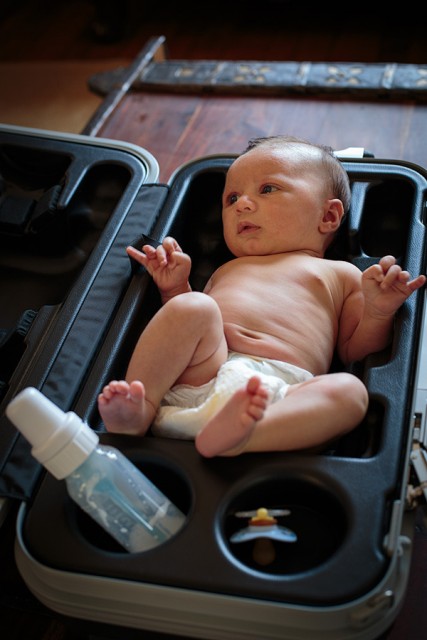
Tanzania is on our list. I'm hoping my new born will let me take a short trip there in 2013. Here is a picture of Fred Jr. on his new crib.
Fred Miranda wrote:
Thanks for the detailed info and sharing these photos skibum5!
Tanzania is on our list. I'm hoping my new born will let me take a short trip there in 2013. Here is a picture of Fred Jr. on his new crib.
Is the new crib a creative way to save money with extra carry-on Travelling with kids is a HUGE adjustment, as I've been learing over the past 4 1/2 years.
Fred Miranda wrote:
Thanks for the detailed info and sharing these photos skibum5!
Tanzania is on our list. I'm hoping my new born will let me take a short trip there in 2013. Here is a picture of Fred Jr. on his new crib.
cute kid
One tip is that I would try taking some of the anti-malaria stuff before you leave to see how well you tolerate it and test it out ahead of time. And if you can't handle the main one they give now then maybe try doxy instead (although bring tons of sunscreen then because you'll VIOLENTLY burn if you get that near equator sun on you while taking that stuff and it can make your stomach grow upset after a while). If you start out in Arusha and quickly get up into Ngorongoro and the Serengeti you might be able to delay the start since not much malaria up the high altitudes of those areas. I think some parts of South Africa or close to malaria free now. Anyway I'm not a doctor.
If you really want to catch the great migration, it can help to have a tour dedicated to that, at least for the Serengeti or Masi Mara stretch (and pick the right time of year and pray, although the moving tented camps can somewhat make up for shifting schedules). When I went I only caught a bit of a far off glimpse of the great migration.
The way things are going I wonder if the great migrations will even be possible to see in another 20 years.
The upper reaches of the main rivers are getting deforested and there is talk of letting in companies to extract resources or something.
The Ngorongoro crater is one of the only reliable places in the Tanz/Kenya region to still be able to see a black rhino, so few left, that other than in the crater they are way too spread out unless you are crazy lucky.