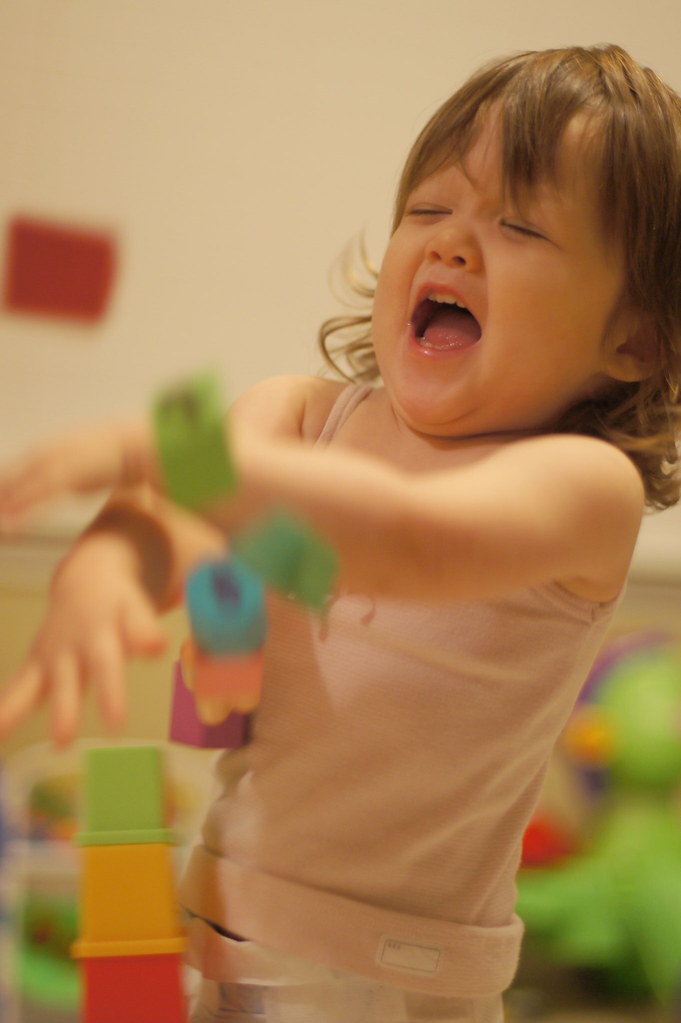
Hey, well, this photo is my wifes favorite. But, on doing a cheapo print from walgreens...ironically more expensive than mpix or ritz,..I found that the image was WAY too dark.
I had my screen turned to full brightness, because its more pleasing to my eyes. Tried to do a calibration with windows, might have worked a little, but not well.
After the adjustments I ended up (using the software that came with the camera, I do not own adobe yet) raising the entire image to "70" and the dark areas to "50" to try and soften her up and make her look less red (I guess the wb must have been off?)
Anyway, do you think the second looks well lit for print, or is my computer still way off, looks great from this end.
Second is much better but could be brighter still. Ideally you view your work in a relatively dark space and avoid bumping the brightness of your monitor. Most monitors are already set too bright. If you edit by turning up your monitor brightness, your print is likely to be much too dark.
The white balance is off. Others here are better at understanding and correcting white balance issues and normative skin tones.
What color is the wall behind her? If I assume, probably incorrectly, that it is neutral white and click on it to reset the WB I get something reasonable. But typically the white of walls is slightly warm.
Its a cute action shot, with great expression and definitely a keeper. Could use some sharpening, perhaps a contrast bump but that's your call. I will be waiting to see what others do and suggest.
Some labs will provide color correction for a small additional fee. If you guys love this shot, you definitely should have this tweaked by the lab or folks here first.
Thank you very much for your posts. Now that you point it out it is so obvious. I have bout 6 different types of lighting, 7 or 8 depending on if the tv is on and the stair lights...
I had always just sort of imagined without really thinking that there would be a specific wb setting that would work throughout, and that the light was kind of "mixed" I guess, though I know that is not how it works.
Anyway, I guess I need to focus on getting consistent lighting! I have some old original bulbs, nice old but newer bulbs, fluo bulbs, and a couple others in different lights. lol, maybe not the ideal conditions
What you've learned here is that you can't trust your eyes and monitor to tell you whether or not a file is "nominally" exposed or not. What is "nominal"? For a digital file that's when highlights and shadows both have the same level of detail seen by eye in person and everything in the middle also looks "seen by eye normal" in the photo.
What I've done is similar in approach to others, but I've done screen captures to show how I did it. What you can trust are the numbers in the file the camera produces and that's what the histogram shows you visually...
In the first shot you posted the Levels histogram tells me this is not a "nominally" exposed file:
1) The gap on the right tells me that the file, overall, is about 3/4 stop underexposed.
2) The separation between the RGB peaks on the color histogram tells me there's color imbalance
Levels is also a remedial tool. The same adjustments can be better done at the RAW stage, but here I'm starting with your JPG and using Levels.
Step one is to address the color imbalance by clicking the middle eye dropper on a what appears to be a shaded white tone on the diaper. That doesn't do a perfect job of normalizing color because the lighting was such a mixed bag of sources, but it's an improvement.
The next step in "normalizing" the image is to move the input sliders, first adjusting the highlights, then the shadows, then moving around the middle tone until the image matches your "in person" impression of the space when you took it...
Again it's not perfect, but with two simple Levels adjustments the it has been moved into the ballpark of "normal" looking given the overall flat lighting conditions in the room. How do I know the lighting was flat rather than contrasty? If you go back to the original and look at the left side of the histogram you will see it is NOT piled up and running off the left side as it would have been with 3/4- 1 stop underexposure in less diffuse lighting.
Take your lovely young model outdoors on a sunny day in a white shirt and black pants, plop her in on a blanket and with the sun behind you and her it the flat light of the sun shoot some photos with your camera WB set to Daylight WB, which should take care of getting the WB correct in camera.
For exposure control shoot in M mode so it will not vary shot-to-shot. Turn the clipping warning on and them adjust shutter and aperture until the white shirt is 1/3 stop below clipping in the camera. That should take care of getting the highlight exposure and detail correct. The fact the lighting is flat (i.e. no shadows) should allow your camera to record detail almost everywhere, including any shadows on the black pants.
Now stop and consider that if you were on vacations and didn't have a computer and took the files directly to Walmart of Costco for 1-hour printing they would turn out quite well. Why? Because they would be "nominal" out of camera and you wouldn't have screwed them up based on what you saw on your monitor back home.
With that outdoor Daylight WB photo session with files exposed per the clipping warning you will create a "nominally" exposed and color balanced file out of your camera you can use to evaluate the color and brightness of your monitor.
I the future when shooting turn the clipping warning on and watch the histogram on the camera.
If you see a big gap on the right you are underexposing by at least 1 stop.
If you see clipping on white clothing / faces you are overexposing by 1/3 to 2/3 stops, respectively
So when shooting keep the exposure between were highlights clip and black out and there is no big flat gap on the right side of the histogram. Once you have adjusted exposure for the highlights, looking at the left side of the histogram. If the left side is piled high and running off it is will telling you it's time to add flash.
The time to do this is when you first start shooting in a new location. Take some test shots and adjust the settings in anticipation of the action and your spur of the moment "snap" shots will wind up better exposed.