Samuli Vahonen
Offline
• • • •
Upload & Sell: Off
|
cogitech wrote:
I'm a self-proclaimed PP novice, so keep that in mind as I humbly submit what I came up with after 10 minutes in the GIMP.
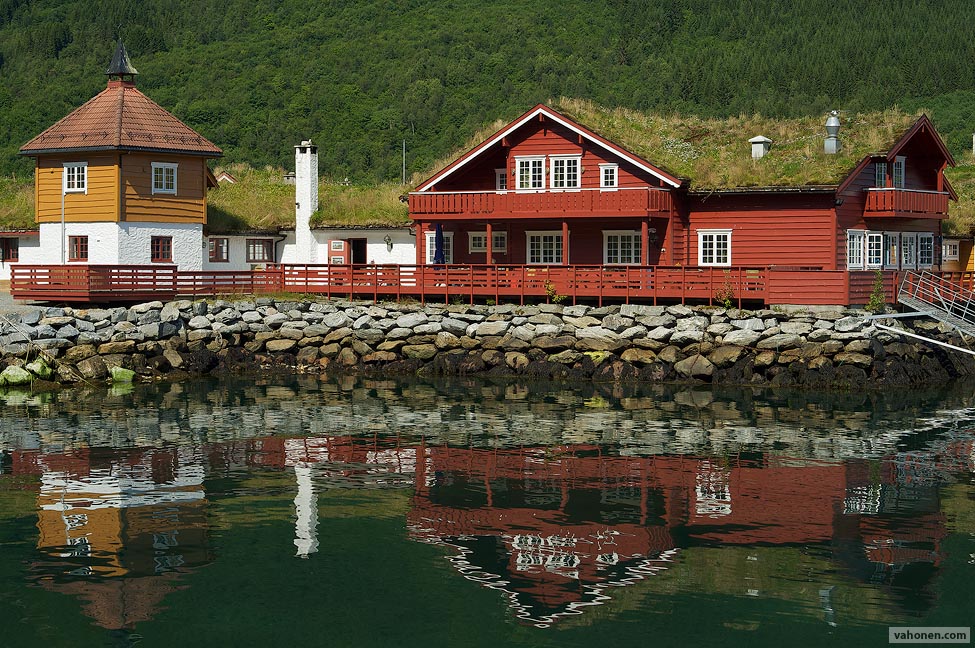
Overall improvement, but for my taste the border between water and rocks got too dark. However it does not appear more 3D to me. The rocks in shore seem more unreal due to dark end going "stuck".
Joseph Marney wrote:
EDIT: PM sent for RAW. That's a hard one, as there is so little visual separation b/w the roof and the trees behind. Look how much better the contrast is on the small building on the left.
Yes more pollution would have helped (smaller contrast on the forest behind), damn Norway, too clean air D: however to me this kind of image is not about the depth of field separation.
StevenPA wrote:
2 + 3. Excellent reminder to pay attention to these things. If you have a web link handy, or know of any good books on the topic, please let me know.
Bifurgator collected list of links to this same thread. I don't have any books specifically about this topic. Only books I have are "general graphic arts"-books, and in Finnish, which touch this topic.
StevenPA wrote:
4 + 5. I've done enough testing to know what aperture I want to use in most situations. I'm normally 2~3 stops down for all Contax lenses as I believe Zeiss has said they've optimized performance for that range. The one lens that I make an exception for is the C/Y 50/1.4, which I like to use at f/8 for DOF reasons. I follow the same sort of guidelines for my other lenses as well; for example, 2~3 stops down on the OM 21/3.5 is f/8 and f/11, respectively. It's interesting to hear you say that micro-contrast decreases after f/11. My impression is the same. Looking at it another way, micro-contrast seems to be maximized in the f/5.6~8 range. Again, Zeiss has said as much (not sure where I read it): 2 stops down is optimum. ...Show more →
Also shooting lens, which has weak microcontrast, at f/11 makes pictures looking pretty muddy, while lenses having good microcontrast provide usable image.
StevenPA wrote:
6 +7 + 8. Noted. Also, in 6, what do you mean by "UniWB which makes the image in camera green (very hard to focus)"?
UniWB is method of removing white balance from preview JPG embedded to RAW (which is used for histogram). By doing this you are able to record quite close that sensor sees into the preview JPG. When shooting with white balance typical problem is that white or blue channels clip, but this is only due to white balance, there would be 1-1.5 stops more headroom. By using UniWB you can "exposure to the right" on much better accuracy. Example of live view with histogram with UniWB on left and AWB on right, same exposure:
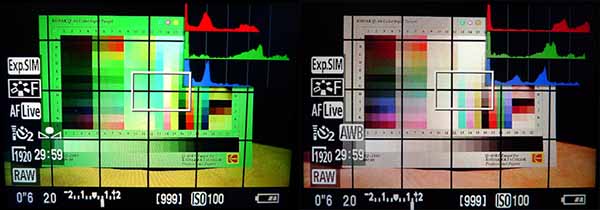
As you see in UniWB image the green channel is about to clip but there is plenty of room in red channel. On AWB image red channel is clipping already. This is maybe not best light and scenario to demonstrate this, I have found this most useful on real shooting outdoors. But as you can see viewfinder image is green and makes live view focusing on some conditions difficult.
I could not find very good articles about this. I found this method already few years ago, when I didn't even have color histogram on my camera, by myself after I discussed one guy involved with sensor design and experimenting by myself in DCRAW, so I really don't know where there is information about this technique. This one best one of the articles I found by quick googling, it even has RAW files for different cameras to use:
http://www.guillermoluijk.com/tutorial/uniwb/index_en.htm
StevenPA wrote:
Have you tried tweaking contrast and saturation in LAB?
I don't use LAB mode, since I don't trust PhotoShop to maintaining colors according to ICC profiles, when transposing between RGB and LAB. Also I don't trust gamut warning on preview profile. Also I don't want to tweak images if possible, after shooting a lot of weddings and motorsports I really hate sitting in front of computer processing photos.
StevenPA wrote:
If you're up for a read, I keep going back to a book I bought on the subject a long time ago called Photoshop LAB Color: The Canyon Conundrum: http://amzn.com/0321356780.
23 UK pounds on amazon.co.uk, quite cheap for PhotoShop book. I'll first have to win my fear of moving between RGB and LAB....
StevenPA wrote:
Printing is another ball game all together, and I will leave that aside for now. I will be able to learn most from images that we can share on the Internet. Plus I don't print more than 5 or 6 11x14s a year anyway.
I love prints. I print about same amount of prints every week in A3 (roughly same size as 11x14), and double number of A4 (A3 folded from middle, about size of US letter but little longer and narrower).
|


 Damn now your image disappeared, when I tried to open it to a tab to compare better to mine.