floris wrote:
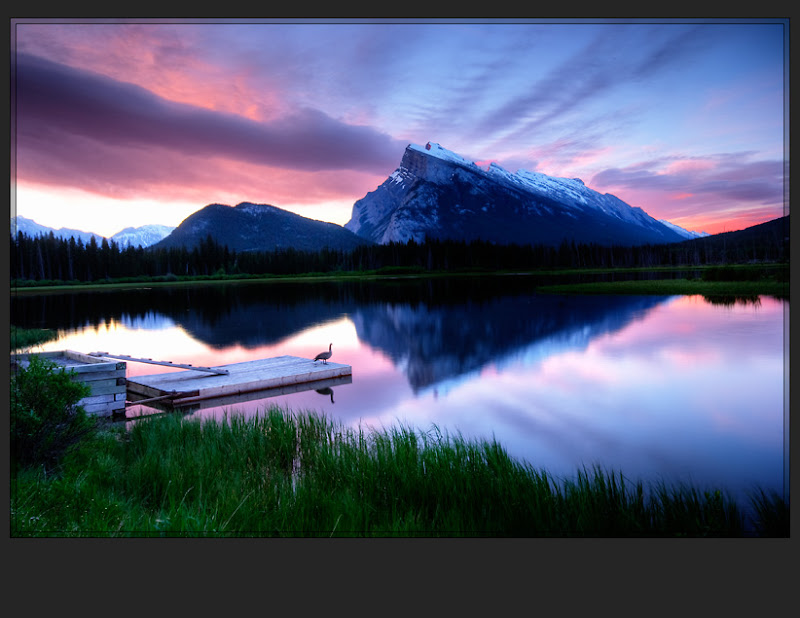
Jay - very nice rendition, the colors are quite lively. Though I do find the sky too dark/gray, and not 'luminous' enough for my taste.
I processed the RAW images to give me results that I though most closely emulated the what was seen with human eyes...since I was not on the scene it was a best guess on my part.
If I had processed the RAW image with brighter sky the resulting blended image would have been more "luminous". If I was processing this for a print, or competition, I would take few extra minute to brighten up the goose just a bit.
Art or Photography? The lens and the digital sensor are imperfect at capturing what our eyes capture. Personally I think it is a matter of intent: if the intent is to as accurately as possible capture the scene as the eye sees it, it is photography. If the alteration is an attempt to evoke an emotional response, it is art.
danmitchell wrote:
I don't think it is a new question at all, and it certainly is not limited to the "digital age." These are roughly the same processes and techniques that photographers have applied to chemical photography for well over a century.
The object is not really to "capture" a perfectly accurate "recording" of the scene as it existed objectively. In fact, this is both impossible and completely uninteresting. If it were the object, we could send any photographer out to take one photo of a place and be done with it.
The real goal is to create (not capture) an image the communicates the photographers subjective experience of the real subject.
There are a lot of questions in this thread so i'd just like to freely put in my few cents.
I bracket and ND grad (but the latter conservatively) and do a little HDR (Photomatix). I have for the most part opted out of Photomatix because it forces one to have to do substantial color correction in PS instead of in the Raw Pipeline (ACR) which gives way better quality results. I have done substantial testing and see quite a bit of detail/quality loss in straight Photo Matix HDR's compaired to Raw processing. For smaller prints or web... that may be neglegable, but for pushing gallery print sizes, this quality loss is a critical issue. But... I may sometimes (rarely) use a HDR Photomatix LAYER in my mix of ACR layers to help fix a problematic area when dynamic range is radical.
I actually prefer a combination. I play with the HDR settings to get a reasonable starting point and selectively blend adjusted maskings of the HDR or the original exposures. For some images I can easily have 4-10 layers to make the adjustments I want. Add a gradient levels adjustment here, a selective color balance adjustment to an area there, tweak exposure in this area, etc. I've also been know to do HDRs on bracketed images where ND grads were used. I think it is always best to try to get as much right in camera as can be reasonably expected, but ND grads have limitations, especially with objects that prevent straight line horizons. Bracketing to HDR makes sense to squeeze out that extra bit of detail, but you then scale back the HDR effect by blending it into the original exposures. At any rate, here's my attempt at the images:
This is a very usefull topic.....i allready learned a lot. Thanks to all who have contributed to this topic. I think the main goal to get is to create a photo that looks very realistic to the eye. There are still some minor things to take in considuration in getting the results looking more realistic....... one of them is that the reflection on a shiny surface can never be more bright than the lightsource itself. In many photo's posted here its exactly the opposite.The sky reflection in the water needs to be slightly darker.....never brighter
Varina wrote:
We certainly didn't develop the idea of HDR, Alex. However, we did develop our own workflow - and I think that's what Jay is referring to here. There are a thousand ways to accomplish HDR. When we teach our classes, we use our own workflow... one that we've spent years refining. We call that workflow "Intelligent HDR"- do differentiate it from typical HDR software and the thousands of other techniques that others have developed.
We certainly don't claim to have created the concept of HDR!
Varina
Well it was a fairly light hearted comment anyway, but what I meant to say was the idea of adjusting a luminance mask 'intelligently' is not new, although I wont make any assumption over how exactly you acheive this, I only know how I do it. Anyway the method does a great job, I really enjoyed the video on your blog.
The versions of my shot have been interesting to see. Simon, the cooler white balance gives a completely different mood although it was just under an hour before sunset and the light was a little warmer (not that you could have known that! BTW as a sanity check I sometimes revert to the Velvia WB of 5500K). The HDR version is really interesting to see, and quite a change from the other versions. Alan yours is probably my favourite. Actually I prefer it to my own effort at processing.
Well...here is my play on your shot you provided. I went for a darker rendition...just because you can bring out the highlights with HDR dosnt mean it dosnt have to be all neutral like there isnt a sunset going on.
Then I found what I think is the strongest crop that gives more flow to the elements and puts the dock and bird in the center for stronger framing....
As to the processsing, I use a combo of blended and tone mapping from Photomatix in select places. I also use selective desaturation. Sorry but I'm not going to detail all that I did but it took far more than 5 min....
Since I started the thread, i will summarize to be helpful.
Personally I like Floris's version the best but it is marginally better than the 2nd image I posted which is a blend of HDR/single image 20/80. But Alichty is very close. Which is not to say the others are not good but it was 7AMish and they do look the closest to what I remember.
More importantly than this observation, I note that: 9/20 posters would go with manual blend. 4/20 posters went with adjustment to just one image. 2/20 posters went with Photomatix. 5/20 posters went with a blend of HDR/single image.
Which takes me back to my assertion at the beginning. Photomatix (with the settings turned down to modest) blended with a single image and with color adjustments is pretty dam good. A manual blend can do as well or better in skilled hands. So if you are interested in 90% results with 10% effort a workflow that does hdr, fixes colors and blends with single image is efficient to my mind.
Finally - thanks all for participating. It was very helpful to me and makes me want to learn manual blending when I get the time.
The technique Jack's link describes is very close to what I used for my version of the shot. I noted that the highlights in the brightest exposure were not blown out at all so I made 2 exposures out of that one where one was dropped by almost 1.5-2 stops. I opened them as layers with the dark one on top and and made a layer mask on the top dark layer. As a starting point for the layer mask, "select all" on the lower light layer and copy that to the clipboard. Option (or alt on a PC) click on the mask in the layers menu and then paste the clipboard in. This will show up as a black and white image. Go to Filter and choose Gaussian Blur and then jack the radius up to around 35-40 pixels. Click OK and when you select either of the color layers you will see an exposure blend.
You can tweak the mask at will using the brush tools with black and white to add or subtract from the mask to enhance your blend.
John McGregor and NMA: I hope you enjoyed playing with this issue. I like the darkeness a bit better in John's but the details a bit better in NMA, but they are both good. The post was mostly meant to stimulate a debate around techniques. My conclusion was that hdr and manual blend were very close in performance but manual blend in the right hands can be better. Thanks for posting. Scott