This topic is in the 2008 archive. You can read it and like its posts here. It is read only.
Archive 2008Focus washers/shims added...end result
p.1 #1Focus washers/shims added...end result
Got to experiment last night with the various focus screen washers for the 5D that arrived from Canon. I wasn't able to tell which thickness washer was originally installed in the camera, but I tried several noticeably thicker washers due to the backfocusing that I was getting. Once I thought I had it dialed in, I tried the next size up and down to make sure. It looks like the #018 washer did the trick:
Taken with the #012 washer/shim (focus point on the numeral "5"):
http://northlake.smugmug.com/photos/411466800_CtHGZ-L.jpg
Taken with the #015 washer/shim (focus point on the numeral "5"):
http://northlake.smugmug.com/photos/411466827_bBWYv-L.jpg
Taken with the #018 washer/shim (focus point on the numeral "5"):
http://northlake.smugmug.com/photos/411466852_6UPzP-L.jpg
Taken with the #012 washer/shim (focus point on the numeral "5"):
http://northlake.smugmug.com/photos/411466800_CtHGZ-L.jpg
Taken with the #015 washer/shim (focus point on the numeral "5"):
http://northlake.smugmug.com/photos/411466827_bBWYv-L.jpg
Taken with the #018 washer/shim (focus point on the numeral "5"):
http://northlake.smugmug.com/photos/411466852_6UPzP-L.jpg
Nov 06, 2008 at 04:02 PM
jjlphoto
Offline
Activity
[X]
Details
p.1 #2Focus washers/shims added...end result
#015 looks good to me. Normal focus usually renders 1/3 in front, 2/3 behind.
Nov 06, 2008 at 04:07 PM

p.1 #3Focus washers/shims added...end result
Hi Mike,
It looks great. I hope it helps with your wide aperture shots.
Best wishes,
Steve
It looks great. I hope it helps with your wide aperture shots.
Best wishes,
Steve
Nov 06, 2008 at 04:08 PM
p.1 #4Focus washers/shims added...end result
Amazing what a properly shimmed focus screen can do, isn't it? It was wonderful when i got the right shim for my Katz Eye.
Nov 06, 2008 at 04:13 PM
p.1 #5Focus washers/shims added...end result
jjlphoto wrote:
#015 looks good to me. Normal focus usually renders 1/3 in front, 2/3 behind.
Ya know, that did enter my mind. But after a while of changing shims, setting back up again, downloading, reviewing, and repeating, my eyes started to get a bit bleary. I took 3-4 shots (twice) with each sized shim to make sure that I had a good, in-focus test shot...it just seemed that I got consistently more in-focus test shots with the #018 shim (not to say that I won't revisit the #015 shim). At least I have the problem narrowed down to two potential solutions...
#015 looks good to me. Normal focus usually renders 1/3 in front, 2/3 behind.
Ya know, that did enter my mind. But after a while of changing shims, setting back up again, downloading, reviewing, and repeating, my eyes started to get a bit bleary. I took 3-4 shots (twice) with each sized shim to make sure that I had a good, in-focus test shot...it just seemed that I got consistently more in-focus test shots with the #018 shim (not to say that I won't revisit the #015 shim). At least I have the problem narrowed down to two potential solutions...
Nov 06, 2008 at 04:27 PM
p.1 #6Focus washers/shims added...end result
Good work Mike!
What was involved in switching the shims, err, I mean "washers"
Max
What was involved in switching the shims, err, I mean "washers"
Max
Nov 06, 2008 at 04:48 PM
p.1 #7Focus washers/shims added...end result
PhotoMaximum wrote:
Good work Mike!
What was involved in switching the shims, err, I mean "washers"
Max
Actually, not too bad. You'll just need one tool...a flat blade jeweler's screwdriver. The washers are pretty delicate, especially the very thin ones. My guess is that you'll probably end up in the same thickness range as me, so that should give you a starting point.
I gently pried the washer out along its top edge (camera was face up). Alongside the focus screen tray latch (either side) is a small gap where you can insert the screwdriver blade. Just pry the washer outwards gently (it will probably deform a bit in the center as you pry, but nothing to really worry about...it can easily be re-shaped). The bottom edge of the washer has two tabs that fit into the two slots located at the back edge of the washer mount (since your camera will probably be face up, these two slots will be towards the face down side of the camera). When inserting a replacement washer, just get the two tabs into position, then gently press the top of the washer to position it behind the focus screen tray latch. When it appears to be inserted evenly, close the tray (minus the focus screen) until it latches, but don't force it...this will press the washer into position. Next, simply unlatch the tray, insert the focus screen, then close, attach your lens, and shoot. Once you get the first washer in, the trial and error gets easier.
I actually started with the #015 first. I then jumped up to the #020...this put everything out of whack, so I set aside the #020 and all washers that were thicker. I then worked my way up and down around the #015 washer. The #012 gave a bit of front focus, so I removed that and set aside all washers that were thinner. This left me with just 2 possibilities (#015 and #018). The whole process took about 1-1/2 hours.
Edited on Nov 06, 2008 at 05:17 PM · View previous versions
Good work Mike!
What was involved in switching the shims, err, I mean "washers"
Max
Actually, not too bad. You'll just need one tool...a flat blade jeweler's screwdriver. The washers are pretty delicate, especially the very thin ones. My guess is that you'll probably end up in the same thickness range as me, so that should give you a starting point.
I gently pried the washer out along its top edge (camera was face up). Alongside the focus screen tray latch (either side) is a small gap where you can insert the screwdriver blade. Just pry the washer outwards gently (it will probably deform a bit in the center as you pry, but nothing to really worry about...it can easily be re-shaped). The bottom edge of the washer has two tabs that fit into the two slots located at the back edge of the washer mount (since your camera will probably be face up, these two slots will be towards the face down side of the camera). When inserting a replacement washer, just get the two tabs into position, then gently press the top of the washer to position it behind the focus screen tray latch. When it appears to be inserted evenly, close the tray (minus the focus screen) until it latches, but don't force it...this will press the washer into position. Next, simply unlatch the tray, insert the focus screen, then close, attach your lens, and shoot. Once you get the first washer in, the trial and error gets easier.
I actually started with the #015 first. I then jumped up to the #020...this put everything out of whack, so I set aside the #020 and all washers that were thicker. I then worked my way up and down around the #015 washer. The #012 gave a bit of front focus, so I removed that and set aside all washers that were thinner. This left me with just 2 possibilities (#015 and #018). The whole process took about 1-1/2 hours.
Edited on Nov 06, 2008 at 05:17 PM · View previous versions
Nov 06, 2008 at 05:10 PM
p.1 #8Focus washers/shims added...end result
Thanks! Its hard to visualize this but I bet it will make sense once I have the shims/washers and get to doing this...
Which lens are you using to do these focus tests with?
Max
Which lens are you using to do these focus tests with?
Max
Nov 06, 2008 at 05:15 PM
p.1 #9Focus washers/shims added...end result
Max...I tested using the Takumar 50/1.4 lens. I just snapped a test shot using the Rokkor wide open at 1.2 and was able to get a sharp focus on the very first attempt (in the past, I had to do a bit of focus bracketing to make sure that got an in-focus shot). Here's the test pic taken with the Rokkor, and a 100% crop (for reference, the point of focus was the statue eye closest to the camera). These were shot in RAW and converted, no sharpening was applied:
Full shot wide open:
http://northlake.smugmug.com/photos/411520567_6rwNk-L.jpg
100% crop:
http://northlake.smugmug.com/photos/411520584_xTWjj-L.jpg
Full shot wide open:
http://northlake.smugmug.com/photos/411520567_6rwNk-L.jpg
100% crop:
http://northlake.smugmug.com/photos/411520584_xTWjj-L.jpg
Nov 06, 2008 at 05:36 PM
p.1 #10Focus washers/shims added...end result
Sweet!
I look forward to doing this as well. I also have the Takumar 50/1.4 and the Rokkor 1.2.
It will be great to nail the focus without the "is it sharp wide open" doubts that I have been going through with these lenses and the Oly 28 I have converted...
I appreciate all you work on this.
Max
I look forward to doing this as well. I also have the Takumar 50/1.4 and the Rokkor 1.2.
It will be great to nail the focus without the "is it sharp wide open" doubts that I have been going through with these lenses and the Oly 28 I have converted...
I appreciate all you work on this.
Max
Nov 06, 2008 at 05:56 PM
p.1 #11Focus washers/shims added...end result
Is the Canon 20D the same process as the 5D when it comes to replacing the shims. My shots with a Rokkor were backfocusing at 1.2, so I tried to add tape to the shim. At the end, I made a big mess out of everything and had to take the camera to Canon to reinstall a new viewfinder 
Nov 06, 2008 at 06:21 PM
p.1 #12Focus washers/shims added...end result
ziyadj wrote:
Is the Canon 20D the same process as the 5D when it comes to replacing the shims. My shots with a Rokkor were backfocusing at 1.2, so I tried to add tape to the shim. At the end, I made a big mess out of everything and had to take the camera to Canon to reinstall a new viewfinder
With the 20D it's easier to remove the two screws from the plastic piece that the screen is behind, then remove the screen, replace the shim, replace the plastic piece and screws then snap in the metal retainer.
tm
Is the Canon 20D the same process as the 5D when it comes to replacing the shims. My shots with a Rokkor were backfocusing at 1.2, so I tried to add tape to the shim. At the end, I made a big mess out of everything and had to take the camera to Canon to reinstall a new viewfinder
With the 20D it's easier to remove the two screws from the plastic piece that the screen is behind, then remove the screen, replace the shim, replace the plastic piece and screws then snap in the metal retainer.
tm
Nov 07, 2008 at 08:54 AM
p.1 #13Focus washers/shims added...end result
Screws? Really? On the 30D, just pop out the retainer, pull the focus screen with some tweezers, and tilt the camera to let the shim fall out. Lay the new shim in, insert the focus screen back in, and pop the retainer back in. Done. Takes about 1-2 minutes.
Nov 07, 2008 at 08:58 AM
p.1 #14Focus washers/shims added...end result
I agree about removing the screws and front plate from the 20D. I remember that making it much easier.
Nov 07, 2008 at 09:03 AM
p.1 #15Focus washers/shims added...end result
I only added a couple of short strips of palm pilot protective screen near the edges of my shaved Ec-CIV, on the side facing the prism, on the 5D. Worked pretty good on the first try! 
Nov 07, 2008 at 02:38 PM
p.1 #16Focus washers/shims added...end result
I guess you were lucky on the first shot  . I thought about trying tape originally, but decided on something more permanent. Plus, I wouldn't have any idea as to how many strips of tape would have been needed. With the Canon washers, there's no worry about any foreign material somehow getting loose and floating around the camera's innards. Glad it worked for you...
Nov 07, 2008 at 04:33 PM
p.1 #17Focus washers/shims added...end result
I should have asked you guys before I messed with it
Nov 07, 2008 at 09:27 PM
p.1 #18Focus washers/shims added...end result
jjlphoto wrote:
#015 looks good to me. Normal focus usually renders 1/3 in front, 2/3 behind.
That does not hold true for macro focus. Close focus is usually equal in front and behind.
Mel-
#015 looks good to me. Normal focus usually renders 1/3 in front, 2/3 behind.
That does not hold true for macro focus. Close focus is usually equal in front and behind.
Mel-
Nov 10, 2008 at 09:56 AM
p.1 #19Focus washers/shims added...end result
Mike Ganz wrote:
I guess you were lucky on the first shot . I thought about trying tape originally, but decided on something more permanent. Plus, I wouldn't have any idea as to how many strips of tape would have been needed. With the Canon washers, there's no worry about any foreign material somehow getting loose and floating around the camera's innards. Glad it worked for you...
Yup. I think I got really lucky with that. I have a brand new Ec-A sitting in the box, waiting to be sanded down, but at the moment I don't dare swapping them. The Ec-CIV with the "palm shim" has been doing a pretty good job on all except my 24-60 Sigma (slight back focusing - probably lens's fault), and as my old landlady rightfully used to say, "don't trouble trouble until trouble troubles you."
I guess you were lucky on the first shot
. I thought about trying tape originally, but decided on something more permanent. Plus, I wouldn't have any idea as to how many strips of tape would have been needed. With the Canon washers, there's no worry about any foreign material somehow getting loose and floating around the camera's innards. Glad it worked for you...Yup. I think I got really lucky with that. I have a brand new Ec-A sitting in the box, waiting to be sanded down, but at the moment I don't dare swapping them. The Ec-CIV with the "palm shim" has been doing a pretty good job on all except my 24-60 Sigma (slight back focusing - probably lens's fault), and as my old landlady rightfully used to say, "don't trouble trouble until trouble troubles you."
Nov 10, 2008 at 11:43 AM
p.1 #20Focus washers/shims added...end result
My washers/shims arrived today.
To recap Mike found washer # 18 worked for his camera.
Initial testing shows I am getting good focus with washer # 05
I will need to do more testing though...
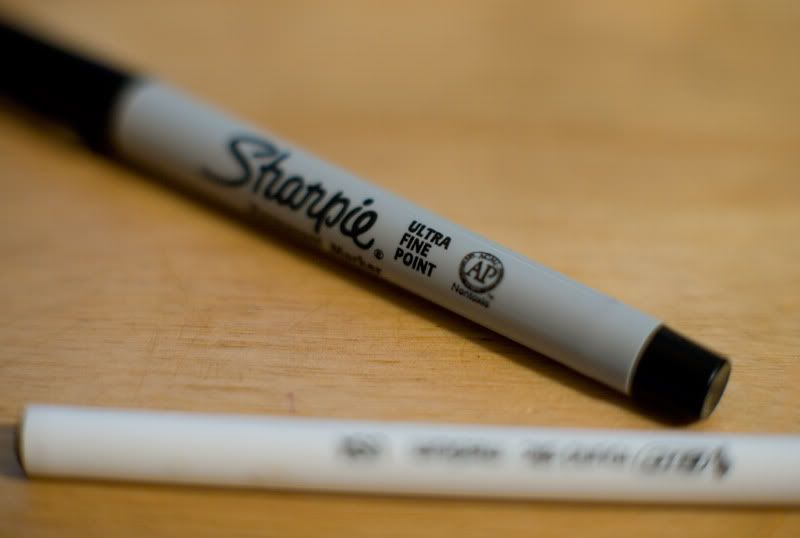
Cropped shot with Rokkor 58/1.2 wide open with EF12 Ext Tube, focused on the word "FINE"...
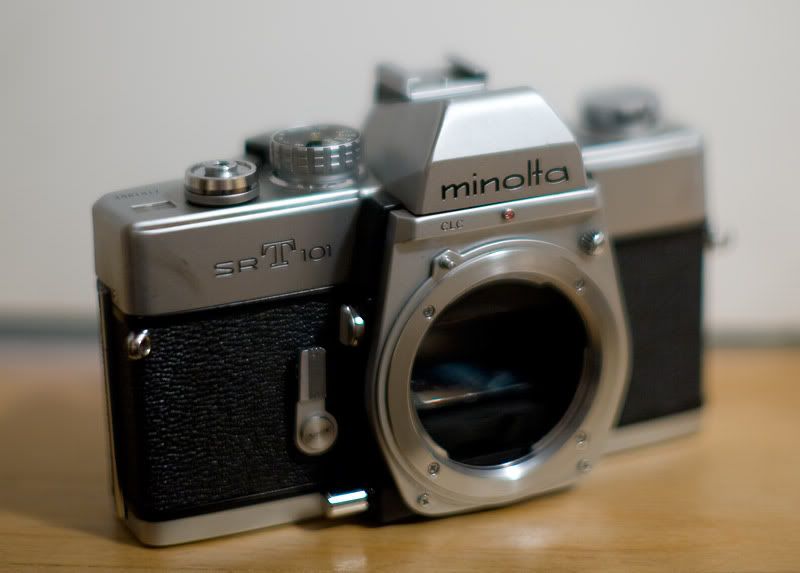
Same lens, also cropped for content, without the Ext tube focused on the "M" on the word "Minolta."
To recap Mike found washer # 18 worked for his camera.
Initial testing shows I am getting good focus with washer # 05
I will need to do more testing though...
Cropped shot with Rokkor 58/1.2 wide open with EF12 Ext Tube, focused on the word "FINE"...
Same lens, also cropped for content, without the Ext tube focused on the "M" on the word "Minolta."
Nov 12, 2008 at 06:20 PM