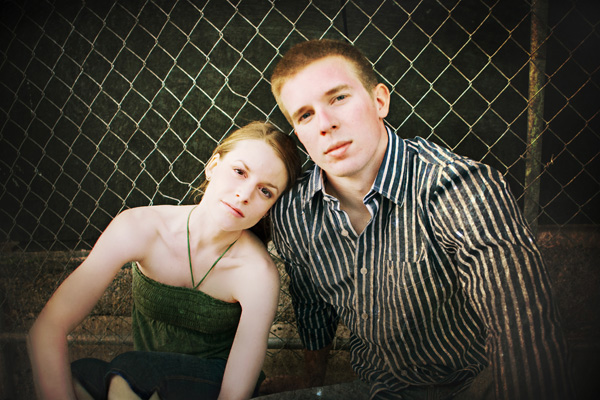
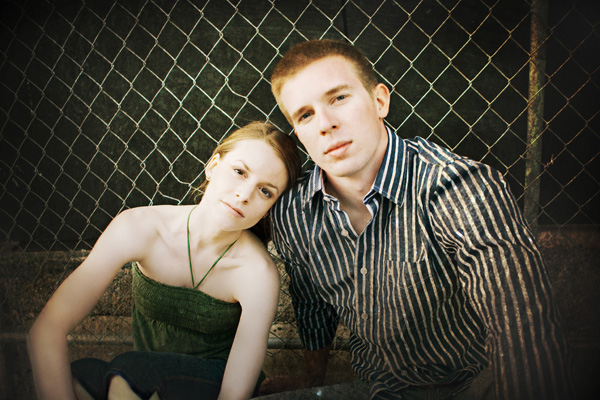
I love my portraits looking warm (as most do) but I'm wondering what you do when photographing on location in cold weather when some people's faces love to red up.....? On scene? Photoshop?
If no Lightroom, use Hue/Saturation in Photoshop and get just that area to look the way you want, regardless of the rest... Then, fill the White Layer Mask with Black. Now, use a white, very soft brush to paint back the new layer at whatever opacity is necessary.
This is one of many ways. Once you find a good one FOR YOU, create an action to set it up, then all you'll ever need to do is hit a Function key and paint a little.
Or, use the Magenta remover action from Kubota and paint accordingly
Both work perfect!
Now, I love Lightroom and set up most of my images in it, but even using the Hue/Sat scrubber to fix the red, it will also pull the red out of anything similar. I take every single image into Photoshop, so this works better for me, but if you don't do that, Lightroom is very convenient and works wonders!
Jonathan Consiglio
Edited by J. Consiglio on Apr 09, 2008 at 08:19 PM GMT
wow that's great! I'll have to get practicing. Those pics look great. Some of you are just too big of photoshop whizzes! I'm gonna go hide in the corner. I gotta LOT to learn about that program
However this illustrates why you need to be careful and use layers, fill layers and brushes and opacity. Notice her lips have lost some of the original color. That may be ok, just know that may happen in an image.
However this illustrates why you need to be careful and use layers, fill layers and brushes and opacity. Notice her lips have lost some of the original color. That may be ok, just know that may happen in an image.
Tom
Good point! It was a quick example after I posted the first response and I went in and grabbed the first one I saw. But, like I mentioned, that is the main problem with Lightroom Hue/Sat scrubber. It will pull the red out of the cheeks, but everything else also!
If you want, send me your emaill address and I can send the the action I made to set it up.. It's not an exact science, but it will give you a good starting point..
I have this problem as well -- except I live in South FLorida and the last engagemetn shoot had a badly burnt couple! which meant crazy tan lines -- half red/half pale. Once i figure out how to get rid of some of the red, I'll let you know.
Perhaps an other way to work around loosing the color is to make a duplicate in Lightroom, one in the correct color and one with the skin color (mostly mageta) corrected.
export them to Photoshop. The corrected skin on the lower layer and brush out with a softbrush the part to be corrected in the top layer. Works pretty fast for me and good control which areas to correct.