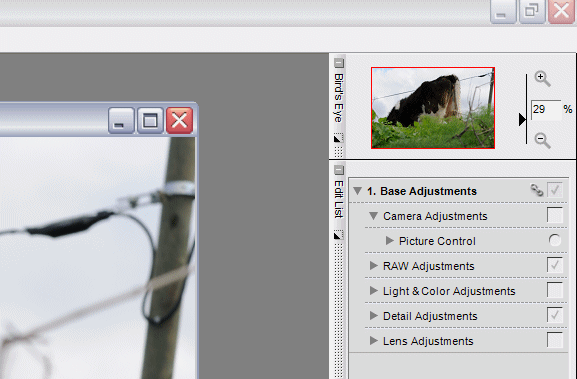
OK, now I've got it. I hadn't found the Picture Control Utility in Capture NX before.
In the Edit List, under Base Adjustments, go to Camera Adjustments, and then Picture Control. I found it as an option when I clicked on one of the small inverted black triangles under the Quick Adjust slider and just to left of the Reset button. I might not have ever noticed that before if I hadn't gone searching! Now, the Custom Curve settings you recommended in the first post makes sense to me, and perhaps I'll be bold enough to create my own in the future.
I'm still lost with the file extension names, but my camera recognized both the *. NOP and *.NCP files, so I won't hesitate to load either in the future when necessary.
Thank you Raymond for this little project, and the new Custom Picture Control setting. I'm now just a little bit more dangerous with my computer!
Chris Noyes wrote:
I guess I'm still confused about the file extension difference though . . . the instructions Nikon provides discuss *.NOP files and say nothing about *.NCP files. I also don't understand the "custom curve" Raymond created and where it was created (in Camera, or on the computer with a specific software package).
I too was confused by the file extension, and then I tried a save to card, checked my card and there was that *.ncp file in the subdir I mentioned to you That's how I found what to do, btw
sithbk wrote:
Hmm. I tried to load/save it but the camera tells me that "no picture control file found on memory card". I've followed John's process and no luck. Is it a mac thing because the file name that I down loaded is "piccon02.ncp"
I've noticed you had some trouble loading the picture control. You might want to try to load the picture control in capture NX. Open the picture control utility and load my custom control there. Then export it to your own CF-card. You need the "manage picture control" menu item to import in your camera. It's the one below the set picture control item...
Roland Jenkins wrote:
How do you "open the picture control utility" in NX ...
It doesn't seem apparent?
You are right Roland, we need some illustrations of this interesting NX stuff.
Personally I only understand the beginning of it, if that at all
This is - at least I think this is - where it all begins.
With an open picture you find Base Adjustments >> Camera Adjustments >> and Picture Control in the right side of the NX application window. Can anybody else continue the illustrations from here ...
Edited by Steen Bondo on Mar 23, 2008 at 08:50 PM GMT
In the screen shot above, notice the small, inverted black triangle just to the left of the "Reset" button, click on that and you will find three selections . . . one of which is the "Picture Control Utility".
I've successfully "imported" Raymonds Files into NX, using Picture Control Utility... from a formated CF Card.
I then tried...
a) exporting the same files to the same card .... overwriting the original
b) exporting the same files to a seperate CF card....
c) saved them in NX under a different name, before exporting to a different CF card...
... but I cannot load them to the Camera! The camera can definitely read the files because it allows me to "delete" them from the card. But if I choose "Load/Save > "Copy to Camera" it just comes up with: "No Picture Control File found on memory card"
In camera, did you first go to the "SET UP > USB" and Select "Mass Storage"? If not, do that before going through the steps you described above from the SHOOTING menu.
There must be a folder named "NIKON" at the root level of the CF card. The picture control file must be inside the "NIKON" folder.
Chris Noyes wrote:
In camera, did you first go to the "SET UP > USB" and Select "Mass Storage"? If not, do that before going through the steps you described above from the SHOOTING menu.
There must be a folder named "NIKON" at the root level of the CF card. The picture control file must be inside the "NIKON" folder.
Done that.... still no luck!
...as I say... the camera's definitely reading the files because they're listed when I choose "Delete from card"
Right... back to basics ... I've downloaded the DX2mode l / ll / lll Files from the Nikon Site... They have successfully now copied to the camera.
Upon reflection, & reading the past posts again... It must have been the NCP file extension that the Camera wasn't reading
Anyhow .... I guess all I need to do now is copy Raymond's tweaking instructions @ the beginning of the thread to adjust the picture controls
________________________________________________
Apologies for cluttering the thread with my problems
NightOwl Cat wrote:
Thanks Raymond for sharing, it looks like at least I'll be able to use it with Capture NX, if not with any of my cameras
Hello NightOwl Cat,
Just wanted to say thanks for mentioning using the modes with other cameras. Just now I put Raymond's two modes onto my D200 then imported into Capture NX to use with my non D3/D300 files. I like the look.
Hello Raymond,
In the picture control utility I can see the changes you made to the default D2X picture controls, but I'm not able to see how the D2Xmode 1, 2 and 3 settings differ from each other. Is there a way to see the setting differences? I'd just like to see what kind of tuning Nikon (or Nik) does between the modes.


 That's how I found what to do, btw