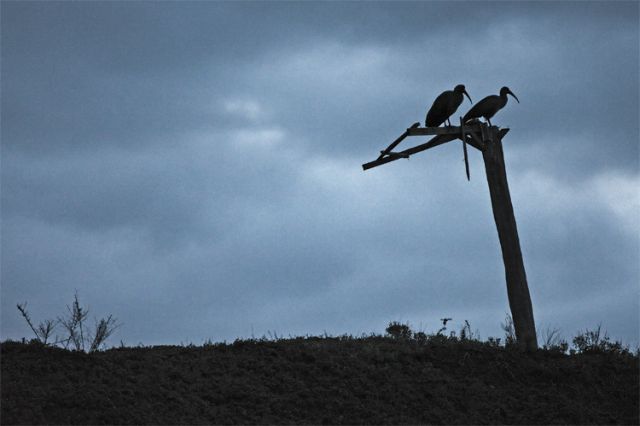
My sister's birthday is coming up, and I'd like to send her one of my photos, printed to be hung on a wall. This is the photo I've chosen:
I already did the post processing when I printed this one out for print on a 4x6. I have the original RAW, shot at ISO 1600 (quite noisy), and resolution of 3456x2304. I have a few questions I'm hoping people can help with:
Concerning the usual post-processing, can the image be improved? I think it's okay as it is, but can the sky be improved? How?
If I print this out, what size do you recommend?
If you'd like to have a tinker, the original RAW is [url]http://philsproof.com/img/2008/02/IMG_4613.CR2]here[/url]
Theo,
Here is a quick rework - tried to recover some of the foreground using two copies from ACR - one with max exposure, the second with min and then placing the first over the second. Also ran it through a NR plugin. Then tinkered with curves etc...although the foreground does have some detail, the colors were mangled somewhat.
Didn't bother to flip it - like your framing better.
I think Bob did a nice job on the foreground. But your sky is moodier, as it should be. You might even darken a couple of the darker clouds for a bit more drama.
As for printing, I'm still on the learning curve. But here are some of the coniderations.
1. What size piece does she need, ideally? With frame and mat? Gallery wrap style?
2. What media will you print on? Glossy for vibrancy? Matte will not need to be as sharp. Canvas will be even more forgining. The image you have does not require great detail to work, and does not contain great detail, so enlargements should not be much of a problem. Having recently done a canvas at 20x30 off my 20 D, I'm sure you could go that large or more. Some vibrancy and perceived saturation of color will drop off with matte and canvas, but you will have a more painterly feel.
3. Preparation for printing. Will you print? Email out? Your lab may have specific color space info, advice as to whether to up-rez or let them do it.
I played with the linked large file for a while but ultimately concluded that I like you rework. You might bring the blue down a smidge in the sky.
Here is my attempt with
Used hightlights/curves to bring out grass below (not sure it improved)
Used magic wand and despeckle/noise reduction, and desaturated the blue sky a smidge
I am not sure it is better but am posting in case it appeals to you.
Incidently, these don't look like the "ravens" I am used to.
Bob Jarman wrote:
Theo,
Here is a quick rework - tried to recover some of the foreground using two copies from ACR - one with max exposure, the second with min and then placing the first over the second. Also ran it through a NR plugin. Then tinkered with curves etc...although the foreground does have some detail, the colors were mangled somewhat.
Didn't bother to flip it - like your framing better.
think I'd reduce the size now that I see the post - have no idea how a print would work re noise etc.
Great work, Bob!
I'm trying to decide if I do or don't like what you did. Do you guys prefer a more saturated (bluer) sky? And do you prefer being able to see the foreground details (the grass)? Ultimately, however, I think I'll have to make the sky more contrasty and dynamic.
On that note, how do you make the sky more dynamic (I've just been adjusting levels/contrast thus far. Don't know how to have more control)
sbeme wrote:
1. What size piece does she need, ideally? With frame and mat? Gallery wrap style?
I'm really not sure, here. I've no experience with actual physical framing. I'd say that the final product shouldn't be so large because it's quite a dark piece (16x20 or 12x18?).
2. What media will you print on? Glossy for vibrancy? Matte will not need to be as sharp. Canvas will be even more forgiving. The image you have does not require great detail to work, and does not contain great detail, so enlargements should not be much of a problem. Having recently done a canvas at 20x30 off my 20 D, I'm sure you could go that large or more. Some vibrancy and perceived saturation of color will drop off with matte and canvas, but you will have a more painterly feel.
I think it would look best glossy. What's your take?
3. Preparation for printing. Will you print? Email out? Your lab may have specific color space info, advice as to whether to up-rez or let them do it. ...Show more →
Thank you for the well thought out questions.
colinr wrote:
Altho I am not an expert - these look like Ibis to me
In Photoshop, you could select the sky and then do a curves adjustment on the selection, creating an S curve to further tweak and enhance contrast.
Or, you could create a new layer from the pull down menu, choose Overlay or Soft Light as your blending mode, check box to fill with neutral color and click OK. Then select a brush, set low opacity of maybe 10% or so, and paint over areas white white to lighten and black to darken. Finally, adjust the opacity of the layer to adjust the intensity of overall changes made.
I think the image could look good in glossy or matte. If there is considerable noise that you cannot eliminate, I'd choose matte or canvas.
I prefer a saturated sky, detail preserved in the grass.
I for one think the shot is best as you present it. To my eyes, adding detail in the foreground detracts from the image as a whole--you did a great job of getting a silhouette with detail, and I think the sky is great as it is.
One of the peeves I had with the original version was that I thought a closer crop from the ground would be better. Here are two versions (disregard the difference in type):
Original
Cropped
Originally, I was trying to fulfill the rule of thirds -- that's why the ground is about 1/3 of the way up. I like the cropped because it pulls the focus towards the stalk and birds. It also gives off a better feeling of rural loneliness.


 ,
,