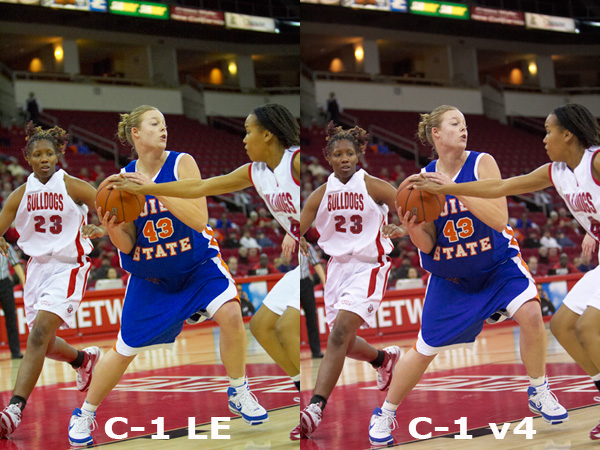
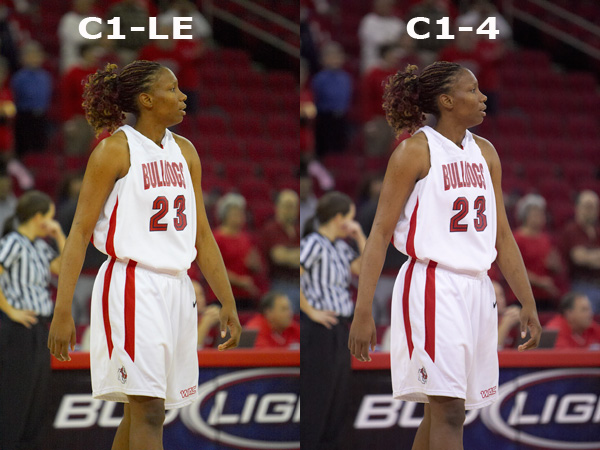
I just upgraded to C1 4 and I cannot believe how much better it is. See the tests I ran, the differences are huge!
Color quality is a quantum leap better, w/ dynamic range adjustments in raw, which we did not have in version LE; The work flow features are very different from LE, and a bit frustrating to learn, but once you get it down, it's great! PLUS: It's a free upgrade to those who are using LE currently... What a deal!!
Be sure to uninstall the beta first.
To wit:
Shot at 3200 ISO, 2.8, 1250 shutter, custom in-camera white balance. Canon 1D MKII No adjustments in C1. Camera Profile for color space on all shots.
Edited by phil hawkins on Jan 09, 2008 at 03:52 AM GMT (Reason: add info)
I use C1 Pro and the interface is SO different it's been really hard for me to figure out.
I did a comparison of the C1v4 converter against the Adobe converter (ACR or Lightroom) and the C1v4 and Adobe converters are almost identical as far as the output of the detail and that's the thing I look at most. I can always tweak color to suit my needs.
I hope they finish up the Pro version of C1 soon.
It's certainly nice to have options.
BTW - it appears to me that your whites have a little pink in them.
Good points, TJ you are correct; I also looked at detail and it is identical. But I care more about skin tones (also do portrait and wedding work) and slight color casting on uniforms is not a big deal to me. Getting a decent white balance in indoor arenas is a challenge, and C1v4 helps me get it right. Plus, I think the pink cast has more to do with the red paint on the court than anything else.
Edited by phil hawkins on Jan 12, 2008 at 04:02 AM GMT
Thanks... I don't care about the pinks cast on uniforms; I care more about skin tones because people are focusing on the player, not the uniform. Plus, as mentioned, I also do portrait and wedding work, and skin tones are much more important.
When I see your images, then I think you set the white balance differently between the two. I expect better performance, but I don’t think this is a true comparison. I used the old version and always got perfect skin tones, this was the reason I favored C1 over Nikon Capture. Today LR gives the same perfect skin tones and the workflow is great, so I decided to use LR. C1 is too late.
Btw, when you want accurate skin tones, can I assume you already use a white balance card or other tool to get an accurate white balance?
You bring up valid questions. When I did the test, I simply did conversions based on settings straight out of the camera. No adjustments were done at all.
White balance was done in the Save Mart Center in Fresno, CA which uses a mixture of mercury vapor lights and flouescent. Mercury vapor lights have a 60-cycle illumination property that acts similar to the scan lines on a analog TV. The eye sees a continuous light, but in reality it is blinking off and on 60 times a second. When shooting at a 1250 shutter, the on-and-off can be seen. I wrestled with the problem for a long time. Then, I bought a Expo-Disc white balance filter, and set the white balance in-camera, using a shutter set at 1/30th a second or less to render a WB sample that combined the on-and-off of the MV lights. It's a blended WB sample that has worked flawlessly.
I was getting much improved results in C1-LE, but I always had to do some tweaking to the WB. Most of the problem was from the wide variety of skin tones among African American athletes; some of the skin tones had a pronounced green cast on my conversions. Then, I used a beta version of C1 4, and the difference was startling. Somehow, v4 does a much better job of converting the WB info from the Canon 1D MKII and providing a much improved result that does not need any tweaking at all.
It is interesting you mention using Nikon Capture with your Nikons... I have a friend who swears by Nikon Capture in his wedding work. Also, very possibly, the difference between how C1-LE converts Nikon vs Canon WB info could account for the difference between your output and mine.
C1v4 works really well with my 40D files also. I really like the new application. I think that it is much nicer than the 3.7.x Pro version that I had been using. I'd recommend it also.
Anyone know how to move a large number of selected images into the new batch queue?
Yes, but beware that process. Tuesday night I sorted 1300 images, labeled each keeper, (about 180 in number), and just as I clicked to do exactly what you ask, it crashed. Needless to say, I lost everything I had done.
But you may not have that many images. I suspect the reason mine crashed was the volume of images.
Label your images in some way; either 1 to 5 stars by hitting the number 1 through 5 key... then, go Edit>Select by Rating>(click on the appropriate rating) and then move over to "Output" on the right side on the screen, at least on my machine, and set up your output parameters, then click on the "Batch" icon (3 little wheels) and you will see an empty "Queue" section. Hold down the Shift key, and click on "Process" and it will move the images to the Queue section and automatically start converting.
Better way to do it is:
As you sort through your images, and find the ones you want, hit Ctrl D and that will start the process of that image. As you find more you want to keep, just keep clicking Ctrl D and it will move the image to the Queue section automatically and start the convert process as each image is added to the Queue. Your conversions will process simultaneously as you sort your images.
Keep in mind I learned all this the hard way. This process is incorrectly stated in the manual....
I've been playing with C1 V4 for a couple of weeks on my MacBook Pro and it has "unexpectedly quit" a few times. I used to use C1 all the time but I'm sure not switching from Lightroom, even though the conversions look great.
tomrock wrote:
I've been playing with C1 V4 for a couple of weeks on my MacBook Pro and it has "unexpectedly quit" a few times. I used to use C1 all the time but I'm sure not switching from Lightroom, even though the conversions look great.
Strange as this may seem, the Mac version is still a ways from being ready. Are you using the Beta?
phil hawkins wrote:
Yes, but beware that process. Tuesday night I sorted 1300 images, labeled each keeper, (about 180 in number), and just as I clicked to do exactly what you ask, it crashed. Needless to say, I lost everything I had done.
But you may not have that many images. I suspect the reason mine crashed was the volume of images.
Label your images in some way; either 1 to 5 stars by hitting the number 1 through 5 key... then, go Edit>Select by Rating>(click on the appropriate rating) and then move over to "Output" on the right side on the screen, at least on my machine, and set up your output parameters, then click on the "Batch" icon (3 little wheels) and you will see an empty "Queue" section. Hold down the Shift key, and click on "Process" and it will move the images to the Queue section and automatically start converting.
Better way to do it is:
As you sort through your images, and find the ones you want, hit Ctrl D and that will start the process of that image. As you find more you want to keep, just keep clicking Ctrl D and it will move the image to the Queue section automatically and start the convert process as each image is added to the Queue. Your conversions will process simultaneously as you sort your images.
Keep in mind I learned all this the hard way. This process is incorrectly stated in the manual.......Show more →
Thanks ... that was the last piece of the puzzle for me.