if you run dual monitors then I would suggest the 6x11. bigger is better in this case. it makes the strokes more natural because of the exact pixel dimension correlation. movements with the pen are more exact when your tablet is as close to your monitor dimension as possible.
tablets are the only way to go with retouching. there is a bit of a learning curve at first for people that have never used on at all. the major thing is realizing that the pen's on screen positioning will be exact to where it is on the pad. the pad mirrors the screen and you will never run off the screen nor will you need to constantly cycle your movements like with a mouse. you can run edge to edge with the pen and never have to leave the pad.
Bigger isn't necessarily better when it comes to tablets. Unless you're an artist used to making long or wide brush strokes you'd be better off with a smaller tablet; 4 x 5 or 4 x 6 is ideal for most purposes.
I currently have a 6 x 8 that's used in a dual-monitor setup and I don't even use all the available space.
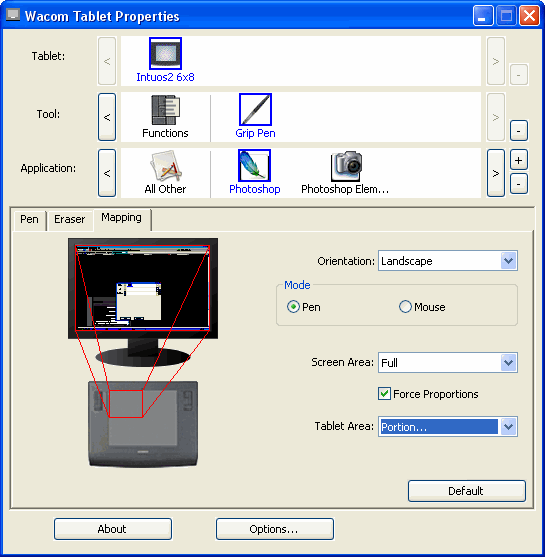
One thing no one has mentioned is that the tablet comes with a software utility that allows you to configure functions for specific applications and to map the tablet area to screen space.
Here's a photo of the utility showing my tablet mapped to one 21" monitor. You will notice I'm only using one-quarter of the available tablet space.
I almost packed mine to go with me when I left for a few weeks. Its that essential to my PS work.
If using dual screens, the 6x11 is great. If using a widwscreen be sure to get a widescreen relative tablet. The 4x5 o na 22 or 24" LCD will mean very little area used of disproportionate strokes when working.
cencored wrote:
Paul I don't know what you mean with your post. I have not used the pen for writing yet, because I think it is quicker to type with a keyboard, but please elaborate what you said.
Sorry to confuse - what I meant was that you can type on the keyboard (as I am doing now) using both hands while still holding the pen! Useful for any text or for keyboard short cuts
I guess I'll just have to find out, but if you're using a 4x6 Intuos, in combo with a 22" monitor, how do you pick which part of the image appears on the tablet to edit? I suppose that's why many people think bigger is better with tablets.
I'll probably order one next week.
Is there any place to buy them besides directly through the Wacom website, maybe someplace less expensive?
There's an even better way to hold the pen when you need to type. Simply use your thumb to curl over and press in, such that the pen is held across the palm of your hand. By holding the pen against your palm with one thumb, you have the fingers and the other thumb available to touch-type. Really quite comfortable.
I am glad I read this thread. I was going to plunk down cash for a larger tablet, but yall have talked me out of it. I currently edit on a 24" samsung and my wrist has been killing me when retouching portraits.
A single point in favor of larger tablets: great for those with less-than-steady hands, like me. The fact that the tablet forces me to make larger movements with my hand or forearm smooths out the natural jitter in my hands.
Funny, at age 32 I can shoot both cameras and firearms pretty well, but I can't draw a straight line to save my life.
A single point in favor of larger tablets: great for those with less-than-steady hands, like me. The fact that the tablet forces me to make larger movements with my hand or forearm smooths out the natural jitter in my hands.
Funny, at age 32 I can shoot both cameras and firearms pretty well, but I can't draw a straight line to save my life.
Reviving this thread......I didn't get the Wacom for Christmas 'cause we got our daughter a 20" iMac instead. But I'm going to get one next week, and I just have a couple quick questions before plunking down the CC:
Is Wacom really the best? Or are there competitors that are as good, maybe a bit less expensive?
Well, business has been good, so I'm ordering a 4x6 Intuos3 tomorrow. I'll aim to get it overnighted so I can play with it over the weekend. Can't wait to try the pen!
Got my Wacom Intuos3 4x6 tablet today.....pretty cool, but I can tell it will take a bit to become familiar/comfortable with it. Hopefully my baby girl will take long naps this weekend so I'll have time to practice without staying up too late!
i bought the super cheapy version - the wacom bamboo - because i wasn't sure how much i'd use it. it has absolutely changed my life when it comes to making clean selections/masks/etc. it travels to and from school with me.
I'm having fun with it already! WOW is all I can say.
Fortunately for me, I pick up these kinds of things pretty quickly, like an ergonomic keyboard -- everyone I know hates 'em, but they're indispensable for me, took me about minutes to get used to it.
I'm already enjoying it so much that I think I'm going to take the 4x6 one to work and order the 6x8 or 6x11 for my house. I do think I'd like a bigger one, as I like being able to make big brush strokes, and I find the smaller field constricted, especially as I work with a widescreen monitor and plan on getting a 30" Apple HD Display next year.



 it travels to and from school with me.