#1256 Sparks of Inspiration

p.1 #1#1256 Sparks of Inspiration
Some creative experimentation with burning steel wool and colorful lights brings a graffiti-covered wall in an underground concrete tunnel to life with explosive energy.
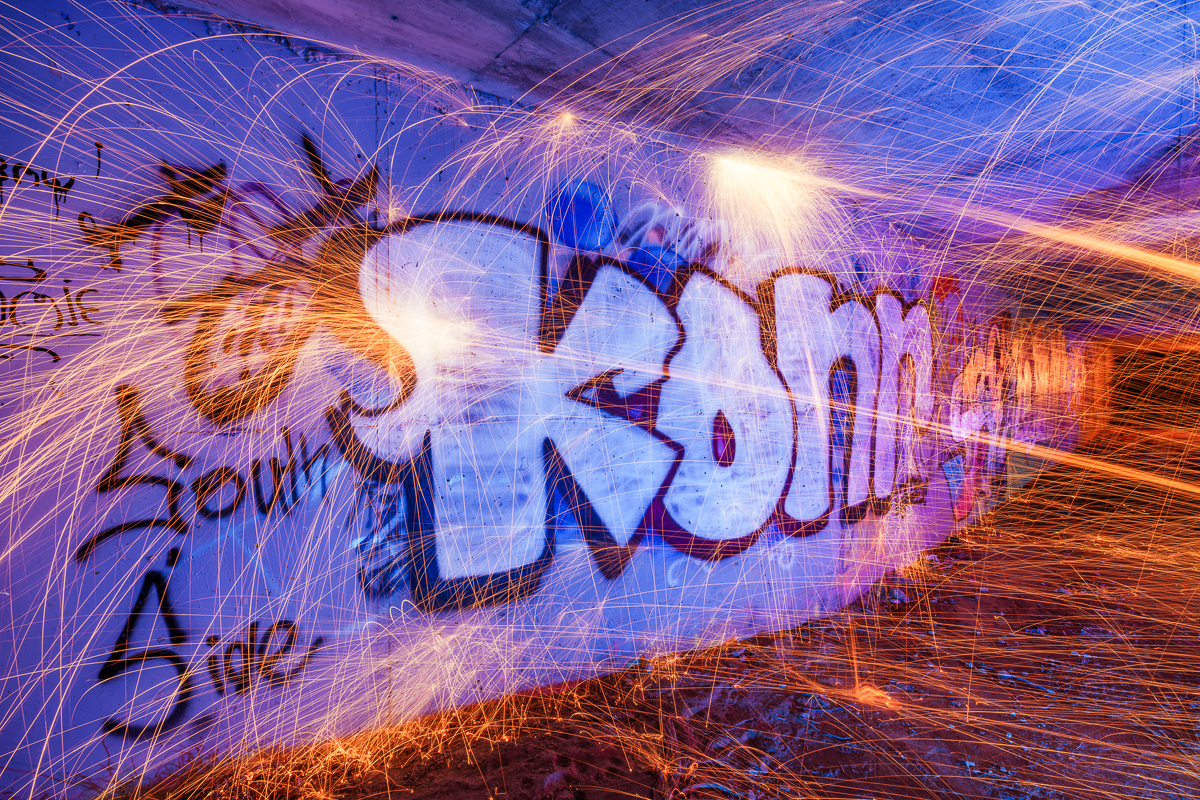
ILCE-7RM5 Viltrox 14mm F4.0 FE lens 14mm f/11.0 30s 100 ISO 0.0 EV
Nov 10, 2026 at 09:42 PM
p.1 #2#1256 Sparks of Inspiration
Fantastic brother!
FYI..Adobe presented Adobe CC2027 2 days ago. All former Ps is gone and while the new installation was supposed to "save" all presets and such, it did NOT!
Not only that it corrupted the "metadata templates" on the right side while in ACR or Br.
I posted an image but the metadata was corrupted and I deleted it!
Got my vote!
Joking of course!
Dan
FYI..Adobe presented Adobe CC2027 2 days ago. All former Ps is gone and while the new installation was supposed to "save" all presets and such, it did NOT!
Not only that it corrupted the "metadata templates" on the right side while in ACR or Br.
I posted an image but the metadata was corrupted and I deleted it!
Got my vote!
Joking of course!
Dan
Nov 11, 2026 at 09:00 AM
p.1 #3#1256 Sparks of Inspiration
Danpbphoto wrote:
Fantastic brother!
FYI..Adobe presented Adobe CC2027 2 days ago. All former Ps is gone and while the new installation was supposed to "save" all presets and such, it did NOT!
Not only that it corrupted the "metadata templates" on the right side while in ACR or Br.
I posted an image but the metadata was corrupted and I deleted it!
Got my vote!
Joking of course!
Dan
Thanks, Dan! Sorry to hear about your Adobe troubles. I installed the new Photoshop too, but fortunately haven't run into those issues. Hopefully you can get everything sorted out! Maybe try an uninstall/reinstall and see if that fixes things.
As for the challenge, I'm thinking my odds are looking pretty good this week with such stiff competition! 😂
Fantastic brother!
FYI..Adobe presented Adobe CC2027 2 days ago. All former Ps is gone and while the new installation was supposed to "save" all presets and such, it did NOT!
Not only that it corrupted the "metadata templates" on the right side while in ACR or Br.
I posted an image but the metadata was corrupted and I deleted it!
Got my vote!
Joking of course!
Dan
Thanks, Dan! Sorry to hear about your Adobe troubles. I installed the new Photoshop too, but fortunately haven't run into those issues. Hopefully you can get everything sorted out! Maybe try an uninstall/reinstall and see if that fixes things.
As for the challenge, I'm thinking my odds are looking pretty good this week with such stiff competition! 😂
Nov 11, 2026 at 10:31 PM
|
p.1 #4#1256 Sparks of Inspiration
adventure_photo wrote:
FYI..Adobe presented Adobe CC2027 2 days ago. All former Ps is gone and while the new installation was supposed to "save" all presets and such, it did NOT!
Not only that it corrupted the "metadata templates" on the right side while in ACR or Br.
I posted an image but the metadata was corrupted and I deleted it!
Got my vote!
Joking of course!
DanThanks, Dan! Sorry to hear about your Adobe troubles. I installed the new Photoshop too, but fortunately haven't run into those issues. Hopefully you can get everything sorted out! Maybe try an uninstall/reinstall and see if that fixes things.
As for the challenge, I'm thinking my odds are looking pretty good this week with such stiff competition! 😂
You GOT this one brother!!!
I entered a new wall mural but the metadata was showing me bad mojo. Funny thing was, it would load onto the WA forum despite the "Created Date" was 3313!
I PM'd Fred to let him know that I was going to leave it posted but decided that he did not need any "flack" from members checking my metatdata and scolding me and him so I just deleted it and posted it on the "Life on Your Street" thread...
Adobe Tier3 support spent 3 hours using my computer and problems as a "guinea pig" to fix their problems. Yes I, myself, reinstalled Adobe on both my computers but the issues prevailed. Same issues on 2 different computers.
Appears they got most of them resolved. My main issue was that after installing Adobe 2027, the metadata was being corrupted and/or modified and/or missing.
Manual corrections did not work. In fact if the "Created Dated" was November 12, 2026, what was downloaded was November 32, 3313! Honest!
No exif no nuttin!
Glad you had no issues!
Dan
Danpbphoto wrote
Fantastic brother!FYI..Adobe presented Adobe CC2027 2 days ago. All former Ps is gone and while the new installation was supposed to "save" all presets and such, it did NOT!
Not only that it corrupted the "metadata templates" on the right side while in ACR or Br.
I posted an image but the metadata was corrupted and I deleted it!
Got my vote!
Joking of course!
Dan
As for the challenge, I'm thinking my odds are looking pretty good this week with such stiff competition! 😂
You GOT this one brother!!!
I entered a new wall mural but the metadata was showing me bad mojo. Funny thing was, it would load onto the WA forum despite the "Created Date" was 3313!
I PM'd Fred to let him know that I was going to leave it posted but decided that he did not need any "flack" from members checking my metatdata and scolding me and him so I just deleted it and posted it on the "Life on Your Street" thread...
Adobe Tier3 support spent 3 hours using my computer and problems as a "guinea pig" to fix their problems. Yes I, myself, reinstalled Adobe on both my computers but the issues prevailed. Same issues on 2 different computers.
Appears they got most of them resolved. My main issue was that after installing Adobe 2027, the metadata was being corrupted and/or modified and/or missing.
Manual corrections did not work. In fact if the "Created Dated" was November 12, 2026, what was downloaded was November 32, 3313! Honest!
No exif no nuttin!
Glad you had no issues!
Dan
Nov 12, 2026 at 09:39 AM
p.1 #5#1256 Sparks of Inspiration
Danpbphoto wrote:
FYI..Adobe presented Adobe CC2027 2 days ago. All former Ps is gone and while the new installation was supposed to "save" all presets and such, it did NOT!
Not only that it corrupted the "metadata templates" on the right side while in ACR or Br.
I posted an image but the metadata was corrupted and I deleted it!
Got my vote!
Joking of course!
DanThanks, Dan! Sorry to hear about your Adobe troubles. I installed the new Photoshop too, but fortunately haven't run into those issues. Hopefully you can get everything sorted out! Maybe try an uninstall/reinstall and see if that fixes things.
As for the challenge, I'm thinking my odds are looking pretty good this week with such stiff competition! 😂You GOT this one brother!!!
I entered a new wall mural but the metadata was showing me bad mojo. Funny thing was, it would load onto the WA forum despite the "Created Date" was 3313!
I PM'd Fred to let him know that I was going to leave it posted but decided that he did not need any "flack" from members checking my metatdata and scolding me and him so I just deleted it and posted it on the "Life on Your Street" thread...
Adobe Tier3 support spent 3 hours using my computer and problems as a "guinea pig" to fix their...Show more →
Oh man, that's so frustrating Dan. And it's such a waste of time trying to figure these things out. I'm sure you tried resetting preferences, etc.? Testing on Adobe Bridge/ACR, do you get same problems? Also, there is a tool Exif Tool here - https://exiftool.org/. Maybe use that to determine if the original exif info is correct in the first place (which I'm sure it is, but just to confirm). And another option is you can reinstall Photoshop 2026 and see if the problem is still there? Maybe reinstall PS 2026, test it, then try updating again to PS2027 from PS2026? And if that fails and PS2026 works, maybe just revert back to that until a new update to PS2027 comes out that may resolve this issue.
adventure_photo wrote
Danpbphoto wrote
Fantastic brother!FYI..Adobe presented Adobe CC2027 2 days ago. All former Ps is gone and while the new installation was supposed to "save" all presets and such, it did NOT!
Not only that it corrupted the "metadata templates" on the right side while in ACR or Br.
I posted an image but the metadata was corrupted and I deleted it!
Got my vote!
Joking of course!
Dan
As for the challenge, I'm thinking my odds are looking pretty good this week with such stiff competition! 😂
I entered a new wall mural but the metadata was showing me bad mojo. Funny thing was, it would load onto the WA forum despite the "Created Date" was 3313!
I PM'd Fred to let him know that I was going to leave it posted but decided that he did not need any "flack" from members checking my metatdata and scolding me and him so I just deleted it and posted it on the "Life on Your Street" thread...
Adobe Tier3 support spent 3 hours using my computer and problems as a "guinea pig" to fix their...Show more →
Oh man, that's so frustrating Dan. And it's such a waste of time trying to figure these things out. I'm sure you tried resetting preferences, etc.? Testing on Adobe Bridge/ACR, do you get same problems? Also, there is a tool Exif Tool here - https://exiftool.org/. Maybe use that to determine if the original exif info is correct in the first place (which I'm sure it is, but just to confirm). And another option is you can reinstall Photoshop 2026 and see if the problem is still there? Maybe reinstall PS 2026, test it, then try updating again to PS2027 from PS2026? And if that fails and PS2026 works, maybe just revert back to that until a new update to PS2027 comes out that may resolve this issue.
Nov 12, 2026 at 12:39 PM
p.1 #6#1256 Sparks of Inspiration
adventure_photo wrote:
FYI..Adobe presented Adobe CC2027 2 days ago. All former Ps is gone and while the new installation was supposed to "save" all presets and such, it did NOT!
Not only that it corrupted the "metadata templates" on the right side while in ACR or Br.
I posted an image but the metadata was corrupted and I deleted it!
Got my vote!
Joking of course!
DanThanks, Dan! Sorry to hear about your Adobe troubles. I installed the new Photoshop too, but fortunately haven't run into those issues. Hopefully you can get everything sorted out! Maybe try an uninstall/reinstall and see if that fixes things.
As for the challenge, I'm thinking my odds are looking pretty good this week with such stiff competition! 😂You GOT this one brother!!!
I entered a new wall mural but the metadata was showing me bad mojo. Funny thing was, it would load onto the WA forum despite the "Created Date" was 3313!
I PM'd Fred to let him know that I was going to leave it posted but decided that he did not need any "flack" from members checking my metatdata and scolding me and him so I just deleted it and posted it on the "Life on Your Street" thread...
Adobe Tier3 support spent 3 hours using my computer and problems as a "guinea pig" to fix their problems. Yes I, myself, reinstalled Adobe on both my computers but the issues prevailed. Same issues on 2 different computers.
Appears they got most of them resolved. My main issue was that after installing Adobe 2027, the metadata was being corrupted and/or modified and/or missing.
Manual corrections did not work. In fact if the "Created Dated" was November 12, 2026, what was downloaded was November 32, 3313! Honest!
No exif no nuttin!
Glad you had no issues!
DanOh man, that's so frustrating Dan. And it's such a waste of time trying to figure these things out. I'm sure you tried resetting preferences, etc.? Testing on Adobe Bridge/ACR, do you get same problems? Also, there is a tool Exif Tool here - https://exiftool.org/. Maybe use that to determine if the original exif info is correct in the first place (which I'm sure it is, but just to confirm). And another option is you can reinstall Photoshop 2026 and see if the problem is still there? Maybe reinstall PS 2026, test it, then try updating again to PS2027 from...Show more →
Truth being I am lazy Scott! For me this would hours of work...my personal situation at home does not give me that time.
Thanks!
Dan
Danpbphoto wrote
adventure_photo wrote
Danpbphoto wrote
Fantastic brother!FYI..Adobe presented Adobe CC2027 2 days ago. All former Ps is gone and while the new installation was supposed to "save" all presets and such, it did NOT!
Not only that it corrupted the "metadata templates" on the right side while in ACR or Br.
I posted an image but the metadata was corrupted and I deleted it!
Got my vote!
Joking of course!
Dan
As for the challenge, I'm thinking my odds are looking pretty good this week with such stiff competition! 😂
I entered a new wall mural but the metadata was showing me bad mojo. Funny thing was, it would load onto the WA forum despite the "Created Date" was 3313!
I PM'd Fred to let him know that I was going to leave it posted but decided that he did not need any "flack" from members checking my metatdata and scolding me and him so I just deleted it and posted it on the "Life on Your Street" thread...
Adobe Tier3 support spent 3 hours using my computer and problems as a "guinea pig" to fix their problems. Yes I, myself, reinstalled Adobe on both my computers but the issues prevailed. Same issues on 2 different computers.
Appears they got most of them resolved. My main issue was that after installing Adobe 2027, the metadata was being corrupted and/or modified and/or missing.
Manual corrections did not work. In fact if the "Created Dated" was November 12, 2026, what was downloaded was November 32, 3313! Honest!
No exif no nuttin!
Glad you had no issues!
Dan
Truth being I am lazy Scott! For me this would hours of work...my personal situation at home does not give me that time.
Thanks!
Dan
Nov 13, 2026 at 11:28 AM