Question about Cross-Posting
p.1 #1Question about Cross-Posting
Greetings All,
I frequently see posts that have been cross-listed between forums, but I have no idea how this is done. Would someone mind taking a moment to explain this process? Is it limited to B&S members? Since I live in Mac land is there a better platform to post from. I use Safari, but have other browsers loaded to resolve accessibility issues I have with our work programs.
Thank you in advance.
Kk
I frequently see posts that have been cross-listed between forums, but I have no idea how this is done. Would someone mind taking a moment to explain this process? Is it limited to B&S members? Since I live in Mac land is there a better platform to post from. I use Safari, but have other browsers loaded to resolve accessibility issues I have with our work programs.
Thank you in advance.
Kk
Sep 27, 2026 at 10:41 AM
p.1 #2Question about Cross-Posting
I cross post on occasion, but do it manually as I don't know of an automated way to do it. In other words I post an image in one forum, then go to the next forum and post it there as well, usually indicating that it has been cross posted from whichever forum it was originally posted in.
Hope that helps.
Hope that helps.
Sep 27, 2026 at 01:37 PM
p.1 #3Question about Cross-Posting
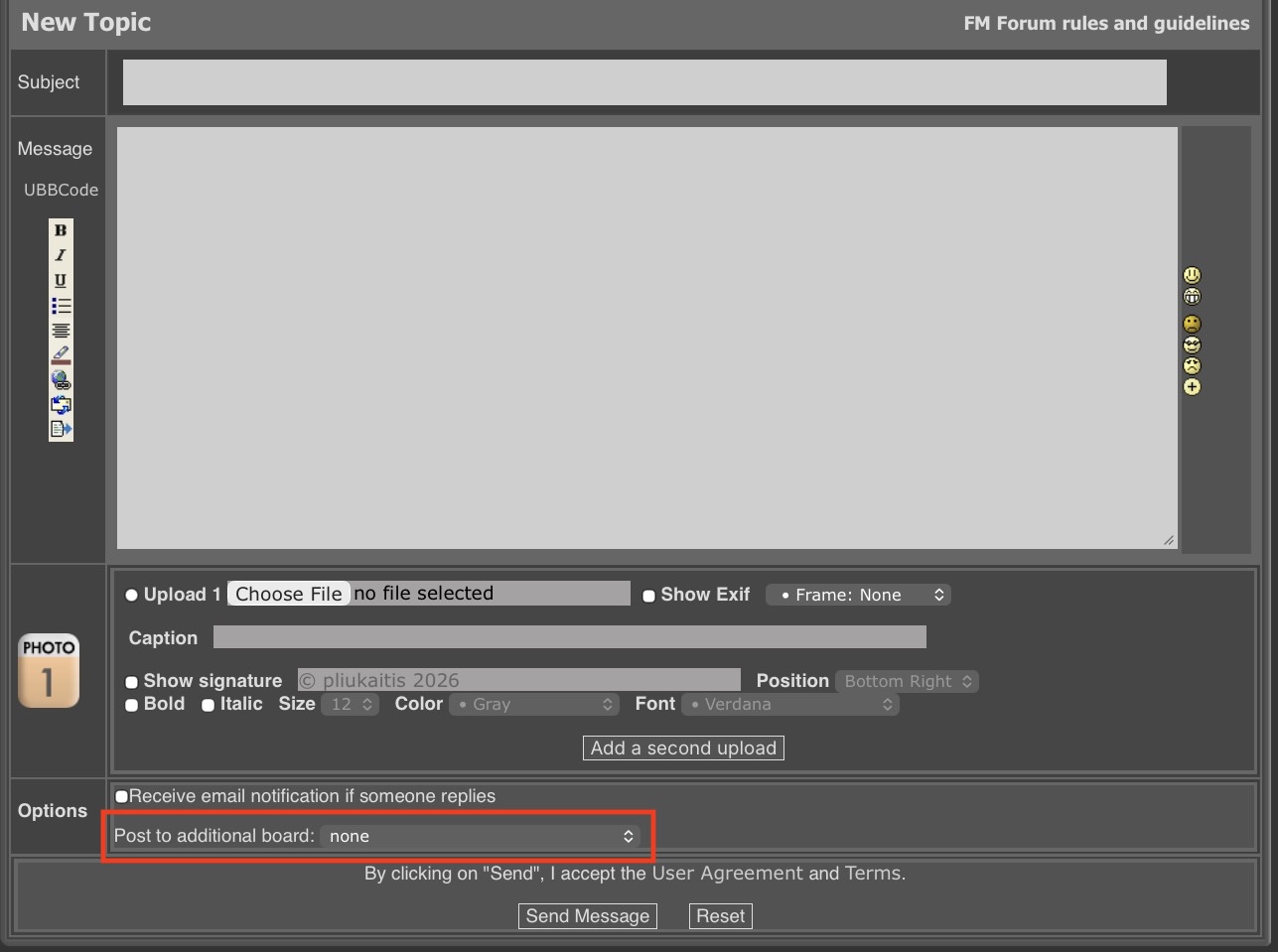
It’s easy. When you create a New Topic in a board scroll to the bottom and you’ll see a section that says Post to Additional Board or something like that. Simply choose from the dropdown and the message will be cross-posted.
Sep 27, 2026 at 04:46 PM
p.1 #4Question about Cross-Posting
Interesting, I don’t get that at all in Safari. I’ll have to test some other platforms.
Thank you.
Kk
jwpstl wrote:
It’s easy. When you create a New Topic in a board scroll to the bottom and you’ll see a section that says Post to Additional Board or something like that. Simply choose from the dropdown and the message will be cross-posted.
Thank you.
Kk
jwpstl wrote:
It’s easy. When you create a New Topic in a board scroll to the bottom and you’ll see a section that says Post to Additional Board or something like that. Simply choose from the dropdown and the message will be cross-posted.
Sep 27, 2026 at 06:57 PM
p.1 #5Question about Cross-Posting
jwpstl wrote:
It’s easy. When you create a New Topic in a board scroll to the bottom and you’ll see a section that says Post to Additional Board or something like that. Simply choose from the drop down and the message will be cross-posted.
I'm pretty sure that feature is only available for members like you who have purchased the upload and sell membership. Neither Kevner nor I have that, and I don't recall seeing the drop down feature available.
It’s easy. When you create a New Topic in a board scroll to the bottom and you’ll see a section that says Post to Additional Board or something like that. Simply choose from the drop down and the message will be cross-posted.
I'm pretty sure that feature is only available for members like you who have purchased the upload and sell membership. Neither Kevner nor I have that, and I don't recall seeing the drop down feature available.
Sep 27, 2026 at 09:15 PM
|
p.1 #6Question about Cross-Posting
No, you don't have to subscribe to Upload and Sell, at least not in the other forums.
You can also edit the first post to include another forum if youi did not so it initially.
Posting twice is not the same thing - that is two separate threads.
EBH
You can also edit the first post to include another forum if youi did not so it initially.
Posting twice is not the same thing - that is two separate threads.
EBH
Sep 27, 2026 at 09:33 PM
p.1 #8Question about Cross-Posting
This is my Safari and Chrome. I do not have those options. Maybe a setting I need to adjust?
 Screenshot Safari by Kevin Kemner, on Flickr
 Screenshot Chrome by Kevin Kemner, on Flickr
Screenshot Safari by Kevin Kemner, on FlickrScreenshot Chrome by Kevin Kemner, on FlickrSep 29, 2026 at 12:48 PM
p.1 #9Question about Cross-Posting
It is not showing. Were you trying in the very first post in the thread?
EBH
EBH
Sep 29, 2026 at 01:20 PM
p.1 #10Question about Cross-Posting
Those were showing a new post. It also doesn’t show up if I try to edit an existing post.
Thanks
Kk
EB-1 wrote:
It is not showing. Were you trying in the very first post in the thread?
EBH
Thanks
Kk
EB-1 wrote:
It is not showing. Were you trying in the very first post in the thread?
EBH
Sep 29, 2026 at 05:14 PM