In-camera sharpening dramatic effect on Sony buffer performance
p.1 #1In-camera sharpening dramatic effect on Sony buffer performance
I'm in the middle of a very deep dive technical examination of Sony's BIONZ imaging ASIC, with initial focus on its buffer performance across Sony cameras. It's a big project and I hope to share all my findings at some point. But for now I'd like to share what I believe is the most impactful finding I've made so far for Sony shooters.
I've determined that the sharpening and contrast level you set in the "Creative Look" menu has the potential for a dramatic effect on buffer performance, both in terms of the number of frames before the buffer runs out and the sustained FPS thereafter. Whether or not you'll see this effect and to what extent depends entirely on the subject matter you shoot - I'm using a torture target of just random printed noise, which produces the maximum FPS buffer impact. I believe even real-world targets will exhibit some measure of this effect, and I believe this effect also explains some of the differences in buffer depth measurements that have been made between individuals.
If you're familiar with Sony's "Creative Look" settings you know they control the sharpening, contrast, saturation, etc.. for the out-of-camera jpg and heif images. So you may be wondering, what does this have to do for all of us who shoot raw? Well, it has everything to do with raw shooting for one very specific reason - all raw images contain an embedded, full-size embedded jpg created by the camera at the time of shooting. It is this jpg that the camera displays during image review/playback, and also the default image displayed by many image editing tools on your desktop prior to completing their own, time-consuming raw conversion. This embedded jpg created by the camera for raws uses the same "Creative Look" settings that the camera applies when shooting in jpg mode.
The reason for this embedded jpg is simple: playback performance. It would be too slow for the camera to develop each raw during playback, not to mention the wasted cycles from re-processing the raw every time you re-review the image. So all cameras create a jpg version of the raw data at the time of shooting and embed this jpg inside the raw file. There are actually multiple embedded jpg's in every raw, each of a different size, including thumbnail, small preview, and full-size. These different sizes correspond to the various in-camera views, with the full-size image used when you're viewing a single image, esp when magnifying.
The significance of these raw-embedded jpg's is that they incur the same computational demands on BIONZ as shooting in jpg mode. Many take this for granted but it's extremely taxing on imaging ASICs like BIONZ to process raw data into a jpg. Anyone who has batch-imported a collection of raw files into a tool like Lightroom with 1:1 preview generation has observed first-hand how this task can bring even a very powerful computer to its knees. Yet we take it for granted how camera imaging ASICs perform the same job, and actually do it faster due to specialized hardware logic designed specifically for the task. However, even with this specialized logic it's still extremely taxing, esp when you consider cameras are asked to do this conversion in real-time at fast FPS shooting speeds.
It's the creation of these jpg's which often limits the actual buffer performance of cameras. You might think buffer performance is simply a matter of the shooting FPS, buffer size in camera (DRAM size), and media card write performance. But in fact there is a critical step that must also be accounted for - converting the frames that are read off the sensor into fully-formed data and images that are ready for writing to the media card. This conversion includes the generation of the embedded jpg, likely the most computationally-demanding part of the process. It requires multiple steps, including raw data noise filtering, demosaicing, white-balance application, lens-correction profile application, and tone application (ie, "Creative Look"), which itself includes sharpening, tonal adjustments like contrast, saturation, etc... Basically everything a tool like Lightroom does on raw files but performed in the camera instead, in real-time no less.
Let's get to a visual example. In my deep-dive BIONZ work I realized everyone testing and comparing buffer performance might be using wildly-different subject matter, which could have a material effect on performance and lead to disparities in measurement. To address that I created the following Gaussian noise target in Photoshop's Filter -> Noise -> Add Noise; Amount=250%, Distribution=Gaussian. I have both color and B&W versions but decided on B&W since not everyone has access to a high-resolution color printer. It was the decision to develop a standardized that lead to discovering the dramatic effect that image detail and sharpening have on buffer performance, and the difference does not relate to the resulting image size as one might suspect.
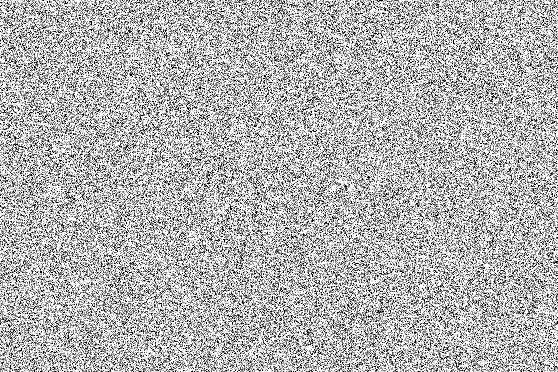
Here's what the noise pattern looks like in digital form:
And here's an animated comparison showing what the printed noise pattern looks like as shot by the camera in OOC jpgs, full-sharpening vs no-sharpening, 100% crop:
I printed out a large version of the pattern on a standard 8x10 paper and positioned it to fill the frame on my A1 + Sony 50mm f/1.8 lens. I then shot 30fps bursts using both JPG "Light" and Lossy Compressed raw.
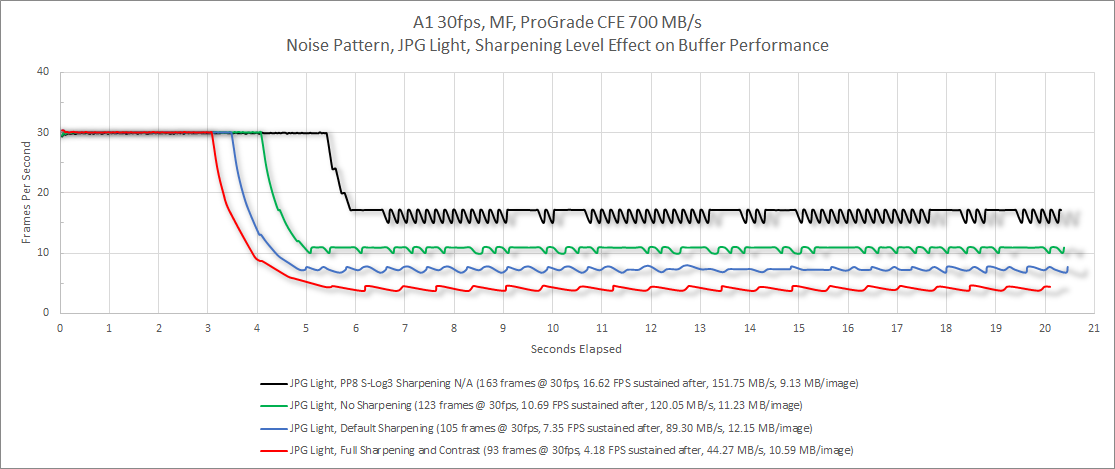
Here are the results when shooting in JPG Light mode, using various sharpening levels.
Here are the "Creative Look" settings for the ST(standard) category used for all images and sharpening levels. "PP8" uses Sony's Picture Controls instead of a Creative Look - the picture controls have no sharpening/contrast settings available, and when set to a flat gamma produce the biggest gain in buffer performance.
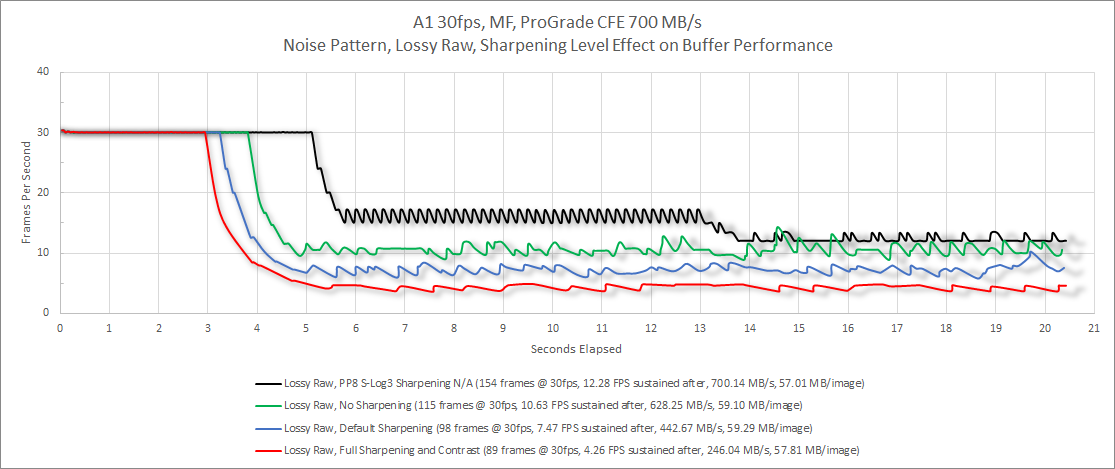
Here are the same results but for Lossy Compressed Raw:
And the results for JPG Light vs Lossy Raw, limited to "No Sharpening" and "Full Sharpening" to keep the visual manageable:
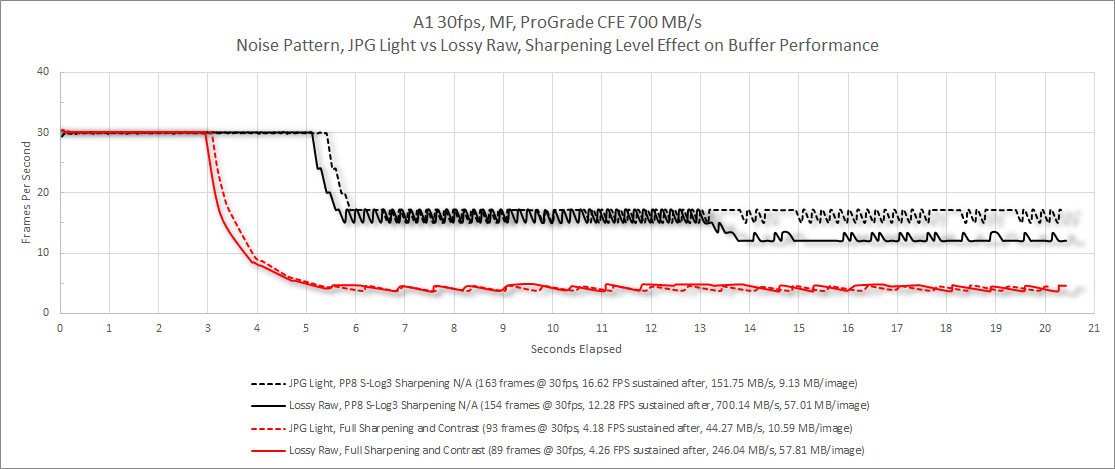
Each data point on the chart details the following:
The charts provide a wealth of data. Here are some important observations and conclusions:
Another experiment I did (not shown) is changing the JPG Light output size from the normal, full-sized 50MP image to the "small" 12MP image, ie downsampled. This had an even more dramatic effect on increasing FPS. Unfortunately the jpg output size setting only applies to the stand-alone jpg when shooting in jpg mode and not to the embedded jpg when shooting raw. It would be nice if Sony provided this option to help facilitate better buffer performance.
Conclusions
As I said earlier, whether or not you'll see this dramatic an effect on FPS and buffer depth from sharpening (or any impact at all for that matter) will depend entirely on the amount of detail in the frame. There are simply too many shooting situations to predict how common or likely an improvement in buffer depth is possible for you. But since changing the Creative Look sharpening to minimal values is easy to do with no impact on your raw images, it seems like a no-brainer to me. Those who want even more "insurance" for maximizing buffer performance can use PP8 with S-Log3, although that requires a bit more commitment since it has a significant effect on the preview image and also raises the notional ISO to 200 (the "sensor" ISO is still 100 though - you can see how ISO works in Log shooting in my Demystifying Log ISO, Exposure, and Noise YouTube video .
I have a lot more data to share about BIONZ and buffer performance in future posts and threads. It might be a while before I get to them as I'm still in the data-collection and analyzing phase.
Lastly, I want to give special thanks to @dclark, who I consulted with during my investigation for information on how he collected and analyzed buffer data for his A1 and A9 III tests. David was extremely generous with his time and was an immense help in getting me started.
I've determined that the sharpening and contrast level you set in the "Creative Look" menu has the potential for a dramatic effect on buffer performance, both in terms of the number of frames before the buffer runs out and the sustained FPS thereafter. Whether or not you'll see this effect and to what extent depends entirely on the subject matter you shoot - I'm using a torture target of just random printed noise, which produces the maximum FPS buffer impact. I believe even real-world targets will exhibit some measure of this effect, and I believe this effect also explains some of the differences in buffer depth measurements that have been made between individuals.
If you're familiar with Sony's "Creative Look" settings you know they control the sharpening, contrast, saturation, etc.. for the out-of-camera jpg and heif images. So you may be wondering, what does this have to do for all of us who shoot raw? Well, it has everything to do with raw shooting for one very specific reason - all raw images contain an embedded, full-size embedded jpg created by the camera at the time of shooting. It is this jpg that the camera displays during image review/playback, and also the default image displayed by many image editing tools on your desktop prior to completing their own, time-consuming raw conversion. This embedded jpg created by the camera for raws uses the same "Creative Look" settings that the camera applies when shooting in jpg mode.
The reason for this embedded jpg is simple: playback performance. It would be too slow for the camera to develop each raw during playback, not to mention the wasted cycles from re-processing the raw every time you re-review the image. So all cameras create a jpg version of the raw data at the time of shooting and embed this jpg inside the raw file. There are actually multiple embedded jpg's in every raw, each of a different size, including thumbnail, small preview, and full-size. These different sizes correspond to the various in-camera views, with the full-size image used when you're viewing a single image, esp when magnifying.
The significance of these raw-embedded jpg's is that they incur the same computational demands on BIONZ as shooting in jpg mode. Many take this for granted but it's extremely taxing on imaging ASICs like BIONZ to process raw data into a jpg. Anyone who has batch-imported a collection of raw files into a tool like Lightroom with 1:1 preview generation has observed first-hand how this task can bring even a very powerful computer to its knees. Yet we take it for granted how camera imaging ASICs perform the same job, and actually do it faster due to specialized hardware logic designed specifically for the task. However, even with this specialized logic it's still extremely taxing, esp when you consider cameras are asked to do this conversion in real-time at fast FPS shooting speeds.
It's the creation of these jpg's which often limits the actual buffer performance of cameras. You might think buffer performance is simply a matter of the shooting FPS, buffer size in camera (DRAM size), and media card write performance. But in fact there is a critical step that must also be accounted for - converting the frames that are read off the sensor into fully-formed data and images that are ready for writing to the media card. This conversion includes the generation of the embedded jpg, likely the most computationally-demanding part of the process. It requires multiple steps, including raw data noise filtering, demosaicing, white-balance application, lens-correction profile application, and tone application (ie, "Creative Look"), which itself includes sharpening, tonal adjustments like contrast, saturation, etc... Basically everything a tool like Lightroom does on raw files but performed in the camera instead, in real-time no less.
Let's get to a visual example. In my deep-dive BIONZ work I realized everyone testing and comparing buffer performance might be using wildly-different subject matter, which could have a material effect on performance and lead to disparities in measurement. To address that I created the following Gaussian noise target in Photoshop's Filter -> Noise -> Add Noise; Amount=250%, Distribution=Gaussian. I have both color and B&W versions but decided on B&W since not everyone has access to a high-resolution color printer. It was the decision to develop a standardized that lead to discovering the dramatic effect that image detail and sharpening have on buffer performance, and the difference does not relate to the resulting image size as one might suspect.
Here's what the noise pattern looks like in digital form:
And here's an animated comparison showing what the printed noise pattern looks like as shot by the camera in OOC jpgs, full-sharpening vs no-sharpening, 100% crop:
I printed out a large version of the pattern on a standard 8x10 paper and positioned it to fill the frame on my A1 + Sony 50mm f/1.8 lens. I then shot 30fps bursts using both JPG "Light" and Lossy Compressed raw.
Here are the results when shooting in JPG Light mode, using various sharpening levels.
Here are the "Creative Look" settings for the ST(standard) category used for all images and sharpening levels. "PP8" uses Sony's Picture Controls instead of a Creative Look - the picture controls have no sharpening/contrast settings available, and when set to a flat gamma produce the biggest gain in buffer performance.
- PP8: Picture Control PP8 w/S-Log3, No sharpening/contrast controls available, with flat image gamma
- "No Sharpening": "ST" Creative Look, Sharpness=0, Sharpening Range=1, Clarity=0, Contrast=0
- "Default Sharpening": "ST" Creative Look, Sharpness=4, Sharpening Range=3, Clarity=1, Contrast=0
- "Full Sharpening": "ST" Creative Look, Sharpness=9, Sharpening Range=5, Clarity=9, Contrast=9
Here are the same results but for Lossy Compressed Raw:
And the results for JPG Light vs Lossy Raw, limited to "No Sharpening" and "Full Sharpening" to keep the visual manageable:
Each data point on the chart details the following:
- Number of initial frames captured @ 30fps before the rate drops to the sustained rate, ie the "buffer depth"
- The steady-state sustained FPS after the buffer full condition is reached
- The average size of the files
- The MB/s for the steady-stated sustained FPS (ie, sustained FPS x average file size)
The charts provide a wealth of data. Here are some important observations and conclusions:
- The maximum sustained FPS tested on this noise target is JPG Light with PP8-Slog3. It yields 16.62fps. This is close to the maximum rate BIONZ can sustain on the A1 for any shooting mode - the rate would be slightly higher for a less-detailed target. Note this translates to a sustained MB/s of only 151.75 MB/s (average file size = 9.13MB), demonstrating that FPS for this subject is constrained by BIONZ processing performance and not the 700 MB/s write speed of the CFE card.
- JPG Light's sustained FPS rate drops to 4.18fps when the maximum sharpening and contrast settings are used, for a sustained MB/s of only 44.27 MB/s (average file size = 10.59MB), again limited by BIONZ compute performance and not the media card. The cause of this drop is presumed to be either the extra computation required to apply the settings on a highly-detailed subject, or, more likely, the additional computational load of compressing the jpg image data, esp if the camera is targeting a specific constrained range of output sizes internally, ie like when you tell Lightroom to "fit" the output jpg to a targeted size. This conclusion is based on additional experiments I've done comparing jpg vs heif, the latter which shows an even more dramatic effect owing to its more computationally-intensive HEVC encoding.
- The Lossy Raw results are effectively identical to JPG Light for all tests except for PP8-Slog3, which is the only setting where BIONZ is able to saturate the 700 MB/s media write rate for this target: Lossy Raw sustains 12.28 FPS with an average file size of 57.01 MB, which translates to 700.14 MB/s. All other shooting modes and sharpening levels for this target are BIONZ-limited rather than media-speed limited.
- The dramatic effect on the initial 30fps "buffer depth" from detailed subjects + sharpening calls into question the assumptions that have been made about the true DRAM buffer size on Sony cameras. Investigating that will be part of my ongoing effort.
Another experiment I did (not shown) is changing the JPG Light output size from the normal, full-sized 50MP image to the "small" 12MP image, ie downsampled. This had an even more dramatic effect on increasing FPS. Unfortunately the jpg output size setting only applies to the stand-alone jpg when shooting in jpg mode and not to the embedded jpg when shooting raw. It would be nice if Sony provided this option to help facilitate better buffer performance.
Conclusions
As I said earlier, whether or not you'll see this dramatic an effect on FPS and buffer depth from sharpening (or any impact at all for that matter) will depend entirely on the amount of detail in the frame. There are simply too many shooting situations to predict how common or likely an improvement in buffer depth is possible for you. But since changing the Creative Look sharpening to minimal values is easy to do with no impact on your raw images, it seems like a no-brainer to me. Those who want even more "insurance" for maximizing buffer performance can use PP8 with S-Log3, although that requires a bit more commitment since it has a significant effect on the preview image and also raises the notional ISO to 200 (the "sensor" ISO is still 100 though - you can see how ISO works in Log shooting in my Demystifying Log ISO, Exposure, and Noise YouTube video .
I have a lot more data to share about BIONZ and buffer performance in future posts and threads. It might be a while before I get to them as I'm still in the data-collection and analyzing phase.
Lastly, I want to give special thanks to @dclark, who I consulted with during my investigation for information on how he collected and analyzed buffer data for his A1 and A9 III tests. David was extremely generous with his time and was an immense help in getting me started.
Sep 05, 2026 at 05:21 PM

p.1 #2In-camera sharpening dramatic effect on Sony buffer performance
Adam, you certainly put in your "heart and soul" into this project. Thank you for doing and sharing that info. What a wealth of info at that!
Now, in essence, for us that shoot RAW and that leave the "Creative Level" at the default setting, it won't have any impact on the buffer capacity, I hope? I am too lazy to go through the post on a lazy Saturday afternoon...
Now, in essence, for us that shoot RAW and that leave the "Creative Level" at the default setting, it won't have any impact on the buffer capacity, I hope? I am too lazy to go through the post on a lazy Saturday afternoon...
Sep 05, 2026 at 05:56 PM
p.1 #3In-camera sharpening dramatic effect on Sony buffer performance
Never use that!
Sep 05, 2026 at 07:32 PM
p.1 #4In-camera sharpening dramatic effect on Sony buffer performance
AGeoJO wrote:
Adam, you certainly put in your "heart and soul" into this project. Thank you for doing and sharing that info. What a wealth of info at that!
Now, in essence, for us that shoot RAW and that leave the "Creative Level" at the default setting, it won't have any impact on the buffer capacity, I hope? I am too lazy to go through the post on a lazy Saturday afternoon...
Haha, thanks Joshua. The charts depict that the default settings can impact the buffer capacity. You'll want to set the Sharpness=0, Sharpness Range=1, Clarity=0. Today I also discovered that the Contrast can be set negative; I used a value of 0 for my "no sharpening" runs but the camera lets you set it down to -9, which will probably help as well.
Adam, you certainly put in your "heart and soul" into this project. Thank you for doing and sharing that info. What a wealth of info at that!
Now, in essence, for us that shoot RAW and that leave the "Creative Level" at the default setting, it won't have any impact on the buffer capacity, I hope? I am too lazy to go through the post on a lazy Saturday afternoon...
Haha, thanks Joshua. The charts depict that the default settings can impact the buffer capacity. You'll want to set the Sharpness=0, Sharpness Range=1, Clarity=0. Today I also discovered that the Contrast can be set negative; I used a value of 0 for my "no sharpening" runs but the camera lets you set it down to -9, which will probably help as well.
Sep 06, 2026 at 08:15 AM
p.1 #5In-camera sharpening dramatic effect on Sony buffer performance
A "Like" click is not enough.
Thank you!
Thank you!
Sep 06, 2026 at 10:28 AM
|
p.1 #6In-camera sharpening dramatic effect on Sony buffer performance
Here are results from the Nikon Z8. This camera shoots @ 20fps indefinitely with HE raw (lossy). Noise target with full Nikon Picture Control sharpening:
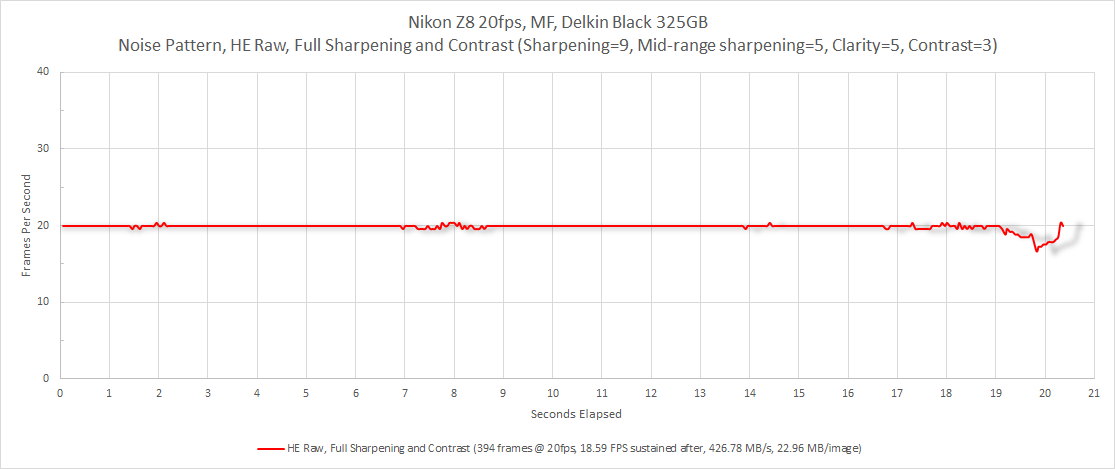
The Nikon is affected but to a much lesser degree. The fact it's 20fps vs the A1's 30fps is only really significant for the initial "buffer" depth measurement (# frames at full speed) - the sustained FPS at buffer full is comparable irrespective of the initial frame rate.
The Nikon is affected but to a much lesser degree. The fact it's 20fps vs the A1's 30fps is only really significant for the initial "buffer" depth measurement (# frames at full speed) - the sustained FPS at buffer full is comparable irrespective of the initial frame rate.
Sep 06, 2026 at 11:05 AM
p.1 #7In-camera sharpening dramatic effect on Sony buffer performance
Is the HE file the same as HEIF? It is no more raw than JPEG.
Sep 06, 2026 at 11:31 AM
p.1 #8In-camera sharpening dramatic effect on Sony buffer performance
Wow - this is super helpful. Thank you for putting the time and energy into this. It will benefit so many people. I wonder whether Sony engineering and marketing ever had a discussion about whether to publish this Info, for surely they are aware of it.
Are you also working on A9iii testing?
Are you also working on A9iii testing?
Sep 07, 2026 at 07:26 AM
p.1 #9In-camera sharpening dramatic effect on Sony buffer performance
mogul wrote:
Is the HE file the same as HEIF? It is no more raw than JPEG.
HE = Nikon's High Efficiency raw, which uses intoPIX's TicoRaw technology.
Is the HE file the same as HEIF? It is no more raw than JPEG.
HE = Nikon's High Efficiency raw, which uses intoPIX's TicoRaw technology.
Sep 07, 2026 at 10:49 AM
p.1 #10In-camera sharpening dramatic effect on Sony buffer performance
Newenglandrocks wrote:
Wow - this is super helpful. Thank you for putting the time and energy into this. It will benefit so many people. I wonder whether Sony engineering and marketing ever had a discussion about whether to publish this Info, for surely they are aware of it.
Are you also working on A9iii testing?
Yep, I'm using both an A1 and A9 III for my BIONZ deep-dive.
If I had to guess I'd say Sony might not want attention brought to particular limitations in BIONZ, although I agree it would be useful if Sony shared this information. Even better would be if Sony and other camera makers allowed users to control how the embedded jpg is created, for example a smaller version that would have an even greater impact on buffer performance than reducing sharpening.
Wow - this is super helpful. Thank you for putting the time and energy into this. It will benefit so many people. I wonder whether Sony engineering and marketing ever had a discussion about whether to publish this Info, for surely they are aware of it.
Are you also working on A9iii testing?
Yep, I'm using both an A1 and A9 III for my BIONZ deep-dive.
If I had to guess I'd say Sony might not want attention brought to particular limitations in BIONZ, although I agree it would be useful if Sony shared this information. Even better would be if Sony and other camera makers allowed users to control how the embedded jpg is created, for example a smaller version that would have an even greater impact on buffer performance than reducing sharpening.
Sep 07, 2026 at 10:52 AM