Looking for composition and post processing feedback

p.2 #1Looking for composition and post processing feedback
Malka_1 wrote:
Late to the party ... but, going back to Jim's "intent" ... in some regard, we can "record" what we thought we "saw". But, then there's the point about what was it that you wanted to "say".
By that, I'll segue to the "telephone game" ...
Imagine you're standing there and you call your BFF. "Hey Bestie ... I so wish you were here. It is so _______ . The _______ was ______. There's this ____ . And, the ______ is so cool. Then, there's this, then there's that, and oh yeah, this other thing too. It felt so _____. "
Whatever that conversation might look like (make one up on your mind), will give you cues and clues to what it is you REALLY want to SAY about, what you "saw". That can be an indicator of how you might proceed with your processing decisions.
Point being, was the sky or the foreground grasses what you FIRST talked about with your friend. Was it the grove of trees, the shape of the slope, or the layering of the slope. As the aspects of the conversation are weighted from First to Last, that can be a strong cue on what it is you want your processing decisions to "say".
That said ... what does your "conversation" with your BFF say? Getting the "magic" to happen will be in line with processing toward what it is you would be MOST EXCITED to tell your BFF about. Say it out loud, and listen to what you are saying. That can be a key to recognizing what your "Magic" message is gonna be (for you).
I'll wait to hear your conversation with your BFF, then chime in a bit more after that.
 I get what you're saying, makes a lot of sense. Very often something catches my attention, but I start shooting before I articulate to myself what it is, and the results reflect that. A conversation is a great way to help crystalize what "it" is.
I've been giving the same advice to whomever I mentored on writing - tell me in plain English first. Interesting - two different mediums, the same approach.
The other half the battle, of course, is capturing the entirety of experience. Again, now that I think on it, not very different than getting down a story on...Show more →
And from that ... there's your order of prioritization for your processing cue / clues.
Point being, the little patch of trees (and the foreground) can be sacrificed a bit, in favor of your PRIMARY (i.e. FIRST things you wanted to convey objectives to convey what is "was like" (presence) to be there. That can be a bit different from what it was that was exactly recorded as "what your saw" ... vs. what you wanted to say. I.E. Glowy and soft transitions (presence of atmosphere).
When I get a chance ... I'll "listen" to your BFF message and see what I can come up with. Socrate has a greater mastery of technical capability, than I for extracting challenging captures. I'd be very interested to see how he brings your BFF message to fruition from capture ... now that he's armed with your desired message of intent to convey.
Of course ... I'm curious to see where YOU take it, now that you've made your "call" to your BFF.
Your message, your pic, your call.
RustyBug wrote
Malka_1 wrote
I got it as close as I can to what I "think" I saw then - it's been a few weeks now.By that, I'll segue to the "telephone game" ...
Imagine you're standing there and you call your BFF. "Hey Bestie ... I so wish you were here. It is so _______ . The _______ was ______. There's this ____ . And, the ______ is so cool. Then, there's this, then there's that, and oh yeah, this other thing too. It felt so _____. "
Whatever that conversation might look like (make one up on your mind), will give you cues and clues to what it is you REALLY want to SAY about, what you "saw". That can be an indicator of how you might proceed with your processing decisions.
Point being, was the sky or the foreground grasses what you FIRST talked about with your friend. Was it the grove of trees, the shape of the slope, or the layering of the slope. As the aspects of the conversation are weighted from First to Last, that can be a strong cue on what it is you want your processing decisions to "say".
That said ... what does your "conversation" with your BFF say? Getting the "magic" to happen will be in line with processing toward what it is you would be MOST EXCITED to tell your BFF about. Say it out loud, and listen to what you are saying. That can be a key to recognizing what your "Magic" message is gonna be (for you).
I'll wait to hear your conversation with your BFF, then chime in a bit more after that.
I've been giving the same advice to whomever I mentored on writing - tell me in plain English first. Interesting - two different mediums, the same approach.
The other half the battle, of course, is capturing the entirety of experience. Again, now that I think on it, not very different than getting down a story on...Show more →
And from that ... there's your order of prioritization for your processing cue / clues.
Point being, the little patch of trees (and the foreground) can be sacrificed a bit, in favor of your PRIMARY (i.e. FIRST things you wanted to convey objectives to convey what is "was like" (presence) to be there. That can be a bit different from what it was that was exactly recorded as "what your saw" ... vs. what you wanted to say. I.E. Glowy and soft transitions (presence of atmosphere).
When I get a chance ... I'll "listen" to your BFF message and see what I can come up with. Socrate has a greater mastery of technical capability, than I for extracting challenging captures. I'd be very interested to see how he brings your BFF message to fruition from capture ... now that he's armed with your desired message of intent to convey.
Of course ... I'm curious to see where YOU take it, now that you've made your "call" to your BFF.
Your message, your pic, your call.
Sep 04, 2026 at 06:02 PM
p.2 #2Looking for composition and post processing feedback
Malka_1 wrote:
The image I worked on was a LR HDR merge from 5 exposure-bracketed images, with some of the highlights clipped. I found another set with a picture that had no clipping at the lowest exposure, and used that single image to redo editing.
A few masks, for sky, trees, foreground. Recovered some complexity in the sky - color, a bit of a cloud and the glow around the tree clump.
I got it as close as I can to what I "think" I saw then - it's been a few weeks now.
I tried BW preset too - the textured one seems to work best as it compensates somewhat for uniformity of the sky.I agree. That single exposure will give you some data you can work with to squeeze a sky close to what you saw. I believe you can still get some more color from that sky. I tried some editing on the image you posted and there is more space to get more data (I still like the original crop, though). I wasn't there so I am just guessing. You should be able to get better results working with the raw data. Keep trying. 
If you are going for the B&W version I wouldn't include much of the sky since you may end up with a big white area with no information. I would rather include more of the foreground and crop some of the sky out. Just a suggestion. Your decision.
SocrateHow did you get that glow around the tree-tops I can see it on my camera screen, but not on my laptop. That was the only thing that I failed to recover in LR. If you don't mind looking over them, below are my settings for sky mask in LR. Thank you for showing me that it's possible!
I don’t remember exactly how I edited of your image. I use PS and I believe you use LR. I remember making two or three different targeted adjustments using mainly the Curves adjustment, each on their own layer (similar to exposure bracketing concept), and merging into one layer using their layer masks.
As far as your sky adjustments are concerned, it is hard to evaluate their effectiveness w/o seeing the image. However, from what I can see looks like you have used the Contrast and Highlights sliders to their extreme (in opposite directions).
The Contrast adjustment is kind of a harsh adjustment and makes changes to the entire tonal range of the image, rather than targeting specific tones. Pushing too far it will also destroy the fine detail. I am thinking that may be that contrast adjustment reduced the ability to recover the highlights. My recommendation would be to avoid using that Contrast slider, when possible, except for small adjustments. You can get better results using just the Highlights, Shadows, White and Black adjustments separately.
Photoshop has just replaced Brightness/Contrast in the main editor of PS with a new adjustment called “Light” that gives you separate controls for highlights, shadows, whites, and blacks.
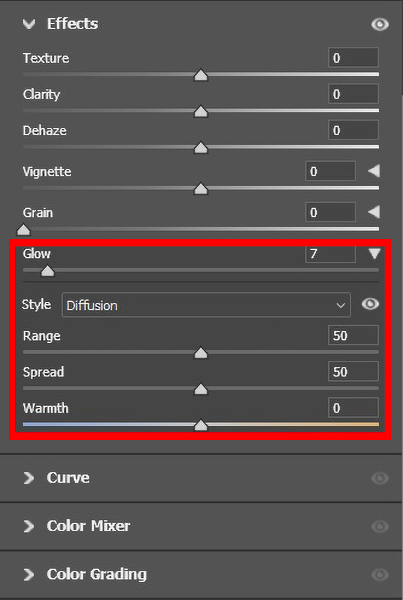
Together with the Light Adjustment Adobe introduced also a new “GLOW” control in the “Effects” panel of Camera Raw (version 18.6). I didn't use that effect in my editing (it was added just a few days ago), but it can be of great help for your image. In your case you need to use the Glow effect locally using masks. You can easily find some tutorials on line on the use of those new adjustments.
I hope this helps.
Socrate
Shasoc wrote
Malka_1 wrote
Appreciate everyone's feedback!The image I worked on was a LR HDR merge from 5 exposure-bracketed images, with some of the highlights clipped. I found another set with a picture that had no clipping at the lowest exposure, and used that single image to redo editing.
A few masks, for sky, trees, foreground. Recovered some complexity in the sky - color, a bit of a cloud and the glow around the tree clump.
I got it as close as I can to what I "think" I saw then - it's been a few weeks now.
I tried BW preset too - the textured one seems to work best as it compensates somewhat for uniformity of the sky.
If you are going for the B&W version I wouldn't include much of the sky since you may end up with a big white area with no information. I would rather include more of the foreground and crop some of the sky out. Just a suggestion. Your decision.
Socrate
I can see it on my camera screen, but not on my laptop. That was the only thing that I failed to recover in LR. If you don't mind looking over them, below are my settings for sky mask in LR. Thank you for showing me that it's possible!I don’t remember exactly how I edited of your image. I use PS and I believe you use LR. I remember making two or three different targeted adjustments using mainly the Curves adjustment, each on their own layer (similar to exposure bracketing concept), and merging into one layer using their layer masks.
As far as your sky adjustments are concerned, it is hard to evaluate their effectiveness w/o seeing the image. However, from what I can see looks like you have used the Contrast and Highlights sliders to their extreme (in opposite directions).
The Contrast adjustment is kind of a harsh adjustment and makes changes to the entire tonal range of the image, rather than targeting specific tones. Pushing too far it will also destroy the fine detail. I am thinking that may be that contrast adjustment reduced the ability to recover the highlights. My recommendation would be to avoid using that Contrast slider, when possible, except for small adjustments. You can get better results using just the Highlights, Shadows, White and Black adjustments separately.
Photoshop has just replaced Brightness/Contrast in the main editor of PS with a new adjustment called “Light” that gives you separate controls for highlights, shadows, whites, and blacks.
Together with the Light Adjustment Adobe introduced also a new “GLOW” control in the “Effects” panel of Camera Raw (version 18.6). I didn't use that effect in my editing (it was added just a few days ago), but it can be of great help for your image. In your case you need to use the Glow effect locally using masks. You can easily find some tutorials on line on the use of those new adjustments.
I hope this helps.
Socrate
Sep 05, 2026 at 11:49 AM
p.2 #3Looking for composition and post processing feedback
Not sure why you want to crop the original image. The crop makes it heavy on the right side. Here is a link to balance in art you might be interested in reading.
https://finearttutorials.com/guide/balance-in-art/
https://finearttutorials.com/guide/balance-in-art/
Sep 06, 2026 at 02:17 PM
p.2 #4Looking for composition and post processing feedback
guywithgas wrote:
The image I worked on was a LR HDR merge from 5 exposure-bracketed images, with some of the highlights clipped. I found another set with a picture that had no clipping at the lowest exposure, and used that single image to redo editing.
A few masks, for sky, trees, foreground. Recovered some complexity in the sky - color, a bit of a cloud and the glow around the tree clump.
I got it as close as I can to what I "think" I saw then - it's been a few weeks now.
I tried BW preset too - the textured one seems to work best as it compensates somewhat for uniformity of the sky.I agree. That single exposure will give you some data you can work with to squeeze a sky close to what you saw. I believe you can still get some more color from that sky. I tried some editing on the image you posted and there is more space to get more data (I still like the original crop, though). I wasn't there so I am just guessing. You should be able to get better results working with the raw data. Keep trying.
If you are going for the B&W version I wouldn't include much of the sky since you may end up with a big white area with no information. I would rather include more of the foreground and crop some of the sky out. Just a suggestion. Your decision.
SocrateHow did you get that glow around the tree-tops I can see it on my camera screen, but not on my laptop. That was the only thing that I failed to recover in LR. If you don't mind looking over them, below are my settings for sky mask in LR. Thank you for showing me that it's possible!Malka,
You need to do a couple of things. The information in the sky is in white & highlights. Reduce them and that will reveal the color in there. Also, target the sky twice, once based on blues and the next based on yellows. These you can achieve by local adjustments. Play around with saturation (bump it up). Each software is different, but almost all major softwares provide the local adjustment functionality.
SreedharSee, if the visual explanation makes more sense. I have attached "before" and "after" images of your JPEG. I processed it in DXO Photo Lab, but you can do so in your software as well.
Thanks Sreedhar. I have been playing with those sliders ad nauseam and at some point decided it's good enough. The blue on fridges only is a deliberate choice - that's what sunset colors looked like to me on my cropped sky.
guywithgas wrote
Malka_1 wrote
Shasoc wrote
Malka_1 wrote
Appreciate everyone's feedback!The image I worked on was a LR HDR merge from 5 exposure-bracketed images, with some of the highlights clipped. I found another set with a picture that had no clipping at the lowest exposure, and used that single image to redo editing.
A few masks, for sky, trees, foreground. Recovered some complexity in the sky - color, a bit of a cloud and the glow around the tree clump.
I got it as close as I can to what I "think" I saw then - it's been a few weeks now.
I tried BW preset too - the textured one seems to work best as it compensates somewhat for uniformity of the sky.
If you are going for the B&W version I wouldn't include much of the sky since you may end up with a big white area with no information. I would rather include more of the foreground and crop some of the sky out. Just a suggestion. Your decision.
Socrate
I can see it on my camera screen, but not on my laptop. That was the only thing that I failed to recover in LR. If you don't mind looking over them, below are my settings for sky mask in LR. Thank you for showing me that it's possible!You need to do a couple of things. The information in the sky is in white & highlights. Reduce them and that will reveal the color in there. Also, target the sky twice, once based on blues and the next based on yellows. These you can achieve by local adjustments. Play around with saturation (bump it up). Each software is different, but almost all major softwares provide the local adjustment functionality.
Sreedhar
Thanks Sreedhar. I have been playing with those sliders ad nauseam and at some point decided it's good enough. The blue on fridges only is a deliberate choice - that's what sunset colors looked like to me on my cropped sky.
Sep 06, 2026 at 05:24 PM
p.2 #5Looking for composition and post processing feedback
Shasoc wrote:
The image I worked on was a LR HDR merge from 5 exposure-bracketed images, with some of the highlights clipped. I found another set with a picture that had no clipping at the lowest exposure, and used that single image to redo editing.
A few masks, for sky, trees, foreground. Recovered some complexity in the sky - color, a bit of a cloud and the glow around the tree clump.
I got it as close as I can to what I "think" I saw then - it's been a few weeks now.
I tried BW preset too - the textured one seems to work best as it compensates somewhat for uniformity of the sky.I agree. That single exposure will give you some data you can work with to squeeze a sky close to what you saw. I believe you can still get some more color from that sky. I tried some editing on the image you posted and there is more space to get more data (I still like the original crop, though). I wasn't there so I am just guessing. You should be able to get better results working with the raw data. Keep trying.
If you are going for the B&W version I wouldn't include much of the sky since you may end up with a big white area with no information. I would rather include more of the foreground and crop some of the sky out. Just a suggestion. Your decision.
SocrateHow did you get that glow around the tree-tops I can see it on my camera screen, but not on my laptop. That was the only thing that I failed to recover in LR. If you don't mind looking over them, below are my settings for sky mask in LR. Thank you for showing me that it's possible!I don’t remember exactly how I edited of your image. I use PS and I believe you use LR. I remember making two or three different targeted adjustments using mainly the Curves adjustment, each on their own layer (similar to exposure bracketing concept), and merging into one layer using their layer masks.
As far as your sky adjustments are concerned, it is hard to evaluate their effectiveness w/o seeing the image. However, from what I can see looks like you have used the Contrast and Highlights sliders to their extreme (in opposite directions).
The Contrast adjustment is kind of a...Show more →
Yes, I am a LR user and I don't believe it has layers. That's possibly the reason for difference in end result, but it may well be operator error - I am still learning. I will try to dial back the contrast as per your recommendation, and also play with the curves and see what I get.
I'll keep the PS tips in mind if/when I subscribe.
Thanks for your help!
Malka_1 wrote
Shasoc wrote
Malka_1 wrote
Appreciate everyone's feedback!The image I worked on was a LR HDR merge from 5 exposure-bracketed images, with some of the highlights clipped. I found another set with a picture that had no clipping at the lowest exposure, and used that single image to redo editing.
A few masks, for sky, trees, foreground. Recovered some complexity in the sky - color, a bit of a cloud and the glow around the tree clump.
I got it as close as I can to what I "think" I saw then - it's been a few weeks now.
I tried BW preset too - the textured one seems to work best as it compensates somewhat for uniformity of the sky.
If you are going for the B&W version I wouldn't include much of the sky since you may end up with a big white area with no information. I would rather include more of the foreground and crop some of the sky out. Just a suggestion. Your decision.
Socrate
I can see it on my camera screen, but not on my laptop. That was the only thing that I failed to recover in LR. If you don't mind looking over them, below are my settings for sky mask in LR. Thank you for showing me that it's possible!As far as your sky adjustments are concerned, it is hard to evaluate their effectiveness w/o seeing the image. However, from what I can see looks like you have used the Contrast and Highlights sliders to their extreme (in opposite directions).
The Contrast adjustment is kind of a...Show more →
Yes, I am a LR user and I don't believe it has layers. That's possibly the reason for difference in end result, but it may well be operator error - I am still learning. I will try to dial back the contrast as per your recommendation, and also play with the curves and see what I get.
I'll keep the PS tips in mind if/when I subscribe.
Thanks for your help!
Sep 06, 2026 at 05:30 PM
|
p.2 #6Looking for composition and post processing feedback
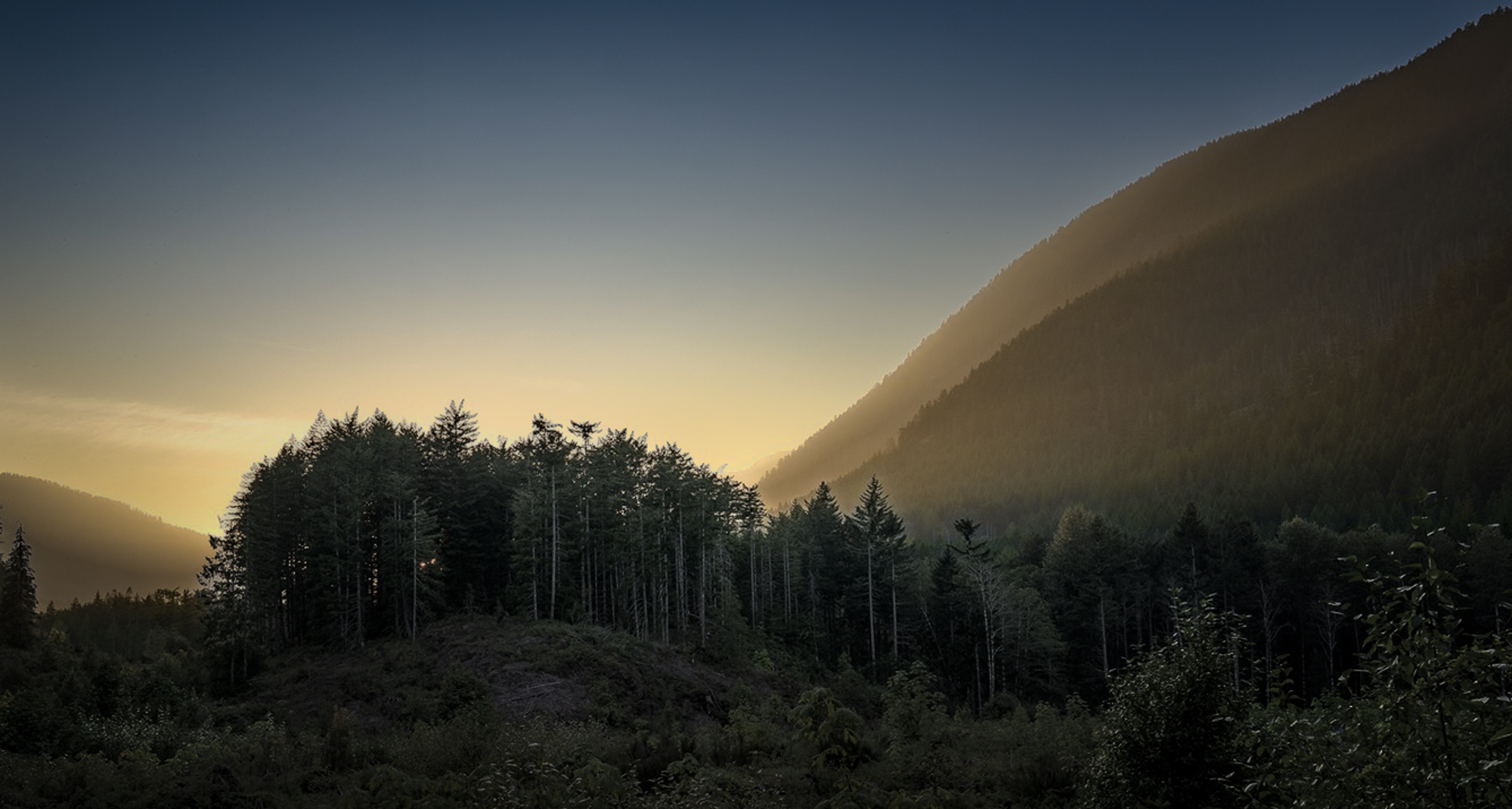
Took a stab at some things, based on your BFF phone call ... conceptually.
Technical execution (i.e. working from RAW vs. jpg) could be better, but hopefully you get the gist.
"BFF" - a gentle glow of sunset, mostly cloudless sky with soft transition from blue to golden, slight haze and shadow on slopes, and a little hilltop with a patch of trees, in perfect view through the clearing between the road and the hill.
Technical execution (i.e. working from RAW vs. jpg) could be better, but hopefully you get the gist.
"BFF" - a gentle glow of sunset, mostly cloudless sky with soft transition from blue to golden, slight haze and shadow on slopes, and a little hilltop with a patch of trees, in perfect view through the clearing between the road and the hill.
 |
||
 |
||
|
Sep 07, 2026 at 04:43 AM
p.2 #7Looking for composition and post processing feedback
Malka_1 wrote:
The image I worked on was a LR HDR merge from 5 exposure-bracketed images, with some of the highlights clipped. I found another set with a picture that had no clipping at the lowest exposure, and used that single image to redo editing.
A few masks, for sky, trees, foreground. Recovered some complexity in the sky - color, a bit of a cloud and the glow around the tree clump.
I got it as close as I can to what I "think" I saw then - it's been a few weeks now.
I tried BW preset too - the textured one seems to work best as it compensates somewhat for uniformity of the sky.I agree. That single exposure will give you some data you can work with to squeeze a sky close to what you saw. I believe you can still get some more color from that sky. I tried some editing on the image you posted and there is more space to get more data (I still like the original crop, though). I wasn't there so I am just guessing. You should be able to get better results working with the raw data. Keep trying.
If you are going for the B&W version I wouldn't include much of the sky since you may end up with a big white area with no information. I would rather include more of the foreground and crop some of the sky out. Just a suggestion. Your decision.
SocrateHow did you get that glow around the tree-tops I can see it on my camera screen, but not on my laptop. That was the only thing that I failed to recover in LR. If you don't mind looking over them, below are my settings for sky mask in LR. Thank you for showing me that it's possible!Malka,
You need to do a couple of things. The information in the sky is in white & highlights. Reduce them and that will reveal the color in there. Also, target the sky twice, once based on blues and the next based on yellows. These you can achieve by local adjustments. Play around with saturation (bump it up). Each software is different, but almost all major softwares provide the local adjustment functionality.
SreedharSee, if the visual explanation makes more sense. I have attached "before" and "after" images of your JPEG. I processed it in DXO Photo Lab, but you can do so in your software as well.Thanks Sreedhar. I have been playing with those sliders ad nauseam and at some point decided it's good enough. The blue on fridges only is a deliberate choice - that's what sunset colors looked like to me on my cropped sky.
Malka, I understand. I was just trying to illustrate there was more latitude (just in case). At the end of the day, it is your photo and your vision
guywithgas wrote
guywithgas wrote
Malka_1 wrote
Shasoc wrote
Malka_1 wrote
Appreciate everyone's feedback!The image I worked on was a LR HDR merge from 5 exposure-bracketed images, with some of the highlights clipped. I found another set with a picture that had no clipping at the lowest exposure, and used that single image to redo editing.
A few masks, for sky, trees, foreground. Recovered some complexity in the sky - color, a bit of a cloud and the glow around the tree clump.
I got it as close as I can to what I "think" I saw then - it's been a few weeks now.
I tried BW preset too - the textured one seems to work best as it compensates somewhat for uniformity of the sky.
If you are going for the B&W version I wouldn't include much of the sky since you may end up with a big white area with no information. I would rather include more of the foreground and crop some of the sky out. Just a suggestion. Your decision.
Socrate
I can see it on my camera screen, but not on my laptop. That was the only thing that I failed to recover in LR. If you don't mind looking over them, below are my settings for sky mask in LR. Thank you for showing me that it's possible!You need to do a couple of things. The information in the sky is in white & highlights. Reduce them and that will reveal the color in there. Also, target the sky twice, once based on blues and the next based on yellows. These you can achieve by local adjustments. Play around with saturation (bump it up). Each software is different, but almost all major softwares provide the local adjustment functionality.
Sreedhar
Malka, I understand. I was just trying to illustrate there was more latitude (just in case). At the end of the day, it is your photo and your vision
Sep 07, 2026 at 06:26 AM
p.2 #8Looking for composition and post processing feedback
It's a great picture, I would personally have cropped out some of the right side of the image to balance everything, and add some more warmth to the sky colors
Sep 07, 2026 at 12:06 PM
p.2 #9Looking for composition and post processing feedback
RustyBug wrote:
Took a stab at some things, based on your BFF phone call ... conceptually.
Technical execution (i.e. working from RAW vs. jpg) could be better, but hopefully you get the gist.
Interesting take on it - it looks like you took down the saturation and brought up the blues in the sky.
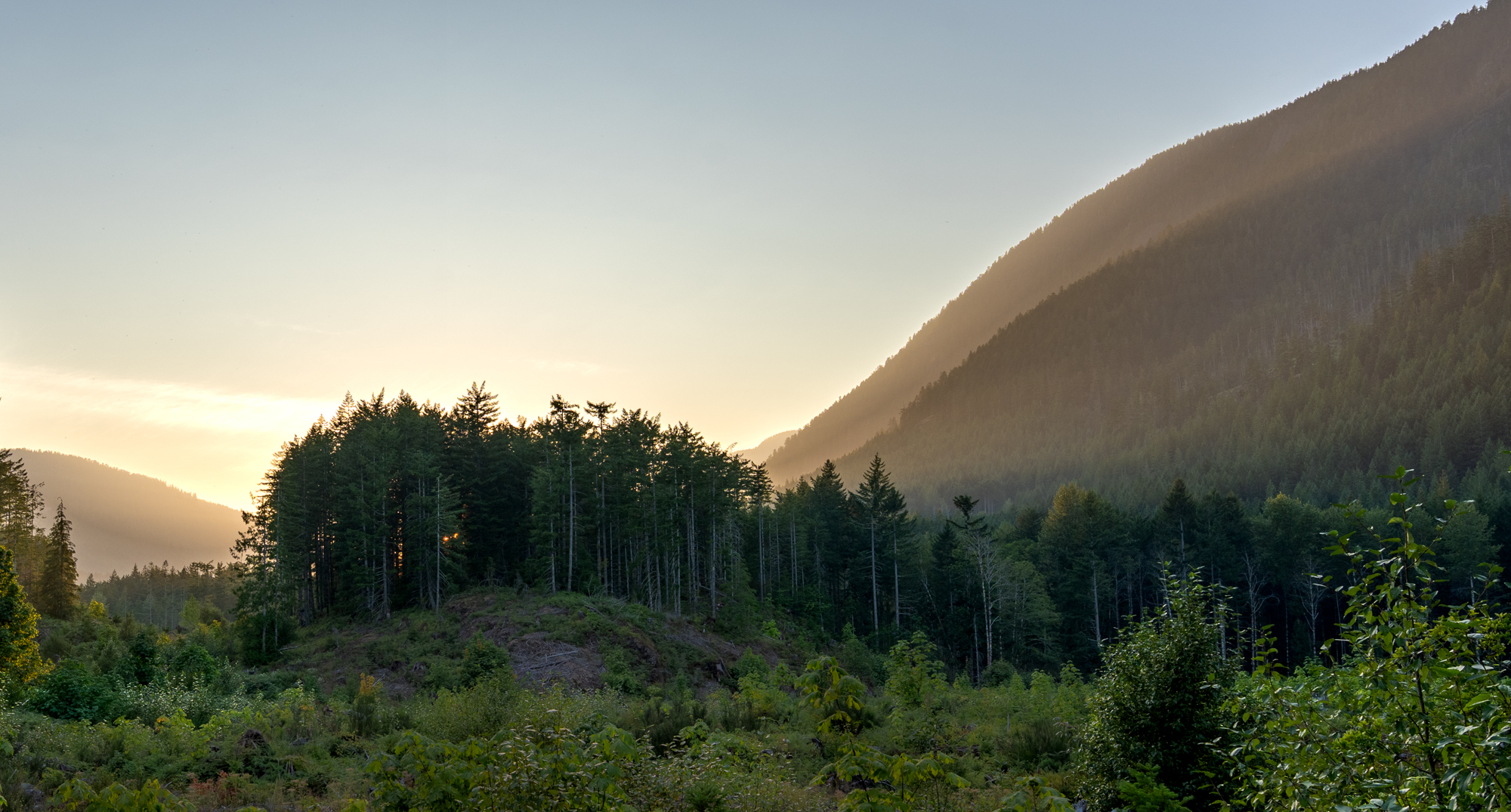
My final image below. I like it a little warmer, and I was able to restore some of the glow around the trees.
I wonder if I'd do any better if I go back in time and take a more deliberate approach. Next time...
Took a stab at some things, based on your BFF phone call ... conceptually.
Technical execution (i.e. working from RAW vs. jpg) could be better, but hopefully you get the gist.
Earlier quote
"BFF" - a gentle glow of sunset, mostly cloudless sky with soft transition from blue to golden, slight haze and shadow on slopes, and a little hilltop with a patch of trees, in perfect view through the clearing between the road and the hill.Interesting take on it - it looks like you took down the saturation and brought up the blues in the sky.
My final image below. I like it a little warmer, and I was able to restore some of the glow around the trees.
I wonder if I'd do any better if I go back in time and take a more deliberate approach. Next time...
 |
||
 |
||
|
Sep 09, 2026 at 04:42 PM
p.2 #10Looking for composition and post processing feedback
Malka_1 wrote:
Technical execution (i.e. working from RAW vs. jpg) could be better, but hopefully you get the gist.
Interesting take on it - it looks like you took down the saturation and brought up the blues in the sky.
My final image below. I like it a little warmer, and I was able to restore some of the glow around the trees.
I wonder if I'd do any better if I go back in time and take a more deliberate approach. Next time...
Yup, land it where ya like it.
Your message, your pic, your call.
RustyBug wrote
Took a stab at some things, based on your BFF phone call ... conceptually.Technical execution (i.e. working from RAW vs. jpg) could be better, but hopefully you get the gist.
Earlier quote
"BFF" - a gentle glow of sunset, mostly cloudless sky with soft transition from blue to golden, slight haze and shadow on slopes, and a little hilltop with a patch of trees, in perfect view through the clearing between the road and the hill.My final image below. I like it a little warmer, and I was able to restore some of the glow around the trees.
I wonder if I'd do any better if I go back in time and take a more deliberate approach. Next time...
Yup, land it where ya like it.
Your message, your pic, your call.
Sep 09, 2026 at 08:10 PM