Forcing Lightroom Classic to make separate xmp's
p.1 #1Forcing Lightroom Classic to make separate xmp's
Forcing Lightroom Classic to make separate xmp's is turning out to be complicated. I know which Pref's to check but Lightroom Classic isn't cooperating. Sometimes it twill tackle a set of folders other times not.
I chose the "make separate " option a long time back but didn't monitor it (my bad.)
I'd love to have a tip or two to make the process of sidecar creation go through the whole 275,000 images all by itself but so far that doesn't seem to work. (Yes, I know that DNG, TIF, Jpeg, PNG, a few others... do not participate in this. So not all 275,000. )
I have spent untold hours using Lightroom Classic but there's a warning that is hard to evaluate. I need help knowing how to answer this warning dialog with its hint of severe unintended consequences:
Adobe warning dialog that stops metadata saving process:
"One or more of these photos has been changed in an external application. Should Lightroom[Classic] overwrite the settings on disk?"
*Overwrite settings
*Cancel
When I read this, all the thousands of edits done out in Photoshop come to mind. Surely Adobe figured out to make a xmp text file resolve the edits done in each environment! (but maybe not...)
Further, did this dialog stop the xmp creation in the background (seems likely...) before it was finished with the plain old Lightroom edits? (seems unlikely...)
Anyone got some experience to share on this? Will be appreciated.
I chose the "make separate " option a long time back but didn't monitor it (my bad.)
I'd love to have a tip or two to make the process of sidecar creation go through the whole 275,000 images all by itself but so far that doesn't seem to work. (Yes, I know that DNG, TIF, Jpeg, PNG, a few others... do not participate in this. So not all 275,000. )
I have spent untold hours using Lightroom Classic but there's a warning that is hard to evaluate. I need help knowing how to answer this warning dialog with its hint of severe unintended consequences:
Adobe warning dialog that stops metadata saving process:
"One or more of these photos has been changed in an external application. Should Lightroom[Classic] overwrite the settings on disk?"
*Overwrite settings
*Cancel
When I read this, all the thousands of edits done out in Photoshop come to mind. Surely Adobe figured out to make a xmp text file resolve the edits done in each environment! (but maybe not...)
Further, did this dialog stop the xmp creation in the background (seems likely...) before it was finished with the plain old Lightroom edits? (seems unlikely...)
Anyone got some experience to share on this? Will be appreciated.
Aug 17, 2026 at 06:52 PM
p.1 #2Forcing Lightroom Classic to make separate xmp's
Is it an option for you select the desired images and do a command + S to 'save' the metadata, which will generate an XMP for each image?
Aug 17, 2026 at 10:56 PM
p.1 #3Forcing Lightroom Classic to make separate xmp's
Yes. Thank you for responding. But this dialog appears AFTER starting a "make xmp's" request through that command.
I have *two* problems. In the post above I'm asking about the implications of the warning I quote in the initial post. How will "overwrite settings" affect Lightroom's ability to recreate the non-destructively edited look of a raw file that had steps taken in both Lightroom and Photoshop, for example? What are the effects of hitting "Cancel"? Will the run of xmp exports stop for every new folder with mixed-editing-tool post-processing?
My problem #2: I should have made clear that although the "Save metadata out as .xmp" catalog Preference checkbox has been ticked for at least a couple of years, that requirement has not been honored by Lightroom (either at all or at best sporadically.) My fault for not following up.
For the last two days as I had time I have been trying to "goose" LRc into tackling (through the CTRL-S command) big batches of folders, such as one whole year which has 12 month folders and whatever daily sets in yet another layer of folders. As you see from the post above I have a *lot* of files in this one catalog. Twice to my happy surprise Lightroom has posted a progress bar at top left telling me it was "Saving metadata for 53,xxx files" Yay! But at some point in the second run it stopped to post the warning dialog quoted. At this rate it will take weeks of spurts of metadata saving during which I have to give up access to Lightroom editing or any other LRc use.
I have *two* problems. In the post above I'm asking about the implications of the warning I quote in the initial post. How will "overwrite settings" affect Lightroom's ability to recreate the non-destructively edited look of a raw file that had steps taken in both Lightroom and Photoshop, for example? What are the effects of hitting "Cancel"? Will the run of xmp exports stop for every new folder with mixed-editing-tool post-processing?
My problem #2: I should have made clear that although the "Save metadata out as .xmp" catalog Preference checkbox has been ticked for at least a couple of years, that requirement has not been honored by Lightroom (either at all or at best sporadically.) My fault for not following up.
For the last two days as I had time I have been trying to "goose" LRc into tackling (through the CTRL-S command) big batches of folders, such as one whole year which has 12 month folders and whatever daily sets in yet another layer of folders. As you see from the post above I have a *lot* of files in this one catalog. Twice to my happy surprise Lightroom has posted a progress bar at top left telling me it was "Saving metadata for 53,xxx files" Yay! But at some point in the second run it stopped to post the warning dialog quoted. At this rate it will take weeks of spurts of metadata saving during which I have to give up access to Lightroom editing or any other LRc use.
Aug 17, 2026 at 11:48 PM
|
p.1 #4Forcing Lightroom Classic to make separate xmp's
Windows or Mac?
I have had the switch on probably since LR3, don't really see any major issues with it > 100K images. Recently I have become more diligent about rankings & keywords and on occasion I see there is a lag but in general I have no issues. I have roughly 35K images that are in collections and syncing with my MacBook Pro and iPad Pro. Develop settings, keywords and rankings all appear to sync pretty well. Occasionly a image or two get stuck and I need to delete from the sync cue.
Since it sounds like you have been pretty much touching a lot of variables maybe you should "restrain" for a while and give the system a chance to settle down and see where you.are really at?
I will say that in the last couple of point releases I have seen some visual delays but they always seem to eventually catch up.
YMMV.
I have had the switch on probably since LR3, don't really see any major issues with it > 100K images. Recently I have become more diligent about rankings & keywords and on occasion I see there is a lag but in general I have no issues. I have roughly 35K images that are in collections and syncing with my MacBook Pro and iPad Pro. Develop settings, keywords and rankings all appear to sync pretty well. Occasionly a image or two get stuck and I need to delete from the sync cue.
Since it sounds like you have been pretty much touching a lot of variables maybe you should "restrain" for a while and give the system a chance to settle down and see where you.are really at?
I will say that in the last couple of point releases I have seen some visual delays but they always seem to eventually catch up.
YMMV.
Aug 19, 2026 at 01:28 PM
p.1 #5Forcing Lightroom Classic to make separate xmp's
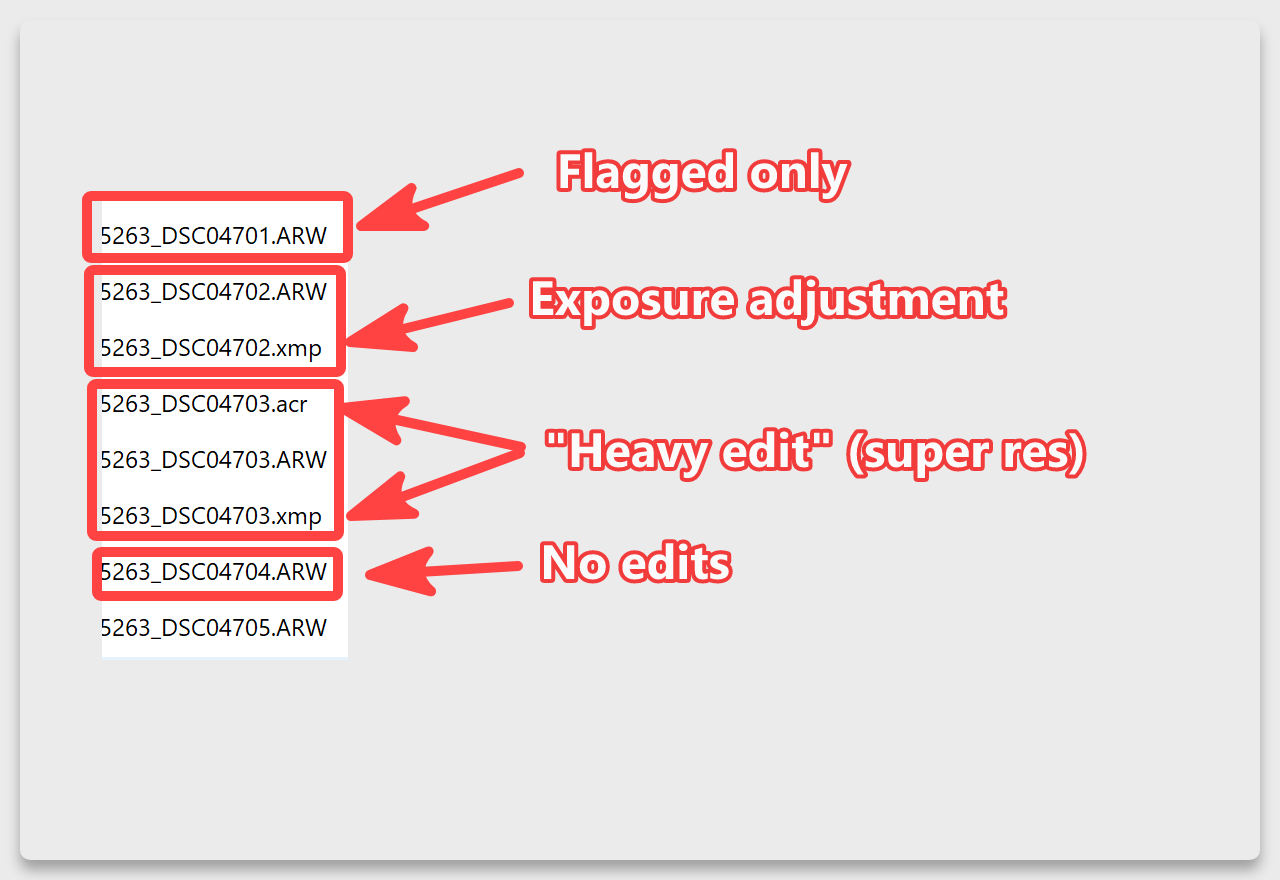
Sidecars are only created if you modify an image's metadata. So unless you've actually made develop adjustments or applied keywords to every image in your catalog, not all will have XMP sidecars. As of LrC 15, there are two kinds of sidecars: XMP and ACR. LrC will generate ACR sidecars for "heavy" generative AI edits and only XMP sidecars for normal edits like exposure adjustments.
https://helpx.adobe.com/lightroom-classic/desktop/organize-photos-in-lightroom-classic/create-xmp-acr-files.html
https://helpx.adobe.com/lightroom-classic/desktop/organize-photos-in-lightroom-classic/create-xmp-acr-files.html
Aug 20, 2026 at 10:10 AM
p.1 #6Forcing Lightroom Classic to make separate xmp's
Can you just set a preset to run on import that moves sharpen from 40 to 41 for instance so LR thinks the file is "developed"?
Aug 20, 2026 at 10:13 AM