Boats
p.1 #1Boats
Mendocino coast

ILCE-7CM2 FE 20-70mm F4 G lens 23mm f/8.0 1/320s 100 ISO 0.0 EV
Aug 17, 2026 at 05:54 PM
p.1 #2Boats
This looks really great. Can you share some of how you got to this look? It has a slight halation like an actual black and white film, and somewhat lower sharpness, but you say it's shot with an a7cii.
I ask as I have a sony mirrorless, but mostly shoot film (example: https://www.fredmiranda.com/forum/topic/658112/1739#17083072 ). With the sony, I have yet to figure out how to get as good a look as what you're achieving here.
I ask as I have a sony mirrorless, but mostly shoot film (example: https://www.fredmiranda.com/forum/topic/658112/1739#17083072 ). With the sony, I have yet to figure out how to get as good a look as what you're achieving here.
Aug 18, 2026 at 06:55 PM
p.1 #3Boats
Cloud75 wrote:
This looks really great. Can you share some of how you got to this look? It has a slight halation like an actual black and white film, and somewhat lower sharpness, but you say it's shot with an a7cii.
I ask as I have a sony mirrorless, but mostly shoot film (example: https://www.fredmiranda.com/forum/topic/658112/1739#17083072 ). With the sony, I have yet to figure out how to get as good a look as what you're achieving here.
I’m actually impressed you noticed that! Yes, I ran both a halation and grain action I’ve built in PS. Both adjustments are tunable to the image and I think both work pretty well. Like you I’m enamored with the traditional B&W film foibles in a mono image. If folks are interested in achieving this type of look, I’d be happy to outline the steps.
This looks really great. Can you share some of how you got to this look? It has a slight halation like an actual black and white film, and somewhat lower sharpness, but you say it's shot with an a7cii.
I ask as I have a sony mirrorless, but mostly shoot film (example: https://www.fredmiranda.com/forum/topic/658112/1739#17083072 ). With the sony, I have yet to figure out how to get as good a look as what you're achieving here.
I’m actually impressed you noticed that! Yes, I ran both a halation and grain action I’ve built in PS. Both adjustments are tunable to the image and I think both work pretty well. Like you I’m enamored with the traditional B&W film foibles in a mono image. If folks are interested in achieving this type of look, I’d be happy to outline the steps.
Aug 18, 2026 at 10:13 PM

p.1 #5Boats
I'm also interested. I like the effect a lot. Super image.
Brent
Brent
Aug 19, 2026 at 05:19 AM
p.1 #6Boats
Okay, here goes. My action does two things, it adds believable grain and a reasonable replication of halation effect, at least as close as have seen from digital to the "real thing" on traditional film. And yes it works with color or B&W images the same way.
First step is it creates 2 layers above your base image, "Noise" and then "Halation" above that Select the halation layer and go to Image>Apply Image>Threshold. Here your image turns black and white and you adjust the slider so only the brightest whites and speculars are selected. Next go to Filters>Blur>Gaussian Blur and adjust the blur to taste. Here I find that setting the blur radius to match the MP count of your cameras sensor is a good starting point. You can fine tune the layer impact at the end by adjusting opacity -- my default is 50%.
Next the action selects the grain layer. Here you go to Filter>Noise>Add Noise. Here I select Gaussian as it's more realistic than uniform and set percentage to achieve the desired effect. Also note the toggle at the bottom for mono -- obviously check this for B&W images and toggle it off for color images. I find 4 to 10% is a good range for believable noise, 5% is my default. Again this layer can be fine tuned after fact by adjusting opacity, and again my default is 50%.
A couple notes. Unfortunately the Apply Image>Threshold is a fixed edit, meaning in this case once set and moved on to the next step it is not adjustable any further except by layer opacity. The only way to change its amount or effective areas is to go back the base image in history and re-run it, selecting your new desired threshold.
Next, it's important that halation sits on top of noise layer, as the "halation" effect in the highlights eliminates-attenuates the grain visibility in those same highlights in the noise layer below it. This is however what happens with real film as well, so again adds to the look credibility.
Let me know what you think!
PS: If anyone is interested in getting a copy of my action above to load into PS, PM me with your cell or email and I can send it to you. (And IF you like it enough, feel free to send a paypal "tip" to either my cell or email that sent the action to you )
First step is it creates 2 layers above your base image, "Noise" and then "Halation" above that Select the halation layer and go to Image>Apply Image>Threshold. Here your image turns black and white and you adjust the slider so only the brightest whites and speculars are selected. Next go to Filters>Blur>Gaussian Blur and adjust the blur to taste. Here I find that setting the blur radius to match the MP count of your cameras sensor is a good starting point. You can fine tune the layer impact at the end by adjusting opacity -- my default is 50%.
Next the action selects the grain layer. Here you go to Filter>Noise>Add Noise. Here I select Gaussian as it's more realistic than uniform and set percentage to achieve the desired effect. Also note the toggle at the bottom for mono -- obviously check this for B&W images and toggle it off for color images. I find 4 to 10% is a good range for believable noise, 5% is my default. Again this layer can be fine tuned after fact by adjusting opacity, and again my default is 50%.
A couple notes. Unfortunately the Apply Image>Threshold is a fixed edit, meaning in this case once set and moved on to the next step it is not adjustable any further except by layer opacity. The only way to change its amount or effective areas is to go back the base image in history and re-run it, selecting your new desired threshold.
Next, it's important that halation sits on top of noise layer, as the "halation" effect in the highlights eliminates-attenuates the grain visibility in those same highlights in the noise layer below it. This is however what happens with real film as well, so again adds to the look credibility.
Let me know what you think!
PS: If anyone is interested in getting a copy of my action above to load into PS, PM me with your cell or email and I can send it to you. (And IF you like it enough, feel free to send a paypal "tip" to either my cell or email that sent the action to you
) Aug 19, 2026 at 08:54 AM
p.1 #7Boats
This is great. I don’t have ps, but am curious if these are options in lightroom, or maybe gimp. In theory, this sounds a lot like what would happen with the scatter on film, where your highlights above a threshold + blur to affect surrounding makes sense. It’s interesting how putting the halation above the noise layer works, but maybe that’s just a function of a digital sensor producing a positive? As opposed to dense grain on negative film where those grains are exposed to light. Really cool.
Excited to try this out with some digital shots this evening!
Excited to try this out with some digital shots this evening!
Aug 19, 2026 at 02:53 PM
p.1 #8Boats
Cloud75 wrote:
This is great. I don’t have ps, but am curious if these are options in lightroom, or maybe gimp. In theory, this sounds a lot like what would happen with the scatter on film, where your highlights above a threshold + blur to affect surrounding makes sense. It’s interesting how putting the halation above the noise layer works, but maybe that’s just a function of a digital sensor producing a positive? As opposed to dense grain on negative film where those grains are exposed to light. Really cool.
Excited to try this out with some digital shots this evening!
If you bought the Adobe Photo package to get LRc, you should have PS as well.
This is great. I don’t have ps, but am curious if these are options in lightroom, or maybe gimp. In theory, this sounds a lot like what would happen with the scatter on film, where your highlights above a threshold + blur to affect surrounding makes sense. It’s interesting how putting the halation above the noise layer works, but maybe that’s just a function of a digital sensor producing a positive? As opposed to dense grain on negative film where those grains are exposed to light. Really cool.
Excited to try this out with some digital shots this evening!
If you bought the Adobe Photo package to get LRc, you should have PS as well.
Aug 19, 2026 at 04:10 PM
p.1 #9Boats
Jack, thanks very much for your detailed instructions. I think this is a bit more involved than I tend to get with my post processing. I'm more of a minimalist.
Brent
Brent
Aug 19, 2026 at 04:30 PM
p.1 #10Boats
bnfotografie wrote:
Jack, thanks very much for your detailed instructions. I think this is a bit more involved than I tend to get with my post processing. I'm more of a minimalist.
Brent
It’s why I made it an action - 1 button push and it’s all done automatically. The remaining power of PS for photography is the combined use of layers, blend modes and filters. And of course the ability to save a series of steps that you perform regularly as an action.
Jack, thanks very much for your detailed instructions. I think this is a bit more involved than I tend to get with my post processing. I'm more of a minimalist.
Brent
It’s why I made it an action - 1 button push and it’s all done automatically. The remaining power of PS for photography is the combined use of layers, blend modes and filters. And of course the ability to save a series of steps that you perform regularly as an action.
Aug 19, 2026 at 04:44 PM
|
p.1 #11Boats
Jack Flesher wrote:
BrentIt’s why I made it an action - 1 button push and it’s all done automatically. The remaining power of PS for photography is the combined use of layers, blend modes and filters. And of course the ability to save a series of steps that you perform regularly as an action.
Jack,
Here's my first crack using your Halation Action. Feel free to give me feedback on it. I'm going to want to play around with it a lot more.
Brent
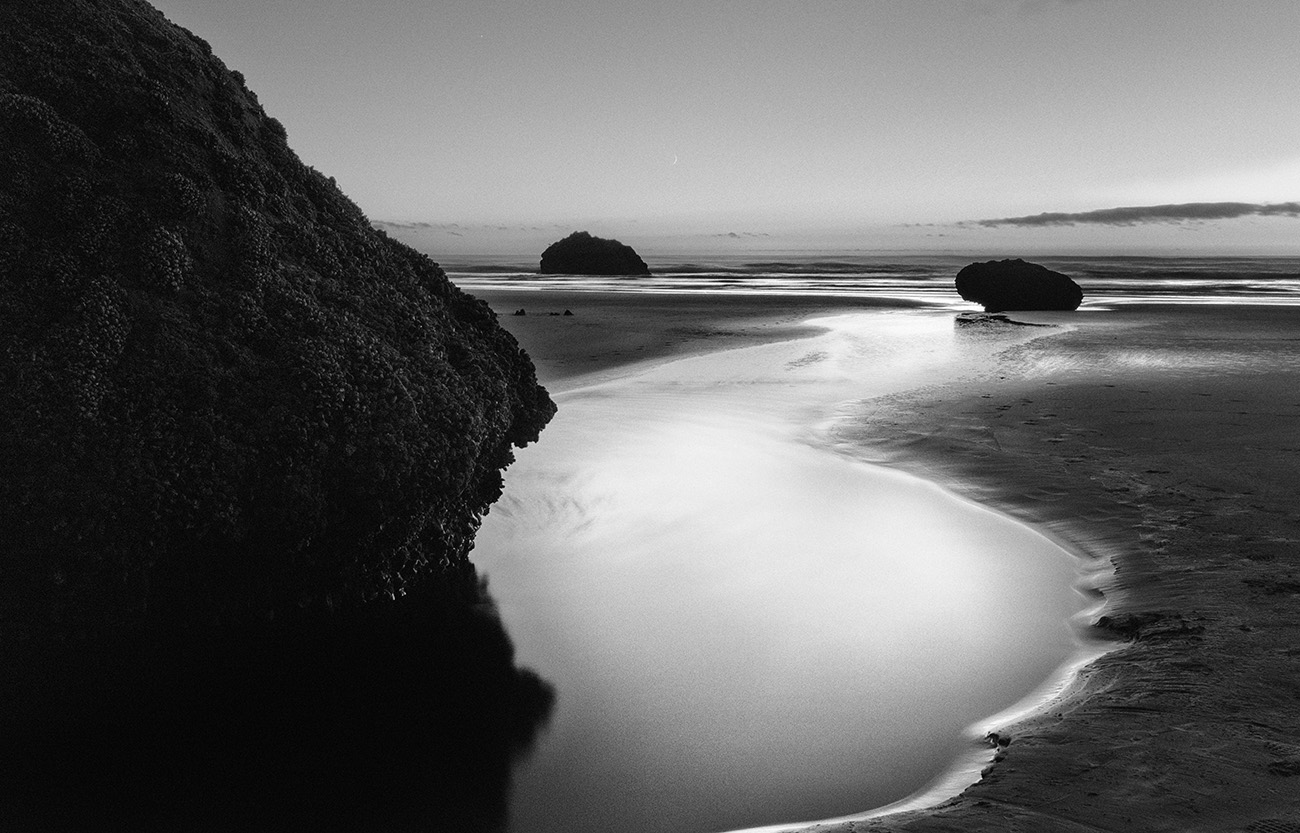
Halation (Oregon Coast)
bnfotografie wrote
Jack, thanks very much for your detailed instructions. I think this is a bit more involved than I tend to get with my post processing. I'm more of a minimalist.Brent
Jack,
Here's my first crack using your Halation Action. Feel free to give me feedback on it. I'm going to want to play around with it a lot more.
Brent
Halation (Oregon Coast)
M Monochrom 35mm 2s 320 ISO 0.0 EV
Aug 20, 2026 at 01:44 PM
p.1 #12Boats
bnfotografie wrote:
BrentIt’s why I made it an action - 1 button push and it’s all done automatically. The remaining power of PS for photography is the combined use of layers, blend modes and filters. And of course the ability to save a series of steps that you perform regularly as an action. Jack,
Here's my first crack using your Halation Action. Feel free to give me feedback on it. I'm going to want to play around with it a lot more.
Brent
Overall, the effect generally looks great! However, in the closest foreground white water, I see perhaps a little too heavy hand effect generated a harsh edge. My guess is dialing back opacity on the halation layer will mitigate this. If not, go back and redo with either less white area showing there specifically in that panel or a larger blur radius in that following step -- and depending on how that helps, maybe a bit of both. It is a trial and error thing, and I myself am still getting the hang of it. I realize the difficulty is we cannot see that final effect until after the action is done running.
Very nice image BTW!
Jack Flesher wrote
bnfotografie wrote
Jack, thanks very much for your detailed instructions. I think this is a bit more involved than I tend to get with my post processing. I'm more of a minimalist.Brent
Here's my first crack using your Halation Action. Feel free to give me feedback on it. I'm going to want to play around with it a lot more.
Brent
Overall, the effect generally looks great! However, in the closest foreground white water, I see perhaps a little too heavy hand effect generated a harsh edge. My guess is dialing back opacity on the halation layer will mitigate this. If not, go back and redo with either less white area showing there specifically in that panel or a larger blur radius in that following step -- and depending on how that helps, maybe a bit of both. It is a trial and error thing, and I myself am still getting the hang of it. I realize the difficulty is we cannot see that final effect until after the action is done running.
Very nice image BTW!
Aug 20, 2026 at 02:09 PM
p.1 #13Boats
Jack Flesher wrote:
bnfotografie wrote
Jack Flesher wrote
bnfotografie wrote
Jack, thanks very much for your detailed instructions. I think this is a bit more involved than I tend to get with my post processing. I'm more of a minimalist.Brent
Here's my first crack using your Halation Action. Feel free to give me feedback on it. I'm going to want to play around with it a lot more.
Brent
Thanks again, Jack. Good suggestions.
Brent
Aug 20, 2026 at 03:12 PM
p.1 #14Boats
+1 all, thank yo for the interesting discussion. Wonder how DxO FilmPack would handle the image and analog look.
Bob
Bob
Aug 21, 2026 at 08:32 AM
p.1 #15Boats
bnfotografie wrote:
BrentIt’s why I made it an action - 1 button push and it’s all done automatically. The remaining power of PS for photography is the combined use of layers, blend modes and filters. And of course the ability to save a series of steps that you perform regularly as an action. Jack,
Here's my first crack using your Halation Action. Feel free to give me feedback on it. I'm going to want to play around with it a lot more.
Brent
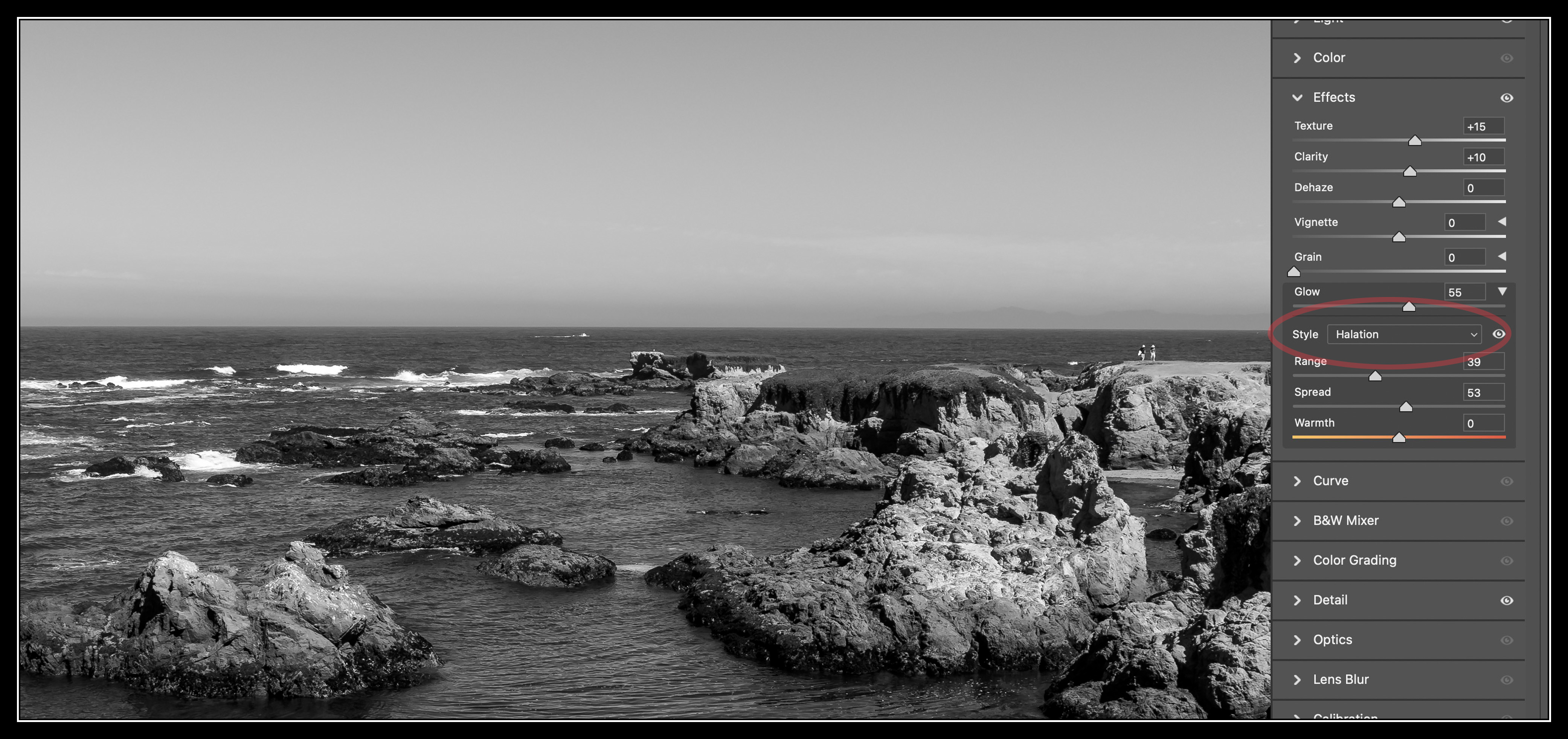
PSA for everyone here: They say timing is everything Adobe literally just added a new "Glow" tool in the latest ACR. It's inside the Effects toolbox. And it's way more powerful and adjustable than my simple action. Thought you all should know
Note that it has 3 types of glow, Diffusion, Bloom and Halation -- and then you can tune the brightness Range, effect Spread and even hue for color images. Finally you can mask it for even more control. This is huge.
Jack Flesher wrote
bnfotografie wrote
Jack, thanks very much for your detailed instructions. I think this is a bit more involved than I tend to get with my post processing. I'm more of a minimalist.Brent
Here's my first crack using your Halation Action. Feel free to give me feedback on it. I'm going to want to play around with it a lot more.
Brent
PSA for everyone here: They say timing is everything
Adobe literally just added a new "Glow" tool in the latest ACR. It's inside the Effects toolbox. And it's way more powerful and adjustable than my simple action. Thought you all should know Note that it has 3 types of glow, Diffusion, Bloom and Halation -- and then you can tune the brightness Range, effect Spread and even hue for color images. Finally you can mask it for even more control. This is huge.
Aug 28, 2026 at 07:18 AM
p.1 #16Boats
Hey Jack! Mendo coast, a favorite topic to photograph for me. I love the effect and the subtlety of which you have dialed it in. Now tell us how to do it in Capture One, lol! As a side note, the two little humans in the shot above were a bonus for your shot to my eyes. I love getting the tiniest little impact of a person in the shot.
Aug 29, 2026 at 01:16 PM
p.1 #17Boats
Very nice post processing and thanks for the explanation how it was done. Interesting indeed that Adobe just added the effect to ACR
Aug 30, 2026 at 06:29 AM
p.1 #18Boats
SGinNorcal wrote:
Hey Jack! Mendo coast, a favorite topic to photograph for me. I love the effect and the subtlety of which you have dialed it in. Now tell us how to do it in Capture One, lol! As a side note, the two little humans in the shot above were a bonus for your shot to my eyes. I love getting the tiniest little impact of a person in the shot.
With the price increases, I decided to take a deeper dive into LRc and ACR since I knew I wouldn’t abandon PS. After a few weeks of working without C1, I decided I could live without it, so I canceled my C1 subscription earlier this year. I am now 100% ACR and PS, I still dislike LRc and so use ACR > PS as my workflow.
To my knowledge there isn’t a way to replicate this effect in C1 and why I always exported my serious images into PS for final tweaking — PS remains the power tool.
Additionally, Adobe has greatly enhanced the functionality of ACR over the past couple years. Examples are its recent AI generative expansions, which are really beneficial if you do perspective corrections. Also there is AI blemish reduction, AI denoise which adds a good 2-3 stops of clean ISO to your camera, and now this glow tool. The real icing on the cake for me was the fact the ACR demosaic sharpening finally equaled what I can get from C1. It’s not as tunable as C1, but does it well enough.
Hey Jack! Mendo coast, a favorite topic to photograph for me. I love the effect and the subtlety of which you have dialed it in. Now tell us how to do it in Capture One, lol! As a side note, the two little humans in the shot above were a bonus for your shot to my eyes. I love getting the tiniest little impact of a person in the shot.
With the price increases, I decided to take a deeper dive into LRc and ACR since I knew I wouldn’t abandon PS. After a few weeks of working without C1, I decided I could live without it, so I canceled my C1 subscription earlier this year. I am now 100% ACR and PS, I still dislike LRc and so use ACR > PS as my workflow.
To my knowledge there isn’t a way to replicate this effect in C1 and why I always exported my serious images into PS for final tweaking — PS remains the power tool.
Additionally, Adobe has greatly enhanced the functionality of ACR over the past couple years. Examples are its recent AI generative expansions, which are really beneficial if you do perspective corrections. Also there is AI blemish reduction, AI denoise which adds a good 2-3 stops of clean ISO to your camera, and now this glow tool. The real icing on the cake for me was the fact the ACR demosaic sharpening finally equaled what I can get from C1. It’s not as tunable as C1, but does it well enough.
Aug 30, 2026 at 08:11 AM
p.1 #19Boats
Nice capture and very interesting workflow and prosing.
Thank you for sharing it.
Marcelo
Thank you for sharing it.
Marcelo
Aug 30, 2026 at 11:53 AM