@ruthenium, thanks for the sample. It does seem like both profiles did better than the straight out of camera photo. I would also agree with the samples you posted here that the Spectra image does appear to have a cyan cast. Personally, I like that you are using Fuji files, as it removes any bias I may have in Sony vs Nikon colors. If I am following @Ulysseita@ when using the profiles, it's recommended to do a custom white balance adjustment, then rely on auto or a preset like daylight.
@Ulysseita@ have you by any chance taken a look into profiling the difference in color rendering between lens brands such as Nikon, Sony, Sigma, and Zeiss?
DWOfPaul wrote:
@ruthenium@, thanks for the sample. It does seem like both profiles did better than the straight out of camera photo. I would also agree with the samples you posted here that the Spectra image does appear to have a cyan cast. Personally, I like that you are using Fuji files, as it removes any bias I may have in Sony vs Nikon colors. If I am following @Ulysseita@@ when using the profiles, it's recommended to do a custom white balance adjustment, then rely on auto or a preset like daylight.
@Ulysseita@@ have you by any chance taken a look into profiling the difference in color rendering between lens brands such as Nikon, Sony, Sigma, and Zeiss?...Show more →
I can confirm that WB was set to Daylight.
The out-of-camera image was with the vivid Fuji Velvia profile. I tend to like vivid colors. I guess this is what happens when one gets older.
I picked up the Cobalt special profile for my camera, and I appreciate that it takes a scientific approach to colour processing in my editing workflow.
It’s frustrating that camera manufacturers — and their ties with Adobe or Capture One — are so lacklustre in this area. You can spend thousands on bodies, displays, and software, yet none of it delivers genuinely accurate colour or demonstrates a real grasp of modern colour science.
Even more maddening is that colour conversion discussions are almost always reduced to whether skin tones “look right” or have some vague “film-like” quality — whatever that means. Very little attention goes to spectral fidelity or sensor behaviour.
I get that it doesn’t really matter if you’re an artist — my own photos will deviate from strict accuracy. But I like that my starting point comes from a place rooted in reality. That makes me feel better as a color professional who rigorously calibrated his equipment and operates within digital standards.
DWOfPaul wrote:
@Ulysseita@@ have you by any chance taken a look into profiling the difference in color rendering between lens brands such as Nikon, Sony, Sigma, and Zeiss?
Absolutely, lens transmission and rendering can introduce differences, sometimes subtle, sometimes a bit more visible depending on the optics.
For calibration, we use original manufacturer glass so that the reference capture remains coherent with the optical intent of the system itself.
In practice, though, these are usually not enormous shifts. Personally, I do not see them as a major issue even in my own work. Most of the time they fall within an acceptable range of variation, and in some cases they are simply part of the lens character. Certain lenses do push colour in recognisable ways, and if you know the lens well, that can even be a pleasant part of the rendering rather than a problem.
So yes, the differences exist, but generally not to a degree that would outweigh the underlying behaviour of the profile.
Since white balance workflow seems to be one of the main points of confusion here, I did make a short video explaining that specific part of Spectre use.
Not posting it as an ad, just because it may be more useful than arguing from screenshots alone:
EvilBoris wrote:
It’s frustrating that camera manufacturers — and their ties with Adobe or Capture One — are so lacklustre in this area. You can spend thousands on bodies, displays, and software, yet none of it delivers genuinely accurate colour or demonstrates a real grasp of modern colour science.
Because their customers don't want it. Almost nobody wants accurate color. It's dull and ugly. Landscape photographers don't want accurate color. Portrait and wedding photographers don't want accurate color. Birders don't want accurate color. Outside of repro/product/scientific applications I am struggling to even think of anyone who wants accurate color.
You may like the sound of it (and ask for "accurate" [1] often) but none of you want it because almost nobody trains in MMA which is a self-preservation requirement in order to safely deliver truly accurate color to a bride after the wedding.
What you all want is PLEASING color, which is far more difficult than simple measured accuracy. Pleasing color is hard. It means introducing intentional deviations from the accurate color that strike all kinds of trade-offs, most of which are psychological, even cultural (skin), but some are not, like perceptual fitting into sRGB.
old-gregg wrote:
Because their customers don't want it. Almost nobody wants accurate color. It's dull and ugly. Landscape photographers don't want accurate color. Portrait and wedding photographers don't want accurate color. Birders don't want accurate color. Outside of repro/product/scientific applications I am struggling to even think of anyone who wants accurate color.
You may like the sound of it (and ask for "accurate" [1] often) but none of you want it because almost nobody trains in MMA which is a self-preservation requirement in order to safely deliver truly accurate color to a bride after the wedding.
What you all want is PLEASING color, which is far more difficult than simple measured accuracy. Pleasing color is hard. It means introducing intentional deviations from the accurate color that strike all kinds of trade-offs, most of which are psychological, even cultural (skin), but some are not, like perceptual fitting into sRGB.
That is true only if one confuses starting point with final look.
Most photographers may not want strictly accurate colour as the final delivered image. Fair enough. But that does not mean a more accurate and better-behaved starting point has no value.
By the same logic, one could also say high resolution is useless because skin will be retouched anyway, or lens sharpness is useless because it may reveal too much. Yet people still pay a premium for better sensors and better optics, because a stronger file remains useful even when the final result is shaped creatively.
old-gregg wrote:
Because their customers don't want it. Almost nobody wants accurate color. It's dull and ugly. Landscape photographers don't want accurate color. Portrait and wedding photographers don't want accurate color. Birders don't want accurate color. Outside of repro/product/scientific applications I am struggling to even think of anyone who wants accurate color.
You may like the sound of it (and ask for "accurate" [1] often) but none of you want it because almost nobody trains in MMA which is a self-preservation requirement in order to safely deliver truly accurate color to a bride after the wedding.
What you all want is PLEASING color, which is far more difficult than simple measured accuracy. Pleasing color is hard. It means introducing intentional deviations from the accurate color that strike all kinds of trade-offs, most of which are psychological, even cultural (skin), but some are not, like perceptual fitting into sRGB.
Absolutely — but once you move into a RAW workflow you’re often discarding any meaningful per-camera calibration in favour of Adobe’s generic profile, which isn’t always particularly well characterised.
If I want the largest possible canvas to work from, I need a degree of consistency and predictability across bodies and throughout the editing pipeline. Not “accuracy” in the strict sense, but a stable, well-behaved starting point.
It’s also true that the moment you begin editing, any notion of strict accuracy disappears — especially in Lightroom, where the tone mapping and colour mixing can introduce noticeable hue shifts under adjustment. So I’m not chasing accuracy as an end result.
What I am after is something closer to an objectively solid foundation before I move into subjective decisions. If the initial transform from RAW is inconsistent or poorly behaved, you’re effectively building your look on unstable ground.
I tend to think of profiles a bit like choosing a film stock: different renderings under different conditions, with some clearly more carefully engineered than others. Given the choice, I’d rather start from something deliberately designed and consistent, then shape it to taste — rather than inherit a generic interpretation and fight it downstream.
In an ideal world, Adobe would invest more of the subscription revenue into properly characterising individual sensors, rather than relying on broad, generic profiles. As it stands, we’re largely working from a one-size-fits-all interpretation — which is fine for convenience, but not if you care about consistency at the start of the pipeline.
Ulysseita wrote:
That is true only if one confuses starting point with final look.
Most photographers may not want strictly accurate colour as the final delivered image. Fair enough. But that does not mean a more accurate and better-behaved starting point has no value.
Fair suggestion, but I will disagree. Color grading is a tough skill to master, and the starting point has a huge influence over the final image unless a user is highly experienced and knows when to stop trusting his eyes. Taking breaks or applying psychological tricks is often required to "reset" your color senses before you can continue. A PLEASING starting point sends your mind in the right direction. Accurate color does not.
Many people in this forum probably remember the popular derogatory remarks about the "Sony color" on forums. How difficult it was for everyone to get the skintone right because of "sony color"? I was shooting color charts and making my own profiles for repro work at the time, so actually needed that accuracy. At the time, the Sony's default profile, which was mimicked by 3rd party RAW converters as well, used to be quite close to accurate, and the S-curve was gentle as well. Apparently none of the complainers got your memo about a starting point! Without a PLEASING starting point they didn't know what to do with accurate color: skin just looked too "waxy" and very few understood what to tweak, but everyone felt oblidged to blame Sony.
I stand by my conclusion: none of you, with very few exceptions, want accurate color. You can't handle accurate color because most don't know how to keep cyan in the skies but eliminate it from the skin in an outdoor portrait without being given a starting point with a baked-in 5500k LUT.
I tend to agree with the above, regarding the importance of pleasing vs. accurate colours.
In fact, I believe that proving that some colours are "accurate" may not be that simple - not like, look at the "accurate" colours and one should immediately know that the presented colours are accurate indeed.
The problem is, I don't think that humans actually know "accurate" colors. In our mind, we have certain ideas of what colours can be expected in an image, but such expectations almost certainly cannot be accurate for an average person. I fully agree with the above-said "unless a user is highly experienced and knows when to stop trusting his eyes. Taking breaks or applying psychological tricks is often required to "reset" your color senses." An average person absolutely cannot be "trusting his eyes." From my experience, if I work on an image for longer than 1h, I can no longer trust my eye.
One objective of post-processing is to present a viewer with colors that should evoke an adequate emotional response to the visual "stimuli". I am with @old-gregg on that the right colours are almost certainly not the "correct" colours. Thus, a starting point for corrections that attempts to present "accurate" colours can make the processing more difficult, rather than easier.
I cannot comment on Adobe colors. Some of the above posts suggest that the default Adobe color profile (profiles?) have poor colors. I think this is something that those who claim this should prove by presenting blind tests to prove the point.
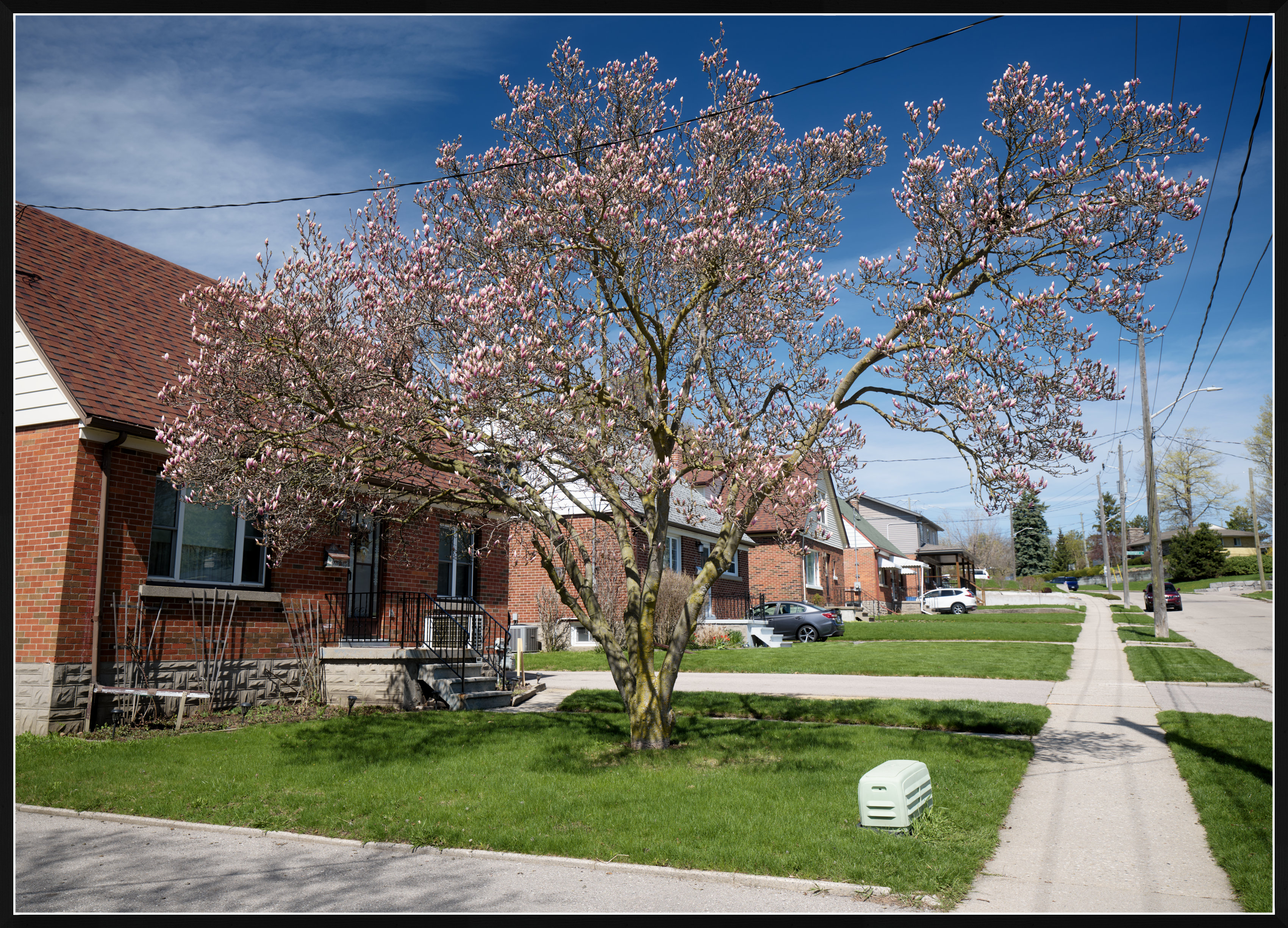
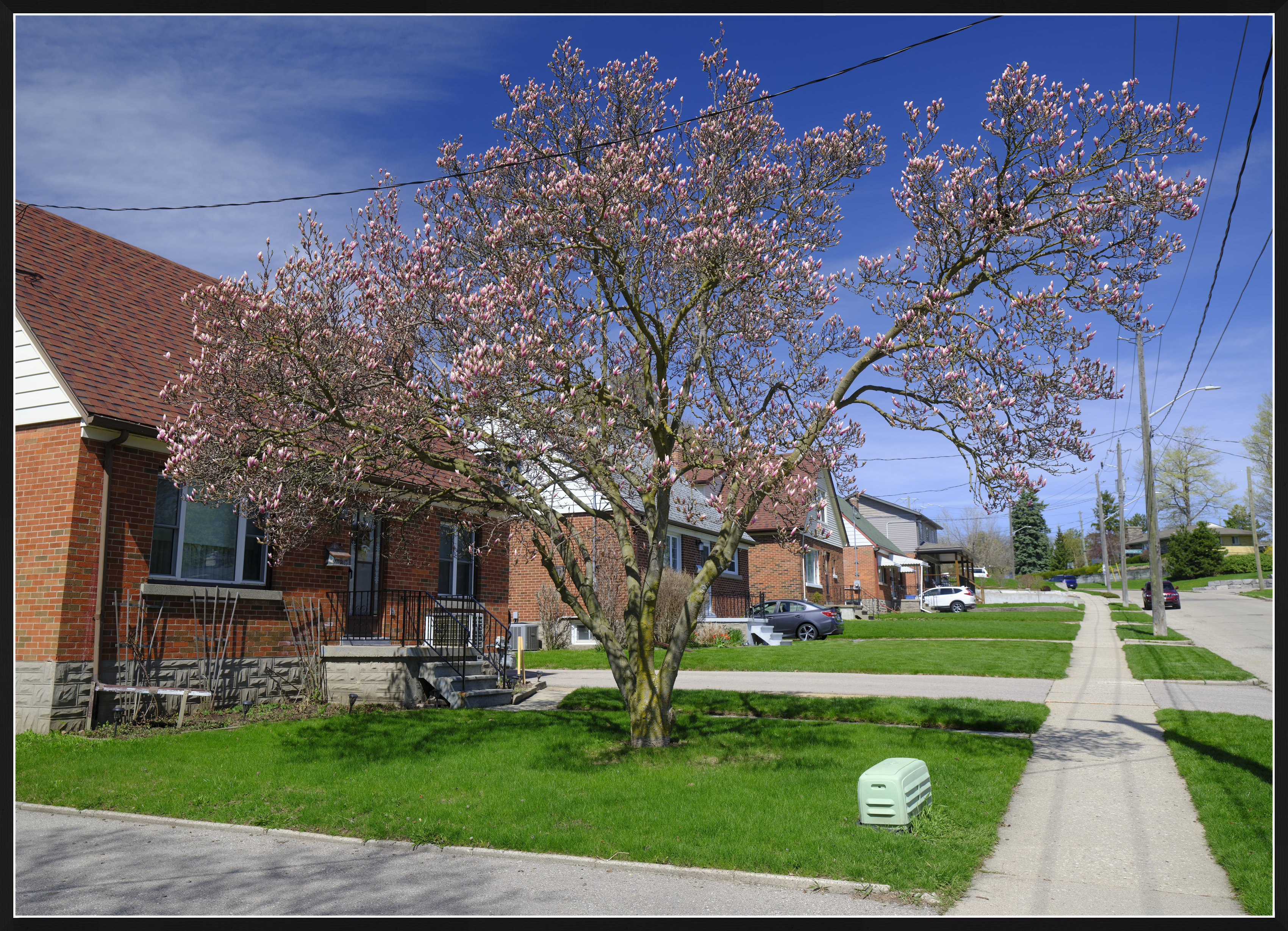
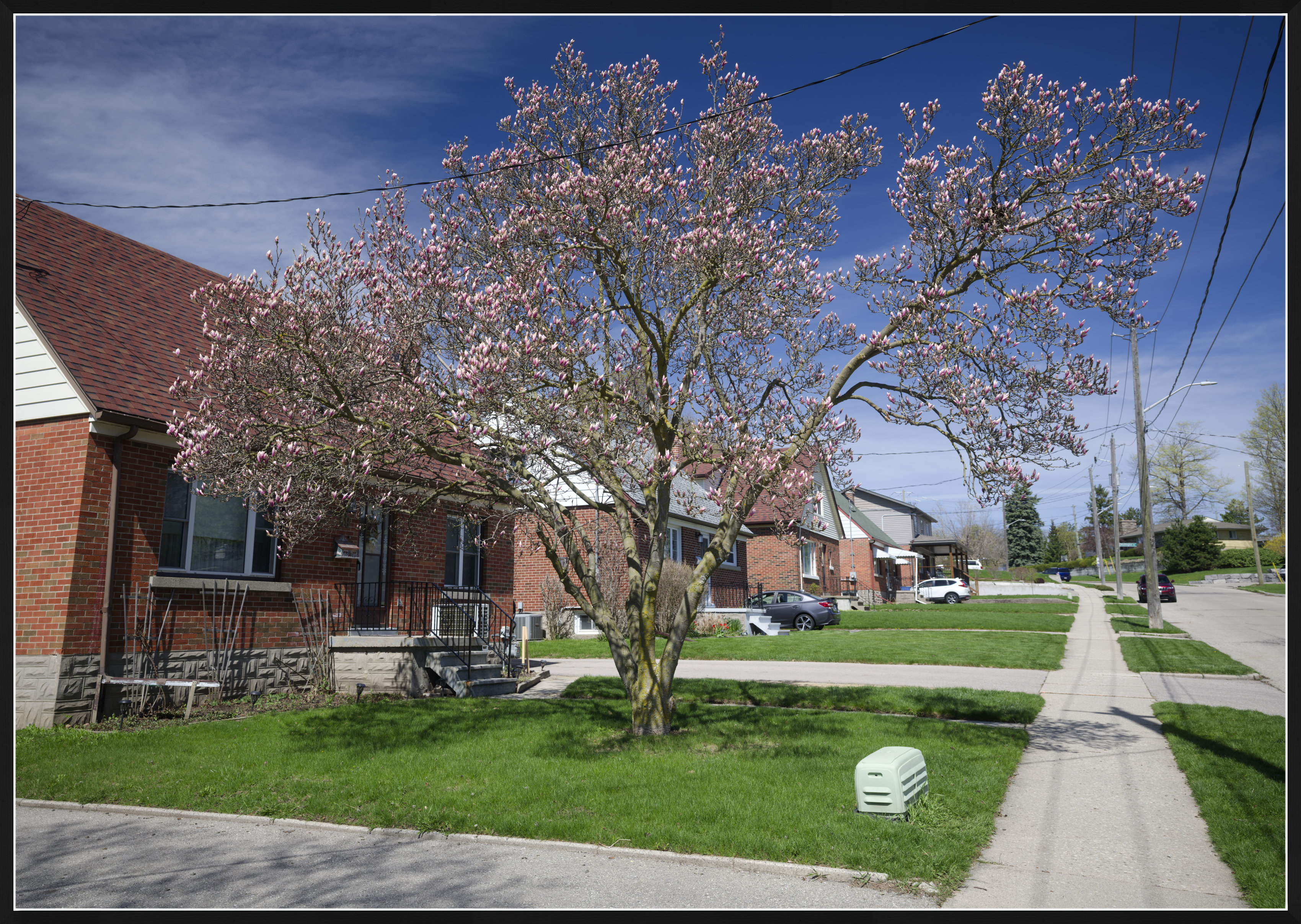
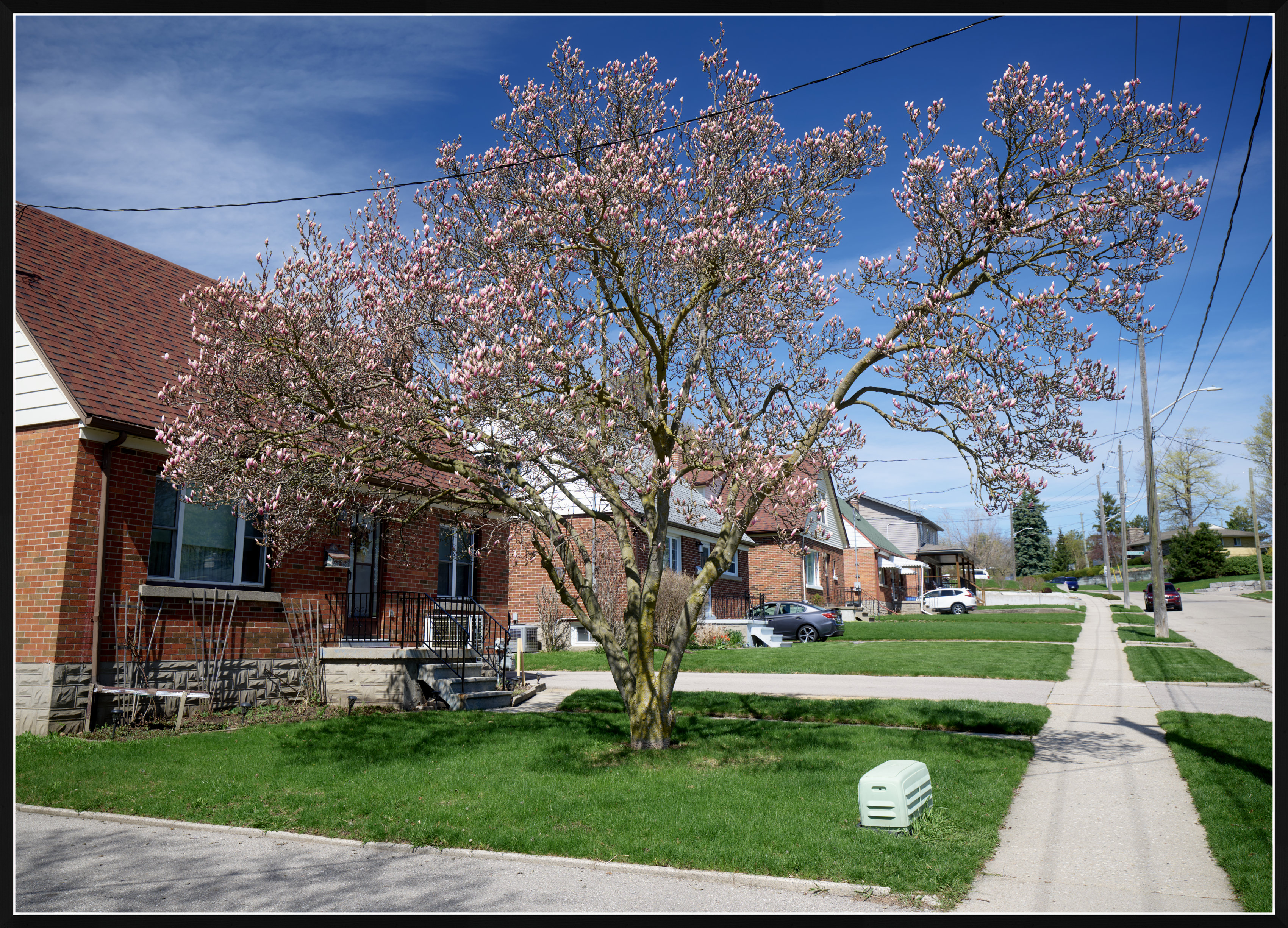
I am using Capture One and DxO Photolab, and I purchased the new Spectre profiles for my main camera, Fujifilm GFX100S II. Below are uploads of one unremarkable scene that I selected for the reason that it has a mixture of typical colours: blue, green, and red. The raw file was captured with the WB set to Daylight in camera. The scene was obviously captured in broad daylight.
The four uploads have been minimally processed in Capture One, DxO Photolab 9, as well as processed in camera. I am not going to tell you which one is which, but of the four there are
One image processed in-camera with the Velvia profile
One image from DxO Photolab, processed with the Generic rendering "Neutral color"
One image from Capture One, processed with the ICC Profile "GFX100S II Cobalt Standard Daylight (S)" with Curve: "Film Standard" - the WB was set to Daylight in Capture One.
One image from Capture One, processed with the ICC Profile "GFX100S II Generic" with Curve: "Film Standard"
It would be interesting to know which of the profiles might be considered a better "starting point" for further processing? Do you like the profile in upload 1, 2, 3, or 4?
GFX100S IIGF20-35mmF4 R WR lens34mmf/5.61/120s80 ISO0.0 EV
GFX100S IIGF20-35mmF4 R WR lens34mmf/5.61/120s80 ISO0.0 EV
GFX100S IIGF20-35mmF4 R WR lens34mmf/5.61/120s80 ISO0.0 EV
GFX100S IIGF20-35mmF4 R WR lens34mmf/5.61/120s80 ISO0.0 EV
ruthenium wrote:
I cannot comment on Adobe colors. Some of the above posts suggest that the default Adobe color profile (profiles?) have poor colors. I think this is something that those who claim this should prove by presenting blind tests to prove the point.
It’s worth separating what’s actually being discussed here.
It’s fairly well documented that Adobe DCP profiles often reuse very similar—sometimes effectively identical—colour matrices across different cameras. On its own, that isn’t necessarily incorrect: a 3×3 matrix is only a coarse approximation of sensor behaviour, and sensors with similar spectral responses can reasonably converge on similar solutions.
However, that already points to a simplified model. A matrix cannot uniquely describe a sensor’s colour response, so the pipeline depends heavily on downstream, non-linear processing—tone curves, LUTs, and hue-dependent adjustments—to produce the final image.
That downstream processing is where issues become visible.
To remove subjective judgement, you can look at controlled input instead. Using synthetic RGB sweeps from a 32-bit EXR (i.e. clean, known data), it becomes clear how the pipeline behaves as exposure increases:
Distinct hues begin to converge
Gradients that should remain smooth start to distort
Certain regions (particularly blue → magenta transitions) break down abruptly and irregularly
At more extreme values, colours collapse toward similar outputs
This isn’t about whether the result is aesthetically pleasing—it’s about the transformation no longer preserving stable hue relationships under intensity changes.
The artifacts are quite obvious in the examples:
This kind of behaviour—loss of hue separation, instability under compression, and uneven distortions—shows up in more subtle forms in real-world imagery as well (highlight roll-off, colour shifts in saturated regions, etc.).
If you process the same input through other software with different tone mapping approaches, you can maintain much smoother gradients and more consistent hue separation under identical conditions:
That suggests this isn’t an unavoidable limitation of digital colour processing, but the result of specific design choices in the rendering pipeline.
Everything sits under or on top of these errors
So the point isn’t simply that “Adobe colour is bad,” or that matrix reuse alone is the issue. It’s that the tone mapping and colour processing in Lightroom/Photoshop introduce non-linearities that can lead to visible artefacts and hue instabilit behaviour that you would not deliberately design for if strict colour consistency were the goal.
These kinds of irregularities aren’t unique to Adobe Lightroom or Adobe Photoshop, but they are clearly present and not representative of best-in-class behaviour in this space.
For clarity, I say this as a Lightroom user who’s open to better options if they improve a streamlined workflow technically. As with cameras and lenses, the tool doesn’t make the artist but the choice of tool can still meaningfully affect the outcome.
I can of course avoid a whole heap of this by using resolve, but that's not really a a great place to handles stills en-masse
@EvilBoris, I don't use Adobe software; thus, I can only commiserate with those who do.
I bought the Cobalt Image's Spectre profile for Capture One, for my camera, GFX100S II.
If you can comment on how the Spectre profile helps to improve processing in Capture One - please, do.
Also, if you can comment on the colors of my previous post (with four uploads) - I would appreciate it. I am interested in whether you should like the Spectre colors (in one of the four uploads).
It's about starting point for me. My issue with Adobe is that their profiles look absolutely nothing like the Sony in-camera JPGs. They've gotten better with the V2. I still prefer to have a range to work with for the profiles, which I why I like the Cobalt ones. I don't think they actually match the other camera's but they do get in the ballpark. Most importantly, I find they usually make for a better starting point for me. I do find it frustrating that if you use multiple cameras in your workflow you have to buy separate base packs or spectre profiles and that gets expensive fast. For example, I picked up another photographer's Z6ii to use alongside my Z6iii for an event last weekend, but now I'd have to spend a chunk of money to be able to match the edits.
My experience just doesn't jibe with the oft-made retort that with RAW you can make anything look like anything. That's just not the case, or at least not the case without SIGNIFICANT tinkering time. The biggest reason I struggle with Sony cameras, which I otherwise love is that the files just take a ton more work for me to get the edits where I want them. It also varies significantly from camera to camera within makers. I find Nikon's are generally pretty consistent in their RAW files. Sony is all over the map.
ruthenium wrote:
[...] It would be interesting to know which of the profiles might be considered a better "starting point" for further processing? Do you like the profile in upload 1, 2, 3, or 4?
I would take the first image.
I like the green grass and the red/brown bricks. I could however probably start my processing using any of the four images.
My own workflow includes a camera profile made using Lumariver together with an X-rite Digital SG color chart. That gives me a pretty much neutral and somewhat boring starting point for further processing. It happens from time to time that i click a film preset in ACR/Photoshop.
I have worked that way for several years now and like having similar starting points for all my images, old and new ones.
Image no. 3 for a starting point to processing for me. Both the greens in the grass are not overcooked and there’s definition left in the sidewalk and road. Not the most immediately attractive image but the one I’d personally like to start with.
That said, as an aside, I find images taken at that kind of day and of that kind of subject to be hard to turn into conventionally/commercially ‘attractive’ shots via colour grading (no disrespect or slur intended, it’s a fine image for this discussion). Too much contrast, too much cold reality.
FWIW I use Cobalt’s profiles to align shots out of my Sony and Nikon into coherent sets using their Fujifilm colour interpretations as a starting point and I find that to work well. I’m not after absolute reality or colour accuracy though, I mostly need to make pretty images for clients. When there’s products that need to be colour accurate I use a colourchart in the image to guide the processing, which seems to work for practical purposes. I’d be interested to see if Spectre could make my life easier but suspect I’m not doing work at an accuracy level that would benefit.
Pete_R wrote:
Image no. 3 for a starting point to processing for me. Both the greens in the grass are not overcooked and there’s definition left in the sidewalk and road. Not the most immediately attractive image but the one I’d personally like to start with.
That said, as an aside, I find images taken at that kind of day and of that kind of subject to be hard to turn into conventionally/commercially ‘attractive’ shots via colour grading (no disrespect or slur intended, it’s a fine image for this discussion). Too much contrast, too much cold reality.
FWIW I use Cobalt’s profiles to align shots out of my Sony and Nikon into coherent sets using their Fujifilm colour interpretations as a starting point and I find that to work well. I’m not after absolute reality or colour accuracy though, I mostly need to make pretty images for clients. When there’s products that need to be colour accurate I use a colourchart in the image to guide the processing, which seems to work for practical purposes. I’d be interested to see if Spectre could make my life easier but suspect I’m not doing work at an accuracy level that would benefit. ...Show more →
No. 3 is Capture One generic profile for my camera, with the "Film Standard" curve that can be called default in Capture One.
This is my preference as well.
In no. 1, I am o.k. with the green and red, but I don't like a hint of cyan in the blue sky.
I agree with your point about "that kind of subject to be hard to turn into conventionally/commercially ‘attractive’ shots" - the scene is unremarkable. It is only the presence of the basic R-G-B colors that made me use it.
Thanks for the update. I keep wondering if I should try Capture 1 again… I’m really only psychologically locked into Lightroom because I have it as part of my CC subscription (which is non-negotiable for my mixed bag of creative work) and am too tight to pay for another subscription. Possibly and perversely to my creative and financial detriment.
Please don’t take my comment about finding a midday suburban scene hard to process as a slight, I could see the combination of RGB made it a thoughtful image for this discussion. Plus, it’s a real world scenario most of us have to work with at some point.
Pete_R wrote:
Thanks for the update. I keep wondering if I should try Capture 1 again… I’m really only psychologically locked into Lightroom because I have it as part of my CC subscription (which is non-negotiable for my mixed bag of creative work) and am too tight to pay for another subscription. Possibly and perversely to my creative and financial detriment.
Please don’t take my comment about finding a midday suburban scene hard to process as a slight, I could see the combination of RGB made it a thoughtful image for this discussion. Plus, it’s a real world scenario most of us have to work with at some point....Show more →
There was another reason for selecting this scene. It was the WB, that was unambiguously Daylight. I thought it was important for the Spectre profile. If my understanding of the video from Cobalt (posted above) is correct, then the Spectre profiles require correct WB to give "correct" colors. I believe the main point was that the colors of the Adobe profile remained incorrect even with the right WB. Hopefully, I am not misinterpreting the message from Cobalt in this video.