My current iMac is starting to bog down, beach ball and when using LR things like cropping lag using the brush tool etc. especially if I have just used Denoise. My current iMac is a 2020 with 64 GB memory 3.6 GHz 10-Core Intel Core i9 Graphics AMD Radeon Pro 5700 8GB not cutting it anymore.
I have narrowed down my 2 choices for a Mac studio. The price is only $300 difference. I want which ever one is best for Lightroom and Photoshop and future proofing so I don't need a new one for at least 5 years!
Coming from an Intel Mac you are going to be shocked at the speed improvement regardless of choice. As pointed out high GPU is a key for things like LR Denoise. IMO stretch your budget and get the latest M chip version possible with the highest GPU and at minimum 64gb ram.
Quick ref point from upgrading my MBP:
M1 Max 10 core CPU, 24 core GPU, 32gb ram > M5 Max 18 core CPU, 40 core GPU, 64gb ram
Lr Denoise speed improvement was right at 50%. (10 Sony 50MP raw files: M1 - 5min, M5 - 2m31s)
Personally, if money available I'd either seriously look at the MBP M5 or wait to see what the upcoming Studio specs bring.
schlotz wrote:
Coming from an Intel Mac you are going to be shocked at the speed improvement regardless of choice. As pointed out high GPU is a key for things like LR Denoise. IMO stretch your budget and get the latest M chip version possible with the highest GPU and at minimum 64gb ram.
Quick ref point from upgrading my MBP:
M1 Max 10 core CPU, 24 core GPU, 32gb ram > M5 Max 18 core CPU, 40 core GPU, 64gb ram
Lr Denoise speed improvement was right at 50%. (10 Sony 50MP raw files: M1 - 5min, M5 - 2m31s)
Personally, if money available I'd either seriously look at the MBP M5 or wait to see what the upcoming Studio specs bring....Show more →
Tollefsen wrote:
My current iMac is starting to bog down, beach ball and when using LR things like cropping lag using the brush tool etc. especially if I have just used Denoise. My current iMac is a 2020 with 64 GB memory 3.6 GHz 10-Core Intel Core i9 Graphics AMD Radeon Pro 5700 8GB not cutting it anymore.
I have narrowed down my 2 choices for a Mac studio. The price is only $300 difference. I want which ever one is best for Lightroom and Photoshop and future proofing so I don't need a new one for at least 5 years!
Can you tell us something about. the nature of the the work you are doing on th ecomputer? It can make a difference.
(Is that iMac one of the old Intel processor designs? I had one of those — I think it was a 2019 — that was great early on but bogged down in the ways you describe. I replaced it with a well-equipped M4Pro mini and the difference was significant.)
You may well not need as much memory as you are considering…
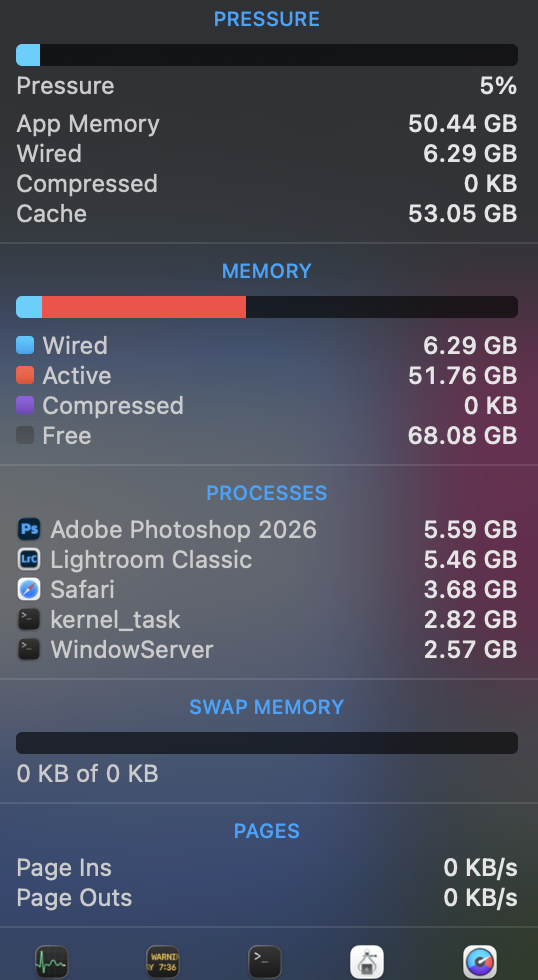
With Lightroom open with a library of a hundred 45MP raw adobeRGB files, Photoshop open with ten TIFs around 90MB each, streaming 8K video, and bunch of browser tabs open my machine is bouncing around 57GB of RAM utilization.
The two important items you want to watch for are memory pressure (the amount of time it’s yellow/red) and swap usage. dienliv - you’re at 5% memory pressure and using zero swap; this more than enough memory for this workload (in fact, you’re not using most of it).
Think of that 51.67GB “active” memory as reserved, but not necessarily in use. Simply launching Lightroom will move a bunch of memory to “active”, even if you don’t do anything with the program.
It is also important to set Adobe apps’ internal memory allocation setting (it is one of the preferences) to a reasonable value.
I had been having a problem where Photoshop would eventually lock up and refuse to budge, necessitating a system restart and losing some work, among other problems.
I discovered that I had told Photoshop that it could use basically all of my RAM in the system, which it dutifully did over time… even though other apps I was running also needed RAM. Reducing the setting (which I had raised earlier) to a more sane level seems to have resolved the issue.
- - -
In general, I think that there’s a tendency among some photography users to think they need a much more powerful (and expensive) system for photography than we actually need, and that the benefits of over-spec’ing the system by too large of an increment aren’t cost-effective.* For example, almost no one doing still photography post-processing (note that I wrote “almost”) needs or will really benefit from installing 128GB of ram, or from getting the highest spec processor. (Things are different if you are doing high end —note that I wrote “high end” — video processing.)
I’m currently running a higher spec M4Pro mini with 48GB ram that drives two 27” Apple monitors. I regularly have more than one 50MP image file open for editing, and I normally keep Bridge/ACR and Photoshop running all the time. It works great.
(For me, perhaps like some of you, the idea that I don’t need the highest-spec machine for serious work is counter-intuitive. I’ve been doing this long enough to remember when we really did need very high-spec systems in order to do effective image processing… and in my case audio production. But today, that is no longer the case.)
* And, yes, there are risk to under-equipping a system, too. Getting the lowest-level configurations, which can be fine for things like email, web browsing, media consumption — can leave you underpowered for using tools like Lightroom in all but the most basic ways.
gdanmitchell wrote:
It is also important to set Adobe apps’ internal memory allocation setting (it is one of the preferences) to a reasonable value.
I had been having a problem where Photoshop would eventually lock up and refuse to budge, necessitating a system restart and losing some work, among other problems.
I discovered that I had told Photoshop that it could use basically all of my RAM in the system, which it dutifully did over time… even though other apps I was running also needed RAM. Reducing the setting (which I had raised earlier) to a more sane level seems to have resolved the issue.
- - -
In general, I think that there’s a tendency among some photography users to think they need a much more powerful (and expensive) system for photography than we actually need, and that the benefits of over-spec’ing the system by too large of an increment aren’t cost-effective.* For example, almost no one doing still photography post-processing (note that I wrote “almost”) needs or will really benefit from installing 128GB of ram, or from getting the highest spec processor. (Things are different if you are doing high end —note that I wrote “high end” — video processing.)
I’m currently running a higher spec M4Pro mini with 48GB ram that drives two 27” Apple monitors. I regularly have more than one 50MP image file open for editing, and I normally keep Bridge/ACR and Photoshop running all the time. It works great.
(For me, perhaps like some of you, the idea that I don’t need the highest-spec machine for serious work is counter-intuitive. I’ve been doing this long enough to remember when we really did need very high-spec systems in order to do effective image processing… and in my case audio production. But today, that is no longer the case.)
* And, yes, there are risk to under-equipping a system, too. Getting the lowest-level configurations, which can be fine for things like email, web browsing, media consumption — can leave you underpowered for using tools like Lightroom in all but the most basic ways....Show more →
Thanks for your thoughts!! I was wondering if I should wait for the M5. I’m sure it will cost more.,,, it will be expensive any way I go!
gdanmitchell wrote:
Can you tell us something about. the nature of the the work you are doing on th ecomputer? It can make a difference.
(Is that iMac one of the old Intel processor designs? I had one of those — I think it was a 2019 — that was great early on but bogged down in the ways you describe. I replaced it with a well-equipped M4Pro mini and the difference was significant.)
You may well not need as much memory as you are considering…
I just use Lightroom and some Photoshop. I do have larger files, 45mp and usually come home with 20,000 photos from a trip that I go through and edit and lots of deleting. Yes, I do it all in Lightroom, just works for me that way. I have an external hard drive as the 4 TB on my current IMac is 3/4 full. I am now processing through the external hard drive a Samsung T7 Shield with an upgraded cord. Other than that nothing special, just the normal social media stuff, browsing the web, e-mail….
Thanks for your time!
20,000 is not very much if you photograph active species with a modern camera. In some locations I assume 5,000-10,000 images per day in the field, so at least 4 copies at 130-140K. But I think this thread is for a desktop computer.
I most always suggest the latest generation of hardware if the user is planning to keep it for a while. The differences in speeds of SoC, SSDs, TB, etc. will matter more in the future and keep the system useful longer. Despite that everyone at FM is obsessed with the LR that is significantly parallel, many parts of applications in general are single threaded, don't use the GPU, and performance there usually increases each generation.
Ultimately the question is the value of dollars put towards computing compared to other things like lenses, camera bodies, photo trips, etc. I feel that computers are rather important and people sometimes don't value them enough.
EB-1 wrote:
20,000 is not very much if you photograph active species with a modern camera. In some locations I assume 5,000-10,000 images per day in the field, so at least 4 copies at 130-140K. But I think this thread is for a desktop computer.
I most always suggest the latest generation of hardware if the user is planning to keep it for a while. The differences in speeds of SoC, SSDs, TB, etc. will matter more in the future and keep the system useful longer. Despite that everyone at FM is obsessed with the LR that is significantly parallel, many parts of applications in general are single threaded, don't use the GPU, and performance there usually increases each generation.
Ultimately the question is the value of dollars put towards computing compared to other things like lenses, camera bodies, photo trips, etc. I feel that computers are rather important and people sometimes don't value them enough.
Thanks! So far I have not ever taken 10,000 in a day! But know how it could happen especially with pre capture now. I’m still procrastinating on the decision, M4 or waiting till for M5. I’m really needing one soon, I have a couple trips coming up…
M5, M5 Pro & M5 Max are already available. M6 is TBD, possibly later this year but even so my bet on the Pro & Max versions will be sometime next year.
Tollefsen wrote:
Thanks! So far I have not ever taken 10,000 in a day! But know how it could happen especially with pre capture now. I’m still procrastinating on the decision, M4 or waiting till for M5. I’m really needing one soon, I have a couple trips coming up…
I thought you were buying as desktop system, so how does that relate to travel?
EB-1 wrote:
I thought you were buying as desktop system, so how does that relate to travel?
EBH
Because it was mentioned that 20K in a day was not that many photos and that over 100,000 is not unusual. I then bring all my photos from a trip and put them on my desktop computer or external hard drive to process at home. That is how I end up with such large LR catalogs and why I’m looking for a desktop with lots of storage.


 and people sometimes don't value them enough.