fredmiranda.com
Login

Moderated by: Fred Miranda
  New fredmiranda.com Mobile Site
  New Feature: SMS Notification alert
  New Feature: Buy & Sell Watchlist
  

FM Forums | Photo Critique | Join Upload & Sell

       2       end
  

how to expose this photograph


hanay78
Offline
• • •
Upload & Sell: Off
p.1 #1 · how to expose this photograph


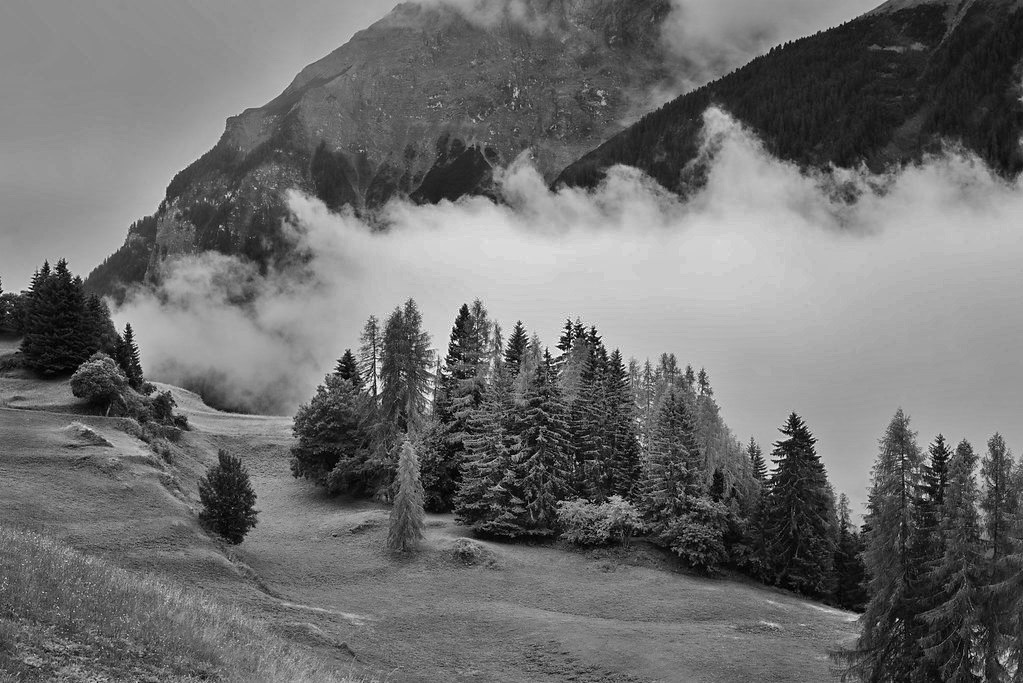
I took a series of photographs with the nice cloud in the center. All of them are wrongly exposed


In the field I decided to expose for the rest of the photograph, hopping that I can recover highlights. But the cloud has no details, is completely burned (even in raw).

I could not use grad filters, or at least i do not know how to use them to keep the detail in the cloud.

Another possibility is of course, expose for the cloud, but this will make anything else tremendously dark. Probably, in this case, I may recover the shadows at least some of them, but they may have plenty of noise.

Any advice? Thank you in advance!

Jorge


Mar 04, 2026 at 05:18 PM
RustyBug
Offline
• • • • • • •
Upload & Sell: On
p.1 #2 · how to expose this photograph


If using the camera (i.e. reflective metering) meter for both ... split the diff.

Alternatively, an incident meter does a better job of telling you what the luminance value of your key light is.

An "old school" trick (requires pre-testing) is to meter the back of your hand (hence diff skin tones) as an "always with you, grey card" (+ knowledge of your testing EC variance from middle grey).

Meter off the grass.

Meter off the highlight (knowing this will put your highlights at middle grey), then add 1 - 1.5 stops. This effectively results in similar to metering both and split the diff.

The key to this is to understand what reflective metering does, how it functions, and where it tries to land you, then make the mental adjustment (for whichever approach your choose) to understand what your incident light actually is.

Sunny 16 rules work surprisingly well also, once you understand them.

Assuming the "same light source" ... the basic difference between the key side vs. shadow side (natural lighting at sunny 16) is around 3 stops. Armed with this knowledge, the "split the diff" value is around 1.5 stops. So, if your meter is trying to land you in the "wrong place", ballpark 1.5 stops adjustment is a relative safe move, depending on whether you are trying to adjust up vs. down. from how your meter is trying to place you (based on your choice of metering reflective portions of the scene.

Bottom line is that reflective metering is predicated upon certain assumptions ... it is key to understanding how those assumptions are baked in to metering algorithm. Then, to recognize the situations that are going to "fool" reflective metering ... and make the adjustments yourself to "outsmart" the metering (reflective). I used to carry an incident meter with me in the old days. Nobody does that anymore. But, to understand the difference between how reflective metering functions vs. incident light metering ... highly valuable knowledge ... even if you are only using reflective metering tools (i.e. in camera).

HTH


Mar 05, 2026 at 08:12 AM
Shasoc
Offline
• • • • • • •
Upload & Sell: On
p.1 #3 · how to expose this photograph


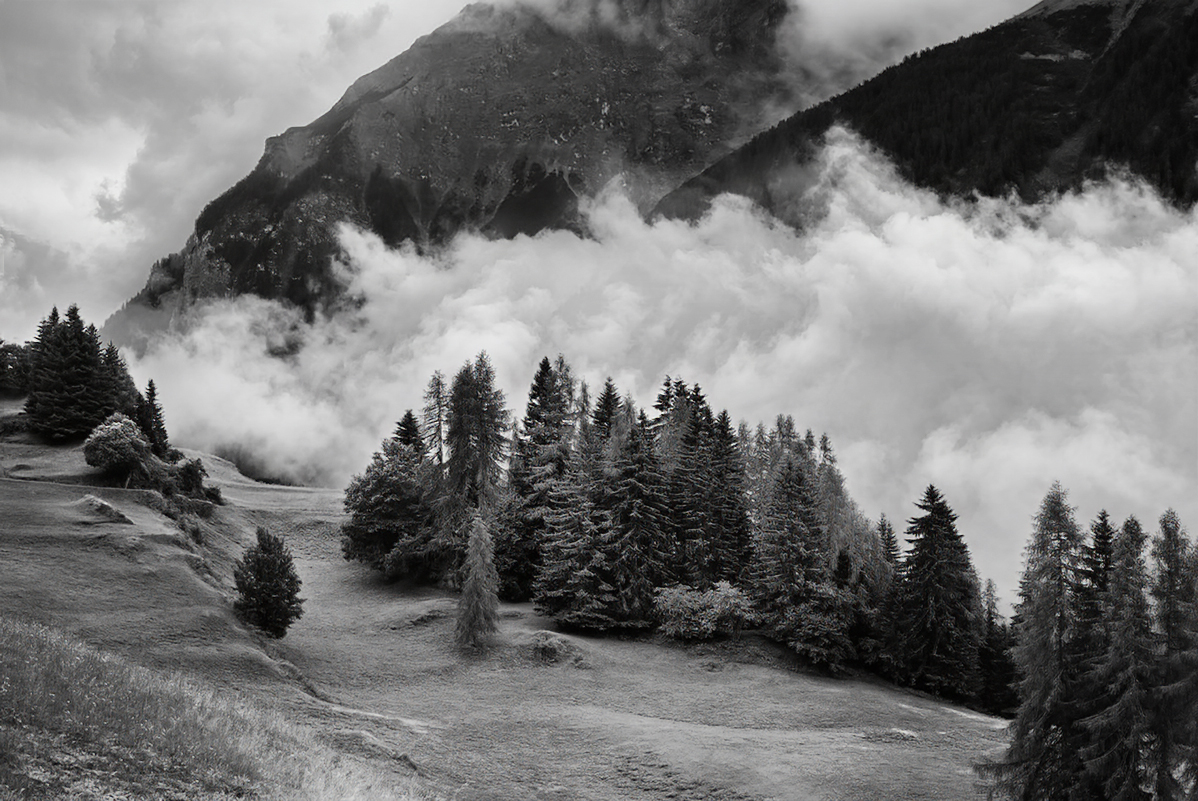
When shooting in this type of lighting situation there is no way to compensate in camera. The best approach is to prioritize the protection of the highlights.

Try to expose for the brightest light avoiding highlights from clipping (use spot metering, and pay attention to the histogram), because blown-out highlights are lost for ever and can't be recovered, while recovering the shadows from a RAW file works better then highlights recovery.

Yes, that produces noise, but nowadays there are programs that can eliminate noise, w/o losing detail.

If you use Aperture Priority you need to compensate with minus 1, 2 stops.

You should also consider using the bracketing technique taking multiple shots at different exposures.

Socrate


Mar 05, 2026 at 10:58 AM
hanay78
Offline
• • •
Upload & Sell: Off
p.1 #4 · how to expose this photograph


Thank you a lot for your answers!

@RustyBug: the rule you make is interesting, dial 1.5 ev less than the highlights. But you see, the cloud is reflecting incident light that hit it from above. A7RII has 13 Ev of dynamic range. The cloud is so burned, that the difference should have been far more than 3 EV in total. 1.5 ev than the highlight very probably would have generated plenty of clipping in the shadows. The surprising thing is: it was a cloudy day. In spite of this, the cloud is tremendously overexpossed

@Shasoc: about the argument of the clipping of the shadows expressed above. What Software are you using for noise?


Mar 06, 2026 at 06:11 PM
Camperjim
Offline
• • • • •
Upload & Sell: On
p.1 #5 · how to expose this photograph


Not that long ago it seemed that many landscape photographers were bracketing exposures and using hdr when needed. With improved dynamic range and better noise reduction software that has become an approach that is rarely needed. This is a good example of why we might still need that approach.


Mar 07, 2026 at 06:16 AM
Shasoc
Offline
• • • • • • •
Upload & Sell: On
p.1 #6 · how to expose this photograph


hanay78 wrote:
Thank you a lot for your answers!

@Shasoc@: about the argument of the clipping of the shadows expressed above. What Software are you using for noise?


I use Topaz software.

Socrate


Mar 07, 2026 at 10:29 AM
Imagemaster
Offline
• • • • • • •
Upload & Sell: On
p.1 #7 · how to expose this photograph


Like Socrate said, you can't get the exposure for the clouds and foreground correct in one shot. Metering mode does not help one iota.

If your shutter speed is high enough to freeze the cloud motion, you take a burst of three exposures using your in-camera exposure bracketing at -1, 0, and +1, or -2, 0, and +2 then stack them in post-processing.

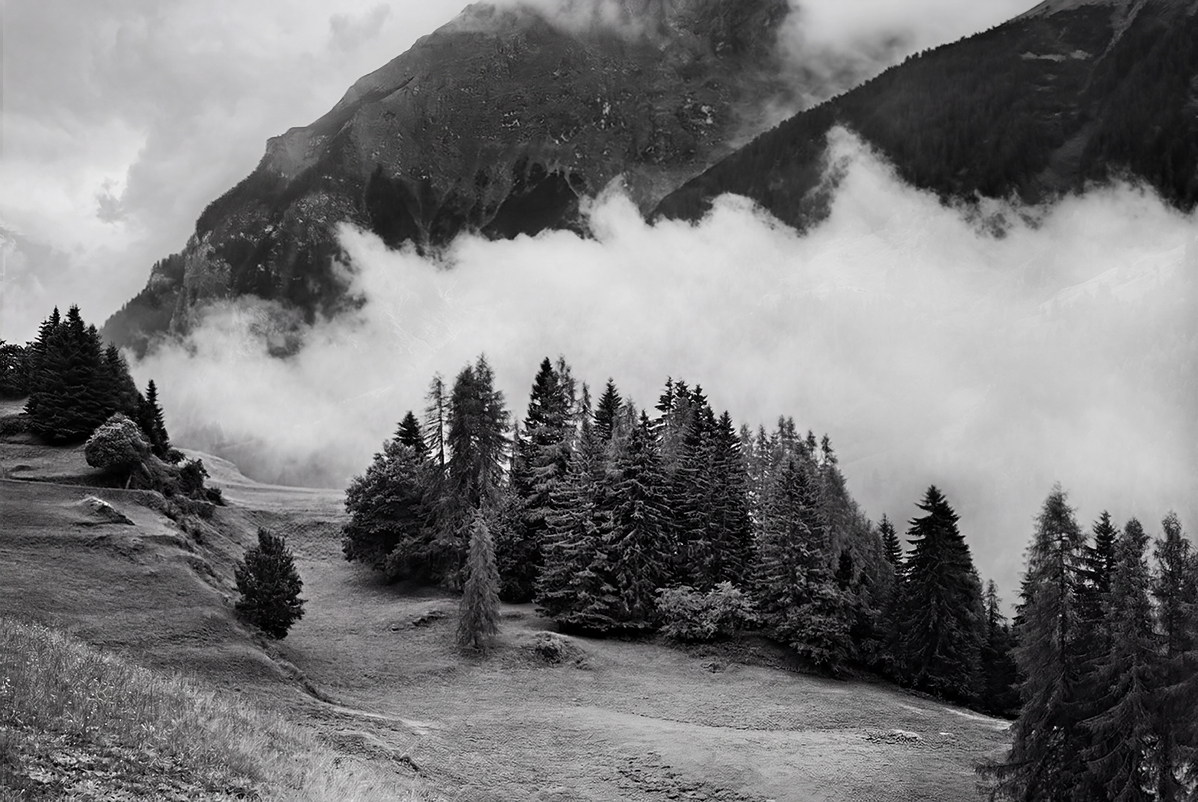
Not what you wanted, but I would not worry about details in the cloud:


Mar 07, 2026 at 10:11 PM
RustyBug
Offline
• • • • • • •
Upload & Sell: On
p.1 #8 · how to expose this photograph


hanay78 wrote:
Thank you a lot for your answers!

@RustyBug@: the rule you make is interesting, dial 1.5 ev less than the highlights. But you see, the cloud is reflecting incident light that hit it from above. A7RII has 13 Ev of dynamic range. The cloud is so burned, that the difference should have been far more than 3 EV in total. 1.5 ev than the highlight very probably would have generated plenty of clipping in the shadows. The surprising thing is: it was a cloudy day. In spite of this, the cloud is tremendously overexpossed

@Shasoc@: about the argument of the
...Show more

I don't think you fully followed what I was trying to say ... that's on my poor explanation, I'll try again.


If you meter (assuming spot meter, weighted center, etc.) using a reflective meter ... the reflective meter is calibrated to an assumed value (hence gray card), and is making the assumption that your subject that you are metering off of is middle gray tonal value, and thus returns a middle gray exposure recommendation. Using a reflective (in camera) meter, it is important to understand how a reflective meter functions ... and thus how it gets "fooled" ... when metering for challenging scenes, etc.

Once you understand how reflective metering works, you can then employ your knowledge to offset how the camera is getting fooled. If you can meter off something that is close (enough) to middle gray (i.e. green grass), that keeps you in the ballpark. If your scene includes different lighting scenarios that warrant you make choices, then you are good to understand which direction you are "drifting" from the calibration / algorithm assumptions.

Back to your scene ...

If you are concerned about the highlights being blown in the clouds, meter the clouds. With a reflective meter, it will give you a value that returns an exposure recommendation to generate a middle gray exposure (i.e. underexposed). Basically, using the premise of the Zone system, you know that you don't want your clouds to be rendered as middle gray (per the reflective meter), so you make the mental adjustment to raise the exposure some amount above middle gray, as the place to land your cloud tonal value.

(imo) Armed with the knowledge that the difference between Key lighting and Shadow lighting (e.g. Sunny 16 vs. Cloudy is about 3 stops), raising the metered value a full three stops puts you very near the luminance value of the light source (reflecting off water vapor). That is "too much" ... so, if we split the difference on that 3 stops, to 1.5 stops or 2 stops, we move from middle gray to closer (yet not all the way) toward the values we want for the clouds, without quite reaching the luminance value of light source (i.e. blown).

Your point about DR ... it's moot ... relative to understanding how to place your exposure where you want it, using a reflective meter. My perspective is that today's ability to lift shadows far exceeds (i.e. 3-5 stops) the difference of being off by 1.5 - 2 stops of capture exposure on the shadow side.

The basic essence of your issue was NOT DR (yes, DR is in play). The basic essence of your issue was your reflective meter got FOOLED to keep you from landing it where you wanted to land it.

Your decision regarding choice of significance for your scene's highlights vs. shadows vs. DR will always be a decision that you can choose either way. BUT ... here's the thing ... if you are getting FOOLED by reflective metering (either direction), you'll have a lifetime of "misses" from what you want it to be.

Land it where you want it ... that's totally your decision, and either is fine. But, you want to know how your tools (i.e. reflective metering) work, so you can work your tools. If your goals for the image were to have the clouds convey the essence of the presence, then losing that could be disappointing.


hanay78 wrote:
I took a series of photographs with the nice cloud in the center. All of them are wrongly exposed

In the field I decided to expose for the rest of the photograph,


Recommendations for deeper studies ... Zone System and Reflective Metering.

My point is that the decision to expose for "the rest of the photograph", means you decided to NOT expose for the clouds.
My perspective is that your understanding of HOW to expose for the clouds, using a REFLECTIVE meter ... that's why you chose your approach that led you to "All of them are wrongly exposed."

If that approach you chose, led you to consistent misses ... maybe, re-consider the approach you chose to NOT use.

HTH


Mar 08, 2026 at 10:22 AM
Shasoc
Offline
• • • • • • •
Upload & Sell: On
p.1 #9 · how to expose this photograph


Imagemaster wrote:
Like Socrate said, you can't get the exposure for the clouds and foreground correct in one shot. Metering mode does not help one iota.

If your shutter speed is high enough to freeze the cloud motion, you take a burst of three exposures using your in-camera exposure bracketing at -1, 0, and +1, or -2, 0, and +2 then stack them in post-processing.

Not what you wanted, but I would not worry about details in the cloud:


Or... you can just fix it in PP.

Socrate


Mar 08, 2026 at 11:10 AM
hanay78
Offline
• • •
Upload & Sell: Off
p.1 #10 · how to expose this photograph


@RustyBug@ Thank you very much for your new response. I did not understood your initial one as you guessed. thanks for the second one. It has been much clarifying. Thanks for sharing your knowledge. Of course i need to modify my approach. it was a complete missing

Than you for the ideas, and the explanation about the reflective meter. I do use it in spot mode. I thing it has relatively small angle, so that your approach can be used efficiently in the field

@Imagemaster & @Camperjim I think the shutter speed was enough to have used bracketing. The point is that I was trying to make a panorama. Thus bracketing was inconvenient, I hope you understand what I mean. Bracketing may have mean to much delay to capture a 3:1 panorama. Anyway, to be able to meter such scenes understanding what i am doing is good thing, to grow as a photographer

@Shasoc@ the feeling of the cloud is pitifully not as I remember it. The place is very special, with inversion the clouds are interesting from this position, where I was standing. the clouds were fantastic, more earial than you depicted it. Also more convex. It is a real pity that my lack of qualification stop me to transform my feelings in an image. Anyway, your post-processing is very impressive and very well done! May I ask you what was your workflow? I very much like to learn to make things like that cleanly

Jorge

RustyBug wrote:
I don't think you fully followed what I was trying to say ... that's on my poor explanation, I'll try again.

If you meter (assuming spot meter, weighted center, etc.) using a reflective meter ... the reflective meter is calibrated to an assumed value (hence gray card), and is making the assumption that your subject that you are metering off of is middle gray tonal value, and thus returns a middle gray exposure recommendation. Using a reflective (in camera) meter, it is important to understand how a reflective meter functions ... and thus how it gets "fooled" ... when metering
...Show more


Mar 08, 2026 at 05:17 PM


Search in Used Dept. 

RustyBug
Offline
• • • • • • •
Upload & Sell: On
p.1 #11 · how to expose this photograph


hanay78 wrote:
@RustyBug@@ Thank you very much for your new response. I did not understood your initial one as you guessed. thanks for the second one. It has been much clarifying. Thanks for sharing your knowledge. Of course i need to modify my approach. it was a complete missing

Than you for the ideas, and the explanation about the reflective meter. I do use it in spot mode. I thing it has relatively small angle, so that your approach can be used efficiently in the field

@Imagemaster@ & @Camperjim@ I think the shutter speed was enough to have used bracketing. The point
...Show more


Here's an exercise I did a VERY long time ago (1980's) ...

Get three pieces of construction paper (or other similar) ... one white, one gray, one black.

Now, in the same lighting setup, use your reflective spot meter to take three different pictures (one of each paper), and allow the camera to determine the exposure. No EC, no manual adjustments ... just what the camera wants to do. Be sure to frame it "tight" so you are photographing the entire frame as the uniform tonal value.

Compare the different exposure values that the camera suggested.
Compare the images.

What you should find, is that the camera will generate three different exposure recommendations.
And, it should yield three GRAY images, that are essentially indistinguishable from one another.

I tested this using slide film long ago. Back in the day when you dropped of film at a lab and had to wait to go pick it up the next day or so. And, yes ... all three slides were gray, indistinguishable from one another.

This is the "test" that correlates to the understanding of what the REFLECTIVE meter is trying to do. It is assuming (i.e. calibrated to yield) that what ever you are pointing it at ... is something that you WANT to be gray.

Point it at dark things, and it increases exposure ... "adds light" to make >>> dark = gray (and thus blows out highlights).
Point it at bright things, and it decreases exposoure ... "subtracts light" to make >>> bright = gray (and thus crushes shadows).

That is the bugaboo about reflective metering that gets things "fooled".

As an "extension" test ... place all three papers in your scened. Take three different images of the three papers. Each time, metering off of the different paper. This time, instead of seeing them be equal ... you'll see that whichever one you metered off of ... it will be the gray one. The other two will either be brighter or darker than expected. Of course, when you meter the gray one, expecting it to be gray, it will be the closest to being gray and the other two remaining closest to how you would expect them to be.


Of course, we also have center weighted, average, matrix, etc. for metering modes. So, even with those different metering modes (and the ability to use EC with them), it still behooves us to understand the essence of how a REFLECTIVE meter works.

In that regard ... the camera / meter might get fooled, but we can recognize the scenarios that might fool it from what we want, and then take control ourselves to land things where we want them.


I encourage you to run your own tests / experiments ... they can be very helpful in understanding it better. The good news, is once it "clicks" for you, you'll rarely get fooled again.

To a certain degree, this understanding of how reflective metering works is a "lost art" ... given the preponderance of availability for folks to use their histogram, bracketing, matrix metering, etc. But, if you are going to wander in the land of "tricky lighting" in the natural world, it's a skill set worth understanding / developing (imo).

HTH


Mar 08, 2026 at 10:09 PM
Camperjim
Offline
• • • • •
Upload & Sell: On
p.1 #12 · how to expose this photograph


hanay78 wrote:
@Imagemaster@ & @Camperjim@ I think the shutter speed was enough to have used bracketing. The point is that I was trying to make a panorama. Thus bracketing was inconvenient, I hope you understand what I mean. Bracketing may have mean to much delay to capture a 3:1 panorama. Anyway, to be able to meter such scenes understanding what i am doing is good thing, to grow as a photographer


Do I understand this is a panorama stitched from 3 different captures? If so, bracketing should still work well. I remember doing this with my Canon T3i many years ago. I shot wide with the camera held vertical and stitched several panorama shots each with exposure bracketing. That old T3i only did 3 shots when exposure bracketing but that still worked well with almost no delay in capturing.

If the dynamic range needed is beyond the range of the camera, there is nothing more to understand. Just bracket and merge later.


Mar 09, 2026 at 06:43 AM
hanay78
Offline
• • •
Upload & Sell: Off
p.1 #13 · how to expose this photograph


@Camperjim@ thanks for answering. The image i show is just one shot. I wanted to do a panorama, but i did not go further because of the lack of detail of the cloud. If I understood well, what you suggest is that one stillhave time to make the bracketing of 3 shots, to fisnish with say 15 images, and that the cloud may have keep its shape?


Camperjim wrote:
Do I understand this is a panorama stitched from 3 different captures? If so, bracketing should still work well. I remember doing this with my Canon T3i many years ago. I shot wide with the camera held vertical and stitched several panorama shots each with exposure bracketing. That old T3i only did 3 shots when exposure bracketing but that still worked well with almost no delay in capturing.

If the dynamic range needed is beyond the range of the camera, there is nothing more to understand. Just bracket and merge later.


Mar 09, 2026 at 07:08 AM
Camperjim
Offline
• • • • •
Upload & Sell: On
p.1 #14 · how to expose this photograph


hanay78 wrote:
@Camperjim@@ thanks for answering. The image i show is just one shot. I wanted to do a panorama, but i did not go further because of the lack of detail of the cloud. If I understood well, what you suggest is that one stillhave time to make the bracketing of 3 shots, to fisnish with say 15 images, and that the cloud may have keep its shape?


I have no idea why you wanted to do a panorama stitch. Was there more to the right or left you wanted to include?

In any case it takes a couple seconds to move the camera for each frame needed to stitch a panorama. The time needed for exposure bracketing is negligible. You should only need 3 to at most 5 or so bracketed shots for each pano frame. That is a small fraction of a second for any modern camera.


Mar 09, 2026 at 08:19 AM
Shasoc
Offline
• • • • • • •
Upload & Sell: On
p.1 #15 · how to expose this photograph


Yeah, I wasn't there and I can't tell what you saw. Mine was just a suggestion saying that, once you have taken the shot and have lost detail in the clouds, you can give some shape and texture to those clouds in PP.

That can be done using a textured layer that you can blend in the blown clouds using masks and opacity to get the image closer to what you saw and want to show.
However, that would be your last resource, as you should always aim to get it right in camera.

Socrate


@Shasoc@ the feeling of the cloud is pitifully not as I remember it. The place is very special, with inversion the clouds are interesting from this position, where I was standing. the clouds were fantastic, more earial than you depicted it. Also more convex. It is a real pity that my lack of qualification stop me to transform my feelings in an image. Anyway, your post-processing is very impressive and very well done! May I ask you what was your workflow? I very much like to learn to make things like that cleanly

Jorge[quote/]


Mar 09, 2026 at 12:38 PM
Imagemaster
Offline
• • • • • • •
Upload & Sell: On
p.1 #16 · how to expose this photograph


It is not rocket science.

If your subject is sitting still or moving slowly enough you use exposure bracketing.

If your subject is moving you bring up the shadows and pull down the highlights as much as needed in post-processing.

You don't need any meter other than the one in your camera, and if necessary you either under-expose or over-expose depending if you prefer retaining more highlights or more shadows.

There are certainly more post-processing methods than what I use and others can certainly recover more than I can.

In the meantime I am getting out and enjoying taking photos without worrying about dynamic range. I concentrate more on trying to get dynamic images.

If you are complicating things more by shooting panoramas, you better use manual exposure.


Mar 10, 2026 at 01:20 AM
RustyBug
Offline
• • • • • • •
Upload & Sell: On
p.1 #17 · how to expose this photograph


+1 with Tony ... Pano = manual exposure.

You don't want to try and blend / overlap varying exposures ... as you aim your camera reflective meter at different objects ... and get different exposure values, based on where you point to build your frame.

If nothing else, bracket and chimp to read your histo. Pick the exposure you like best for your image goals. Then, set manual and stitch.

Whether you chimp or use a spot meter ... different tools of approach, but also know that the chimp will be showing your jpg profile values, not your raw values on many cameras. So that may warrant mental compensation, too.


Mar 10, 2026 at 11:53 AM
Camperjim
Offline
• • • • •
Upload & Sell: On
p.1 #18 · how to expose this photograph


RustyBug wrote:
+1 with Tony ... Pano = manual exposure.

You don't want to try and blend / overlap varying exposures ... as you aim your camera reflective meter at different objects ... and get different exposure values, based on where you point to build your frame.

If nothing else, bracket and chimp to read your histo. Pick the exposure you like best for your image goals. Then, set manual and stitch.

Whether you chimp or use a spot meter ... different tools of approach, but also know that the chimp will be showing your jpg profile values, not your raw values on many cameras.
...Show more

I have never had any issue with the "varying exposures" except when I tried to use a polarizing filter. Any decent software should blend the exposures to give smooth transitions. I suppose you could also do a manual adjustment before stitching but I never found that necessary.

Bracket and stitch to achieve a desired result only works if the dynamic range allows it. When it is severe as in this example, bracketing may be necessary. Trying to bracket, chimp, decide what is desired and then shoot manually takes some time and experience and again you are forever restricted by that decision. Bracket all the shots to be stitched and you will have endless choices for post processing.

It has been years since I did any pano bracketing but again decent software should be able to produce a great image. I recently downloaded Kolor Auto Pano Gigo but have yet to try it. Regardless of the software, there are two choices for processing: HDR first and then stitch or stitch each bracket first and then HDR. I have used both successfully in the past but again that was quite a while ago.


Mar 10, 2026 at 07:08 PM
RustyBug
Offline
• • • • • • •
Upload & Sell: On
p.1 #19 · how to expose this photograph


Camperjim wrote:
I have never had any issue with the "varying exposures" except when I tried to use a polarizing filter. Any decent software should blend the exposures to give smooth transitions. I suppose you could also do a manual adjustment before stitching but I never found that necessary.

Bracket and stitch to achieve a desired result only works if the dynamic range allows it. When it is severe as in this example, bracketing may be necessary. Trying to bracket, chimp, decide what is desired and then shoot manually takes some time and experience and again you are forever restricted by that
...Show more

Understood.


Just that if I'm wanting to have the OP's clouds be my primary consideration for exposure, I'm gonna figure that out first (meter / bracket / chimp). Then, whatever exposure that is ... I'll set manual and stitch from there. Having all frames of the same exposure makes post-work easier, imo.

That said, I've also gone the bracket-it-all route, too. You can get there either way.


Mar 11, 2026 at 07:40 AM
Imagemaster
Offline
• • • • • • •
Upload & Sell: On
p.1 #20 · how to expose this photograph


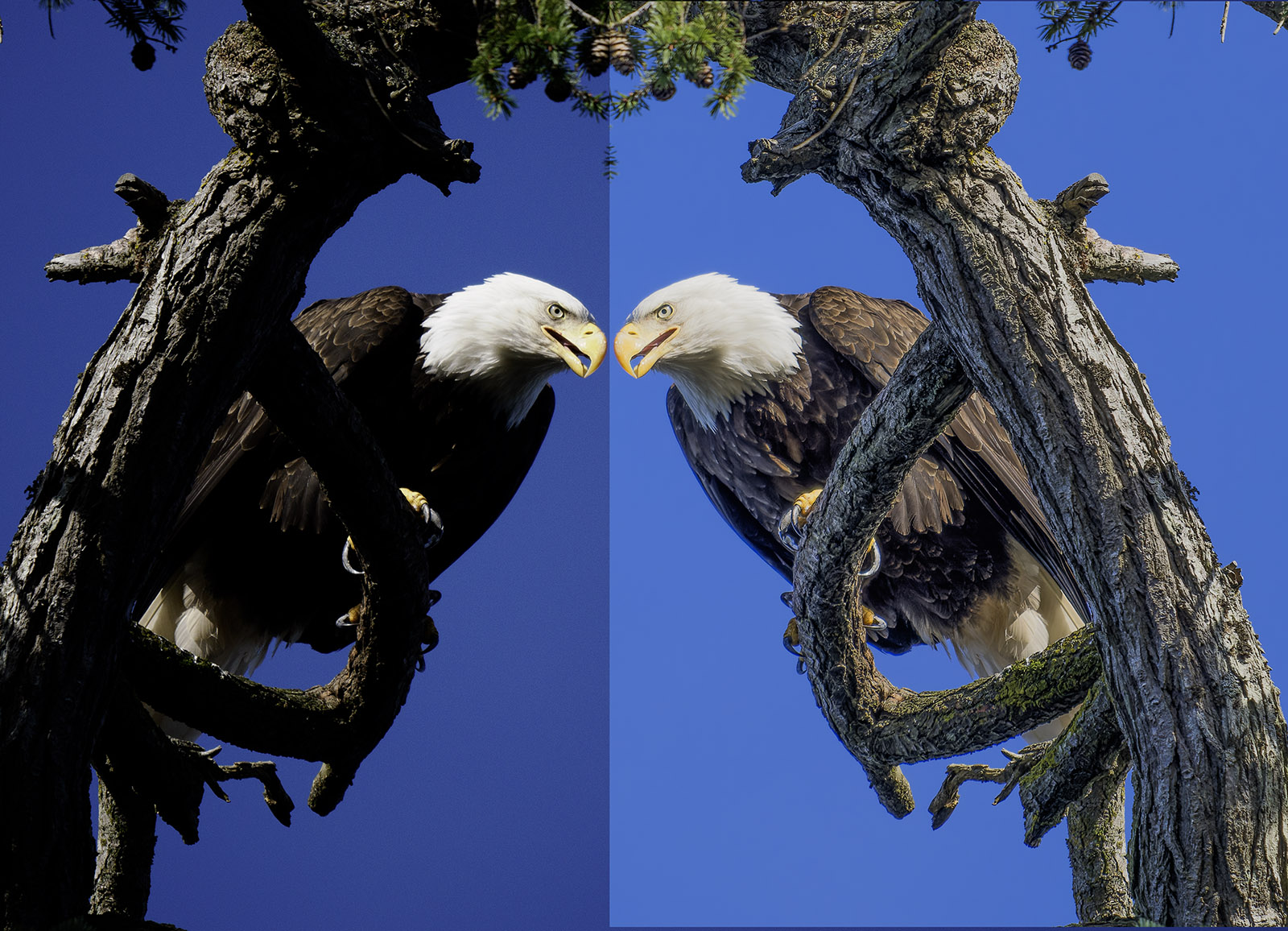
?si=Mn_4Gc9AlG6yoGta


Mar 12, 2026 at 02:08 PM
       2       end


FM Forums | Photo Critique | Join Upload & Sell

       2       end


Welcome back
Log in to your account