Thinking about subscribing to Upload & Sell to occasionally post photos in the Micro Four Thirds Forum. Can anyone point me to a link that covers recommended FM dimensions and other how-to essentials? Thanks.
Don't have size requirements for you, but do have another option for posting that might work for you. A free Flickr account will let you save up to 1000 images on their site, then any of them can be easily uploaded to FM or other photography forums. Only caveat with that approach is that the file will be sent at no larger than 1024 pixels on the long side, per Flickr's rule about exporting an image.
Thank you, Fred. Not ruling it out, but if there's something more direct and simpler than opening another site (when I already have a website), I'd probably prefer it.
Is it odd that photo-posting instructions aren't readily available on FM? Maybe so many folks go the Flickr route that no other instruction is necessary?
As far as size it concerned, it's kinda up to you I suppose. I've seen some images that are so large I can not see them in their entirety without scrolling. As a general rule I think that 1024 on the long side is more than acceptable on most screens. I used to use that size all the time. Lately, however, I have been posting at 2048 on the long side for. That size will fill the screen quite nicely for a horizontal image but one will need to scroll just a little to see an entire vertical image of that dimension.
If you want to participate in either the Weekly or Monthly assignment threads you MUST subscribe to the Upload & Sell thingy. It also requires a maximum of 800 on the long side.
Are you sufficiently confused?
Feel free to attempt a test post here in this thread.
Thank you, Larry. I've also seen posts too large for my (large) desktop monitor, and definitely want to avoid that if I ever get to uploading. I may start with Tony's suggestion, but will keep your clever option in mind as another possibility.
Tony, I hadn't thought about it in those terms. Should have. Makes total sense. And anything that works for you is likely to prove more than good enough for me.
Jack Kelley wrote:
Tony, I hadn't thought about it in those terms. Should have. Makes total sense. And anything that works for you is likely to prove more than good enough for me.
Members have inquired why I post my images at 800-1000 pixels. To small. But I like seeing the entire image on the screen. Be it my wife's 16 macbook pro or my 27&30" NEC calibrated monitors.
Yes bigger is better but I like seeing the entire image on the screen.
I know post at 1250...best "play" with the size that suits you.
The above answers should get you "there".
Dan
Dan, I always see Tony's entire images onscreen (and have for many years), whether viewing on a 27-inch desktop monitor, a 13.6-inch laptop, or an iPhone. Do you not?
Jack Kelley wrote:
Dan, I always see Tony's entire images onscreen (and have for many years), whether viewing on a 27-inch desktop monitor, a 13.6-inch laptop, or an iPhone. Do you not?
Regards,
-- Jack
No I do not on my wife's 16" mac Jack. About 90% shows but I do have to scroll a tad to see the full image.
My images posted on the "C,Street.." forum are sized at 1225pixels long side..They are fine on my bigger monitors but I do have to scroll a wee bit on this mac to see full view.
Dan
Danpbphoto wrote:
No I do not on my wife's 16" mac Jack. About 90% shows but I do have to scroll a tad to see the full image.
My images posted on the "C,Street.." forum are sized at 1225pixels long side..They are fine on my bigger monitors but I do have to scroll a wee bit on this mac to see full view.
Dan
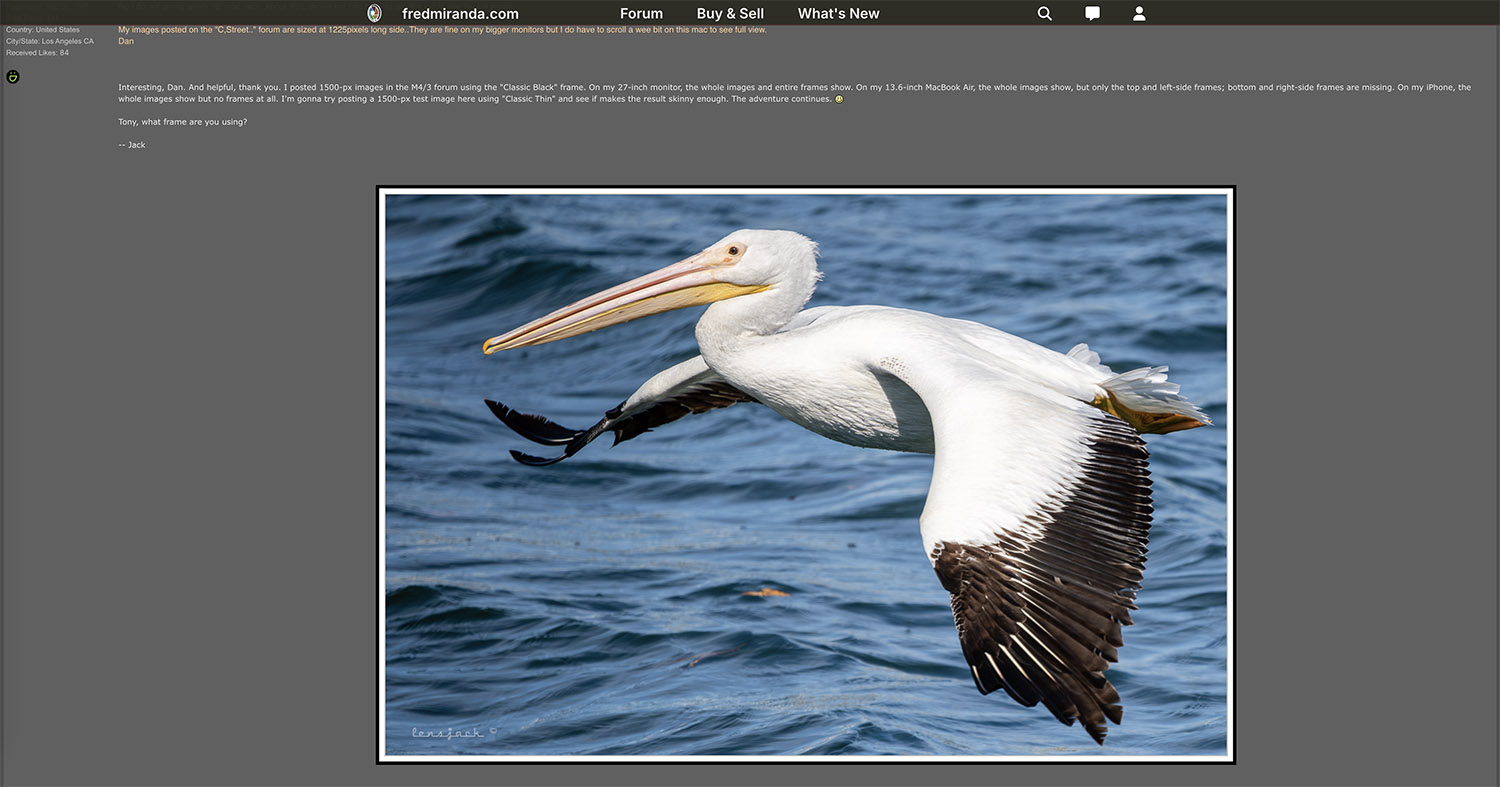
Interesting, Dan. And helpful, thank you. I posted 1500-px images in the M4/3 forum using the "Classic Black" frame. On my 27-inch monitor, the whole images and entire frames show. On my 13.6-inch MacBook Air, the whole images show, but only the top and left-side frames; bottom and right-side frames are missing. On my iPhone, the whole images show but no frames at all. I'm gonna try posting a 1500-px test image here using "Classic Thin" and see if makes the result skinny enough. The adventure continues.
Exact same outcome - Everything visible scroll-free on the desktop, whole images but partial frames on the laptop and no frames on the iPhone. So here's a 1200px try:
Same. I must've offended Fred in a past life. I'll revisit this tomorrow, grateful for further thoughts. Dial down JPEG quality, e.g.? Take up curling?
Jack Kelley wrote:
Tony, what frame are you using?
-- Jack
Yo Jack. Your 1500px images displays just fine on my 27" iMac.
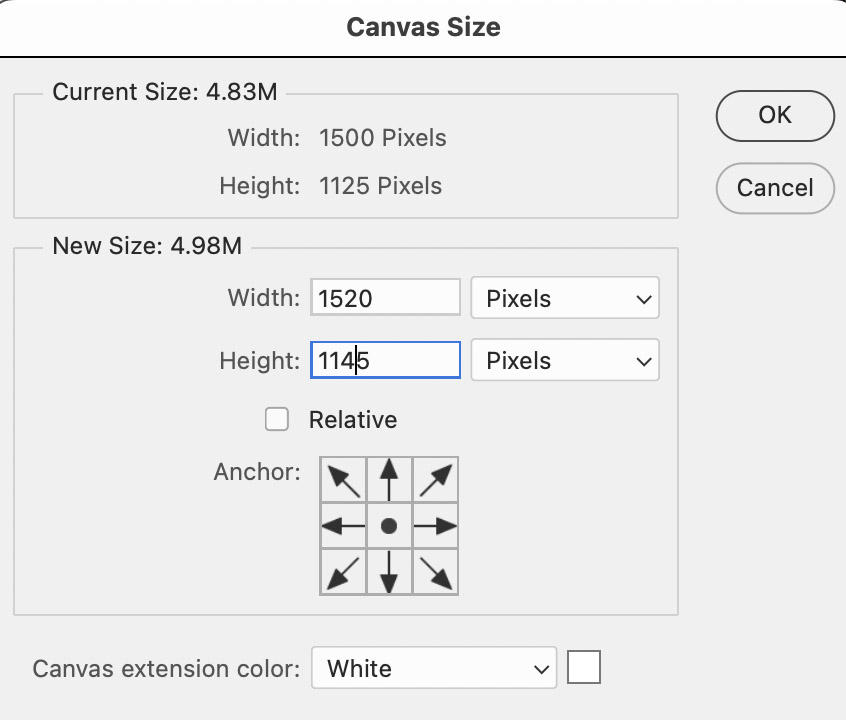
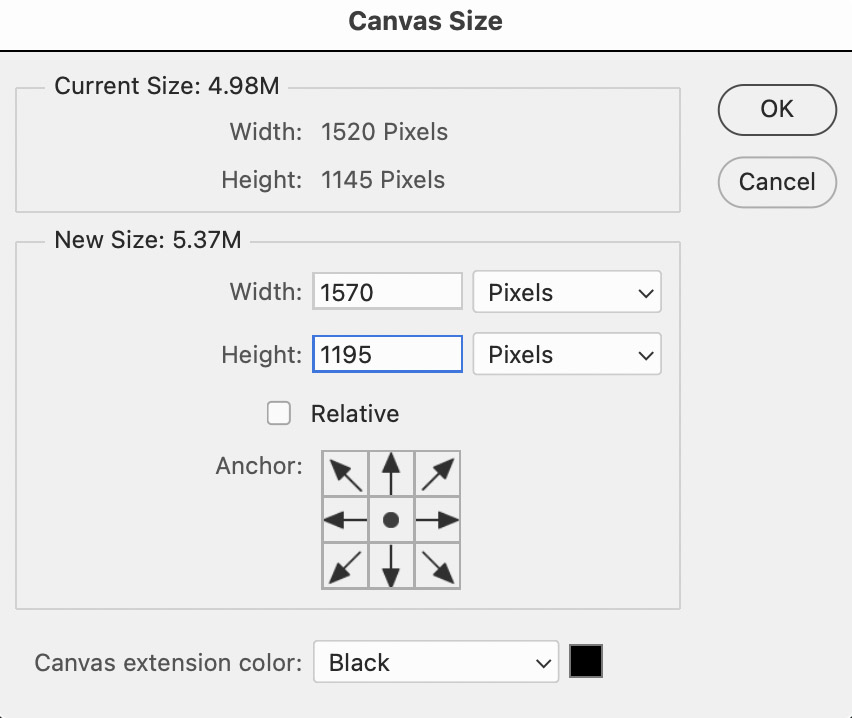
For the simple frame below I first increase the Canvas Size by 20px in White, then increase it by 50px in Black. I should have an Action made to do that in one step, but you know how it goes.
Jack Kelley wrote:
Exact same outcome - Everything visible scroll-free on the desktop, whole images but partial frames on the laptop and no frames on the iPhone. So here's a 1200px try:
Jack, this shows fine less the frame. The image you posted before that doesNOT fill the screen even with the frame removed.
I get an error message from "FM" stating file size is too large..1.5mb..
Imagemaster wrote:
Yo Jack. Your 1500px images displays just fine on my 27" iMac.
For the simple frame below I first increase the Canvas Size by 20px in White, then increase it by 50px in Black. I should have an Action made to do that in one step, but you know how it goes.
Tony, your image does not fit on the 16" macbook laptop screen.
Imagemaster wrote:
Strange Dan, because it fits with plenty of room to spare on my 13" Mac Airbook.
Will it fit if you hold down Command key and press the ' - ' key?
Thanks Tony! I have to hit that key('-') a few times to reduce image to fit on screen.
Not a biggie guyz..I only use my wife's mac in the morning...all editing and posting to FM done on a 30"' Viewing also..my "man cave".
Thanks both of you!
Dan
Tony and Dan, thank you for your patience. I am - as the late Bobby Bowden used to say - "bumfuzzled" by the disparities in what we three are seeing. I see Tony's posts fully-framed on desktop, laptop, and iPhone. I see Dan's posts (unframed by choice, right?) with no scrolling required on all three devices. Dan, any chance you having to scroll Tony's posts could be because the MacBook isn't set at max resolution?
Tony, thanks for providing screenshots of your framing method. Before trying it, I just want to take a stab at reducing jpeg quality on my uploads. Dan saying he got a 1.5MB "file too large" reading on one led me to check pre-upload size. The first test at 1500px, jpeg quality 100, is 1MB. Next one at 1200px, jpeg quality 100, is 692kb. This one at 1200px, jpeg quality 85, is 483kb. Dunno how much the built-in FM frames boost size, but wondering if uploading a smaller file will make a difference.