Most landscapes are not at 5 figure ISOs, so NR is not as challenging. At ~16,000+ FF/FX (or lower with some croppers) you have to decide which NR tools and models are best for the situation. That varies quite a bit depending on the image capture and subject matter, and continues to change over time.
I'm not a photographer, so fortunately not trapped within the LR database workflows.
I mostly use NR on landscape and wildlife photos, so I can't comment much on face recovery.
For raw noise reduction, I usually stick to LR now. Their AI noise reduction has gotten quite good. If I am really trying to push a noisy raw file, I will go into DXO Photo Lab.
Often, though, for landscapes I merge multiple raw files, and up to doing NR towards the end of my workflow, which seems to produce the best results. This poses an issue because I need to apply NR on a tif file, and LR and DXO AI noise recuction does not work on a tif file. And now comes my mixed feelings on Topaz. The defaults on Topaz AI noise reduction were always a bit heavy handed and I found you needed to tweak the settings and sometimes use a different model, such as using strong noise to preserve more fine details.
My favorite was DeNoise AI and I wish they would bring it back. I tried 2 versions of Photo AI, and while I was more times than not happy with the final results, I found it a frustrating experience to figure out how to get the best results. There was a lot of trial and error, and still some annoying surprises. I have found the new Topaz Photo to be an overall better experience than Phoot AI. But you definitely need to play around with the settings. Usually, it defaults to applying a good amount of sharpening, which is what I have found causes the most artifacts. So I either turn off sharpening completely or dial it back quite a bit. It's also important that you preview various areas of your photo to make sure you're happy with the seetings for example, balancing artifacts around tree branches vs noise in the sky.
A few months ago, I got a recommendation to try on1 nonoise ai for tif file denosing. It's often on sale for $50, so there is not much to lose if you don't like it. I just haven't had the time to give it a fair try, so I have stuck with Topaz for tif files, since I have a fairly good idea of what to expect for good and bad at this point.
Side note, but if you have the Nik Colection Nik Define is still a pretty useful noise reduction program. AI noise reduction has surpassed it, but for years, it was much better than the standard noise reduction in LR, I used it quite heavily. Just make sure you sample the correct areas of your photo and use the control points to keep detials were you want them if it removes too many details.
N4865G wrote:
Good day,
Would you share your opinions about the best noise reduction software available at the moment?
I have been using Topaz Photo AI for a few years now with rather positive results, but their face correction/recovery surely could be better.
What do you use, and what are your results? I would be willing to explore other options.
My main use is the noise correction for sports photography with ISO range of 4000-6400.
I use Capture One for my post-process.
Thanks!
Dom
Like you, I use Capture One as the main post-processing application. I adopted Capture One relatively recently, after using DxO Photolab for years. I didn't switch from PL to C1, but adopted a mixed process. When efficient denoising is needed, I convert the raw files to DNG in Photolab 9 with DeepPRIME XD/XD2s denoising method (with all default settings, together with the default DxO lens corrections), then continue working on the DNG in C1. This approach generally works quite well. Only one thing that I noticed and pay attention to is the WB. I tend to start corrections in C1 by auto adjusting the levels, followed by manual adjustments in the WB, then everything else.
DxO has a dedicated PureRAW 5 application for denoising and converting raw to DNG. However, I prefer using Photolab 9 (along with FilmPack) because there are some tools that I find useful. Thus, my mixed process typically involves exporting 16 bit uncompressed tiff files from Capture One, that I continue working on in DxO PL 9. The latter involves minor tweaks, like adding a frame, and occasional additional (to what was done in Capture One) masking, as the masking in Photolab 9 is now more precise and and more convenient (in my experience) than the masking in Capture One. The final jpeg is exported from Photolab.
You can download Photlab 9 or PureRAW and test at no charge for 30 days to see whether you should like working with the DNG files in Capture One. To generate a DNG in Photolab, open the raw file, click on DxO Optical Corrections only in Preset Editor, then select denoising with DeepPRIME XD/XD2s, and export as DNG with denoise and optical corrections only.
EB-1 wrote:
Most landscapes are not at 5 figure ISOs, so NR is not as challenging. At ~16,000+ FF/FX (or lower with some croppers) you have to decide which NR tools and models are best for the situation. That varies quite a bit depending on the image capture and subject matter, and continues to change over time.
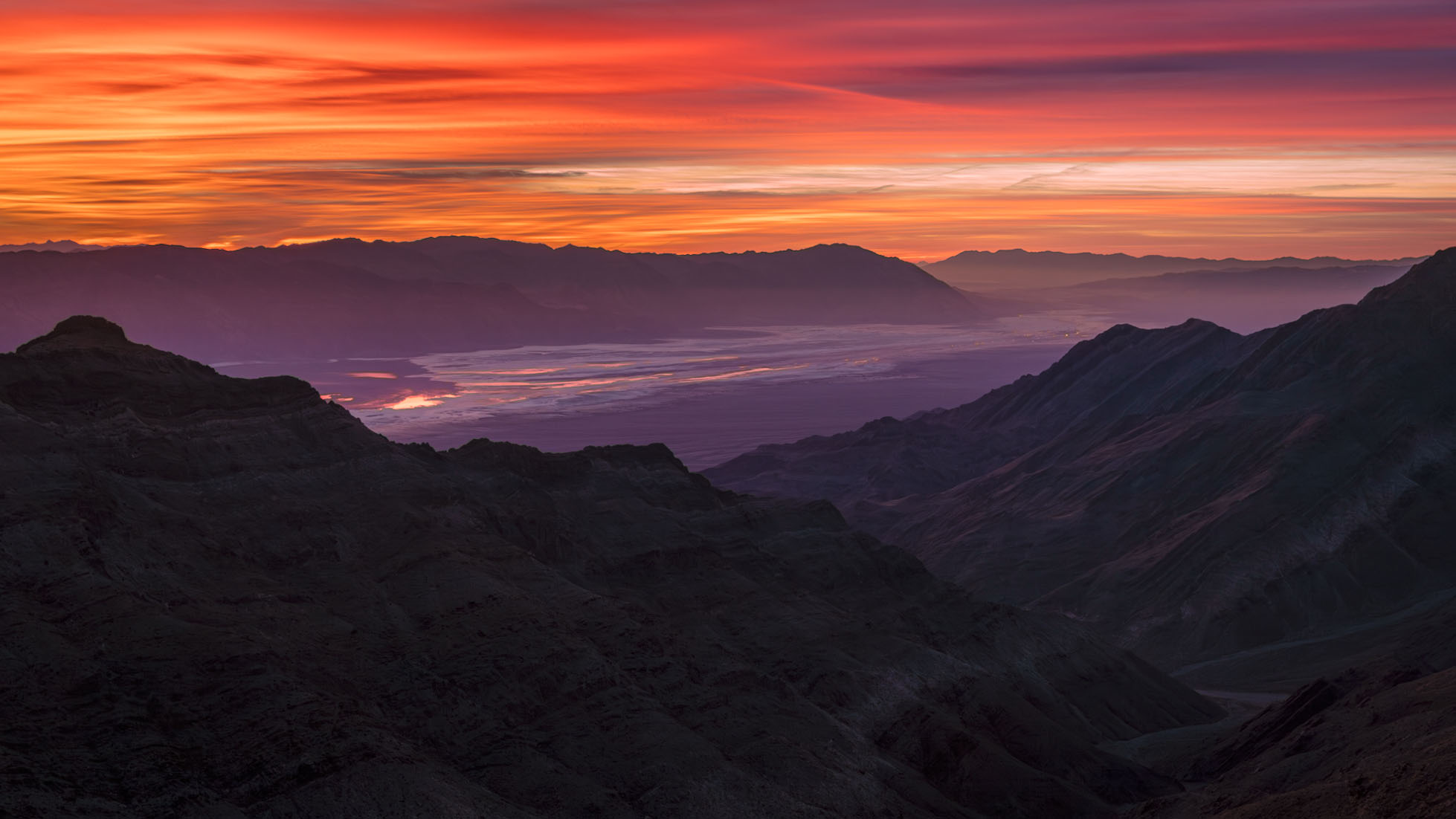
It isn't quite that simple. As a, in part, landscape photographer I can tell you that we often push at the edges of dynamic range, even if we tend to shoot at lower ISOs when possible. I'll give you an example in which I relied pretty heavily on Adobe's AI Denoise. Here is the completed photograph, at the end of a workflow based on ACR and PS:
This was a very challenging photograph. (The location is a high ridge in the Panamint Range west of Death Valley, looking southeast across the valley before sunrise.) The biggest challenge was the extreme dynamic range of the scene, exacerbated by the very hot red channel in the intensely colored clouds. Not certain if I could work with a single exposure, I bracketed the scene at 1-stop intervals over a range of perhaps 6 stops or so. However, it turned out that I was able to work with a single exposure.
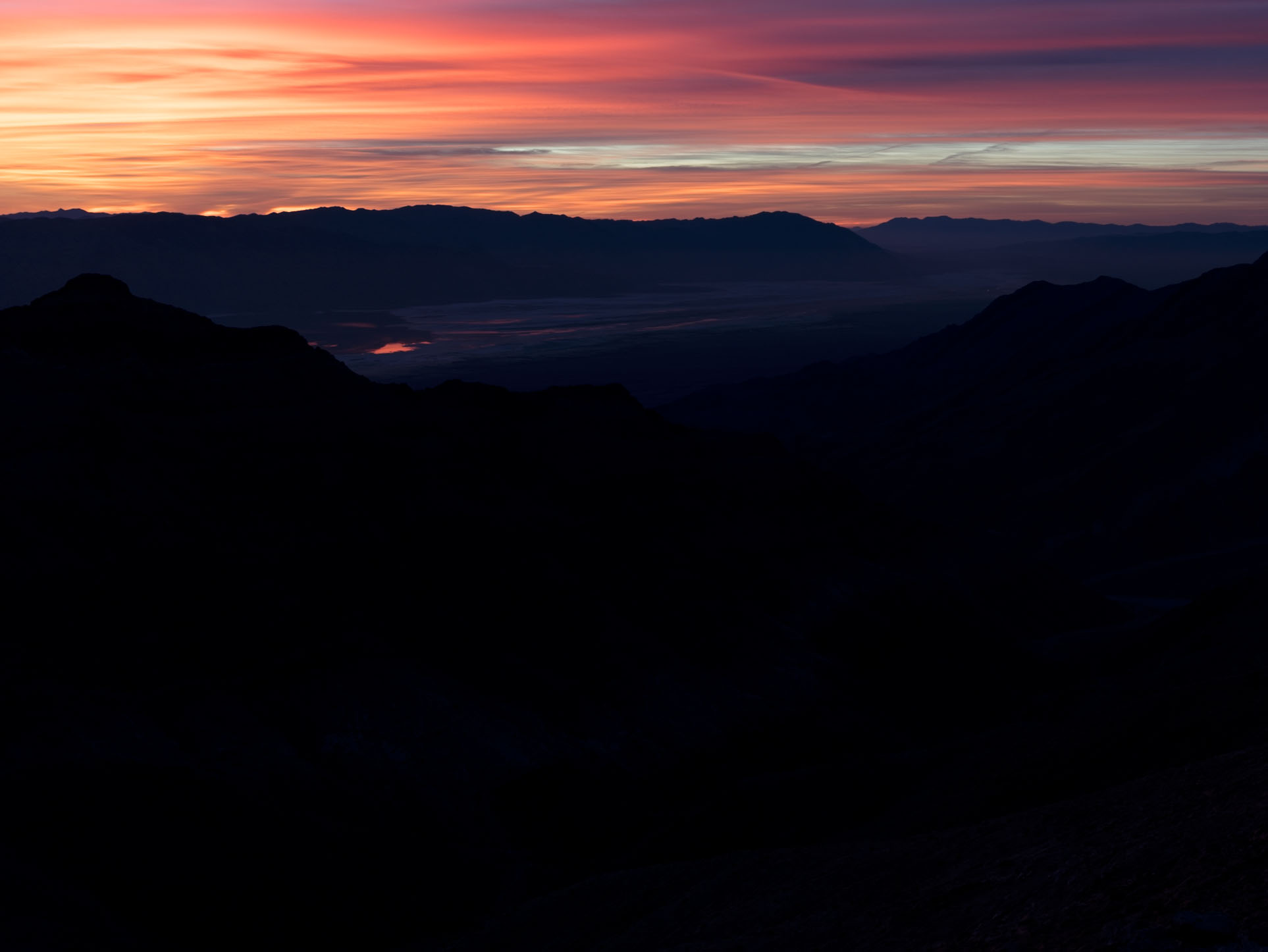
The intent in that exposure was to protect the highlights in the brighter and most intensely colorful areas of the clouds at upper left. That meant severely "underexposing" (though I'd call it correctly exposing!) the scene to produce the following raw file.
Here the highlights are still a bit too hot, but the shadows are so dark that there is almost no visible detail.
Working entirely in ACR — and making extensive use of its sophisticated masking features — I suppressed those highlights a bit more and radically brightened the non-sky portions of the image, in particular raising the levels in the foreground mountains significantly. That gave me the following in ACR:
(This file was then imported into Photoshop as a smart layer so that I could continue to edit it non-destructively in PS and ACR. The 16:9 aspect ratio crop was for aesthetics/compositional reasons.)
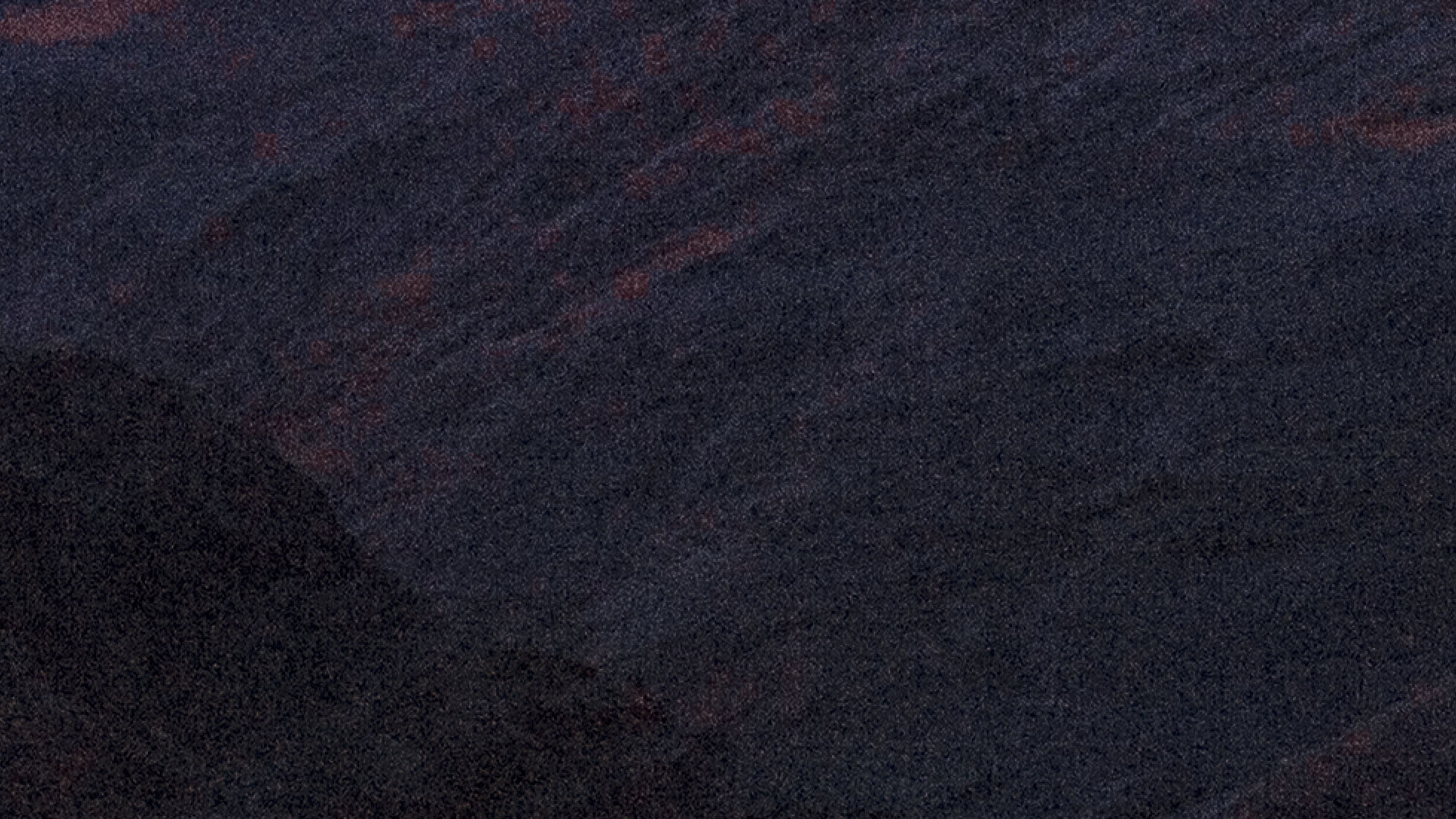
As expected, raising those shadows so radically revealed a whole lot of noise. Here's a 200% crop of a section of the foreground mountains before NR was applied.
In the past, I would have tried to use the traditional NR tools in ACR and PS to deal with this noise, and I could have made it work well enough in a print, but it would not have been ideal. It likely would have relied on creating separate masks for parts of the image to apply NR selectively — the sky, the far mountains and valley, the slightly less dark mountains at lower right, and the very dark mountains at bottom left.
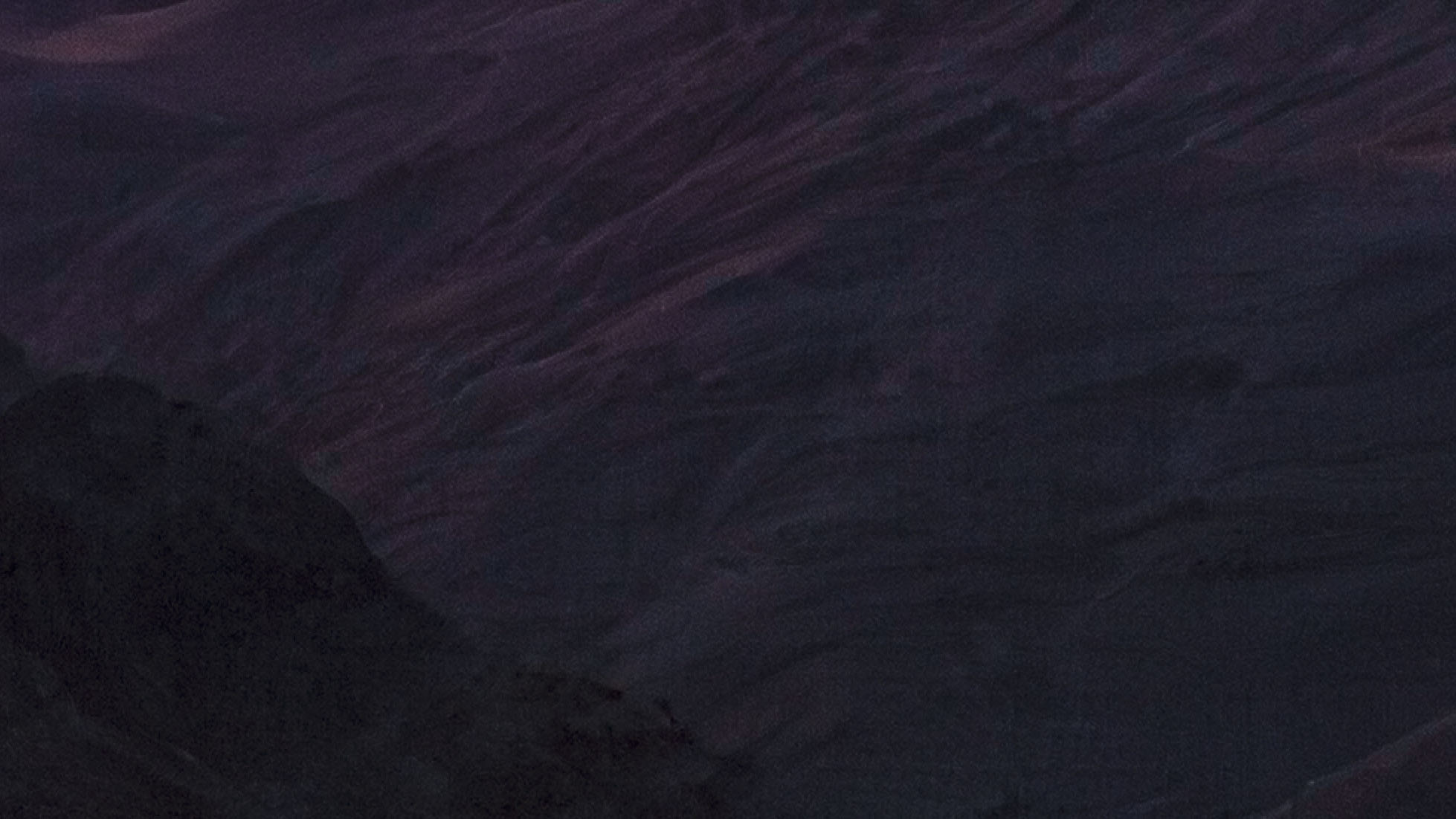
Instead I simply clicked the apply AI Denoise button in ACR and let it do its thing, then set the level to 50%. Here's the result from almost the same section of the raw file, also at 200% magnification.
I have other examples that are not landscapes, that use ISOs as high as 12800 on a APS-C Fujifilm system that I use for street photograph.
Stefan Official wrote:
Topaz used to be very strong when it came to noise reduction, but Lightroom has clearly surpassed it by a wide margin. Today, DxO and Lightroom are the technological leaders in this field: sometimes DxO delivers a few percent better results, sometimes Lightroom does. I no longer use Topaz for noise reduction at all, because it has fallen behind in every respect and hasn’t developed nearly as well as its competitors.
The key reason why I now do all my noise reduction exclusively in Lightroom is the workflow: Lightroom works completely non-destructively. I can adjust or undo every change at any time. If I later decide that I want a bit more or a bit less noise reduction – or even want to disable it entirely – Lightroom makes that possible without any limitations.
If I were to denoise my RAW files in an external application beforehand, the result would be baked into a TIFF. That means leaving the RAW level entirely. The file becomes larger, less flexible, and all previous processing steps are permanently embedded. With Lightroom’s internal tools, however, I stay fully on the RAW level – nothing is permanently baked in.
Here’s an example:
You denoise an image in DxO because it happens to perform maybe 5% better on that specific photo. Later, you realize the noise reduction was actually a bit too strong. In Lightroom, I would simply move the slider and fix it. But with a TIFF generated externally, that’s no longer possible because the changes are irreversibly written into the file. The moment you leave the RAW layer, the limitations start piling up.
Or you end up with a TIFF where parts of the processing are already irreversibly embedded – and just 30 minutes later in your editing workflow you realize it was too much. That will never happen to me in Lightroom: I can adjust any parameter at any time, and the final image will be perfectly tuned.
This is why slightly better noise-reduction results are completely irrelevant if they come at the cost of flexibility. A small advantage in the beginning becomes a major disadvantage later.
I am deliberately saying TIFF here, because even though some tools and plugins can output DNG, the file has already been demosaiced – it’s no longer a true RAW file.
This is why I keep everything inside Lightroom. Since its AI noise reduction has become nearly state-of-the-art, there is no reason to leave Lightroom for this task. The disadvantages and limitations of external software are simply too great – not to mention the hassle of managing additional files.
And when editing, I also love using Lightroom’s virtual copies – a brilliant feature for flexible workflows....Show more →
Agree 100%. I have both Dxo and Lightroom and I use Lightroom 95% of the time because it’s sooooo good.
mudlake wrote:
Agree 100%. I have both Dxo and Lightroom and I use Lightroom 95% of the time because it’s sooooo good.
Hey mudlake, I tried reaching out to you via PM but my account doesn't have enough posts / activity, so I can't PM anyone. Is there any other way I could message you directly?
I also simply use the AI noise reduction of Lightroom / Camera RAW (in my case Camera RAW). In most cases setting it to 20-25 is plenty enough to have really good detail (I shoot with an A7RV) and minimal noise left (it doesn't bother me at all if there is a little noise left). I don't see how using another program could improve that in a meaningful way.
I'll just chime in here... I had the full Topaz suite of individual apps, until they pulled the rug out from under those then talked me into Photo AI, and it was never as good as the individual apps. Then Topaz went subscription and I said phooey to that. Fool me once...
In the meantime, I switched to the minimum Adobe photographer's package, I don't need online storage. The NR built into ACR is what I mainly use now and it is excellent.
FWIW, my method with ACR (or any NR app really) to avoid the plastic look is to zoom to 200% in the shadowy or worst grainy area's apply NR up to the point where I can just still see some film like grain but detail isn't lost. Zoom out to 100% and it usually looks great with just a hair of texture, then zoom out to fit-to-screen and it looks perfect (to me) without the plastic look and no objectionable grain in sight. To each his own but works for me.


 Unfortunately the site won't let me reply to you.