EB-1 wrote:
Most landscapes are not at 5 figure ISOs, so NR is not as challenging. At ~16,000+ FF/FX (or lower with some croppers) you have to decide which NR tools and models are best for the situation. That varies quite a bit depending on the image capture and subject matter, and continues to change over time.
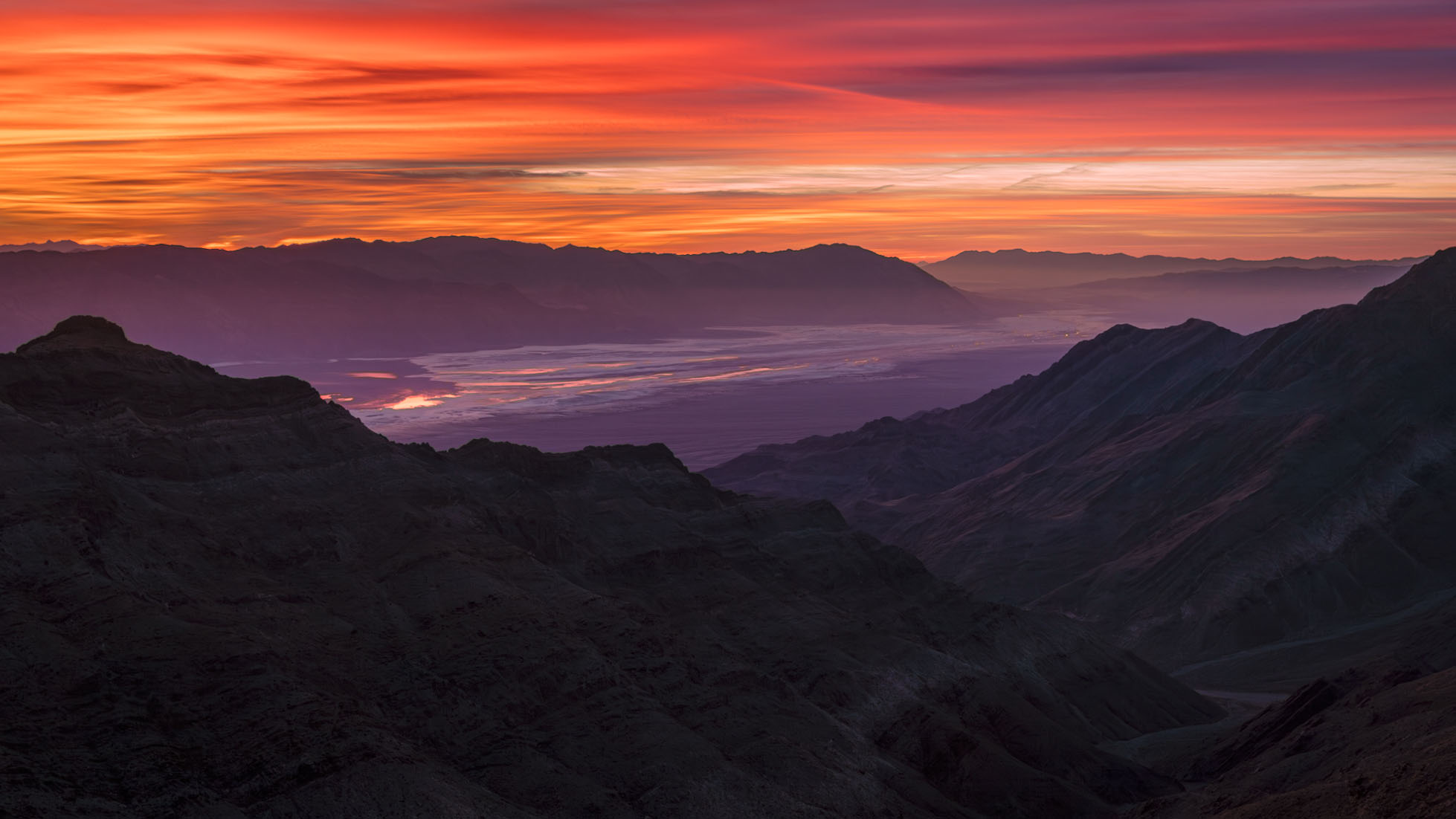
It isn't quite that simple. As a, in part, landscape photographer I can tell you that we often push at the edges of dynamic range, even if we tend to shoot at lower ISOs when possible. I'll give you an example in which I relied pretty heavily on Adobe's AI Denoise. Here is the completed photograph, at the end of a workflow based on ACR and PS:
This was a very challenging photograph. (The location is a high ridge in the Panamint Range west of Death Valley, looking southeast across the valley before sunrise.) The biggest challenge was the extreme dynamic range of the scene, exacerbated by the very hot red channel in the intensely colored clouds. Not certain if I could work with a single exposure, I bracketed the scene at 1-stop intervals over a range of perhaps 6 stops or so. However, it turned out that I was able to work with a single exposure.
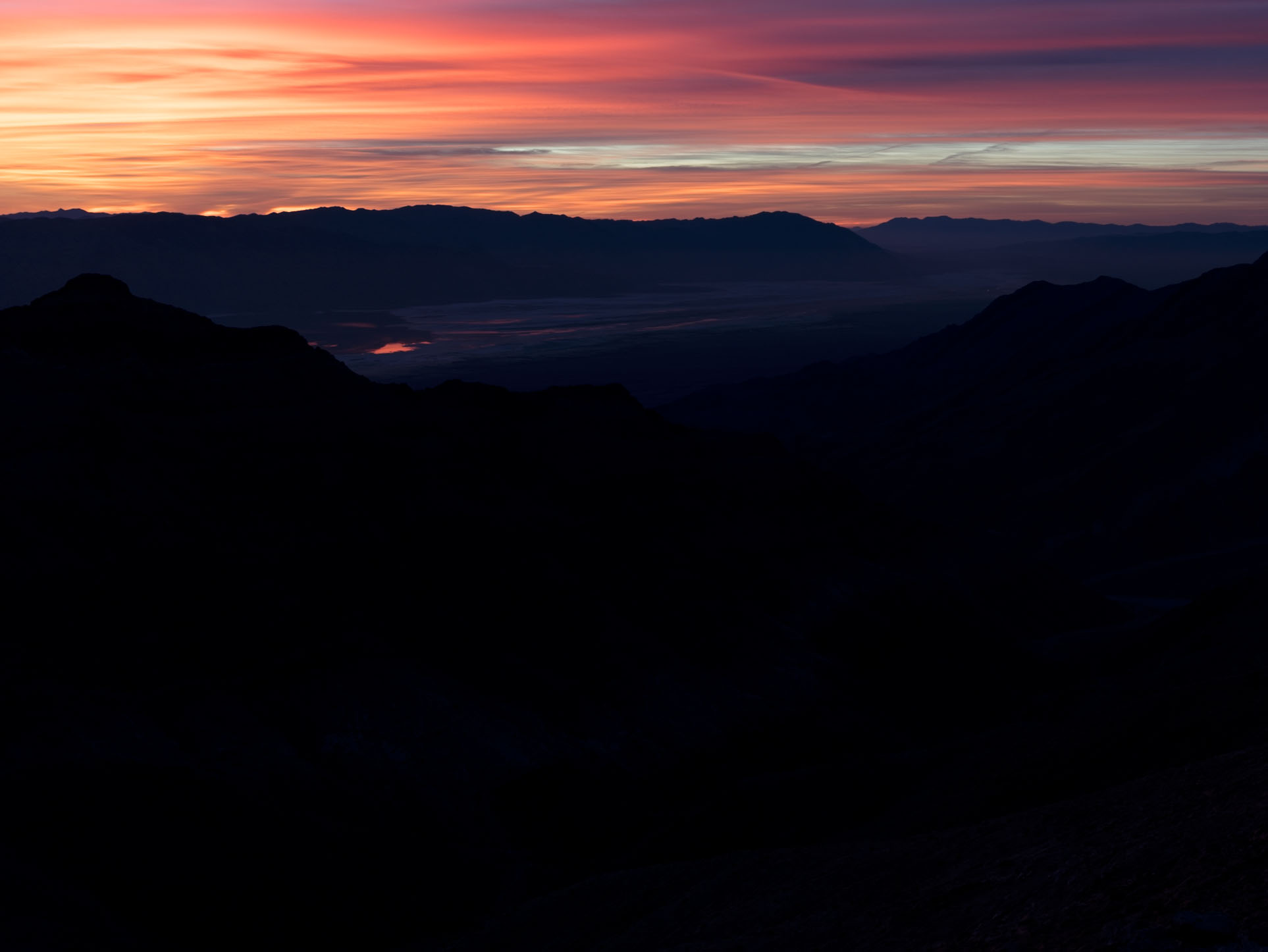
The intent in that exposure was to protect the highlights in the brighter and most intensely colorful areas of the clouds at upper left. That meant severely "underexposing" (though I'd call it correctly exposing!) the scene to produce the following raw file.
Here the highlights are still a bit too hot, but the shadows are so dark that there is almost no visible detail. Working entirely in ACR — and making extensive use of its sophisticated masking features — I suppressed those highlights a bit more and radically brightened the non-sky portions of the image, in particular raising the levels in the foreground mountains significantly. That gave me the following in ACR:
(This file was then imported into Photoshop as a smart layer so that I could continue to edit it non-destructively in PS and ACR. The 16:9 aspect ratio crop was for aesthetics/compositional reasons.)
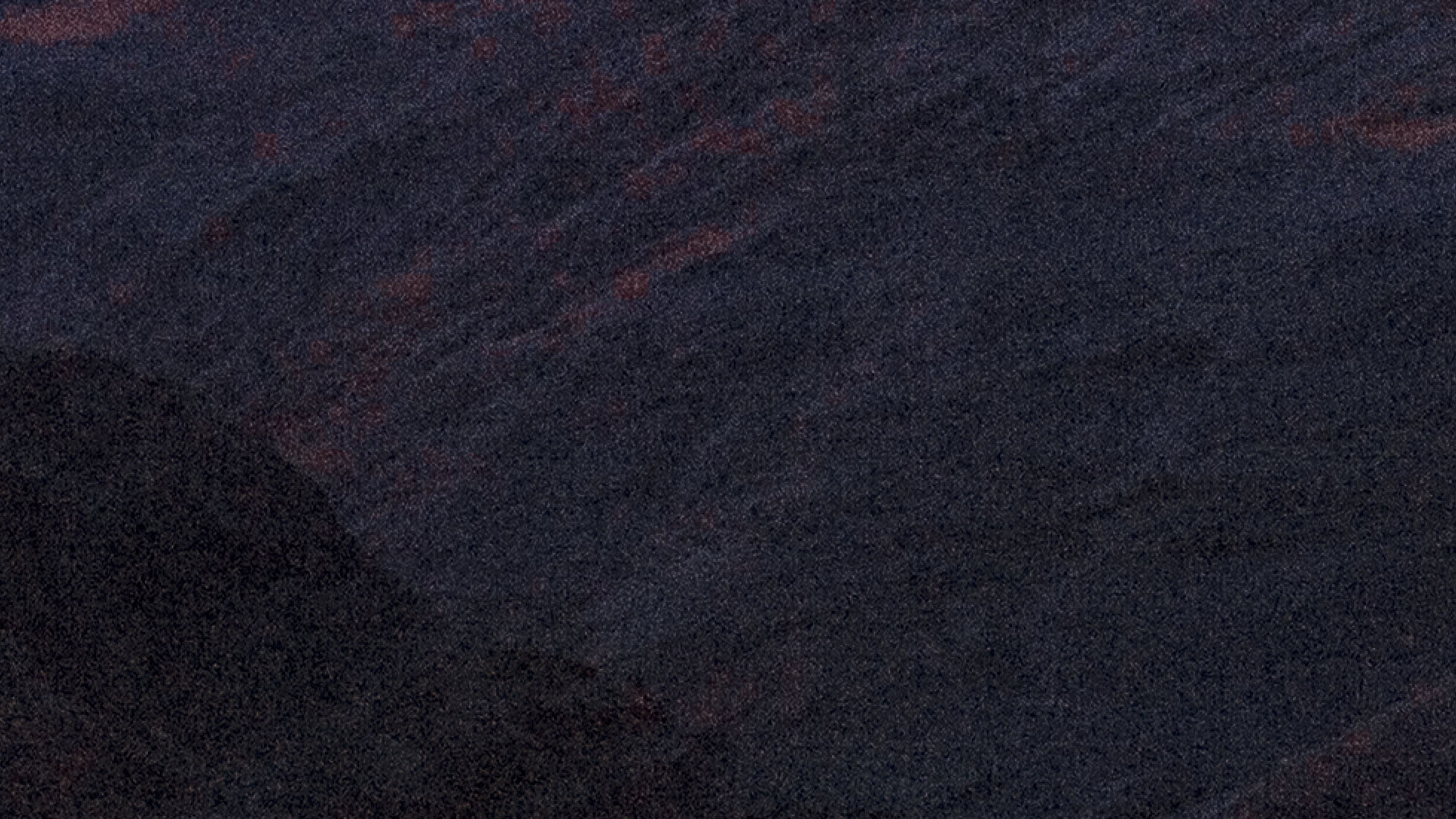
As expected, raising those shadows so radically revealed a whole lot of noise. Here's a 200% crop of a section of the foreground mountains before NR was applied.
In the past, I would have tried to use the traditional NR tools in ACR and PS to deal with this noise, and I could have made it work well enough in a print, but it would not have been ideal. It likely would have relied on creating separate masks for parts of the image to apply NR selectively — the sky, the far mountains and valley, the slightly less dark mountains at lower right, and the very dark mountains at bottom left.
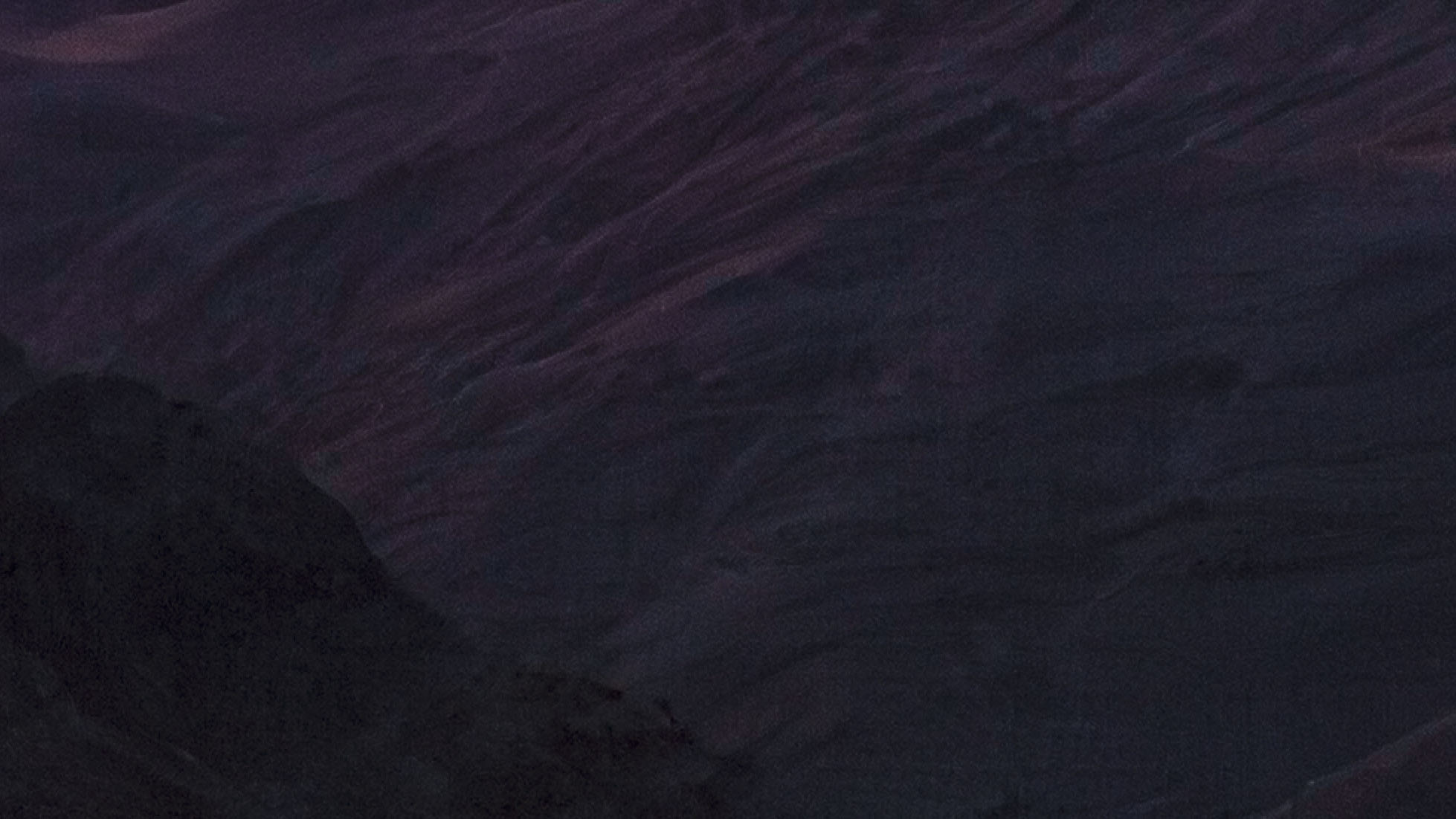
Instead I simply clicked the apply AI Denoise button in ACR and let it do its thing, then set the level to 50%. Here's the result from almost the same section of the raw file, also at 200% magnification.
I have other examples that are not landscapes, that use ISOs as high as 12800 on a APS-C Fujifilm system that I use for street photograph.
EB-1 wrote:
Most landscapes are not at 5 figure ISOs, so NR is not as challenging. At ~16,000+ FF/FX (or lower with some croppers) you have to decide which NR tools and models are best for the situation. That varies quite a bit depending on the image capture and subject matter, and continues to change over time.
It isn't quite that simple. As a, in part, landscape photographer I can tell you that we often push at the edges of dynamic range, even if we tend to shoot at lower ISOs when possible. I'll give you an example in which I relied pretty heavily on Adobe's AI Denoise. Here is the completed photograph, at the end of a workflow based on ACR and PS:
This was a very challenging photograph. (The location is a high ridge in the Panamint Range west of Death Valley, looking southeast across the valley before sunrise.) The biggest challenge was the extreme dynamic range of the scene, exacerbated by the very hot red channel in the intensely colored clouds. Not certain if I could work with a single exposure, I bracketed the scene at 1-stop intervals over a range of perhaps 6 stops or so. However, it turned out that I was able to work with a single exposure.
The intent in that exposure was to protect the highlights in the brighter and most intensely colorful areas of the clouds at upper left. That meant severely "underexposing" (though I'd call it correctly exposing!) the scene to produce the following raw file.
Here the highlights are still a bit too hot, but the shadows are so dark that there is almost no visible detail. Working entirely in ACR — and making extensive use of its sophisticated masking features — I suppressed those highlights a bit more and radically brightens the non-sky portions of the image, in particular raising the levels in the foreground mountains significantly. That gave me the following:
(This file was then imported into Photoshop as a smart layer so that I could continue to edit it non-destructively in PS and ACR. The 16:9 aspect ratio crop was for aesthetics/compositional reasons.)
As expected, raising those shadows so radically revealed a whole lot of noise. Here's a 200% crop of a section of the foreground mountains before NR was applied.
In the past, I would have tried to use the traditional NR tools in ACR and PS to deal with this noise, and I could have made it work well enough in a print, but it would not have been ideal. It like would have relied on creating separate masks for parts of the image to apply NR separately — the sky, the far mountains and valley, the slightly less dark mountains at lower right, and the very dark mountains at bottom left.
Instead I simply clicked the apply AI Denoise button in ACR and let it do its thing, then set the level to 50%. Here's the result from almost the same section of the raw file, also at 200% magnification.
I have other examples that are not landscapes, that use ISOs as high as 12800 on a APS-C Fujifilm system that I use for street photograph.