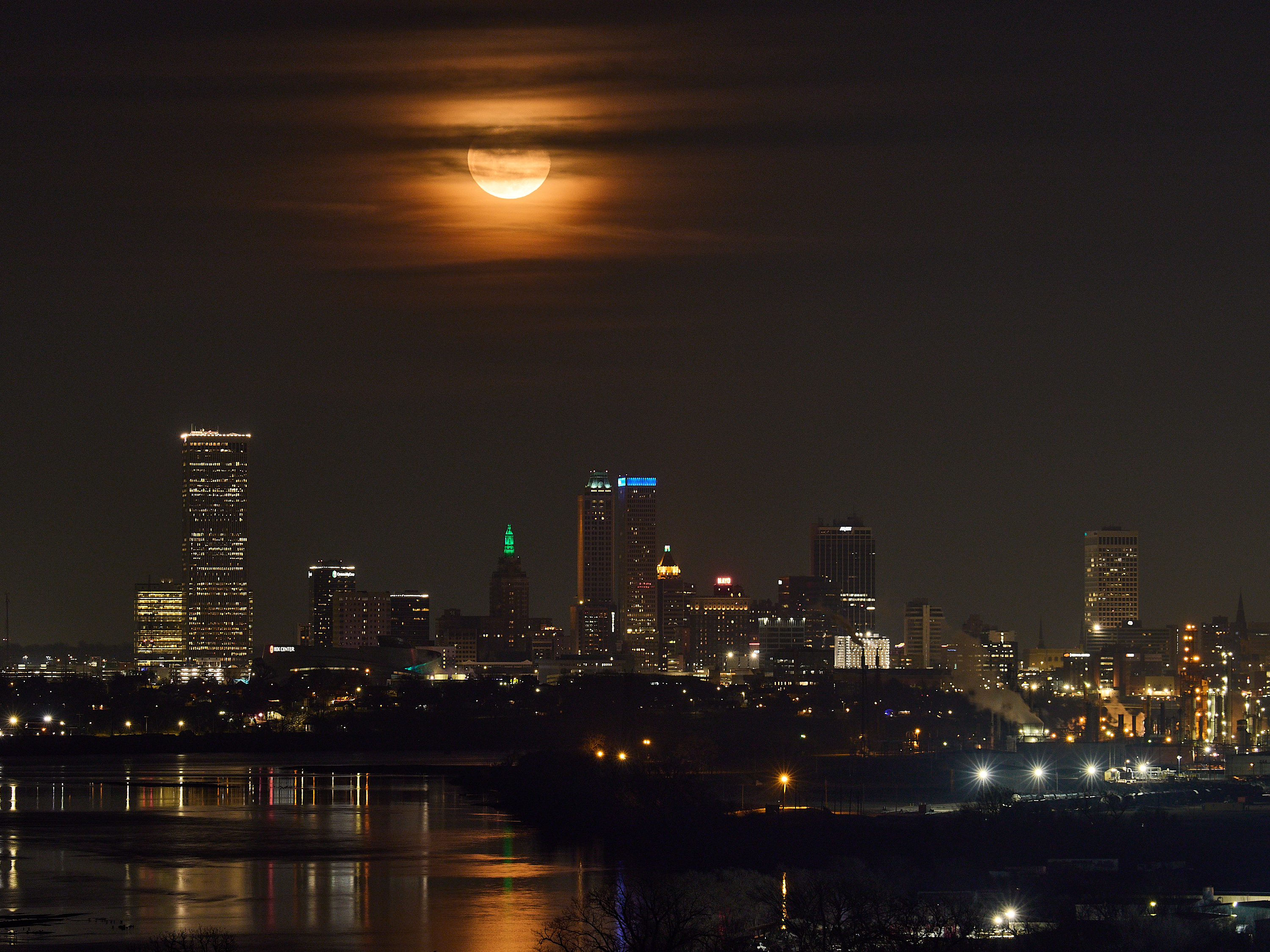
Here's a photo I took of the moon over downtown Tulsa a weekish ago.
I've gone out to this spot twice so far to try this and I'm still not entirely happy with my result yet but hopefully I'll keep getting better. I think I need a smaller aperture to get a bit better focus across the different buildings and I want to improve my balance of getting detail in the moon but still getting detail from the buildings. Might require some HDR stitching or using a different camera. These were taken with an OM1 and I can't quite pull the shadows up as much as I can with my GFX but I don't have ideal focal length lens for this specific photo on that camera.
The Tulsa skyline location I can't figure out, as you have the river there and BOK tower and center where they are, but I'm assuming a fairly long lens in FF terms, maybe even long on the OM. Was the aperture at f/4, or above that?
RWNPhoto wrote:
The Tulsa skyline location I can't figure out, as you have the river there and BOK tower and center where they are, but I'm assuming a fairly long lens in FF terms, maybe even long on the OM. Was the aperture at f/4, or above that?
The photo was taken from Chandler Park, just a bit west of downtown. Another similar view that's also great is actually getting on the turnpike right by Chandler Park that goes directly over the river and taking the photo from there, which I've done once so far, costs a dollar for the turnpike fee and risks getting ran over.. but it's a good spot.
I should have included more shot details, but it's the OM1mk2, 50-200f2.8 lens @ 116mm, 200iso, .5s shutter, and f4.
Looks good to me. My first thought is that it would have been good to catch the moon closer to the horizon (although from the look of the clouds that might not have been possible that night). I would also try a longer exposure if you want more shadow detail, shoot the moon faster to get more detail, then replace the blown moon with the properly exposed one.
Jim Dockery wrote:
Looks good to me. My first thought is that it would have been good to catch the moon closer to the horizon (although from the look of the clouds that might not have been possible that night). I would also try a longer exposure if you want more shadow detail, shoot the moon faster to get more detail, then replace the blown moon with the properly exposed one.
The clouds were blocking the moon until it got to about that point. I knew what time the moon should have shown up and I couldn't really see the clouds at night and was standing around like "where the heck is the moon" lol. Then it finally showed up between some clouds.
I probably do need to do an HDR composite. I like to try and make a photo work without any stitching and that's probably at least partly because I haven't got around to learn how to do that effectively and may not even have a good tool to do it with and also the added time spent at my computer at home instead of outside. I need to get force myself to take time to learn how to do it and find a program I like to do it with.
FWIW, you can take multiple exposures, adjusting for both the city and moon, and mash them together in Lightroom with 1 click (Photo Merge HDR).
Better yet, take two optimal images, on a tripod, drop each on a distint layer in Photoshop, or any other program that lets you layer and mask, optimize each. Then, add a layer mask on the top image to block off the parts of the underlying image that should not be included.
Taperwing wrote:
FWIW, you can take multiple exposures, adjusting for both the city and moon, and mash them together in Lightroom with 1 click (Photo Merge HDR).
Better yet, take two optimal images, on a tripod, drop each on a distint layer in Photoshop, or any other program that lets you layer and mask, optimize each. Then, add a layer mask on the top image to block off the parts of the underlying image that should not be included.
I don't have Lr or Photoshop and I'd prefer to not need to sign up for another monthly subscription. I do use Capture One to edit images and it can do an auto-HDR and I've used that successfully for some things but the moon size and halo and it's light cast on the clouds and sky changes quite a lot of the image and I've had a bit less success with things like that and I feel like something that gives me a bit more manual control would be better.
I do have Affinity Photo and I can probably do it in that but I've not taken the time to learn.
But, next time I go out I'll try to intentionally take some photos I can try HDR stacking and see what I can do with the tools I already have and see how that goes.
You can certainly perform the indivual layering, adjustment and masking in Affinity Photo. While more tedious, it will give you far more control over the final image, versus and auto HDR stack. While it doesn't have the newer, automated, AI-type tools baked into Adobe products, Affinity does have edge detection and color-based masking.
The have a freeware version, but it sounds like you would need to 'upgrade' to the home version (30 Euro) for the masking option. But, no harm in seeing if the free version is useful.
Thanks @Taperwing - those are some good suggestions that I'll give a try. I should also dig deeper into what I can pull off in Capture One, I know i can do some masking and layers and maybe mixing that with it's HDR tool I can get some better results. Just all comes down to needing to dedicate some time to learning this side of photography better.
Taperwing wrote:
You can certainly perform the indivual layering, adjustment and masking in Affinity Photo. While more tedious, it will give you far more control over the final image, versus and auto HDR stack. While it doesn't have the newer, automated, AI-type tools baked into Adobe products, Affinity does have edge detection and color-based masking.
Not sure if you meant this or not, but Affinity does have auto hdr, focus, and astro stacking built into it now. Unsurprisingly, I haven't used them much. I did try out the astro stacking once but not enough to really learn what I was doing with it.
While I have some experience with Affinity working up figures for professional documentation and publication, I have never had reason to try an HDR stack in that application.
I have dabbled a bit more with HDR stacking in Lightroom, but for the most part, have not been impressed with the automated results. On other hand, I have had great luck mixing exposures by stacking in layers and selectively masking, although that requires jumping over to Photoshop. Again, Affinity Photo could also work, if you want to give it a try. From my perspective, this is quite powerful, as the user has the ability to make any adjustments to each layer, and gets to control how they are mixed in the final presentation by selective masking.
I think it is a fine composition Bruce. On my 30" calibrated monitor, it is very nice!! Bigger da better! I agree about a longer exposure time to bring out finer detail and sharpness if possible. I carry a mono and a tripod in my van for instances like this!
Again well done!
Dan
Danpbphoto wrote:
I think it is a fine composition Bruce. On my 30" calibrated monitor, it is very nice!! Bigger da better! I agree about a longer exposure time to bring out finer detail and sharpness if possible. I carry a mono and a tripod in my van for instances like this!
Again well done!
Dan
Thanks Dan! You're doing a great job at buttering up my ego here, hah. I also think it's a good photo but I think I can do a little bit better with a couple of tweaks and since it's a reasonably repeatable photo (I do have to have the moon show up) it's a good one to learn with.
Bruce Marriner wrote:
Thanks Dan! You're doing a great job at buttering up my ego here, hah. I also think it's a good photo but I think I can do a little bit better with a couple of tweaks and since it's a reasonably repeatable photo (I do have to have the moon show up) it's a good one to learn with.
For most of us, that is the "why" we post here. Not buttering up any ego's here. Just fine photography! Why can't we link photography with fun AND learning?
I encourage ANY photographer to post here. Since you are new to FM, you have become pro-active on FM.
Now you can gripe and cuss at everyone who sez different!
"Rank(double entendre meaning) has it's priviledges" eh?
Dan
Bruce Marriner wrote:
The photo was taken from Chandler Park, just a bit west of downtown. Another similar view that's also great is actually getting on the turnpike right by Chandler Park that goes directly over the river and taking the photo from there, which I've done once so far, costs a dollar for the turnpike fee and risks getting ran over.. but it's a good spot.
I should have included more shot details, but it's the OM1mk2, 50-200f2.8 lens @ 116mm, 200iso, .5s shutter, and f4.
Ah, okay, Chandler Park. For a time I lived a just down the road from it, right off 41st. Chandler Park is a long ways away from downtown, so wasn't thinking about it.
RWNPhoto wrote:
Ah, okay, Chandler Park. For a time I lived a just down the road from it, right off 41st. Chandler Park is a long ways away from downtown, so wasn't thinking about it.
Just a tad over 3 miles but the distance helps the moon look larger