I have been using Adobe Photoshop Elements for the longest. Bought a new computer over the holidays and the old version of Elements (on my old computer) is not compatible with the new computer. It happens and I forked over the cash to buy the newest version of Elements.
Went to install it and the editor would not launch. Reached out to Adobe and it ends up my new Microsoft Surface laptop's processor is not compatible with Elements (Snapdragon processor). Adobe is working on fixing that issue but no clue when that's going to happen.
For the time being, I'll continue to use Elements on my older computer but if Adobe doesn't sort this out, any recommendations on an alternative? I don't want to go to a subscription version of Photoshop (just can't justify the expense for as infrequent as I edit photos these days). Just need something that can handle Canon RAW files and with similar editing capabilities as Elements.
This entire headache has made me dislike how Adobe is relying more on monthly subscriptions and supporting standalone products less.
This is version 3 of what was Affinity Photo 2, together with the matching desktop publishing and vector graphics programs, rolled into a single app. Previously Affinity products had a smallish one-off licence fee, but Canva bought the company and made it free and claim it will be forever. You can argue backwards and forwards as to whether this sustainable, but provided you always save as TIFF your images won’t be trapped in their proprietary .af format.
I replaced Photoshop by Affinity Photo years ago (now using Photo 2), and it’s a better program than Photoshop: easier to use, less buggy, and just as capable. Adobe appear trapped by decades of old code and a desire to stay compatible with an old user interface.
Affinity can convert raw files, but I use something else for that (paid). Others will have to comment on how good Affinity’s raw conversion is on Windows; on Mac it can also use Apple’s.
Melcat's rec on Affinity is good. Other free photo editing software includes RawTherapee, darktable and gimp. If you watch for sales, there are discounts for ON1 Photo RAW but not everyone likes it. Many good photographers use Capture One and DxO PhotoLab and those programs are worth the money if you're going to be using them often. Good Luck with whatever you decide!
I think what irks me the most about all this is that I could use Elements without thinking. Now I have to learn a new interface and for a while, it will feel as though I'm all thumbs at it. Makes me miss the old days when these editors were installed on a disc and could move from computer to computer without issue.
I encountered similar issues recently. Old laptop not compatible with Window's 11. So I finally got smart and moved to a Macbook. Can't stand the whole concept of "renting" software an my Photoshop CS6 couldn't run on the new computers.
So for the MacBook I got the free version of Affinity. Seems to work fine but yeah, I'm old and set in my ways. Sort of sucks to learn a new program and way to do things. But for sure Affinity seems well equipped to handle pretty much everything I'll need.
So for now when traveling I'll use Affinity on the laptop to check each day's work and such.
At home for now I'm keeping my old photo editing desktop running as a standalone with CS6 since it's me holding back the software, not the other way around.
For me, Elements was just a little more robust than DPP. Wasn't as overwhelming as the fully loaded Photoshop. Interface is somewhat straightforward (l like it better than Photoshop or Lightroom) with just enough tools to fine tune your image for presentation. Also handles RAW files nicely.
I liked the older versions of Elements better than what you have today. Seemed more focused on photo editing. Today it's mixed with Premiere Elements (video editing) and an organizer. Neither of which I will ever need and feels like it just clutters the experience. You've got to sift through everything you don't want, to get to what you do want.
I also don't like the 3 year license hogwash and all the incompatibility issues that I'm experiencing now. Just feels as if Adobe is trying to push customers to the online or "cloud" versions of their photo editing programs.
coppertop wrote:
I have been using Adobe Photoshop Elements for the longest. Bought a new computer over the holidays and the old version of Elements (on my old computer) is not compatible with the new computer. It happens and I forked over the cash to buy the newest version of Elements.
Went to install it and the editor would not launch. Reached out to Adobe and it ends up my new Microsoft Surface laptop's processor is not compatible with Elements (Snapdragon processor). Adobe is working on fixing that issue but no clue when that's going to happen.
For the time being, I'll continue to use Elements on my older computer but if Adobe doesn't sort this out, any recommendations on an alternative? I don't want to go to a subscription version of Photoshop (just can't justify the expense for as infrequent as I edit photos these days). Just need something that can handle Canon RAW files and with similar editing capabilities as Elements.
This entire headache has made me dislike how Adobe is relying more on monthly subscriptions and supporting standalone products less.
Same issues here when I bought a Lenovo Yoga Slim 7i with the Qualcomm chip early on. None of my photo stuff worked. After talking with Topaz, DxO, Adobe and Luminar.....I gave up. Sold the Lenovo and took the loss, and bought a MacBook Pro. Topaz has released a ARM64 version of Gigapixel (but not Photo Studio), and LR (Cloudy) works now ,but LrC runs in emulation (poorly).
ps: The free version of Affinity wasn't out before I surrendered so I couldn't try it under ARM64, and to the folks touting other software....the issue here is What software will fun under ARM64 operating system.
Z250SA wrote:
Please educate an old fart, how do these Elements and Affinities differ from DPP?
DPP is pretty much the Develop tab of Lightroom or the Adobe Camera Raw feature of Photoshop, but with much less (almost no) masking capability. Like Lightroom etc., it operates on a single 'layer'.
Photoshop (and Elements) and Affinity do layer-based editing additionally with complicated selection masking and so on, along with the basic raw editing workflow.
------------------
There's also Darktable, which is a free raw editor and catalog manager.
The main difference between all of these as well as say the classic Gimp is the workflow. They're all different and depending on what you're used to can come across as positively arcane.
coppertop wrote:
Went to install it and the editor would not launch. Reached out to Adobe and it ends up my new Microsoft Surface laptop's processor is not compatible with Elements (Snapdragon processor).
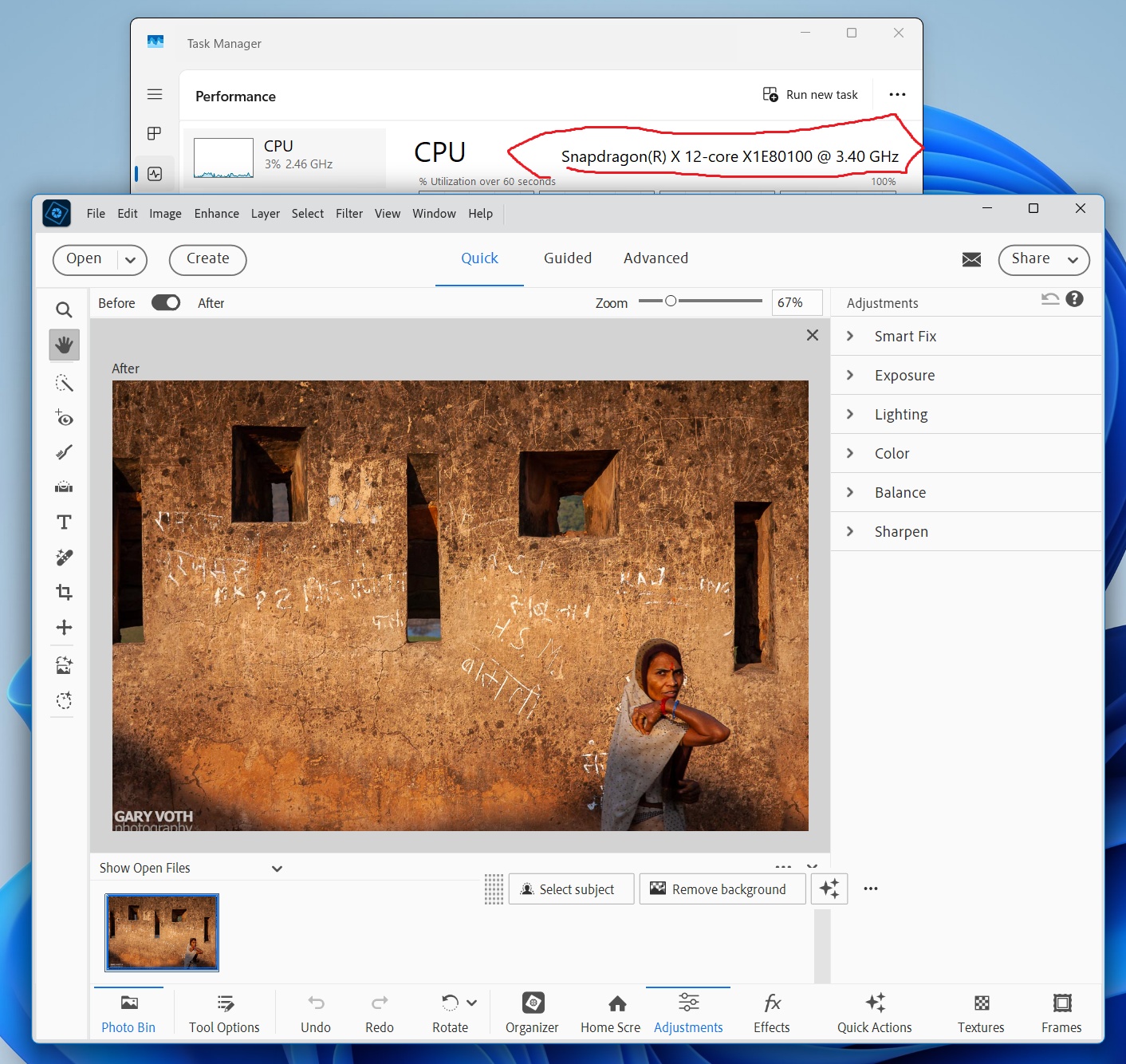
Adobe's support folks are misinformed about their products on Windows on Arm (trust me, it would not be the first time). Elements 2026 runs fine under Prism emulation (see my screenshot). There appears to be a bug in their launcher, however, that is not allowing the Editor or Organizer to open properly.
You can however, open the apps directly.
If you want a simple way to launch the app, then on your PC, navigate to the following file using File Explorer:
C:Program FilesAdobePhotoshop Elements 2026Elements HomeAdobe Photoshop Elements 2026.exe
Right click on this file and drag it to your Desktop, then choose 'Create shortcuts here'. Double-click the shortcut to open the Editor. You can do the same thing for the Organizer.
garyvot wrote:
Adobe's support folks are misinformed about their products on Windows on Arm (trust me, it would not be the first time). Elements 2026 runs fine under Prism emulation (see my screenshot). There appears to be a bug in their launcher, however, that is not allowing the Editor or Organizer to open properly.
You can however, open the apps directly.
If you want a simple way to launch the app, then on your PC, navigate to the following file using File Explorer:
Right click on this file and drag it to your Desktop, then choose 'Create shortcuts here'. Double-click the shortcut to open the Editor. You can do the same thing for the Organizer....Show more →
Thanks. You've got the same processor that I have. Tried the file you point to but it didn't work. Apparently Adobe has renamed the editor launcher .exe file. It's now Adobe/PhotoshopElements2026/PhotoshopElementsEditor.exe
Takes me to the buy now/start trial window. Choose start trial and it works. Will purchase the license and install Affinity just in case. Affinity looks interesting but it's hard to ignore the familiarity with Elements.
StephenS_CP wrote:
My biggest disappointment is that Adobe hasn't ported Bridge to ARM. I don't use Photoshop Elements.
Same. And they don't even allow you to install it to run under emulation, unlike Lightoom Classic.
I'm not sure if you are familiar with the hack to install x64 versions of unsupported Adobe apps by copying their install folders from another Intel based PC. In any case, you can actually do this with Bridge and get it to run, but it cannot make use of ACR (it can't even render thumbnails for RAW images), which makes this mostly useless for a RAW shooter.
A native version would be preferable of course, so I do hope they address this eventually.
coppertop wrote:
I can now learn Affinity while having the security of Elements to fall back on.
When it was still a separate company that published Affinity Photo, Serif produced some excellent video tutorials that are still up on Youtube in this channel:
Apparently, not much has changed between Photo 2 and Studio, except that the menus were rearranged a bit to accommodate the additional functions from the desktop publishing and vector graphics apps.
Two things might trip someone up coming from Photoshop:
1. The “persona” terminology. It’s just a major mode: raw development, pixel editing, vector editing, and page layout. Arguably, combining the 3 apps into 1 has made this less confusing, although it remains weird.
2. Layer masks, other than on adjustment layers, work a bit differently. It’s more general, and more complex. There’s a video on that I recommend you watch.
Let me just say I bought the Lenovo the minute it was released. There were only two updates to Windows 11 Arm64 by the time I dumped it. I am sure there have been software updates since then that may have fixed some of the compatibility issues. For me LrC was running slowly under emulation and there was no Arm64 native version.