p.1 #1 · sRGB vs Adobe RGB for family photographer
I'm a little confused how to handle sRGB vs Adobe RGB with my professional work.
I'm a family photographer. I deliver the images to the clients digitally. My clients mostly use the photos for sharing digitally, on social, etc. Some of them use the photos to print Christmas cards (and the like), and some of them will make actual prints, either small (4x6) or wall sized.
Here's my question - even though some of my clients print my photos, am I fine to just continue shooting in, and delivering files in sRGB? What's the downside to that? If not, am I supposed to deliver two sets of files, one for digitally viewing the images, and the other for printing? What am I (and my clients) missing by shooting sRGB?
p.1 #2 · sRGB vs Adobe RGB for family photographer
sRGB is a small, 8-bit space. It remains convenient as most all web platforms support it. You will generally get truer skintone colors from a bigger colorspace like aRGB or especially P3 with it's broader coverage into the more subtle yellow/orange/red bands; and most printers can utilize the extra colors available in these spaces over sRGB so some visual benefits can be achieved. In addition to the more accurate color tones, you also can get smoother tonal gradations since there are more colors to replicate them. But from a practical perspective, sRGB is pretty much WYSIWYG when viewed across multiple platforms, meaning your customer's prints from it, assuming they're well made, will look very similar to the web view version where the aRGB or P3 print can look more refined in comparison.
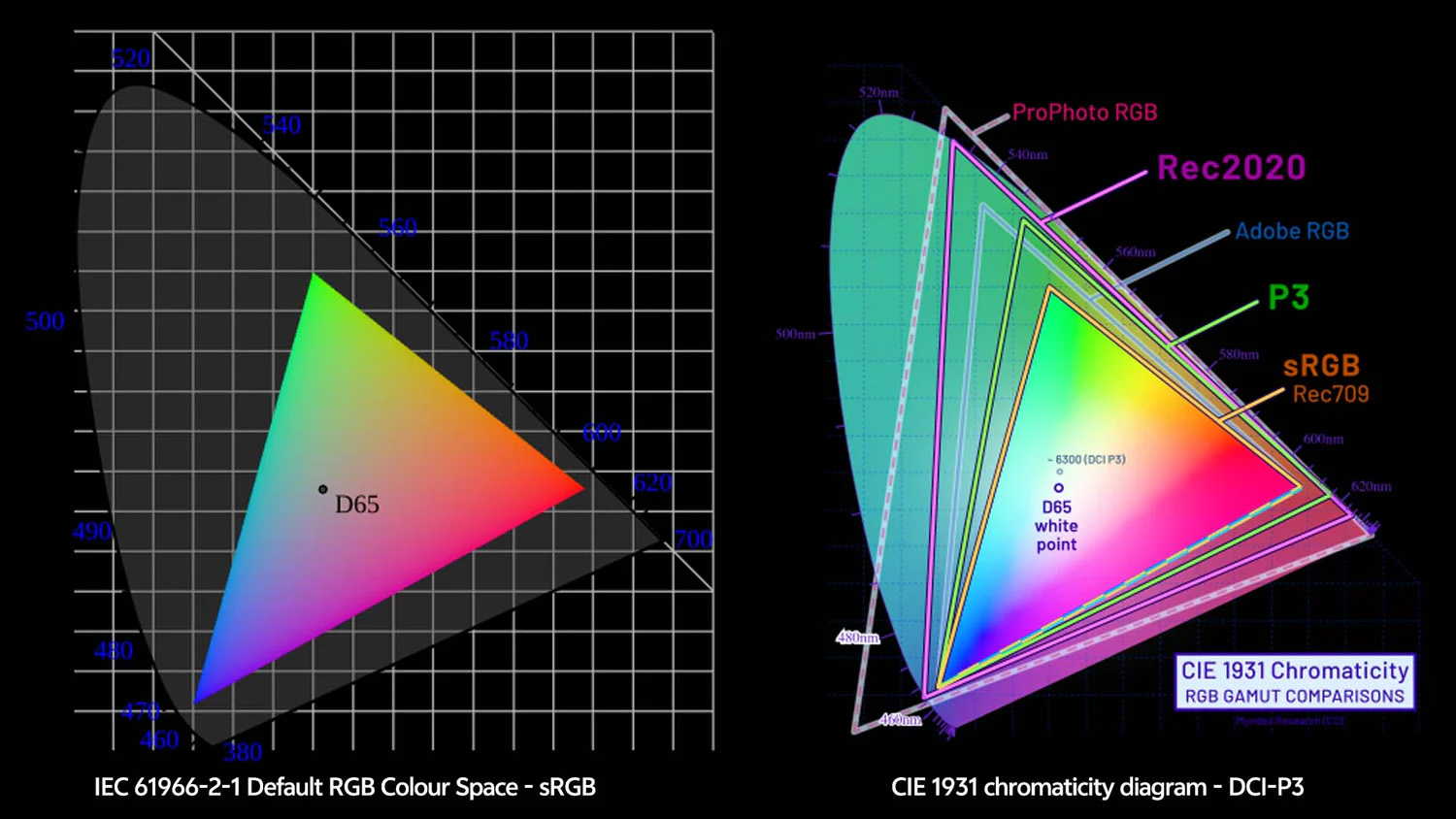
(Since the image below underscores it, the other aspect of colorspaces is their native white point anchor. Both a and s RGB use D50 or basically 5000K as "white," while P3 uses D65 or 6500K white. D50 is a slightly yellower, warmer light like you might get in late afternoon or under certain "warm white" interior lighting, while D65 is whiter, closer to high noon lighting or "bright white" lighting. FWIW)
Here is a simple color map showing the relative colors available in the different colorspaces:
p.1 #3 · sRGB vs Adobe RGB for family photographer
I don't think most clients could tell the difference, and many printers only want sRGB. Perhaps more importantly, images for printing should be larger in pixel dimensions than those intended for sharing.
p.1 #4 · sRGB vs Adobe RGB for family photographer
It depends on where you send your files for printing, ask them if they prefer sRGB or AdobeRGB. If you give the client the files for printing then send them as sRGB.
If you do any retouching then I'd recommend shooting in AdobeRGB -> post process to final output stage in full rez then resize for digital and save with sRGB. All of the final steps for resize and colour space conversion can be done with an action in PS.
p.1 #5 · sRGB vs Adobe RGB for family photographer
Thanks all!
As of now, my clients are the ones doing the printing, so JBPhotog answered that for me - just deliver the files in sRGB (even though that won't be quite as good as if they were sent in Adobe RGB).
So, shoot everything in Adobe RGB, then export in sRGB if delivering files digitally with the client printing. I'm printing, work with Adobe RGB.
p.1 #10 · sRGB vs Adobe RGB for family photographer
If you're editing in Lightroom, for example, I believe it natively works in the Pro Photo color space. If you refer to the numbers or visual tools while editing, in order to determine if there is any clipping, this can throw things off when you actually export to sRGB or Adobe RGB. As illustrated in Jack's earlier post, the Pro Photo space is a lot larger, especially compared to sRGB, meaning images that weren't clipping during editing might actually be clipped once exported.
Just to add to the confusion, many of your clients might be Apple device owners and I believe since the past ~10 years most or all Apple devices now use the P3 color space, which is very close to Adobe RGB.
That's of course a good thing with respect to color quality, but it makes it more difficult to decide on which single color space to use for delivery.
sRGB would be a safe 'lowest common denominator' choice as it will display well pretty much everywhere, including non-color managed environments where wider gamut color spaces can end up looking a lot worse. The problem is you have no control over how your images are viewed once you deliver them, if a hosting/sharing site strips away colorspace tags, etc. An sRGB file stripped of its colorspace tag viewed in P3 will probably look a bit punchier, more saturated than intended, but I'd guess most people won't care and might actually prefer it over a low contrast, desaturated image (Adobe RGB or P3 without colorspace tag displayed in an SDR space).
I also would not bother sending clients web resolution and high resolution versions because it will just add confusion. Back in the days of limited bandwidth, there was reason to do so. But now, inevitably the web resolution files will unwittingly be used when the high resolution files should be... A lot of people also apparently don't realize that apps like Apple's Mail will by default (I think) downsize photos sent as attachments. So many times I've had a client email me a phone photo for retouching/printing for it to only be 1200x1600, for example.
While editing images I tune tonality via my editing style for the assumption it will be viewed on P3 and use my own Apple devices to confirm. I've found that most of the people I'm interacting with for my work are iPhone users and probably also own other Apple devices. So long as it looks good to them, It's good with me.
But as you've probably learned, the way your clients view your images is different than how you, as a photographer, view them (technically). Most people have no idea about color spaces, color management, etc. They react to what is *in* the photo.
p.1 #11 · sRGB vs Adobe RGB for family photographer
weezintrumpete wrote:
Sorry yeah, I do shoot exclusively RAW. I didn’t realize that the color space doesn’t apply to the RAW file. Thanks!
If you shoot raw + jpeg, then the camera can output the jpeg with an embedded aRGB or sRGB color profile, as set in the camera settings. When shooting raw only, a jpeg (full- or small-sized) is also embedded in the raw file, however I have never looked into whether the color space of the embedded jpeg is influenced by the aRGB vs sRGB choice in the camera settings.
The simplest and possbly dramatic way to see the differences between sRGB, aRGB, and the becoming more common Display P3 color profiles is simple. Find a place that sells vibrant red roses (or similar vibrant warm colors). Take a picture of the flowers, process from raw to your taste, then export with embedded aRGB and Display P3 profiles, along with the sRGB. Finally, compare how the petals (look at the texture) look on your display in the three jpegs. Optionally, post the jpegs here in this thread, to see the look of the different color profiles when viewed in a browser. To the best of my knowledge and experience, most (if not all) modern browsers support aRGB and Display P3, on Windows or Apple. The browser support shouldn't be a concern.
My own preference is to export from raw to jpeg with embedded Display P3 profile. Also, I don't resize the images except those from the large format GFX100S II that I resize to 8000x6000. If an image needs to be resized for posting on a forum where the size is restricted, this is done on a case by case basis. On FM, there's no explicit restriction on pixel size to the best of my experience. There might be a disk size limit around 3.5MB but I haven't seen an explicit statement to this effect.
p.1 #12 · sRGB vs Adobe RGB for family photographer
JBPhotog wrote:
Which Raw application lets you change the captured colour space in post?
Shooting Raw in AdobeRGB is a larger colour gamut than Raw in sRGB.
The cameras native colorspace is what is captured in raw. Good raw converters then allow you to convert that raw to a variety of different output/editing colorspaces AND file formats depending on your intended use. Among the common colorspaces are Prophoto, Image P3, aRGB and sRGB; among common image formats are jpeg, tiff, PSD and png in 8 or 16-bit color depth accordingly. Furthermore, the best editing platforms allow you to then convert these colors to a space for the intended output medium, down to actual dedicated color profiles for a specific projector and screen, or a specific printer using a specific paper and inks. In other words, combined these allow for a completely color managed workflow from capture through output.
p.1 #13 · sRGB vs Adobe RGB for family photographer
You could go a step further than most by imbedding the full colour profile into the image files, no matter which profile it is. Then there's a fighting chance of someone seeing more appropriate colours if their display or print software is actually more colour aware than they are. It makes the image files bigger but also more user friendly. These days the amount of storage space needed is likely to be much less of an issue than it used to be.
p.1 #14 · sRGB vs Adobe RGB for family photographer
Well, some more data for you. Ruthenium above referenced high reds from flowers or tomatoes or strawberries. Here, P3 is superior to aRGB due to its broader Red and Orange saturation range; although aRGB carries more Cyan saturation than P3 if that's of import to you. Current Epson and Canon wide gamut inks can get very close. Here is a decent article explaining the advantages and limitations of each: https://www.dxo.com/news/white-paper-wide-gamut/
p.1 #15 · sRGB vs Adobe RGB for family photographer
Personally, I recommend providing clients with an 8bit sRGB image as the baseline. That is something everyone will be able to use for pretty much any purpose. If you have some more technically inclined clients, or you are photographing artworks for reproduction, then additionally provide them with a 16bit TIFF format version in Adobe RGB or ProPhoto RGB.