taildraggin wrote:
If I'm not mistaken, this looks like a bit of transverse CA - something that should come out easily in post. The preceding DSC00969.jpg shot may be a better example.
Form Google AI:
"Purple fringing (or color fringing) in photography is a visible purple/magenta/bluish outline or "ghost" around high-contrast edges, like dark tree branches against a bright sky, caused by different light wavelengths failing to focus at the same point (chromatic aberration) or sensor/software issues, appearing as an unwanted halo that can often be reduced in editing software like Capture One or Lightroom by adjusting lens corrections. Causes
1. Chromatic Aberration (Lens Issues): Lenses struggle to focus all colors of light (wavelengths) to the exact same spot, with shorter wavelengths (violet/blue) often focusing slightly differently.
2. Sensor Saturation/Micro-lenses: Tiny pixels can get overwhelmed by bright light, causing electrons to overflow and create a purple cast, especially in high-contrast scenes.
3. Software Processing: Digital camera processing (like Bayer pattern interpolation) can amplify these imperfections, creating the fringe.
4. High Contrast & Wide Aperture: The effect is worse in bright, harsh light, high-contrast scenes, and when using a wide-open lens aperture."
Anyway, we should have the raw file to better understand if the purple fringing visible in the DSC00969.jpg shot can be removed by using a proper raw converter.
I could remove it from the jpeg file in a couple of minutes:
taildraggin wrote:
Even the greatest lenses made can be made to do something like this. You can find small flaws in any lens. This is a really good lens.
I'm not sure it's a lens only issue (points #1 and #4 above).
P.S.: purple fringing is not visible in the top right corner of the DSC01055.jpg file ...
I have the RAW files at home on an external HDD so I will share the RAW file of DSC00969 later today (via Google Drive) once I get back home from work and have time to fetch it. Also, please comment if any other RAW files from the same album are of interest.
My personal feeling is that there could be some element of this at play in this scene:
> 2. Sensor Saturation/Micro-lenses: Tiny pixels can get overwhelmed by bright light, causing electrons to overflow and create a purple cast, especially in high-contrast scenes.
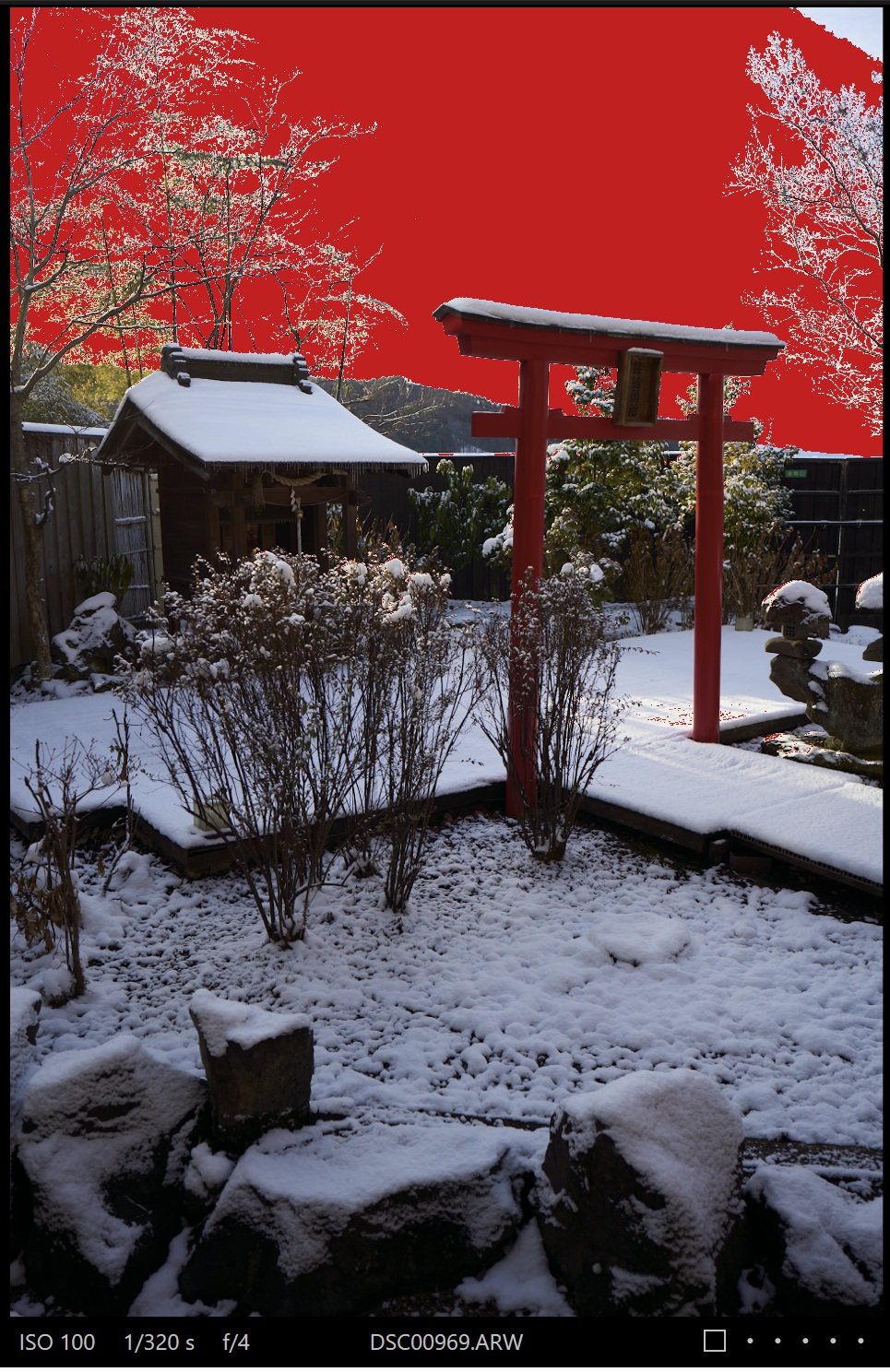
The background areas with the branches of these shots (DSC00969 and 973) appeared quite heavily overexposed (when enabling overexposure warning highlight, those areas where highlighted strongly) when I looked at them earlier on C1 Pro so I think it could be a scene where sensor pixel oversaturation issue as in 2. is occurring.
- DSC00969.ARW (original RAW file)
- DSC00969.JPG (original JPEG from camera)
- DSC00969_C1_Pro.jpg (same shot exported from RAW through C1 Pro with A7CII default settings (and all noise reduction turned off as that's my normal default configuration)
- exp_warning.jpg (screenshot when exposure warning enabled in C1 Pro)
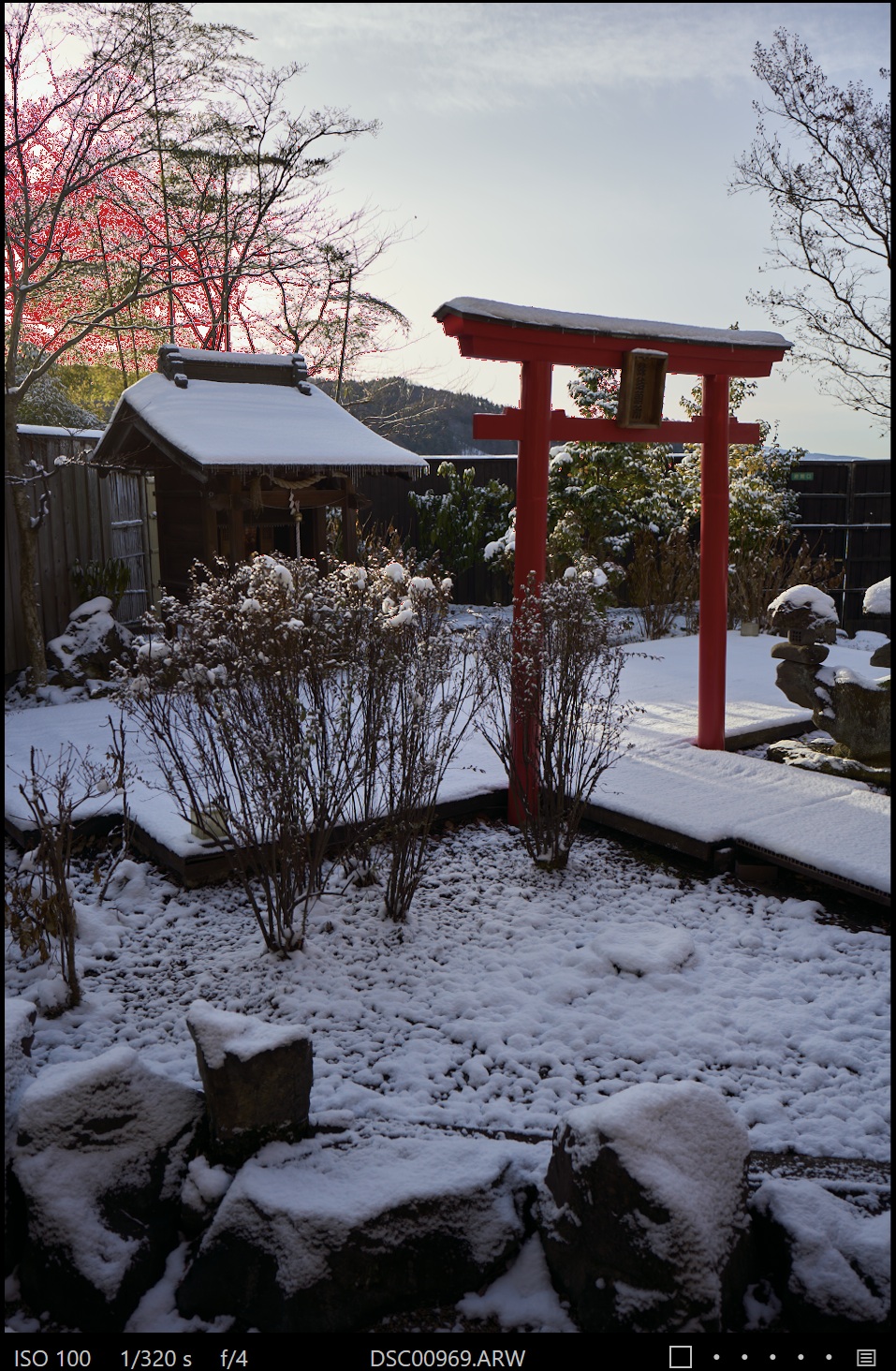
- exp_warning_highlight-100.jpg (screenshot with exposure warning when highlights pulled down -100 (max amount))
- exp_warning_minus_4.jpg (screenshot with exposure warning when exposure pulled down 4 stops)
Some observations: The original JPEG from camera doesn't show so noticeable fringing in the same area, it seems to become much more noticeable in file exported through C1 Pro. When pulling highlights down -100 (max amount), the same area still shows exposure warning highlights. The same area with trees at the top left still looks kind of reddish with exposure warning enabled when exposure is pulled down 4 stops (maximum available exposure adjustment).
So I think this is not really looking like any lens issue.
Attaching the exposure warning images here as well.
Exposure warning in C1 Pro without any adjustment to exposure level.
Exposure warning with highlights pulled down -100 (max)
Yes, it seems a software issue, or a combination of sensor saturation and demosaicing algorithm issue.
I have converted the raw file that Juha kindly shared with us; I used both C1 and DxOPureRaw5. The DxO software doesn't have the 28/2 APO profile yet, and it used a Sony 28 mm profile!! (I can't tell DxOPureRaw5 which lens profile to use )
The following images show that the 16 bit TIFF obtained from the raw file developed by DxOPureRaw5 doesn't show as much fringing as C1. When DxO will be updated with the 28/2 APO profile with E-mount, I guess I could get even better results.
I haven't been able to get out as much as I'd like to, so take this with a grain of salt. But I'm not seeing any real CA or LoCA concerns. My general impression of my copies of lenses is that the 50 shows the least amount of "anything" problematic, the 35 shows a bit more, and the 28 sort of falls in between. But so far I haven't seen anything that is wildly out of line with the other APO-Lanthars.
tsdevine wrote:
I haven't been able to get out as much as I'd like to, so take this with a grain of salt. But I'm not seeing any real CA or LoCA concerns. My general impression of my copies of lenses is that the 50 shows the least amount of "anything" problematic, the 35 shows a bit more, and the 28 sort of falls in between. But so far I haven't seen anything that is wildly out of line with the other APO-Lanthars.
I pulled the trigger on the Voigtländer 2.0/28mm Apo Lanthar two days ago and I can confirm all the points of Tim above:
- even pixelpeeping I cannot see any LOCA or lateral chromatic colour errors - impressive!
- @ comparing these three lenses, I would put them in a similar sequence: 50 > 65 > 28 > 35
(with the 35 already being excellent!)
My gut impression from the shooting I have done is that his ratings are a bit harsh. I've been shooting the Sigma 28-45 for quite a long time, and mine is really strong at 28mm. His tests of the 28-45 show that it's really strong as well, so I agree with his assessment of the 28-45. My general impression is that the CV 28 is very strong at wider apertures maybe to f/8 or so, but then it seems like sharpness (probably diffraction related) kicks in a bit stronger on the CV and it's not quite as high resolving as my 28-45 above f/8. So at some of the wider apertures it's as strong or stronger than the 28-45.
That is of course 1 copy of each lens, my copies....vs his 1 copy of each lens.
So I think his rating looks a little low to me < f/8, using the Sigma 28-45 for comparison. It seems like the CV 28 has more depth of field behind the focus subject, compared to my 28-45. It also often seems to have a bit less nervousness in the bokeh than my 28-45. So those 2 things could be contributing to my feeling that it resolves well at wider apertures.
Note I'm not a test chart shooter. I'll go out and shoot subjects, often things I'm interested in shooting. And then I'm doing more practical comparisons of how I feel each performs.
Sadly, I don't have the lens, but I do wonder how he makes his subjective assessments and ranks lens "sharpness" based on photos of his bookcase or perhaps on some other images that may not be directly comparable to images from other lenses. Has he explained that anywhere?
I don't usually pay a lot of attention to these tests and one thing I don't especially like about them is the use of bookshelves at a distance of a couple of meters for sharpness testing (as it seems). At least the sharpness results are demonstrated with such photos in most of those reviews. The results might not be as relevant as e.g. testing at near-infinity like landscape / cityscape scenarios.
The review says that "You get some nice sunstars when closed at F16" but as usual with most CV lenses, sunstars are great already when stopping down just a bit (for example at f4 which the aperture I use most frequently with my lens for any cityscape or landscape type shots).
I personally have the 28/2, 35/2 and 50/2 Apo-Lanthars in E-mount currently and I used to have 65/2 and 110/2.5 as well but I don't shoot macro much at all and 65/2 and 110/2.5 were not ideal for me as general purpose lenses due to size, weight etc. so I traded those 2 away. 65/2 was particularly impressive in terms of IQ at close distance shooting but I found it to have a bit too short focus throw near infinity which made it a bit tricky for long distance city shooting and I didn't generally utilize its macro capabilities.
Based on my experience with my 28/35/50 AL lenses, I feel like 35/2 has the strongest "bite" / most impactful sharpness at close distances wide open and also the most structured bokeh which can look a bit distracting sometimes. I find the 28/2 and 50/2 to have a bit less "bite" and somewhat smoother rendering. I enjoy 28mm focal length a lot for my general walkaround type shooting so from that perspective I would favor the 28mm lens. I consider 28/2 and 35/2 to be my overall favorites of the current trio. I tend to favor Nokton 50/1 and 50/1.2 over the 50/2 AL for my personal shooting most of the time, but there are no obvious flaws with 50/2, I just find it a bit less exciting.
As for vignetting, I'm not really feeling that 28/2 has too much of it (I think that 28/2 Ultron II and 28/2.8 CS VM lenses have stronger vignetting and I still have CS and used to have Ultron as well, used both adapted to Sony). I use 28/2 AL wide open mostly for relatively close distance bokeh shots and some vignetting is often a good thing in those type of shots, and I think the vignetting is mitigated quite a bit already by f2.8 and f4.
Ripolini wrote:
Yes, it seems a software issue, or a combination of sensor saturation and demosaicing algorithm issue.
I have converted the raw file that Juha kindly shared with us; I used both C1 and DxOPureRaw5. The DxO software doesn't have the 28/2 APO profile yet, and it used a Sony 28 mm profile!! (I can't tell DxOPureRaw5 which lens profile to use )
The following images show that the 16 bit TIFF obtained from the raw file developed by DxOPureRaw5 doesn't show as much fringing as C1. When DxO will be updated with the 28/2 APO profile with E-mount, I guess I could get even better results. ...Show more →
I have not noticed C1 add CA-like artifacts to my images. Tree branches are CA's home.
Transverse (Lateral) CA Effects
There are also so-called transverse chromatic aberrations, denoting the wavelength dependence of transverse positions e.g. of image details. They can arise from the wavelength dependence of the image magnification or of distortions. Such effects do not occur at the center of an image and generally increase with the distance from that center. (In contrast, axial aberrations affect the whole image.) An increased f-stop number does not reduce transverse aberrations.
I don't have any training in optics, but it does seem to check all the boxes for lateral CA: short focal length lens, off center occurrence, even at a mild (not wide open) f/stop (f/4, in this case).
Given the number of sample images it looks to hard to induce.
Well, the 58/0.95 is not an "APO" lens, it is impressively fast and sharp though, hence the price and the nickname. Similarly, if we consider much cheaper lenses like my Zeiss 100/2 Makro-Planar and 135/2 Apo Sonnar, we note that the former isn't an "Apo" lens and shows much more LoCA than the Apo Sonnar. Of course, the Apo Sonnar has much much less CA, not zero CA. There are no perfect lenses. The Makro-Planar is only slightly cheaper than the Apo Sonnar; it has same speed and shorter focal length (smaller glass elements) but macro 1:2, with a more complex design for the correction of aberrations at close range. I mean, the two lenses play in the same league, price is/was not much different and the one that doesn't carry the name "Apo" has (in high-contrast scenes) visible LoCA till f/4-f/5.6.
taildraggin wrote:
... it does seem to check all the boxes for lateral CA: short focal length lens, off center occurrence, even at a mild (not wide open) f/stop (f/4, in this case).
Probably nobody read what I wrote previously:
"purple fringing is not visible in the top right corner of the DSC01055.jpg file ... "
That image has a corner (top right) with tree branches and similar contrast but NO visible purple fringing, Why?
I have an hypothesis that Juha won't like
Ripolini wrote:
Probably nobody read what I wrote previously:
"purple fringing is not visible in the top right corner of the DSC01055.jpg file ... "
That image has a corner (top right) with tree branches and similar contrast but NO visible purple fringing, Why?
I have an hypothesis that Juha won't like
I read it, but just don't want to believe that it comes from editing software or sensor firmware.
Ripolini wrote:
Right. And where the different behavior of top left and top right corners could come from?
This is what AI has to say about it:
Yes, a decentered lens element can cause or significantly worsen lateral chromatic aberration (CA). When a lens element is not properly aligned (decentered), the optical path becomes asymmetrical, causing light of different wavelengths (colors) to refract unevenly and fail to converge at the same point on the focal plane, leading to color fringing.
Key Details on Decentered Lenses and CA:
Asymmetrical Performance: A decentered lens often results in uneven image quality across the frame, such as one corner appearing much softer than others.
Color Fringing: Because the lens components are not properly aligned, different wavelengths of light focus differently, creating color separation, especially in high-contrast areas.
Impact: This can result in increased chromatic aberration across the image or specifically on one side, depending on which element is misaligned.
If a lens consistently shows poor performance in specific corners compared to others, it is likely experiencing issues related to decentering.
My 50/2 APO shows it simularly at both sides so seems to be centered perfectly😊. Well, as long as I can get rid of it easily in pp I don’t care, but I might need something else than C1 pro for that.
Ripolini wrote:
Well, the 58/0.95 is not an "APO" lens, it is impressively fast and sharp though, hence the price and the nickname. Similarly, if we consider much cheaper lenses like my Zeiss 100/2 Makro-Planar and 135/2 Apo Sonnar, we note that the former isn't an "Apo" lens and shows much more LoCA than the Apo Sonnar. Of course, the Apo Sonnar has much much less CA, not zero CA. There are no perfect lenses. The Makro-Planar is only slightly cheaper than the Apo Sonnar; it has same speed and shorter focal length (smaller glass elements) but macro 1:2, with a more complex design for the correction of aberrations at close range. I mean, the two lenses play in the same league, price is/was not much different and the one that doesn't carry the name "Apo" has (in high-contrast scenes) visible LoCA till f/4-f/5.6.
Probably nobody read what I wrote previously:
"purple fringing is not visible in the top right corner of the DSC01055.jpg file ... "
That image has a corner (top right) with tree branches and similar contrast but NO visible purple fringing, Why?
I have an hypothesis that Juha won't like ...Show more →
I think this 1055 has quite many differences to 969 in terms of various conditions, e.g. based on raw files the focus distance on 969 was 31.3m and on 1055 it's 6.322m. Both are heavily overexposed in certain (different) areas but light angles and a lot of things relating to the compositions are different. In 1055 the trees on the right side are pretty close and in 969 the trees on the left are very far away etc. If "sensor related oversaturation" would be behind the fringing on 969, I still think it would depend a lot on various conditions and wouldn't necessarily show up in other shots with branches and similar contrast if other conditions are not quite the same.
Anyway, possible lens decentering could also be a factor. I received my original lens just around 15min before heading out on that hotspring trip where I took those photos, so I didn't have much time to test it beforehand, but I did a quick decentering (4-corners) test from balcony at that time at f2 and all corners looked fine (just checking on the camera) so I didn't worry about it afterwards. I also didn't notice any weak corners or edges etc. on my actual shots.
I did another quick test this morning from balcony and I would say that 3 corners looked fine and equal but one looks a little bit suspect when inspected closely on a computer. I'll need to check in more detail to make sure so not sharing any corner-check samples now. When shooting vertically like I did on most of these samples, the potentially weak corner would be lower left. The upper left and right corners both looked perfectly good and equal.
Anyway, I also bought a 2nd copy of the lens today (while Fujiya Camera still had some stock) so I can compare them to see if my original copy is really having any issue. Today's weather turned quite cloudy so I didn't do much shooting with the 2nd copy yet but on initial inspection it looks perfectly good.
Based on Okigubo Sakuraya online store, next shipments for the E-mount version from Cosina are now expected in May so I figured it will be hard to get it soon after the few remaining stores that still have some stock from initial shipments run out... Hence I got motivated to go for the 2nd copy with some urgency...
And now Fujiya Camera also went to backordered status with the lens so I might have got their last one from initial shipments.


 )
)

