I currently have an Epson ET-2760 home/office printer that has served me well since 2020. As I recall I paid $99 for it back then.
Recently it has been suffering from some nasty nozzle clogs which leaves missing lines and generally less than acceptable results.
After 3-4 nozzle cleanings that still leaves missing segments and/or jumbled colors, it says it can no longer perform the cleanings because of print head issues and that I need to take it in for service. If I turn it off for a while and turn it back on it will clear that hurdle and allow me another 3-4 cleanings. This usually results in an acceptable printed page. However, I don't think this work around will last much longer.
Bottom line, it's time for a new printer. I am SHOCKED at what they are currently asking for a new printer of this basic caliper. In 5 years they have gone from $99 to over $300.
I'd like to hear some suggestions on where I might find a decent home office printer at a reasonable price. This Epson has treated me well, all things considered (8,000 pages), but I'm open for other brand suggestions as well.
LarryBeemer wrote:
I currently have an Epson ET-2760 home/office printer that has served me well since 2020. As I recall I paid $99 for it back then.
Recently it has been suffering from some nasty nozzle clogs which leaves missing lines and generally less than acceptable results.
After 3-4 nozzle cleanings that still leaves missing segments and/or jumbled colors, it says it can no longer perform the cleanings because of print head issues and that I need to take it in for service. If I turn it off for a while and turn it back on it will clear that hurdle and allow me another 3-4 cleanings. This usually results in an acceptable printed page. However, I don't think this work around will last much longer.
Bottom line, it's time for a new printer. I am SHOCKED at what they are currently asking for a new printer of this basic caliper. In 5 years they have gone from $99 to over $300.
I'd like to hear some suggestions on where I might find a decent home office printer at a reasonable price. This Epson has treated me well, all things considered (8,000 pages), but I'm open for other brand suggestions as well.
What specs do you need. Just printing or do you need scanning as well. Is speed important or not. There are many choices over a range of prices. Also, do you want new or refurbished. There are refurbished units at discounted prices
John Wheeler
What specs do you need. Just printing or do you need scanning as well. Is speed important or not. There are many choices over a range of prices. Also, do you want new or refurbished. There are refurbished units at discounted prices
John Wheeler
Thanks for responding John. You are correct. I should have provided the information you suggested.
Besides printing, I would like to copy and/or scan documents with software that has the ability to save scans (single as well as multiple page scans) as pdf files.
As far as speed is concerned...it doesn't have to be supersonic, but kinda fast. I'm not as patient as I once was.
I would like to have a wireless/wi-fi connection. My wife prints to the printer from her computer as well.
Being able to print from a phone would be nice I suppose but not an absolute necessity.
I'm not a huge fan of refurbished units but I might consider one. Best I can tell, the one you provided a link to has an Ethernet connection but I appreciate you posting it.
I do like the EcoTank style of ink wells as opposed to ink cartridges. The original inks on this Epson unit lasted nearly 4 years before I added any...and they were not really empty then.
I think that about covers it....
HI @LarryBeemer
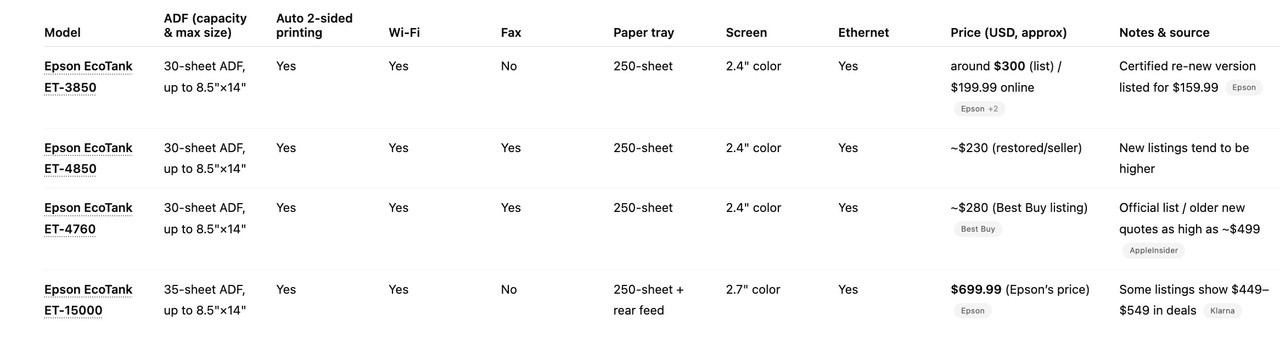
The link I gave in the tite said the unit was WiFi. I am attaching a table of tradeoffs of the Epson printers with ADF, single sided scanning and double sided printing that are eco tank
I understand about the large jump in pricing. The printer companies figured out they were going to lose a lot of money pricing the ET versions so low. So the models integrate higher pricing since you won't be payig for ink cartridges over time. At your (and my) level of printing the ET versions are defintiely a better buy. So it is sticker shock yet time to acknowledge reality of those higher costs. I ended up with an 4850 yet that was because I got a sweet deal through Costco and then is was $357 new with an extra black bottle of ink. The first three on the list are very similar and I would double check the printing speeds yet I believe the print resolution is the same. I probably could have gotten a 3850 for my needs yet at the time the 4850 deal was the same price. I did not look at what canon or brother had to offer yet those might be worth looking at as well. The newest "home office" printers are also a bit slower of the speeds I got of printers 5 to 10 years ago. I assume they adjusted the feature set for that market.
Hope this helps
John Wheeler
I usually buy new, yet when money is tighter, I have purchased refurbished on some electronic items.
If you buy refurbished, there are several vendors that offer extended warranties on refurbished units.
I am not the biggest fan of Amazon, yet they often offer extended warranties with their Asurion program. Not expensive and the easiest to use if there is any issue. No muss, no fuss, and most often it's a replacement with free returns through Amazon's return process.
Another vendor that gives extended warranties on refurbished items is Adorama. I don't know how their program works, though.
Many refurbished units have not even been used, yet they cannot be sold as new once they have been shipped or are in a customer's hands.
Since you can reduce the cost to nearly half the list price and definitely well below the bargain prices, it can take the sting out of buying a new printer. The extended warranty (often up to three years) helps blunt some of the risk, too.
I would also check places such as Costco and Sams Club if you in the US as they often work special deals through the printing companies.
For non-photo output, a laser printer is far more cost effective than inkjet over time. Monotone laser is super cheap to run. Color laser has higher initial and consumables costs, but is still cheaper than inkjet over time. Lasers don't waste material and don't care if they sit idle for days or months. Inkjets waste huge quantities of ink and have to be run regularly to prevent irreparable head clogging.
I use a Brother HL-L2340DW monochrome and HL-L3230CDW color. Both run happily on E-Z Ink third party toners refills that are 1/5 the price of Brother cartridges. Definitely not for photos. Document text and graphics are perfect.
For my home office I gave up on colour and went for a basic Brother laser printer. Only gives me B&W but that's fine for office documents. Cheap to buy and run and gives me excellent output.
Photo printing is in another league, with expensive inks, special paper, colour matching, etc. etc. so I don't use that kit for office printing.
jeffbuzz wrote:
For non-photo output, a laser printer is far more cost effective than inkjet over time. Monotone laser is super cheap to run. Color laser has higher initial and consumables costs, but is still cheaper than inkjet over time. Lasers don't waste material and don't care if they sit idle for days or months. Inkjets waste huge quantities of ink and have to be run regularly to prevent irreparable head clogging.
I use a Brother HL-L2340DW monochrome and HL-L3230CDW color. Both run happily on E-Z Ink third party toners refills that are 1/5 the price of Brother cartridges. Definitely not for photos. Document text and graphics are perfect....Show more →
---------------------------------------------
rob_ww wrote:
For my home office I gave up on colour and went for a basic Brother laser printer. Only gives me B&W but that's fine for office documents. Cheap to buy and run and gives me excellent output.
Photo printing is in another league, with expensive inks, special paper, colour matching, etc. etc. so I don't use that kit for office printing.
Thanks for the Laser printer suggestions fellas. I will look into it
Unfortunately, we had to replace the well pump last week. No water from Sunday afternoon at about 2pm until around noon on Tuesday. Not fun. You don't realize what on-demand water means until you don't have it.
Also unfortunately, the vacuum cleaner just bit the dust at the end of last week. They are not inexpensive either.
Soooo, it appears that the new printer idea will be need to be kicked down the road for the time being.
rob_ww wrote:
For my home office I gave up on colour and went for a basic Brother laser printer. Only gives me B&W but that's fine for office documents. Cheap to buy and run and gives me excellent output.
Photo printing is in another league, with expensive inks, special paper, colour matching, etc. etc. so I don't use that kit for office printing.
Did the same thing after seeing how much ink was costing me for my ink jet printer. When it died, bought a Brother laser printer like you and am very happy that I did.
FWIW at this point, we use an Epson WF-3820 at the house. It works great and doesn't seem to over drink juice like the HP it replaced did. Also, wireless printing works perfectly. And as the big plus, it was relatively cheap. Note that Office Depot usually gives a pretty healthy printer trade-in credit, working or not -- I think we got $40 off for our old, defunct HP.