p.1 #1 · Canon R5ii tracking AF without subject recognition
Not sure if this is possible. But what I'm trying to accomplish with my R5ii is this:
#1. AF tracking of whatever I place the focus on. So if I focus on a person using, for example, center focus, and the person moves to the right, the focus moves to the right as well.
#2. No subject recognition. So again if I'm focusing on a person with the center button, and their back is to the camera, and someone else staring at the camera enters the frame outside of the center focus button, the focus does NOT shift to the person staring at the camera.
I was trying to figure this out but I can't. If I turn off subject recognition, the focus point still goes to the person in #2 above (say to their eye even though this should be disabled). If I turn off whole area tracking, then #1 doesn't happen. The focus stays in the center.
I tried both the locked center focus button and the unlocked. Neither seemed to help.
I was doing this while at a game so I would make changes in between plays and nothing seemed to work. The way I was trying to do it was with bbf with the AEL button using the detail set.
I feel like I'm missing something obvious here but I can't seem to figure it out. Hoping someone will chime in with some advice. Thank you.
p.1 #2 · Canon R5ii tracking AF without subject recognition
Yes, it's possible and exactly how I have my cameras set up. You have to set the AF to at minimum one back button and enter the AF settings submenu by pressing the INFO button to activate/deactivate subject recognition, whole area tracking, etc. Basically you'd set up the back button with the opposite settings you use as default so that when you press the back button it overrides your standard AF settings. This assumes you use the shutter release with AF. If you already use a back button, you set another set of AF parameters on another back button (such as * if you're already using AF-ON).
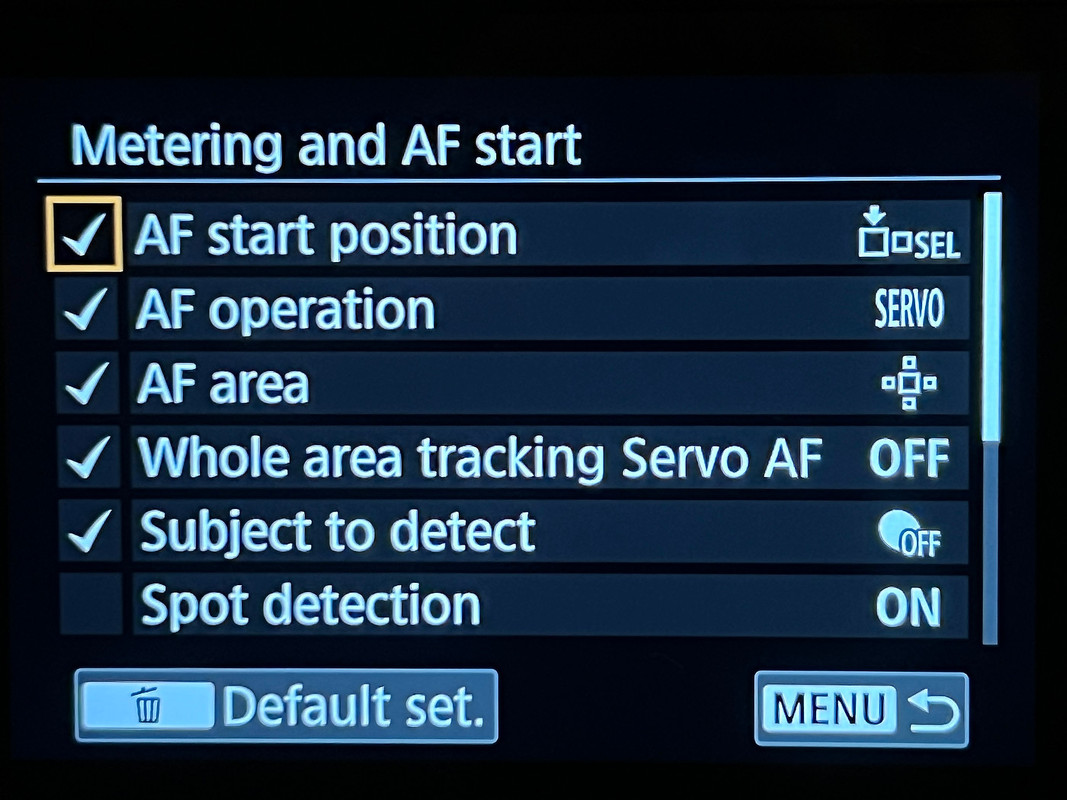
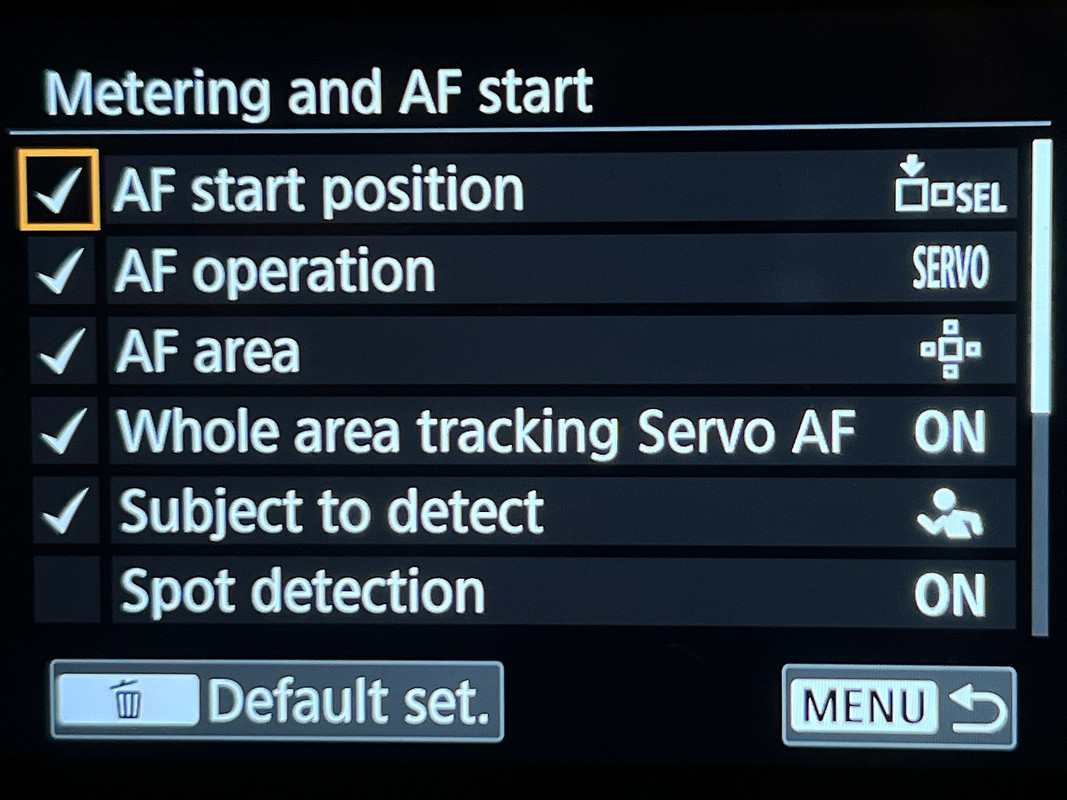
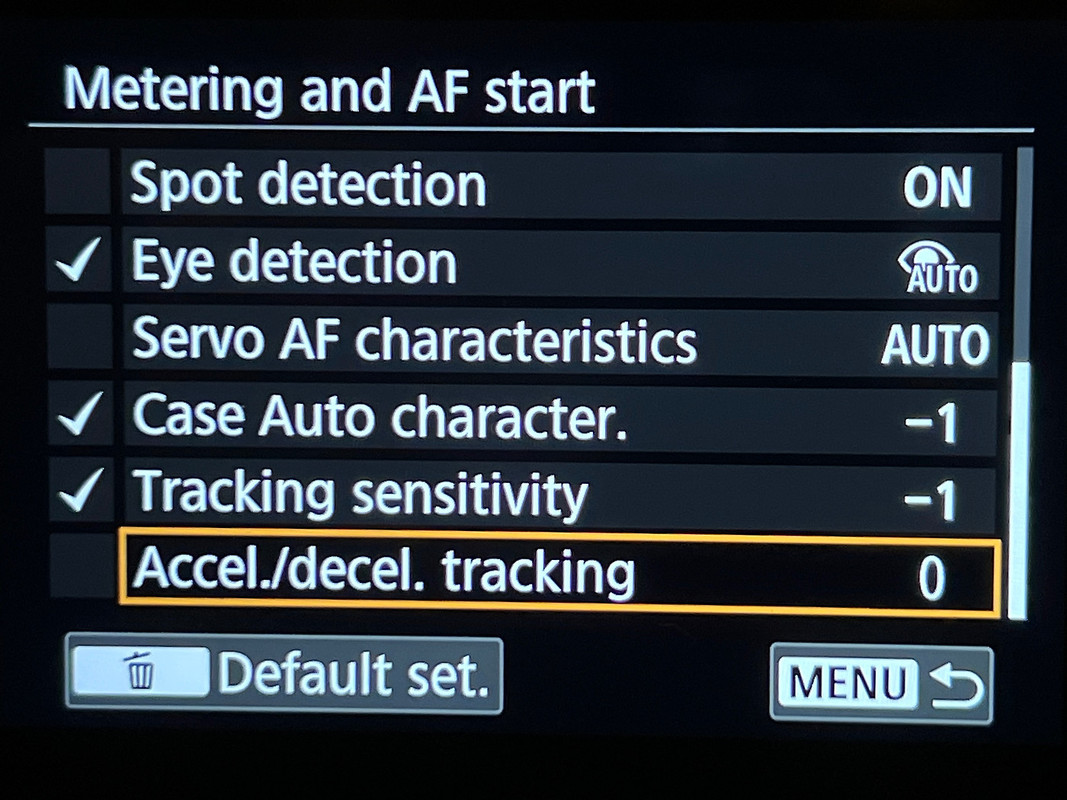
Here are screenshots of my R5II settings.
The first is without any subject recognition/tracking and basically emulates how I had my DSLRs set up. Only settings in the first half of the menu have been set. It might seem obvious in hindsight but there has to be a checkmark in the left column to turn on a specific feature. You can't just turn it on in the right column.
The next two are the settings I use for subject recognition/tracking.
p.1 #3 · Canon R5ii tracking AF without subject recognition
Thanks so much for the thorough post! I appreciate it.
I thought I had done all these things but I'll check again. I just haven't had time yet.
Again, thanks a lot!
p.1 #4 · Canon R5ii tracking AF without subject recognition
Indeed it does work nicely on my R5MkII. I noticed if I half press on any type of subject of any kind in the center focus point, and move the camera away from it the focus box stays nicely on said subject no matter how much I move the camera or the subject may move. Pretty cook actually.
p.1 #5 · Canon R5ii tracking AF without subject recognition
dcisive wrote:
Indeed it does work nicely on my R5MkII. I noticed if I half press on any type of subject of any kind in the center focus point, and move the camera away from it the focus box stays nicely on said subject no matter how much I move the camera or the subject may move. Pretty cook actually.
I have found that sometimes, in certain situations ,this actually works better than subject detection as the camera doesn't fool itself and jump off as easily.
p.1 #6 · Canon R5ii tracking AF without subject recognition
It appears as if I did not have the check mark beside "subject to detect". Hard to believe it could be that simple and I was struggling so much to find the answer.