p.3 #1 · Discontinued? TTArtisan M-Z 6-Bit Adapter Ring
matoqui wrote:
I don't have the Newer adapter. With the Funmount adapter I don't see a need to tweak the text file on the field. You choose one of the 12 lenses that you pre-define by selecting an f-stop between f/10 and f/36 on the camera, and cycling power.
Can you share exactly how to configure the lensinfo text file to enable this? I have yet to find any reliable and accurate info online about how to do this.
p.3 #2 · Discontinued? TTArtisan M-Z 6-Bit Adapter Ring
If you use the default lens definitions, you do not need to change the file "lens.txt". To select a lens, select the corresponding aperture according to the table in the following link, then take a picture and turn the camera on and off.
For example:
1. Set the camera's aperture to f/16 to select lens number 5, which by default is a 35mm f/2.
2. Take a picture of anything
3. Turn OFF the camera, then ON
Now the camera should indicate a 35mm f/2 lens. When imported into LR Classic, the EXIF indicates a Nikon 35/2 lens.
The table comes from the manual, which can be downloaded from the following link:
You can change the data on the file "lens.txt" to specify different lenses. The adapter attaches to the computer with a usb cable and shows off as an external drive with the file. You should use an ascii text editor to modify the file, and make sure you save the modified file and properly eject the drive.
p.3 #3 · Discontinued? TTArtisan M-Z 6-Bit Adapter Ring
I just got a TTArtisan 6-bit M-Z adapter running firmware 1.0.0. Is it worth updating to 1.0.2, or are there any known issues introduced with the newer version?
p.3 #4 · Discontinued? TTArtisan M-Z 6-Bit Adapter Ring
I updated it from v1.0.0 to v1.0.2 (which is the latest on their website), but the camera is now showing 2.0.2 instead. Not sure if anyone else is seeing that.
Either way, good news is that the original firmware didn't recognize the 6-bit coding on my Leica 28mm f/1.4 Lux, but after the update it reads it correctly now.
p.3 #5 · Discontinued? TTArtisan M-Z 6-Bit Adapter Ring
I just updated mine to 1.02 and now focus confirmation no longer works and I have NO idea why. Do you happen to still have the other firmware files? Haha
Fred Miranda wrote:
I just got a TTArtisan 6-bit M-Z adapter running firmware 1.0.0. Is it worth updating to 1.0.2, or are there any known issues introduced with the newer version?
p.3 #6 · Discontinued? TTArtisan M-Z 6-Bit Adapter Ring
akfujishooter wrote:
I just updated mine to 1.02 and now focus confirmation no longer works and I have NO idea why. Do you happen to still have the other firmware files? Haha
Did you use a Mac or a PC to update the firmware?
I used a Mac the first time I did the firmware update to 1.02 and the adaptor stopped working. Reapplied the update using a PC and it all came back to life.
p.3 #7 · Discontinued? TTArtisan M-Z 6-Bit Adapter Ring
I used a Mac, that’s all I have access to. Maybe that’s what did it then.
Edit: I downloaded a Windows VM and tried again and it worked. I guess you just have to use windows on it 🤷🏼♂️ Bob Bogo wrote:
Did you use a Mac or a PC to update the firmware?
I used a Mac the first time I did the firmware update to 1.02 and the adaptor stopped working. Reapplied the update using a PC and it all came back to life.
p.3 #8 · Discontinued? TTArtisan M-Z 6-Bit Adapter Ring
akfujishooter wrote:
I used a Mac, that’s all I have access to. Maybe that’s what did it then.
Edit: I downloaded a Windows VM and tried again and it worked. I guess you just have to use windows on it 🤷🏼♂️
I'm curious to hear what technology you used to run that VM... my technology stack for that was not pleasant to navigate (an old VirtualBox + windows ISO that were compatible with my aging Mac).
p.3 #9 · Discontinued? TTArtisan M-Z 6-Bit Adapter Ring
Haha well. My mid-2015 pro died a year ago, and I inherited my wifes 2016 pro when I bought her an M4 Air. So…also running a very old setup haha. I just downloaded Parallels and then windows 11. It was all a free trial which is all I needed! There won’t be any firmware updates to the 6bit clearly, so won’t need to use it again
Bob Bogo wrote:
I'm curious to hear what technology you used to run that VM... my technology stack for that was not pleasant to navigate (an old VirtualBox + windows ISO that were compatible with my aging Mac).
p.3 #11 · Discontinued? TTArtisan M-Z 6-Bit Adapter Ring
Last night in my frantic Internet digging to figure out what happened to my adapter, I did see a few places where people said the firmware was showing up as 2.02. No indications as to why though 🤷🏼♂️
Fred Miranda wrote:
Here’s something interesting I ran into.
p.3 #12 · Discontinued? TTArtisan M-Z 6-Bit Adapter Ring
akfujishooter wrote:
Last night in my frantic Internet digging to figure out what happened to my adapter, I did see a few places where people said the firmware was showing up as 2.02. No indications as to why though 🤷🏼♂️
Thanks for the info.
Just out of curiosity, I connected the adapter to my Mac and it showed up in Finder under "TTARTISAN". Just like on the PC, I found a DeviceInformation.txt file on the drive, and it confirms the adapter is indeed running v1.02.
So the Nikon Zf is incorrectly reporting it as v2.02, but otherwise everything is working perfectly and the adapter is performing as expected.
p.3 #13 · Discontinued? TTArtisan M-Z 6-Bit Adapter Ring
So is is really discontinued? I wanted to get one to shoot my 35'lux on a used Nikon Zf (which I don't own yet either) but it seems to be long gone?!
What's the option if one wants Nikon's green box focus confirmation? Stacking Megadap ETZ21 Pro+ and TTArtisan M-E 6-Bit? I'm worried that will mess with the tolerances and degrade performance.
p.3 #16 · Discontinued? TTArtisan M-Z 6-Bit Adapter Ring
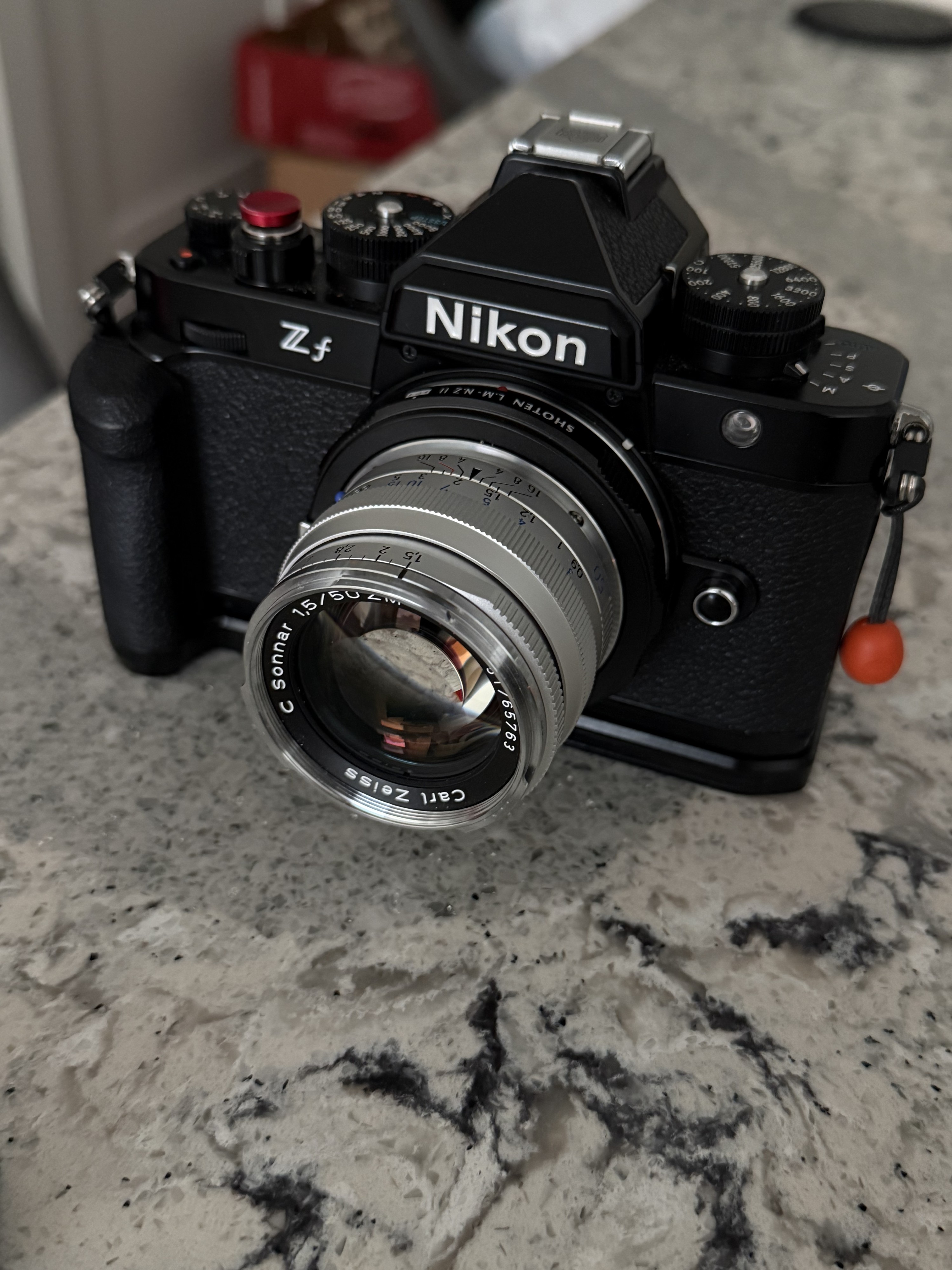
For all who wants another adapter to look at, I recently got in the Shoten M to Z adapter with a chip inside it.
It's working fine on my ZF with a Zeiss 50. Best thing is focus confirmation along with peaking.
p.3 #17 · Discontinued? TTArtisan M-Z 6-Bit Adapter Ring
Sorrymanagement wrote:
For all who wants another adapter to look at, I recently got in the Shoten M to Z adapter with a chip inside it.
It's working fine on my ZF with a Zeiss 50. Best thing is focus confirmation along with peaking.
p.3 #18 · Discontinued? TTArtisan M-Z 6-Bit Adapter Ring
NO, the Shoten adapter doesn't optically read the 6-bit info, so it won't transmit Leica lens name, aperture setting, etc, from what I understand. You will however get the green box focus confirmation.
p.3 #19 · Discontinued? TTArtisan M-Z 6-Bit Adapter Ring
patotts wrote:
NO, the Shoten adapter doesn't optically read the 6-bit info, so it won't transmit Leica lens name, aperture setting, etc, from what I understand. You will however get the green box focus confirmation.
That's correct. You have to set the focal length/max aperture by first taking a picture at a specific f-number set in camera. Without that you'll get focus confirmation but incorrect EXIF data. Source: I have one of these adapters.
p.3 #20 · Discontinued? TTArtisan M-Z 6-Bit Adapter Ring
You have a way to set the focal length in the text file inside the adapter so that ibis works correctly. I haven't checked how dxo sees these yet. I usually set the non lens cpu data tab with the name for the lens.