fredmiranda.com
Login

Moderated by: Fred Miranda
  New fredmiranda.com Mobile Site
  New Feature: SMS Notification alert
  New Feature: Buy & Sell Watchlist
  

FM Forums | Fuji Forum | Join Upload & Sell

       2       end
  

GFX100S II Pixel Shift


tsdevine
Online
• • • • •
Upload & Sell: On
p.1 #1 · GFX100S II Pixel Shift


I started dabbling with pixel shift features of the a7R V over the years I've had it. I don't do it very often, but I've find it can be a fun challenge and works well in the right circumstances. This morning I thought I'd give it a shot with my Fuji, shooting the Pennsylvania State Capitol Rotunda.

The pixel shift implementation is pretty much the same between Fuji and Sony. You can choose either 4 shot or 16 shot, and the camera pretty much does the rest. It uses electronic shutter, but does give you an option in the time delay between each shot. You take the resulting files, which each can be processed on their own as just a normal single shot exposure. But using the Fuji Pixel Shift Combiner software, you can combine these shots together and it outputs a linear DNG file. The resulting file is well over a gigabyte.

You can take the DNG into Lightroom, or other software that can process DNG files. I used Lightroom Classic, Photoshop and Topaz on the file below.

One of the biggest challenges to shooting the rotunda is getting the camera on a flat plane, centered underneath the dome. I can never get it perfect, and frankly, I'm not sure all the elements around the rotunda are in perfect position. I just try to get close and then adjust in post as best I can. This particular shot, I think I was able to get it about as centered as any attempt I've made.

I used a small tabletop tripod and sturdy ballhead, as shown here:


While this isn't the first time I've done pixel shift shots of the rotunda, it is the first time with my Fuji. I did learn some idiosyncrasies with the Fuji that I need to kind of research a bit. I tried using the Fuji app on my iPhone, but it seemed to kick me out of pixel shift mode when I use it. I couldn't see an obvious way to put it in pixel shift mode using the app. (First thing on my list to research). So I tried using the LCD, but when you put it in pixel shift mode, it seems like it forces the more detailed LCD display, which adds so much clutter it makes it very hard to try to center the camera under the rotunda. So I'd go back to regular shooting mode, try to center it, and then go back into pixel shift mode. But when switching into pixel shift mode, the images seems to shift to the left a bit. Also, when I bring the file into Lightroom, as soon as I interact with it, it seems to crop the image a bit. I can't seem to undo it and I have no explanation for the behavior.

So it's a bit of trial and error, but that is sort of part of the challenge and the fun in it.

Here's one of the resulting photos I was able to produce using the approach above, taken with my Fuji GFX100S II and 20-35mm lens. It's about 396 megapixels, and has a pretty amazing amount of detail.


Rotunda in Symmetry by Tim Devine, on Flickr

Here is a 100% resolution crop of the upper left quadrant.

Sony does have some capability to handle movement in the individual shots that are being combined, which it doesn't produce miracles, it does work somewhat well if you are shooting outdoors and it isn't absolutely calm. Would be nice if Fuji could do something similar.

Anyway, just thought I'd share.

-Tim


Edited on Sep 06, 2025 at 08:27 AM · View previous versions


Aug 24, 2025 at 09:22 PM
tsdevine
Online
• • • • •
Upload & Sell: On
p.1 #2 · GFX100S II Pixel Shift


Anyone have any idea, by chance, why Lightroom seems to crop the DNG that the Fuji Pixel Shift Combiner software creates? It almost looks like the embedded thumbnail is full dimensions as I'd expect, but when the file is fully loaded...it switches to a cropped view.


Aug 25, 2025 at 06:59 AM
InFocus2014
Offline
• • •
Upload & Sell: On
p.1 #3 · GFX100S II Pixel Shift


That detailed file is really amazing. Also, you did a great job on alignment. Overall, a stellar job. Thanks for posting.

When Sony introduced 16 image Pixel Shift, I experimented with it, then again when they upgraded to make it compatible with "hand holding" (I would challenge that claim, to some degree). Overall, I found it to be an arduous process that didn't work well outdoors, and required carrying a sturdy tripod.

Instead, to capture detailed, high-resolution files I prefer to take lots of images and stitch them. I use back-button focus, so I get the focus (then locked), lock the exposure with AEL and then spray the subject area with many shots, overlapping by about 30%. I can be quite fast and sloppy about the process and still get perfect stitched results with Lightroom/Photoshop.

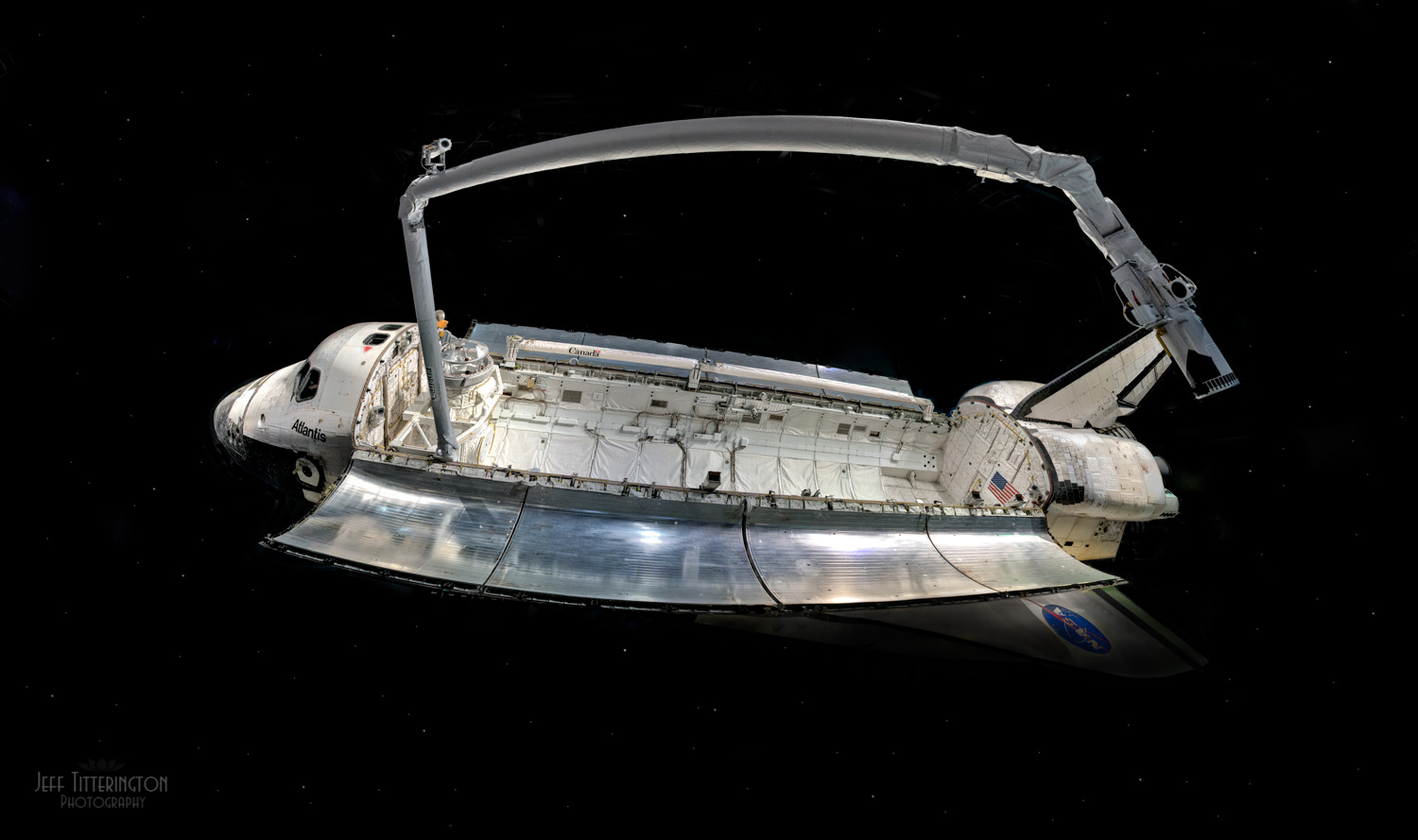
Below is an example I shot ten years ago at the museum at Cape Canaveral with 32 shots stitched. I banged-off 32 frames in about 12 seconds, as my spot was about to be swamped by other tourists. I can zoom-in to the huge file and see fine detail like rivets. I now stitch images a lot, which often provides wide-angle flexibility when shooting a normal lens... and no tripod.

I was going to ignore the Pixel Shift capability of my GFX100S II, but now, I just cannot dismiss it so easily. Thanks, Tim.

There is a dome in my city that could work as a subject. I might try Pixel Shift with the GF 20-35mm, then shoot a stitched series with the GF 110mm and see how they compare in both image quality and overall processing time/complexity.

I do not generally carry tripods, so I hope that I continue to prefer stitching.


32 Shot Stitched Image taken in 2015: Sony A7RII, Canon 24-70mm f2.8 II, ISO 640, 24mm, f4.5, 1/50, processed in LR/PS


Aug 25, 2025 at 07:50 AM
rji2goleez
Offline
• • • • • •
Upload & Sell: On
p.1 #4 · GFX100S II Pixel Shift


tsdevine wrote:
Here's one of the resulting photos I was able to produce using the approach above, taken with my Fuji GFX100S II and 20-35mm lens. It's about 396 megapixels, and has a pretty amazing amount of detail.

https://live.staticflickr.com/65535/54742934943_4b380d200b_h.jpg
Detailed Symmetry by Tim Devine, on Flickr

Here is a 100% resolution crop of the upper left quadrant.

Sony does have some capability to handle movement in the individual shots that are being combined, which it doesn't produce miracles, it does work somewhat well if you are shooting outdoors and it isn't absolutely calm. Would be nice if Fuji could do something similar.

Anyway, just thought I'd share.

-Tim


Tim - The shot is amazing in the level of clarity and detail. I haven't really tried using pixel shift on the Fuji but you inspire me to give it a go. Wish I had some info to offer but at least wanted to say that the resulting image is awesome!


Aug 25, 2025 at 08:06 AM
Jim Dockery
Offline
• • • • •
Upload & Sell: Off
p.1 #5 · GFX100S II Pixel Shift


I think you nailed it this time

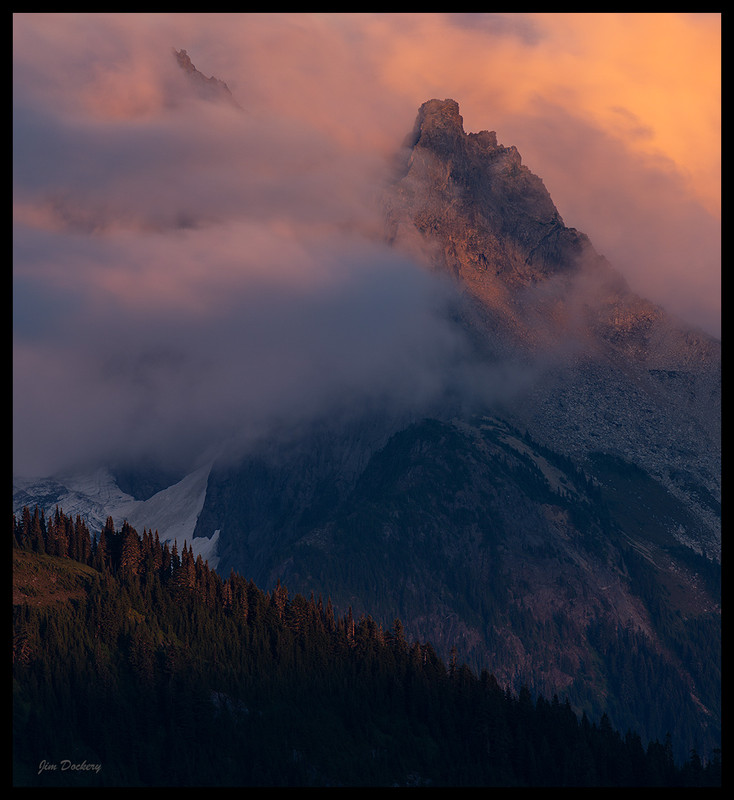
I was just experimenting with the pixel shift on my A7cr last week on a hike in the North Cascades. It worked perfectly and essentially extended the reach of my telephoto lens to crop into the distant mountains.


Aug 25, 2025 at 08:14 AM
tsdevine
Online
• • • • •
Upload & Sell: On
p.1 #6 · GFX100S II Pixel Shift


InFocus2014 wrote:
That detailed file is really amazing. Also, you did a great job on alignment. Overall, a stellar job. Thanks for posting.

When Sony introduced 16 image Pixel Shift, I experimented with it, then again when they upgraded to make it compatible with "hand holding" (I would challenge that claim, to some degree). Overall, I found it to be an arduous process that didn't work well outdoors, and required carrying a sturdy tripod.

Instead, to capture detailed, high-resolution files I prefer to take lots of images and stitch them. I use back-button focus, so I get the focus (then locked), lock the exposure
...Show more

Great shot! I'm kind of the polar opposite with regard to tripods. My most used setup is a RRS TVC-22i with an Arca Swiss P1+ ball head. If I'm travelling light, I take my RRS TFC-24L with an Arca Swiss P0 ball head. In the case for your shot, it's probably the only way you could have gotten it. Maybe at some point I will try shooting that way.

I've used pixel shift on my a7R V a bit, mostly shooting waterfalls outdoors. When conditions are right, nothing is really moving but the water. I've had really good luck with the a7R V pixel shift/stabilize feature while shooting waterfalls. The way I shoot, holding the shutter open a bit, demands a tripod anyway.


Aug 25, 2025 at 08:31 AM
tsdevine
Online
• • • • •
Upload & Sell: On
p.1 #7 · GFX100S II Pixel Shift


rji2goleez wrote:
Tim - The shot is amazing in the level of clarity and detail. I haven't really tried using pixel shift on the Fuji but you inspire me to give it a go. Wish I had some info to offer but at least wanted to say that the resulting image is awesome!


Thanks Bob. With the stabilize feature on Sony, you can get good results in more situations I think. While I can't 100% say for sure, I suspect Fuji is less forgiving. You need to have no movement, which might limit you to "perfect" conditions outdoors...or use it in an indoor setting like I did here.


Aug 25, 2025 at 08:36 AM
tsdevine
Online
• • • • •
Upload & Sell: On
p.1 #8 · GFX100S II Pixel Shift


Jim Dockery wrote:
I think you nailed it this time

I was just experimenting with the pixel shift on my A7cr last week on a hike in the North Cascades. It worked perfectly and essentially extended the reach of my telephoto lens to crop into the distant mountains.
https://i.postimg.cc/dVNxs1jt/Yellow-Aster-Butte-8-25-1639-PSMS16.jpg


Thanks Jim, I agree, I have had good results outdoors with my a7R V. But I've not tried it in situations where there is a breeze, most of my shooting it's been pretty calm.

My biggest challenge is remembering to try it in the field! Other than space, there's no real reason not to. You can always cull them out when you ingest them. And any of the individual files can be used on their own. I think this is true for Fuji too.


Aug 25, 2025 at 08:39 AM
SGinNorcal
Online
• • •
Upload & Sell: On
p.1 #9 · GFX100S II Pixel Shift


I use the pano stitch function in Capture One quite often. I've wondered how it would work if I used the Pixel Shift function in camera to collect the images but then combined using the pano stitch function in C1. Seems like it would produce the same thing yet eliminate a software step, keeping within C1. I'm not sure if there would be a difference in the files. Guess I need to try and see.


Aug 25, 2025 at 01:18 PM
tsdevine
Online
• • • • •
Upload & Sell: On
p.1 #10 · GFX100S II Pixel Shift


SGinNorcal wrote:
I use the pano stitch function in Capture One quite often. I've wondered how it would work if I used the Pixel Shift function in camera to collect the images but then combined using the pano stitch function in C1. Seems like it would produce the same thing yet eliminate a software step, keeping within C1. I'm not sure if there would be a difference in the files. Guess I need to try and see.


I suspect that Capture One stitches after the demosaic step, where this fundamentally changes the demosaic process/approach and outputs a linear DNG. So I don't think it would work, but I could be wrong.


Aug 25, 2025 at 01:52 PM


Search in Used Dept. 

SGinNorcal
Online
• • •
Upload & Sell: On
p.1 #11 · GFX100S II Pixel Shift


tsdevine wrote:
I suspect that Capture One stitches after the demosaic step, where this fundamentally changes the demosaic process/approach and outputs a linear DNG. So I don't think it would work, but I could be wrong.


Yes, after de-mosaic but does output a DNG.


Aug 25, 2025 at 02:35 PM
tsdevine
Online
• • • • •
Upload & Sell: On
p.1 #12 · GFX100S II Pixel Shift


SGinNorcal wrote:
Yes, after de-mosaic but does output a DNG.


Right, but neither 4 or 16 shot pixel shift requires Bayer demosaicing. That's one of the big benefits of pixel shift, getting all colors sampled at each pixel. It doesn't need to interpolate 2/3rds of the color information. And when it's done, it yields a linear DNG.

For stitching, it demosaics the RAW files and then basically finds where to stitch the various individual shots together, yielding a linear DNG.


Aug 25, 2025 at 03:00 PM
tsdevine
Online
• • • • •
Upload & Sell: On
p.1 #13 · GFX100S II Pixel Shift


I went back to my a7R V pixel shift shot I took in May of 2024. I noticed I could have been more aggressive with sharpening, so I sharpened it a bit more (It's pretty amazing how much sharpening these files need, and can take.

Here's a screenshot from a retina display M1 Macbook Pro at 300%.


Full Size

It holds up really well. It was shot with a Sigma 14-24mm @ 14mm at f/6.3. The Fuji shot with the 20-35mm was @ 20mm at f/8.

Surprising the color is in the same ballpark too, I guess I'm consistent in processing.


Aug 25, 2025 at 08:50 PM
tsdevine
Online
• • • • •
Upload & Sell: On
p.1 #14 · GFX100S II Pixel Shift


tsdevine wrote:
Anyone have any idea, by chance, why Lightroom seems to crop the DNG that the Fuji Pixel Shift Combiner software creates? It almost looks like the embedded thumbnail is full dimensions as I'd expect, but when the file is fully loaded...it switches to a cropped view.


So I opened the DNG in Raw Therapee and it wasn't cropped. In Lightroom I see it says an embedded profile was applied, so I had a hunch that was the problem.

So with Exiftool, I stripped out the embedded lens profile and now LR shows me the full image.

exiftool -OpcodeList1= -OpcodeList2= -OpcodeList3= yourfile.dng

Doubt there is much interest in all of this, but you never know, maybe someone will stumble across this post and it will help.

Now I have to reprocess the file (my MBP is groaning as we speak.)


Aug 25, 2025 at 09:31 PM
tsdevine
Online
• • • • •
Upload & Sell: On
p.1 #15 · GFX100S II Pixel Shift


tsdevine wrote:
So I opened the DNG in Raw Therapee and it wasn't cropped. In Lightroom I see it says an embedded profile was applied, so I had a hunch that was the problem.

So with Exiftool, I stripped out the embedded lens profile and now LR shows me the full image.

exiftool -OpcodeList1= -OpcodeList2= -OpcodeList3= yourfile.dng

Doubt there is much interest in all of this, but you never know, maybe someone will stumble across this post and it will help.

Now I have to reprocess the file (my MBP is groaning as we speak.)


Unfortunately, when you do the above, you can't apply the lens profile in Lightroom. So I used ChatGPT to give me suggested manual distortion and vignetting settings for this lens when shot at 20mm and f/8. The values it suggested as a starting point were pretty close. I just had to dial in a bit more barrel distortion correction.


Aug 26, 2025 at 08:01 AM
rji2goleez
Offline
• • • • • •
Upload & Sell: On
p.1 #16 · GFX100S II Pixel Shift


tsdevine wrote:
So I opened the DNG in Raw Therapee and it wasn't cropped. In Lightroom I see it says an embedded profile was applied, so I had a hunch that was the problem.

So with Exiftool, I stripped out the embedded lens profile and now LR shows me the full image.

exiftool -OpcodeList1= -OpcodeList2= -OpcodeList3= yourfile.dng

Doubt there is much interest in all of this, but you never know, maybe someone will stumble across this post and it will help.

Now I have to reprocess the file (my MBP is groaning as we speak.)


It's always good to learn what our cameras can and can't do!


Aug 26, 2025 at 08:14 AM
Danpbphoto
Offline
• • • • • • •
Upload & Sell: On
p.1 #17 · GFX100S II Pixel Shift


I can only remark on your results here Tim. Outstanding!
How you got there is something I have not investigated. My 100s ii is still a very new "toy" I am trying to learn.
Again super compositions here.
Dan


Aug 27, 2025 at 01:02 PM
tsdevine
Online
• • • • •
Upload & Sell: On
p.1 #18 · GFX100S II Pixel Shift


Thanks Dan, I had cameras that supported pixel shift for quite a long time, I think back to my a7R III. I only really started playing around with it when I got the a7R V. Given how Fuji pretty much mimics Sony (or vice versa), it wasn't hard. (Frankly it's not hard period). You just need the camera to be still, and ideally everything you're shooting (albeit Sony is a little more forgiving). You do have to sharpen them quite a bit, but they take sharpening extremely well. And given that it is getting real color samples at each pixel, you don't really run into Bayer artifacts.

It's fun to try. And each of the shots that make up a set an be processed as a normal shot. So there really isn't anything to lose.

And I first shot the rotunda back in 2014, and have gone back several times since then. It is so hard to align the camera perfectly.

In any case, in the right conditions it can be amazing.


Aug 27, 2025 at 07:52 PM
tsdevine
Online
• • • • •
Upload & Sell: On
p.1 #19 · GFX100S II Pixel Shift


So the shot I posted above seemed cropped a bit compared to when I process a single frame. I realize some pixels on the extreme edges are lost due to pixel shift, but it seems a little narrower than I expected. I was able to strip out the info in the EXIF that made Lightroom autocorrect. But then I lost access to the corrections for the 20-35. I manually corrected using the manual tools in Lightroom. But I ended up with an image that had a wider view, but also less pixels then what the image at the top yielded. The far edges aren't as crispy, my guess is that my manual approach to correction stretched the edges a bit more than the purpose built profile. I do like the wider view in this shot though.


The Beauty Above by Tim Devine, on Flickr


Aug 27, 2025 at 07:55 PM
tsdevine
Online
• • • • •
Upload & Sell: On
p.1 #20 · GFX100S II Pixel Shift


rji2goleez wrote:
It's always good to learn what our cameras can and can't do!


How true! And I'm pretty sure there are features I haven't used....but I've definitely been more adventurous over the past few years.


Aug 27, 2025 at 07:58 PM
       2       end


FM Forums | Fuji Forum | Join Upload & Sell

       2       end


Welcome back
Log in to your account