RoamingScott wrote:
Why do you insist on posting completely irrelevant Canon anecdotes with systems you don’t own and don’t use?
Your monochrome example in particular is completely pointless in this conversation.
Once again, you come at me with an ignorance based attack. I'll try to explain it better, although I doubt you'll figure it out.
I can go into picture styles on an old Canon body, whether Gdan the man likes it or not, change the in camera settings to monochrome, and it shows a different number of photos left on the card. So it is probably affecting the info on the raw file, based on in camera settings, otherwise it'd show the same number of photos. Fuji is probably the same, I'm agreeing with the op.
I've always assumed that any Fujifilm camera profile selection would have no visible effect on raw files, but I never actually tested it.
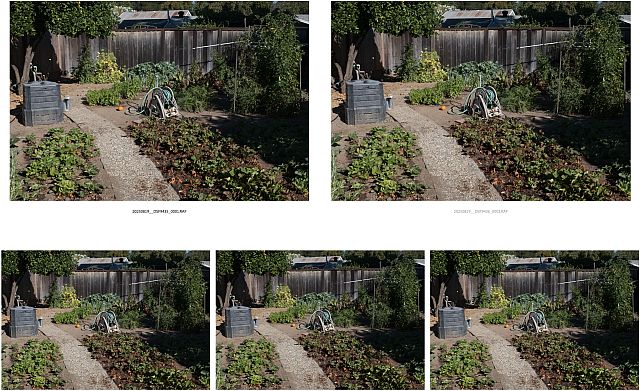
A few minutes ago I wandered out into the vegetable garden with the XT5 and made five exposures using different profiles. The first one is the so-called "STD" setting and the last one was "Sepia" — I didn't record what the others were.
I opened the five files in Adobe Bridge and then ACR, and here's what you see. They look the same, with no trace of the interpretive effects of profile selection. (Initially the preview thumbnails did show those effects, but after opening the files that vanished.)
In other news, it has been a great year for tomatoes, chard, kale and corn... but strangely not great for beets and peppers. And that strawberry plot on the right is old and needs to be reworked. (The one on the left was started this year and is doing great!)
AmbientMike wrote:
I can go into picture styles on an old Canon body, whether Gdan the man likes it or not, change the in camera settings to monochrome, and it shows a different number of photos left on the card. So it is probably affecting the info on the raw file, based on in camera settings, otherwise it'd show the same number of photos. Fuji is probably the same, I'm agreeing with the op.
I know nothing about Canon but if what you say is correct then Fuji is not the same.
EDIT: Of course its affecting the embedded jpeg and the metadata in the raw file but not the raw data and it won't have much impact on file size.
AmbientMike wrote:
Once again, you come at me with an ignorance based attack. I'll try to explain it better, although I doubt you'll figure it out.
I can go into picture styles on an old Canon body, whether Gdan the man likes it or not, change the in camera settings to monochrome, and it shows a different number of photos left on the card. So it is probably affecting the info on the raw file, based on in camera settings, otherwise it'd show the same number of photos. Fuji is probably the same, I'm agreeing with the op.
Cameras often embed a jpeg version of the image in the RAW file - that allows an image viewer to show a preview of the RAW file without doing a RAW to jpeg conversion. So that would be one way the quality and size of JPEG would impact the size of RAW file. The actual RAW data is not impacted of course.
curious80 wrote:
Cameras often embed a jpeg version of the image in the RAW file - that allows an image viewer to show a preview of the RAW file without doing a RAW to jpeg conversion. So that would be one way the quality and size of JPEG would impact the size of RAW file. The actual RAW data is not impacted of course.
That's true, imbedded jpeg may be smaller, maybe that explains a lot of it then.
But even in Canon’s raw processor I couldn't get the same exact thing, adjusting contrast in pp vs in camera. So no, I don't think raw is unaffected by in camera settings.
ThePettyGrievanceDepartment spluttered:
Your bay are gardening update didn't have much relevance in that regard, either.
- - -
ThatGuy wrote:
Wow. Small photos posted to the internet from a 3rd party converter didn't show a difference.
Oh, c'mon. Even in a thumbnail you'd see the difference between a sepia image and a color image.
Here, for your obsession, are the images using the STD and SEPIA profiles at full size exported to jpg from the raw converter (ACR) without any processing... at full native size. Click and expand to however big you want.
ruthenium wrote:
WB doesn't impact the RAW; it impacts the interpretation of the raw in your raw converter. For example, you take a shot in daylight, whereas your WB is ( for some inexplicable reason, and purely for example) set to 3000. Then, upon converting from raw in an app that reads this WB, you should see some rather unexpectedly bluish scene.
Sure but the OP is asking whether any JPEG settings impact the RAF file itself, and the answer is no. None of these settings including WB impact the RAW data. The camera would include the WB information as well as other cameras settings including color profiles etc as meta-deta in the RAW file and depending on the RAW converter used it can choose to honor one or more of those camera settings while processing the raw file.
Oh, c'mon. Even in a thumbnail you'd see the difference between a sepia image and a color image.
Here, for your obsession, are the images using the STD and SEPIA profiles at full size exported to jpg from the raw converter (ACR) without any processing... at full native size. Click and expand to however big you want.
Which, Incidentally, is roughly the same thing I saw on a photo I shot of water droplets on collard greens in my garden (I guess its gardening duels what next.) Low contrast in camera adjusted in pp didn't have the same pop vs high contrast in camera
MrChangeTheTopic wrote:
I can see lower contrast on the lower one.
Which one used the sepia profile and which used STD?
Run the experiment on your own Fujifilm gear and let us know what you find out. ;-)
BTW, there's no difference in "contrast." I checked. The shadows moved between shots, which might explain your confusion. (The focus points are slightly different in two images since I didn't use a tripod to make these quick images, as close inspection of individual elements — such as the hose — will reveal. You might misinterpret these local differences in sharpness as differences in contrast, but you would be wrong. Feel free to conduct a tripod based, manual focus test with your Fujifilm gear and share the fill size native raw conversions with us.)
- - -
Getting back to the actual topic...
curious80 wrote:
Sure but the OP is asking whether any JPEG settings impact the RAF file itself, and the answer is no. None of these settings including WB impact the RAW data. The camera would include the WB information as well as other cameras settings including color profiles etc as meta-deta in the RAW file and depending on the RAW converter used it can choose to honor one or more of those camera settings while processing the raw file.
That is correct. RAW files (with some exceptions on more modern cameras) should contain the actual sensor data, and that data is the same no matter what post-capture camera settings are used. (Or at least it should be!)
Additional data can accompany the raw file when it is exported using a camera-specific raw file format such as .RAF. Then the importing application may (or may not) allow you to access that accompanying data and use it to add effects that mimic those created in-camera with jpg files.
That's what happened, for example, when I imported the Fujifilm raw files in my example and initially saw the effects of the camera settings in the Adobe Bridge thumbnails — as I mentioned, the file shot with the Sepia profile selected was actually sepia toned until I opened it in ACR, at which point the file defaulted back to the underlying raw image.
If one like shooting jpg files and is OK with having the profile hard-wried into the resulting jpg files (e.g. no second guessing your profile choice in post!) then that's just fine. On the other hand, if you choose to shoot raw, in addition to the other advantages of the raw file format, you can still select profiles like those in the camera and apply them to your raw file in applications like ACR.
gdanmitchell wrote:
Which one used the sepia profile and which used STD?
Run the experiment on your own Fujifilm gear and let us know what you find out. ;-)
BTW, there's no difference in "contrast." I checked. The shadows moved between shots, which might explain your confusion. (The focus points are slightly different in two images since I didn't use a tripod to make these quick images, as close inspection of individual elements — such as the hose — will reveal. You might misinterpret these local differences in sharpness as differences in contrast, but you would be wrong. Feel free to conduct a tripod based, manual focus test with your Fujifilm gear and share the fill size native raw conversions with us.)
- - -
Getting back to the actual topic...
That is correct. RAW files (with some exceptions on more modern cameras) should contain the actual sensor data, and that data is the same no matter what post-capture camera settings are used. (Or at least it should be!)
Additional data can accompany the raw file when it is exported using a camera-specific raw file format such as .RAF. Then the importing application may (or may not) allow you to access that accompanying data and use it to add effects that mimic those created in-camera with jpg files.
That's what happened, for example, when I imported the Fujifilm raw files in my example and initially saw the effects of the camera settings in the Adobe Bridge thumbnails — as I mentioned, the file shot with the Sepia profile selected was actually sepia toned until I opened it in ACR, at which point the file defaulted back to the underlying raw image.
If one like shooting jpg files and is OK with having the profile hard-wried into the resulting jpg files (e.g. no second guessing your profile choice in post!) then that's just fine. On the other hand, if you choose to shoot raw, in addition to the other advantages of the raw file format, you can still select profiles like those in the camera and apply them to your raw file in applications like ACR....Show more →
You have got to be kidding me.
It doesn't matter. The 2 shots explicitly presented to give an example of everything being the same, are different. That's the point, if the raw data is unaffected, that shouldn't be happening, either that or you really goofed up the test badly.
Yes, as much as you might like to make a big deal over the nameplate on the gear, in your (pathetic?) efforts to silence me, I got similar results years ago on Canon. Yes, it certainly looks like raw data is affected by settings in camera, and thanks for helping me make that point, by posting examples
gdanmitchell wrote:
Among things that no one will ever be able to do, MrAmbient, it is "silence" you. Or knock that permanent angry chip off your shoulder.
Bye.
For as big a stink as you like to make over me not using Fuji, you post to the Sony board on a regular basis. Including today after going after me for poting on the fuji board, of all the dumb things
You were the angry one once I pointed out the photos looked different, whatever your asinine explanations. If you are going to post 2 different looking photos in some strange attempt to tell me in camera settings have no effect, you might silence me, because I dont even know what to tell you
It doesn't matter. The 2 shots explicitly presented to give an example of everything being the same, are different. That's the point, if the raw data is unaffected, that shouldn't be happening, either that or you really goofed up the test badly.
Yes, as much as you might like to make a big deal over the nameplate on the gear, in your (pathetic?) efforts to silence me, I got similar results years ago on Canon. Yes, it certainly looks like raw data is affected by settings in camera, and thanks for helping me make that point, by posting examples ...Show more →
Such minor differences as there are have been explained as from the SHOOTING, not the in camera processing. Neither is Sepia! Being pedantic about semantics just makes you look silly.
The question was "recipes". If you have a custom WB set for a recipe (and many do), that will be the WB value of your RAF file on import to LR if you even if you do not apply camera settings on import.
Film sims provided by Fuji will not by themselves change your WB values.
I don't think I've seen a note of this yet, but the histogram is based on the JPEG rather than the raw AFAIK, so you might expose differently if you're using that depending on the film simulation you have selected.