gdanmitchell wrote:
We could all agree that some system is capable of resolving X lines/millimeter. That’s objective. (Though, to dig deeper, that measurement is based on an assumption about how much contrast must be maintained between those line pairs, and that is a decision that is arguably… subjective!)
The question of whether some amount of resolution (or other characteristic) is sufficient and/or is visible is subjective.
And rather than “the best it can be” is also subjective. If no one can see the difference between A and B, the characterization as “best” is subjective. If we can measure a difference between A and B that cannot be seen, there is an objective difference, but believing that is is or is not relevant is a subjective decision.
chiron wrote:
There are often debates in the forums about whether C1 or Adobe LRC + PS provide better results in converting and editing images. But I don't recall seeing competing version of the same images done by skilled users of each software package.
Does anyone have samples of the same images edited with equal technical proficiency by both Adobe and C1?
I don't have any images to offer ... but, there was a time several years back when I switched to C1 because after using it for a demo, I found that it's sharpening algorithm was much more to my liking than Adobe had been to my taste. I had a few images that "came alive" with C1, that it was a noticeable difference.
I used C1 for a couple years, then Adobe seemed to have "upped their game", and closed the gap to within a modest difference, that I reverted back to using LR for its workflow.
I think that in today's terms a few things come to mind ...
A) "Better" and better "at what" is indeed relative, depending on how you deem "better"
B) The diff's of working with color / sharpening / NR / uprez / masking / pano-stitching / etc. are going to be key aspects wrt to understanding the comparators
C) Workflow is a key aspect to using the software. If you are "fighting with your tools" because of workflow, the nominal amount of "better" (at what) may be less significant of an adjustment than that of the differences that person A) rendered an image with software B) of image C)
D) Plenty of opportunities to download and demo (just be aware of time limits for doing so) software to do your own comps, relative to the meaningfulness of items (et al) in B) above.
E) Simply stated ... if YOU like working with C1 better than Adobe ... then use C1. If it rolls the other way around, roll with Adobe. The matter of "better" (at what) is relative to what is BETTER FOR YOU.
F) Sure, if you are prone (I was, others have been) to make such comps ... that's fine. Just recognize that if you TRULY want to understand the differences ("better", or otherwise) between C1 and Adobe, you're gonna need to invest some time and attention to each of them to come to a place where YOU feel that you understand which is "better" for you. It may be that you need to invest some $$$ and have BOTH for a longer period of time to really put them through YOUR paces. Picking the tool that you are gonna use for many years to come, is a valuable decision. Investing the time / $$$ to make a decision that you can "put behind you" is something worthwhile (imo). Penny wise, pound foolish kinda thing, ya know.
G) Just use the one you like ... until you get to a place that either you no longer like using it ... or, you get to a place that it CANNOT meet your needs, and you've outgrown it for some reason or another. I haven't used C1 in a while, now ... but, I'm not sweating the differences between Adobe and C1 (at the moment ), even though I know that I did experience a difference (years ago) between them. Sure, my curiosity might be there ... but, it's not something I'm worried about these days.
H) chiron wrote:
Does anyone have samples of the same images edited with equal technical proficiency by both Adobe and C1?
I'd have to have equal proficiency with both software programs to account for the variance, so unless the person has "mastered" both programs, their proficiency bias would be in play. Ultimately, a mastery of either one can get you to most places. It's just going to be a matter of how well you like the ride of one vs. the other.
In case someone is interested in how their post-processing apps, Adobe or C1, etc, perform against DxO Photolab 8, I am uploading two photos processed and cropped in PL8, then upscaled to 6000 pixels on the long side in Topaz Photo AI.
The link to the raw files is here
These two photos are far from perfect and present different technical challenges that you should see if you open the raw files.
If better final results (than those I am posting here) are obtained in Adobe, C1, or other processing software, I would greatly appreciate it the results are shared here (please, post full-sized jpegs, or provide links to full-sized jpegs).
This is not meant to be a contest, but a learning opportunity. I am genuinely interested in the performance of the different software products that one can use for correcting and processing complex/difficult raw images.
OM-1MarkIIOLYMPUS M.300mm F4.0 lens300mmf/4.01/400s200 ISO0.0 EV
OM-1MarkIIOLYMPUS M.300mm F4.0 lens300mmf/4.01/1250s12800 ISO0.0 EV
ruthenium wrote:
In case someone is interested in how their post-processing apps, Adobe or C1, etc, perform against DxO Photolab 8, I am uploading two photos processed and cropped in PL8, then upscaled to 6000 pixels on the long side in Topaz Photo AI.
The link to the raw files is here
These two photos are far from perfect and present different technical challenges that you should see if you open the raw files.
If better final results (than those I am posting here) are obtained in Adobe, C1, or other processing software, I would greatly appreciate it the results are shared here (please, post full-sized jpegs, or provide links to full-sized jpegs).
This is not meant to be a contest, but a learning opportunity. I am genuinely interested in the performance of the different software products that one can use for correcting and processing complex/difficult raw images....Show more →
This is very off-topic, but how do you like the OM1 II system compared to Sony full-frame? If you print your images, what differences do you notice in image quality?
gdanmitchell wrote:
Whether the measure able difference matters is subjective.
I said that exact same thing above, and you claimed that’s not how subjective and objective work. So which is it? You can’t argue both ways Dan, pick one and stick with it
ruthenium wrote:
In case someone is interested in how their post-processing apps, Adobe or C1, etc, perform against DxO Photolab 8, I am uploading two photos processed and cropped in PL8, then upscaled to 6000 pixels on the long side in Topaz Photo AI.
The link to the raw files is here
These two photos are far from perfect and present different technical challenges that you should see if you open the raw files.
If better final results (than those I am posting here) are obtained in Adobe, C1, or other processing software, I would greatly appreciate it the results are shared here (please, post full-sized jpegs, or provide links to full-sized jpegs).
This is not meant to be a contest, but a learning opportunity. I am genuinely interested in the performance of the different software products that one can use for correcting and processing complex/difficult raw images....Show more →
First, your results look excellent on detail, greens and skintone. I doubt my results will be anything objectively better, but I will give it a try tomorrow and post.
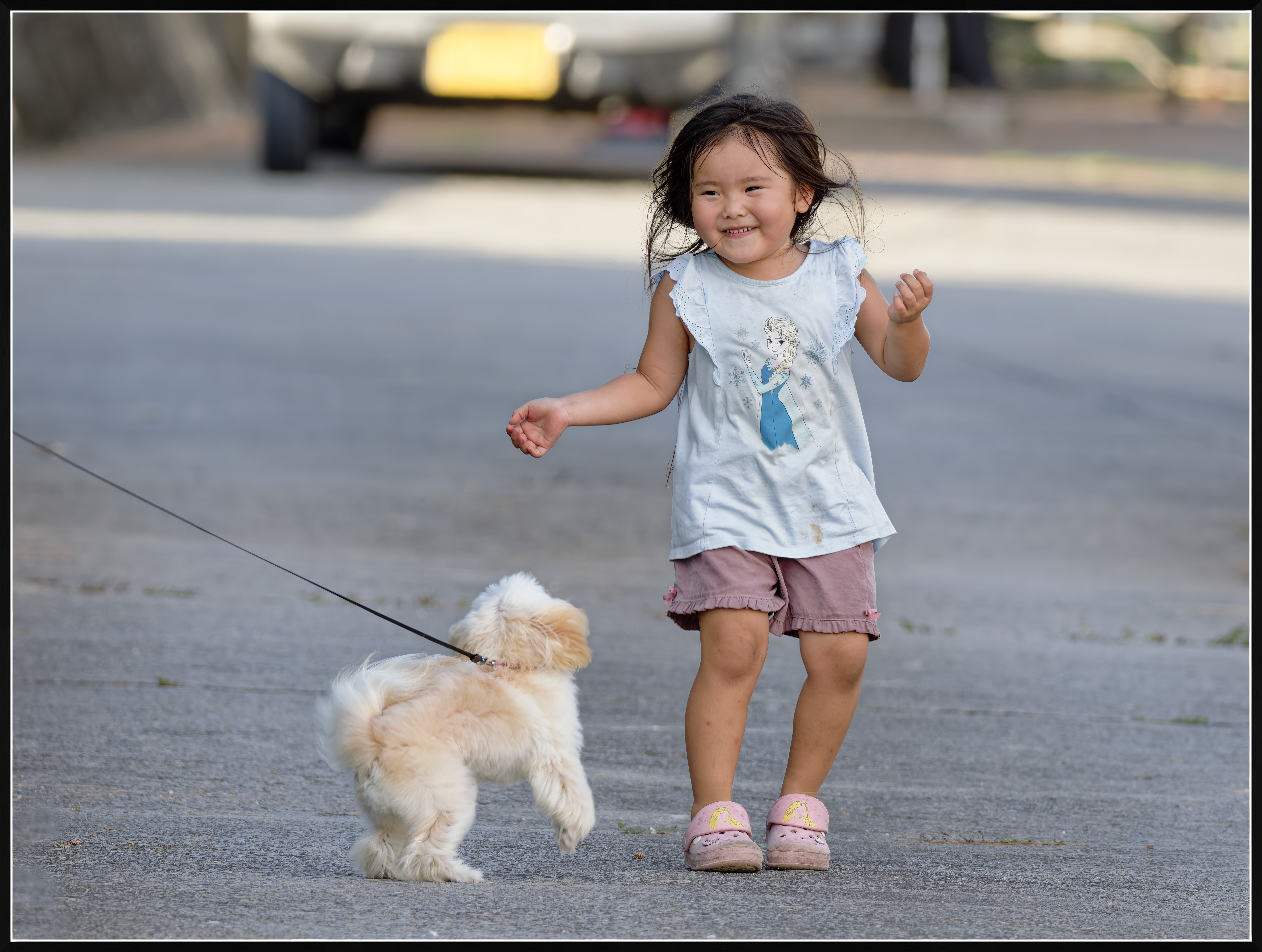
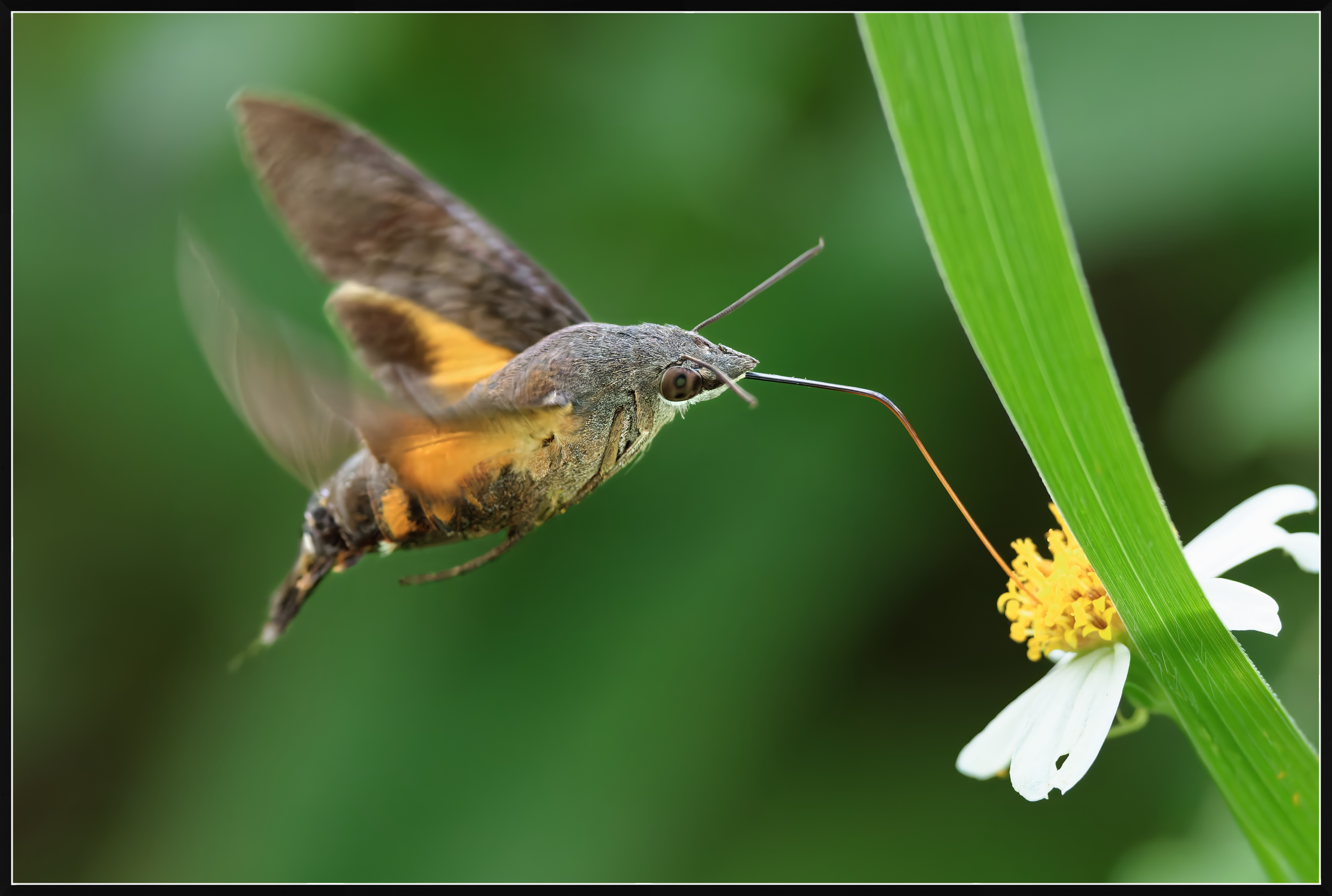
Here are my two quick edits. Raws, cropped appropriately then output as 6000px jpegs as you see them, all of this straight from C1. Borders were added in PS.
On image 1, I think my overall color and skin tone is maybe a touch better (you tell me), net resolution appears similar.
On image 2, I think your mixed routine did a better job of both upscaling and ISO NR, with better detail.
Edit: I spent maybe a total of 8 minutes on both images. Once adjusted in C1, the jpegs opened in PS in about 5 seconds, where I added the borders and uploaded the full 6K JPEGs to DB to link back here.
ruthenium wrote:
In case someone is interested in how their post-processing apps, Adobe or C1, etc, perform against DxO Photolab 8, I am uploading two photos processed and cropped in PL8, then upscaled to 6000 pixels on the long side in Topaz Photo AI.
The link to the raw files is here
These two photos are far from perfect and present different technical challenges that you should see if you open the raw files.
If better final results (than those I am posting here) are obtained in Adobe, C1, or other processing software, I would greatly appreciate it the results are shared here (please, post full-sized jpegs, or provide links to full-sized jpegs).
This is not meant to be a contest, but a learning opportunity. I am genuinely interested in the performance of the different software products that one can use for correcting and processing complex/difficult raw images....Show more →
It's been a minute (i.e. few years) since I looked at DxO products. But, the one thing I do seem to recall in my comps of DxO vs. C1 vs. Adobe is that the workflow vs. quality difference(s) included a "longer" processing time for the software to perform more thorough analysis / math to the image. In my mind, something like DxO products (not a complaint) are oriented toward taking more processing / time to get to a "better" output. C1 seemed to be a bit more IQ vs. speed oriented than LR.
I'm dating myself because it's been a while, but the processing workflow of quality (acceptable vs. excellent) vs. speed of algorithm was a bit of a quid pro quo situation, back when I compared things. Today ... I have no idea if DxO (etc.) products have narrowed the time needed, or gone the other way and expanded things even more so, to take even longer to do "heavier" lifting, with more refined detail, etc.
Again, not a knock on any of them, just noting that the time to process to yield results may vary between products, also. In other, words ... the quid pro quo may not be an apple to apples to apples thing ... in the paradigm of quality vs time. Here, again ... the OP would do well to demo / run his own tests to understand inherent diff's.
Jack Flesher wrote:
Here are my two quick edits. Raws, cropped appropriately then output as 6000px jpegs as you see them, all of this straight from C1. Borders were added in PS.
On image 1, I think my overall color and skin tone is maybe a touch better (you tell me), net resolution appears similar.
On image 2, I think your mixed routine did a better job of both upscaling and ISO NR, with better detail.
Edit: I spent maybe a total of 8 minutes on both images. Once adjusted in C1, the jpegs opened in PS in about 5 seconds, where I added the borders and uploaded the full 6K JPEGs to DB to link back here. ...Show more →
Thank you - your input is truly appreciated!
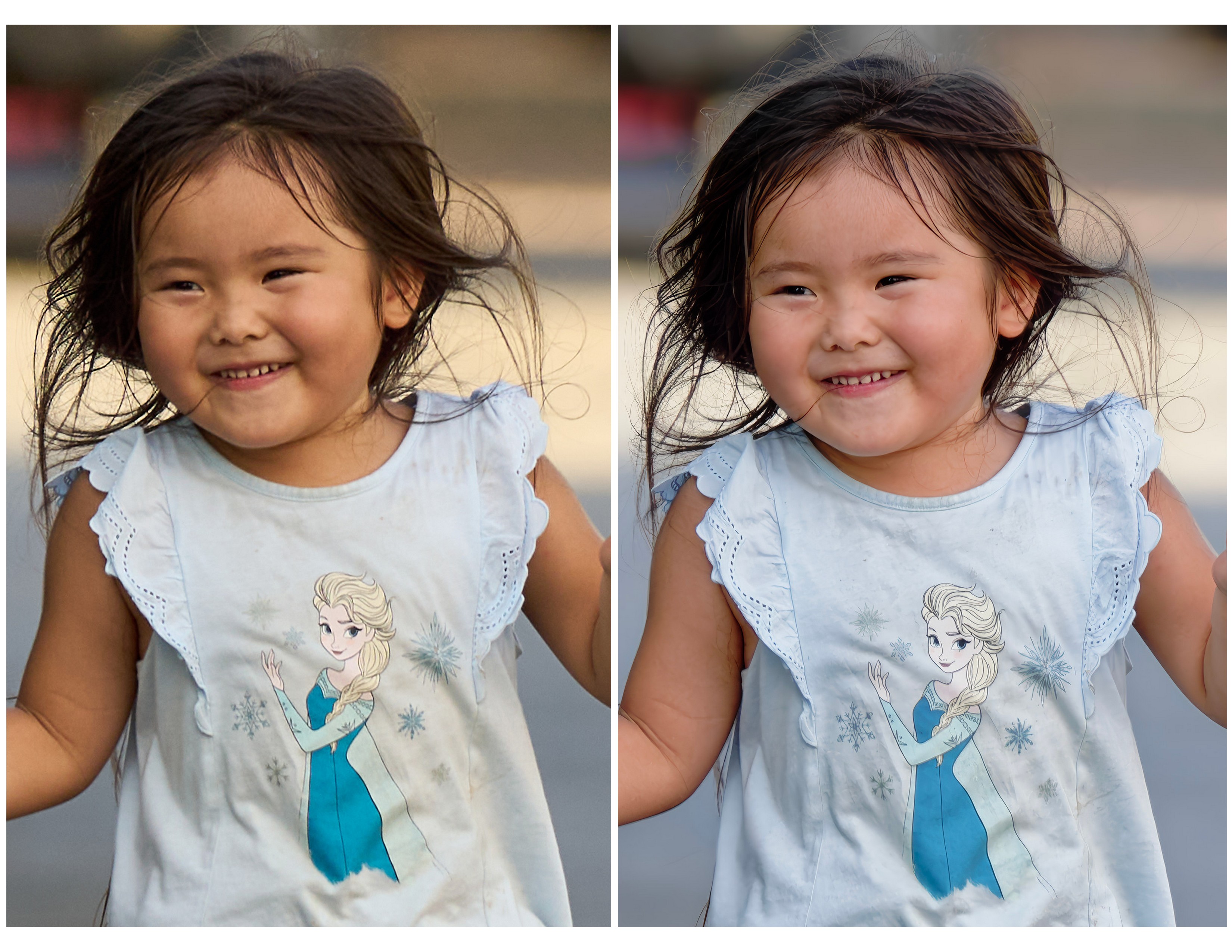
When looking closely at the girl, I tend to agree with you on the skin tone. Mine is too pinkish in comparison, and yours must be more true to life. The difference, however, is most likely personal, as when I was processing the raw I might have subconsciously wanted that "girlish" pink.
On Image 2, I had the expectation that most likely, there is no better alternative to DxO PL8 followed by upscaling in Topaz Photo AI for denoising high-ISO images while retaining the ultimate amount of detail.
ruthenium wrote:
Thank you - your input is truly appreciated!
When looking closely at the girl, I tend to agree with you on the skin tone. Mine is too pinkish in comparison, and yours must be more true to life. The difference, however, is most likely personal, as when I was processing the raw I might have subconsciously wanted that "girlish" pink. I understand that your crop wasn't upscaled. This is probably one reason for seeing more detail in the image I posted above.
On Image 2, I had the expectation that most likely, there is no better alternative to DxO PL8 followed by upscaling in Topaz Photo AI for denoising high-ISO images while retaining the ultimate amount of detail....Show more →
Just to clarify, my crop on the little girl was in fact upscaled to 6000 px at C1 output, so this was a fairly hefty upscale all done in one iteration inside C1. I purposely did everything to both images all in C1 in order to render a comparison of only it. I have other tools I use on noisy images and for critical upscaling, but used neither here. I may now rework the moth shot for a more ideal using them to compare. I think the little girl shot stands well as is.
Edit, I just reconfirmed it is indeed 6000px, IDK what exactly you copied, perhaps used a screenshot because it's posterized. If you DL the file from DB then look at it, you'll see they're all 6000 px plus a little for the border
Here is my second tier tool work up of the moth; this is the process I use for very noisy images. It's almost all done inside PS, but probably a bit more complex than Topaz tools. I need it so rarely it serves me fine without having to invest in tools I rarely use; and I think it got reasonably close to what you got out of Topaz.
Jack Flesher wrote:
Just to clarify, my crop on the little girl was in fact upscaled to 6000 px at C1 output, so this was a fairly hefty upscale all done in one iteration inside C1. I purposely did everything to both images all in C1 in order to render a comparison of only it. I have other tools I use on noisy images and for critical upscaling, but used neither here. I may now rework the moth shot for a more ideal using them to compare. I think the little girl shot stands well as is.
Edit, I just reconfirmed it is indeed 6000px, IDK what exactly you copied, perhaps used a screenshot because it's posterized. If you DL the file from DB then look at it, you'll see they're all 6000 px plus a little for the border ...Show more →
I see my mistake. I downloaded by right-clicking on the image. The correct way was to download by clicking on the down-pointing arrow. I updated the image in my previous post. Now this shows the crop from your 6000px image. Sorry about this.
Jack Flesher wrote:
Here is my second tier tool work up of the moth; this is the process I use for very noisy images. It's almost all done inside PS, but probably a bit more complex than Topaz tools. I need it so rarely it serves me fine without having to invest in tools I rarely use; and I think it got reasonably close to what you got out of Topaz.
To clarify on the processing, the images I posted were processed in DxO PL8 from raw. This is where the raw files were denoised and sharpened.
I never use the dedicated denoising and sharpening tools in Topaz Photo AI. However, the Upscale tool of Topaz applies marginal denoising by default. There is also some refining of details that happens as part of the upscaling. I use all the defaults in the Upscale tool. The effects of the added denoising and refined details in Topaz are very subtle. I don't find these objectionable.
After reading many posts on this forum, I am left with the impression that denoising and sharpening in Adobe is recommended in combination with masking. To the best of my understanding, this is done to avoid artifacts, like sharpening the areas that should be out-of-focus. This is NEVER a concern in DxO Photolab, where one simply clicks to enable the denoising tool of choice and clicks the Lens Sharpness Optimization to enable sharpening (I do change the sharpening setting from the new default +1 to the old default 0, or even -0.5 for portraits, but this is a personal preference). I don't know how DxO does this, but I have never seen artifacts produced by such global corrections. It is the simplicity and high efficiency of the two tools that I like and that save me time. Needless to say, enabling denoising takes no time, unlike in ACR. DeepPRIME denoising is applied to every image I process, as there is never a concern that this can be detrimental and I don't waste time deciding which images need or don't need denoising. The "deep" denoising takes place when images are exported, and the process is almost certainly faster than in ACR however I have not done scientific measurements.
This feels super personal and what you're comfortable with. Both tools seem more than adequate. I do hate giving Adobe a subscription fee honestly, but I'm more used to LRC and the noise reduction has gotten much better over the years.
ruthenium wrote:
To clarify on the processing, the images I posted were processed in DxO PL8 from raw. This is where the raw files were denoised and sharpened.
I never use the dedicated denoising and sharpening tools in Topaz Photo AI. However, the Upscale tool of Topaz applies marginal denoising by default. There is also some refining of details that happens as part of the upscaling. I use all the defaults in the Upscale tool. The effects of the added denoising and refined details in Topaz are very subtle. I don't find these objectionable.
After reading many posts on this forum, I am left with the impression that denoising and sharpening in Adobe is recommended in combination with masking. To the best of my understanding, this is done to avoid artifacts, like sharpening the areas that should be out-of-focus. This is NEVER a concern in DxO Photolab, where one simply clicks to enable the denoising tool of choice and clicks the Lens Sharpness Optimization to enable sharpening (I do change the sharpening setting from the new default +1 to the old default 0, or even -0.5 for portraits, but this is a personal preference). I don't know how DxO does this, but I have never seen artifacts produced by such global corrections. It is the simplicity and high efficiency of the two tools that I like and that save me time. Needless to say, enabling denoising takes no time, unlike in ACR. DeepPRIME denoising is applied to every image I process, as there is never a concern that this can be detrimental and I don't waste time deciding which images need or don't need denoising. The "deep" denoising takes place when images are exported, and the process is almost certainly faster than in ACR however I have not done scientific measurements....Show more →
No offense intended here, but what you're posting above as my image still looks posterized and soft compared to what I uploaded. IDK what the issue is, but when I view them side-by-side, I see more detail in my version.
Regardless, the results you're getting with DxO look very good, as good as what I get from C1 from detail, maybe not quite as good on color, but definitely better on noise. I may experiment a little with it if for nothing more than noise handling.
Jack Flesher wrote:
No offense intended here, but what you're posting above as my image still looks posterized and soft compared to what I uploaded. IDK what the issue is, but when I view them side-by-side, I see more detail in my version.
Regardless, the results you're getting with DxO look very good, as good as what I get from C1 from detail, maybe not quite as good on color, but definitely better on noise. I may experiment a little with it if for nothing more than noise handling.
Jack, I don't know what might be causing a problem, if there is a problem. Sorry about this.
The file I obtained from you shows 6040 x 4540 = 27.4M. The small crop from this is 1280 x 1909 = 2.4M (against mine small crop that is 1225 x 1814 = 2.2M).
If you can prepare a figure that shows side-by-side the two small crops of the girl, please post this comparison.
The jpeg that I posted earlier is 6000 x 4528 = 27.2M and can be downloaded in your browser (right-click on the image, then Save Image As).
I hope we can resolve whatever is the issue, one way or another.
Dmitri
ruthenium wrote:
Jack, I don't know what might be causing a problem, if there is a problem. Sorry about this.
The file I obtained from you shows 6040 x 4540 = 27.4M. The small crop from this is 1280 x 1909 = 2.4M (against mine small crop that is 1225 x 1814 = 2.2M).
If you can prepare a figure that shows side-by-side the two small crops of the girl, please post this comparison.
The jpeg that I posted earlier is 6000 x 4528 = 27.2M and can be downloaded in your browser (right-click on the image, then Save Image As).
I hope we can resolve whatever is the issue, one way or another.
Dmitri...Show more →
At this point it’s irrelevant Dmitry — it’s only us discussing it . My 6040 includes the border I added. Something is happening in the crop. I suspect when you view both images full size next to each other, they look similar except for color tone?
I further suspect that’s from how C1 manages color vs DxO AND the WB we each chose.
I started the trial of DxO and processed one extremely noisy image and one that needed a lot of perspective correction. Ironically, C1 handled both significantly better than DxO. I was surprised how good DxO was with “normal” noise, but how bad it was with trickier heavy noise. Also the detail loss in a heavy skew/perspective correction surprised me. In general, lighter lifting conversions, it performs well. But for my cameras raw files, C1 remains a lot more “robust.” Plus there’s just a lot more granularity in adjustments available in C1.
I do think DxO’s boxed color is a bit better than Adobe, but for me both still run a bit behind C1, especially on skintone and more especially so for difficult Asian and Black skin. All in all, the tools we have available today are an order of magnitude better than what we had 8 or 10 years ago, so individual usability is important. 👍
Jack Flesher wrote:
At this point it’s irrelevant Dmitry — it’s only us discussing it . My 6040 includes the border I added. Something is happening in the crop. I suspect when you view both images full size next to each other, they look similar except for color tone?
I further suspect that’s from how C1 manages color vs DxO AND the WB we each chose.
I started the trial of DxO and processed one extremely noisy image and one that needed a lot of perspective correction. Ironically, C1 handled both significantly better than DxO. I was surprised how good DxO was with “normal” noise, but how bad it was with trickier heavy noise. Also the detail loss in a heavy skew/perspective correction surprised me. In general, lighter lifting conversions, it performs well. But for my cameras raw files, C1 remains a lot more “robust.” Plus there’s just a lot more granularity in adjustments available in C1.
I do think DxO’s boxed color is a bit better than Adobe, but for me both still run a bit behind C1, especially on skintone and more especially so for difficult Asian and Black skin. All in all, the tools we have available today are an order of magnitude better than what we had 8 or 10 years ago, so individual usability is important. 👍...Show more →
A few things that may or may not be useful.
1) I suppose you have tried the Elite version, not the Standard.
2) Don't use the built-in presets. When starting from scratch, click on No Corrections (Apply) then DxO Optical Corrections Only (Apply), disable Vignetting Correction (adjust vignetting correction manually, if needed).
3) Color Rendering defaults to Neutral Color when unclicked (try this first), an alternative option to try is the Generic Rendering --> DxO Camera Profile.
4) Most aggressive denosing is with DeepPRIME XD/XD22s. Click on this. For super-noisy images move Luminance to 90.
5) In regular, relatively simple cases that do not require an elaborate processing what remains is to adjust light and contrast. T here is no one method that works for every raw file, but the simplest things to try are as follows:
-Adjust DxO Smart Lighting to your liking
-Adjust DxO Clear View Plus to your liking
-Adjust Contrast, optionally enable Tone Curve -> Light Contrast (Luma)
-Adjust Microcontrast if needed. This is normally set to 16 by default, but this may result in too much microcontrast.
6) Keep an eye on Lens Sharpness Optimization. This is at +1 by default, yet I like it at 0 (sometimes at -0.5).
Correcting WB, colors, and adding local corrections can be done further if necessary.
I hope this may be helpful.
I don't know what you mean by the "perspective correction." Is this to correct a lens distortion? I have not seen a "detail loss in a heavy skew/perspective correction"; thus, there might be something that could be done differently.
If you share the raw file, I shall be happy to try correcting this to my liking and shall return the resulting jpeg.
1 through 4 is exactly what I did. I played with the color options and maybe chose landscape or something similar. The NR in 4 was horrible at any of the settings, I tried them all at various levels for my test image, which was a high iso night sky. 5 yes, 6 I didn’t spend a lot of time with, but am sure I could get it dialed in with time.
End of day the workflow was more like LR in that there wasn’t the level of specificity to individual tools that C1 has.
PS where is the crop tool hidden? I didn’t see it under any of the main headers.


 . My 6040 includes the border I added. Something is happening in the crop. I suspect when you view both images full size next to each other, they look similar except for color tone?