p.2 #1 · Making an enlargement for Hummingbird Pictures
Snarkmaster wrote:
And apologize for the know-it-alls who think they represent the majority of members.
Thank you for your apology, but let’s get back to the subject instead of dwelling on your issues
… ;-)
- - -
speaking of which…
Burnard wrote:
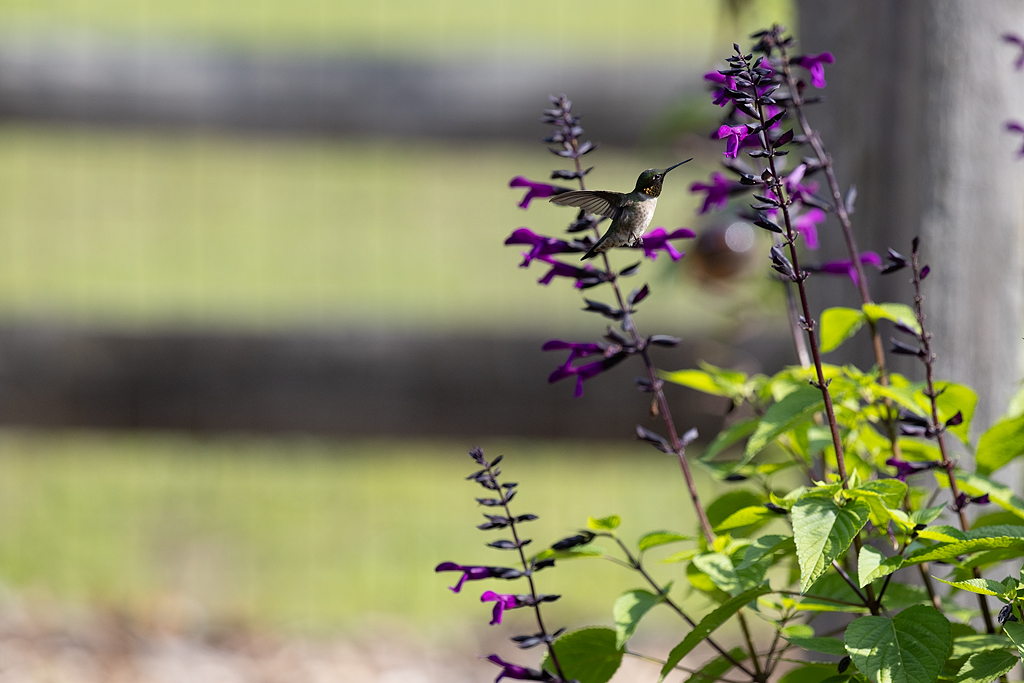
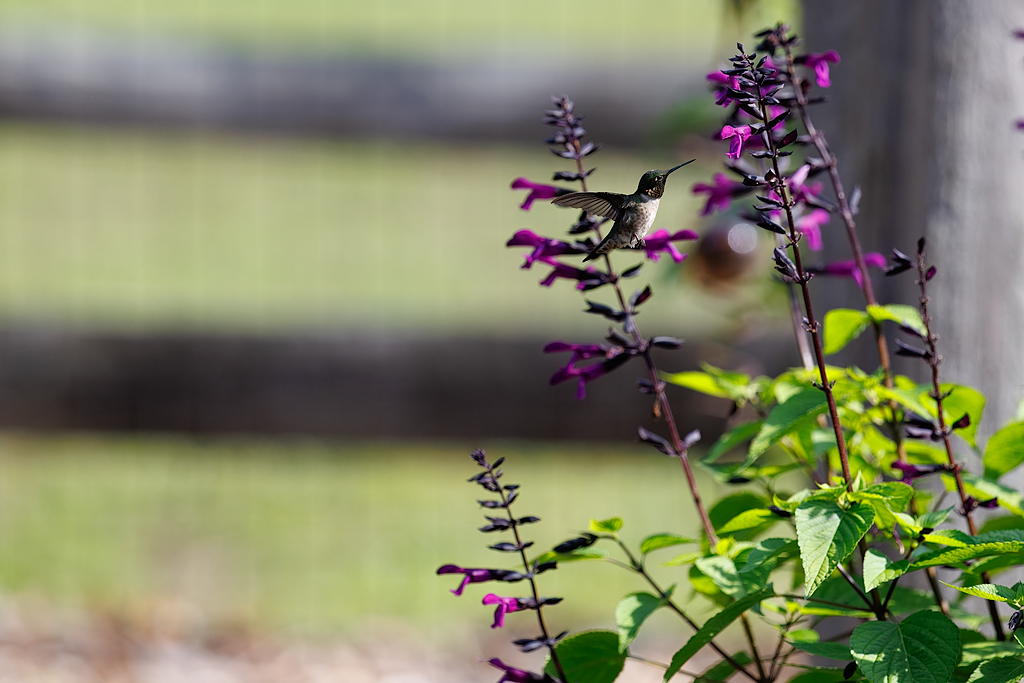
Now that we see the processing workflow you did on the image, my guess is the Topaz Photo step produced the artifacts on the background.
It could be useful to see a version of the image (full or cropped) it its original, pre-processed form. We might be able to help the OP understand that issue with the artifacts.
p.2 #3 · Making an enlargement for Hummingbird Pictures
BobnJake wrote:
Didn't mean to stir up the nest with this question, for general info, all I did with the image was, I brought it into Topaz Photo AI, for denoise, slight sharpening, then into LrC, Masked the bird and did some minor adjustments, then masked the background with some adjustments ( the background was totally blurred before any adjustments were made , I only darkened it a little so that the bird stood out more)
I know how to print and crop for an 8x10 image, I was just initially asking about resizing up to possibly and 11x14 image. what I ended up doing was taking the original file that was posted and sent it to a reprinting service and from that file they made me 8x10 and 11x14 prints that came out great ) to me!!
Thanks again for everyone's input, sorry for the feathers that I ruffled up...Show more →
When you "brought it into Topaz Photo AI, for denoise" my guess is "it" wasn't the raw file, and maybe you don't process from raw at all, correct?
p.2 #5 · Making an enlargement for Hummingbird Pictures
Burnard wrote:
Good point Dan. The artifacts look familiar from things I've seen after Topaz processing.
I think we might be onto an explanation for the odd areas around the OOF flowers IF I understand the OP correctly to say that in the original image the background area was even more OOF, that a mask was created to isolate that background (and exclude the bird), and something was done to attempt to reduce the softness of the out of focus background ares.
If so — and seeing the OP's original file could tel us if this is on the right track — then it is entirely possible that those artifacts (light or dark bands around the edges of the flowers at the left and below the main subject) could be the result of some operation to try to "sharpen" that "unsharpenable" material.
I just tried something similar with a photograph of mine that has a similar OOF background area. If I jack up the amount of sharpening a whole lot, and especially if I increase the radius setting, I can produce a very similar effect in ACR. Turning Adobe clarity way up can do the same thing, only more so.
There could be other explanations, but that seems like the leading candidate at the moment.
p.2 #8 · Making an enlargement for Hummingbird Pictures
While we can’t quite duplicate your process with the jpg rather than the raw, it is possible to try to sharpen the background as I think you mentioned earlier. WhenI do that — as described above —using various approaches to sharpening, that does create similar halo-like issues around the blurred areas.
I wonder if you could go back to your raw file and see what happens if you forego sharpening the OOF background. (Esthetically, I don’t see any good reason to sharpen that OOF background anyway — if anything, I’d perhaps consider softening it a bit.)
Normally I’d counsel against such a radical crop, but for some purposes (a modest size screen image ore smallish print) it can work ok, and the primary subject of your image seems reasonably sharp.
p.2 #9 · Making an enlargement for Hummingbird Pictures
Imagemaster wrote:
Over-cropping is a bad start. You would have to provide the full-size RAW file for download for anyone to give a proper assessment, IMO.
Totally agree with this. Unfortunately, it seems relatively rare for requests for raw data to be honored. There might be a lack of understanding of how important is the unprocessed raw for helping with questions on this forum.
p.2 #11 · Making an enlargement for Hummingbird Pictures
I think the background issue started when I brought the raw image into Topaz Photo AI and had sharpening applied to everything, have to try and figure out how to sharpen only the HB and not everything else
Thanks everyone for your input
p.2 #12 · Making an enlargement for Hummingbird Pictures
BobnJake wrote:
I think the background issue started when I brought the raw image into Topaz Photo AI and had sharpening applied to everything, have to try and figure out how to sharpen only the HB and not everything else
Thanks everyone for your input
I’m an ACR/Photoshop user, so I can’t give you precise directions that will fit your work environment. But here’s what I would do…
In ACR I would select that bird — perhaps using the “subject” selection option, perhaps cleaned up a bit with the brush if necessary. I would then use the invert and create new mask option to create a new mask that includes everything except the bird.
Then I would do whatever sharpening I thought t necessary on the bird layer, including the use of tools such as clarity and dehaze. (The latter is useful for lots of things other than removing haze.)
If necessary I might then switch to the not-bird background mask and do various things to soften it — lowering clarity, sharpness, etc. and perhaps even altering how bright it is and how saturated.