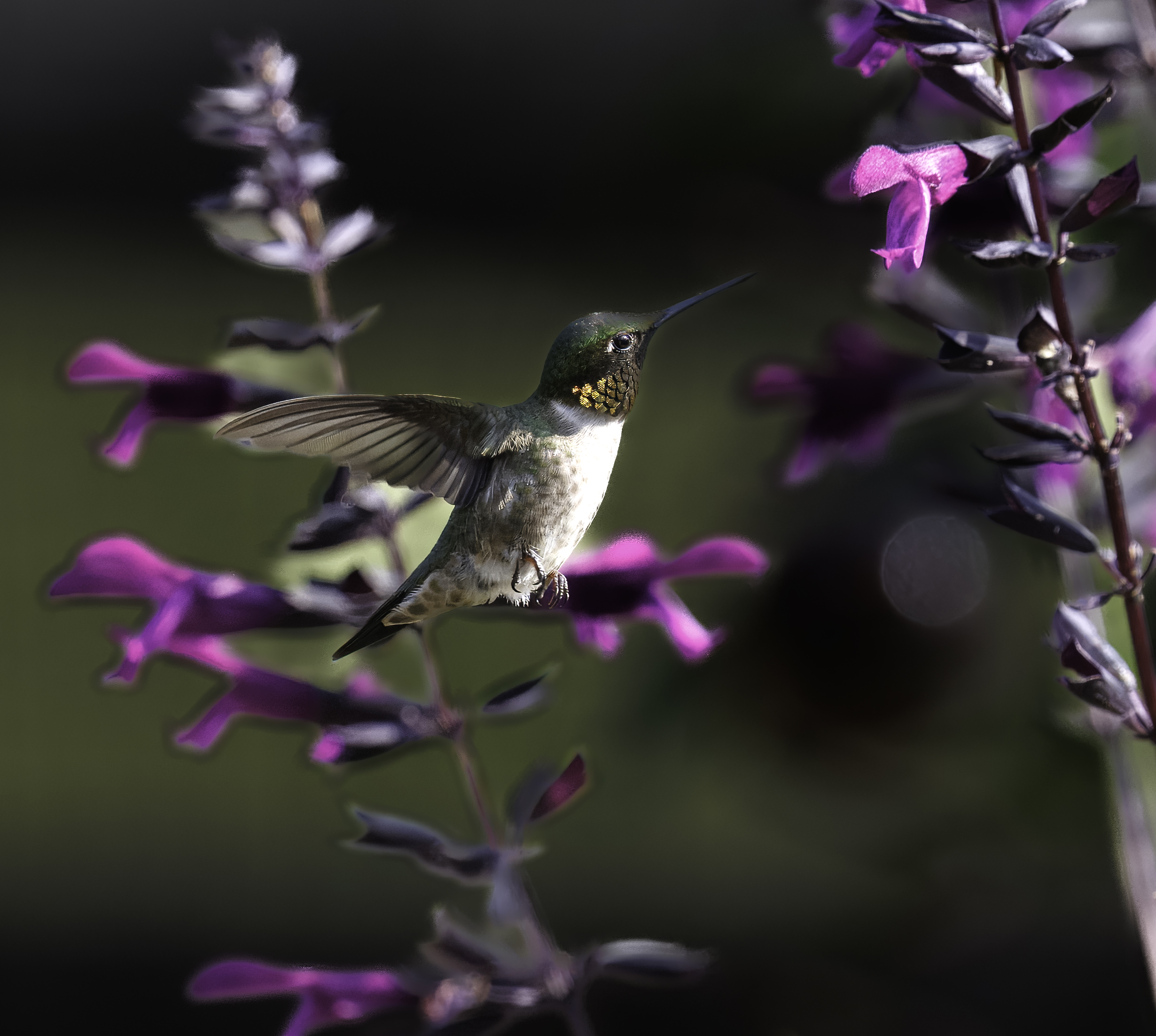
p.1 #1 · Making an enlargement for Hummingbird Pictures
I've got some decent shots of Hummingbirds that I would like to make enlargements, maybe 8x10, even 11x14. I'm shooting with the Canon R5MKII so I should have the resolution in the Raw files, I hope. Here's a cropped shot typical of what the end product would hopefully look like. Is this feasible? Enlargements are a new thing to me, so if you think, they may come out, could you give me "a condensed PS tutorial ", on the steps to take, thanks so much
p.1 #2 · Making an enlargement for Hummingbird Pictures
Your camera outputs a raw file that's roughly 27" on the long side. That gives you a lot of breathing room to crop your image down to a 11x14 or 8x10 after you process your raw image in camera raw and open it in photoshop. That's my simple starting point.
p.1 #3 · Making an enlargement for Hummingbird Pictures
I would be far more concerned about the telltale sloppy AI editing artifacts first before worrying about a print or a resize. A crop that deep can still make a good print if post processed carefully.
p.1 #7 · Making an enlargement for Hummingbird Pictures
For one thing, 8x10 and 11x14 have different aspect ratios. For an 8x10 @ 300ppi, you'd need to crop to a 4:5 aspect ratio and resize to 2400 x 3000 pixels.
p.1 #10 · Making an enlargement for Hummingbird Pictures
buggz wrote:
Not to hijack, but it best to crop and then process?
Or vice versa?
It's easier to crop first and then process. Fewer distractions, better control and workflow. I feel for the OP as he seems lost and the image he posted provides little context.
p.1 #11 · Making an enlargement for Hummingbird Pictures
Thanks.
As to the op's image, the subject looks good, it's the back ground that is a bit weird to me.
Not too far off, and, if you wanted that way, it's all good.
armd wrote:
It's easier to crop first and then process. Fewer distractions, better control and workflow. I feel for the OP as he seems lost and the image he posted provides little context.
p.1 #13 · Making an enlargement for Hummingbird Pictures
There are a bunch of YouTube tutorials on this. Just search for something like "how to prepare images for printing." Write a short cheat sheet as you watch.
p.1 #14 · Making an enlargement for Hummingbird Pictures
I think the issue that people are commenting on — which is not exactly the one I think you are asking about — is the odd dark areas around the edges of the out-of-focus background flowers, especially noticeable at the lower left… and in the flowers directly below the bird.
I’m not sue what is going on there, though it could be a number of things. Since you didn’t ask about that specifically, that’s all I’ll say about it for now.
BTW, the hummingbird itself looks fine — nice and sharp, which isn’t always easy with that kind of bird!
Regarding the general question of whether you could print this at sizes approximating 8x10 or 11x14 (though actuall 3:2 aspect ratio so more like perhaps 8x12 or 11x 16.5 or equivalent), a full image from your camera, assuming good exposure and sharpness and all the rest, would ahve not problem printing at those sizes. In fact, you would be able to print a solid image much larger than that.
What we don’t know is how much your have cropped from the full original image to get the version we see. There are some (open to discussion) rules of thumb about how large you can print an image based on the number of pixels per inch (ppi) that the image provides.
To give a very simplified version of this, most people prefer to print with the image in something like 300ppi or 360ppi resolution. So, let’s say you have cropped this down to being only 2400 pixels wide. Divide that by 300 (ppi) and you could print it 8” wide at 300ppi. If the crop is less severe and you have, say 4800 pixels wide, you could print it 16” wide at 300ppi. (Substitute 360 if you think that would be better, though it won’t make much difference — perhaps no visible difference at all.)
What if you image has pixel dimensions that are too small for the size you want using that formula? Many of us who print believe that we can produce high quality prints with lower ppi settings in many cases if necessary. For example, a 200ppi print should look pretty good to most people, in which case (using the examples above) you could produce a 12” wide or 24” wide print from the 4800 pixel wide image.
A fine way to learn more about this is to get a decent smaller format printer and make some prints!
PS: One simple, though less than ideal and not the only, way to deal with that background might be to create a mask in LR or ACR for the bird, then invert it to select the rest of the frame, then take steps to soften the non-bird portions of the frame even more. Not a perfect solution, but easier than explaining some of the other ways to deal with it.
p.1 #17 · Making an enlargement for Hummingbird Pictures
Didn't mean to stir up the nest with this question, for general info, all I did with the image was, I brought it into Topaz Photo AI, for denoise, slight sharpening, then into LrC, Masked the bird and did some minor adjustments, then masked the background with some adjustments ( the background was totally blurred before any adjustments were made , I only darkened it a little so that the bird stood out more)
I know how to print and crop for an 8x10 image, I was just initially asking about resizing up to possibly and 11x14 image. what I ended up doing was taking the original file that was posted and sent it to a reprinting service and from that file they made me 8x10 and 11x14 prints that came out great ) to me!!
Thanks again for everyone's input, sorry for the feathers that I ruffled up
p.1 #18 · Making an enlargement for Hummingbird Pictures
BobnJake wrote:
Didn't mean to stir up the nest with this question, for general info, all I did with the image was, I brought it into Topaz Photo AI, for denoise, slight sharpening, then into LrC, Masked the bird and did some minor adjustments, then masked the background with some adjustments ( the background was totally blurred before any adjustments were made , I only darkened it a little so that the bird stood out more)
I know how to print and crop for an 8x10 image, I was just initially asking about resizing up to possibly and 11x14 image. what I ended up doing was taking the original file that was posted and sent it to a reprinting service and from that file they made me 8x10 and 11x14 prints that came out great ) to me!!
Thanks again for everyone's input, sorry for the feathers that I ruffled up...Show more →
Don’t bother apologizing for “ruffled feathers” on this forum. Unfortunately a few of the folks who entered this discussion early on are folks whose trademark is insulting snark. On behalf of the forum community, perhaps we need to apologize for them…
When you mention the masking and adjustments you did, I wonder if trying to decrease the background blur might have reduced those artifacts on the background flowers that many here noticed. If I understand correctly you tried to reduce what was even more softness in the background than what we see now.
From my subjective perspective, if this is the case, I would be more comfortable with very soft background blur than with those artifacts, FWIW.