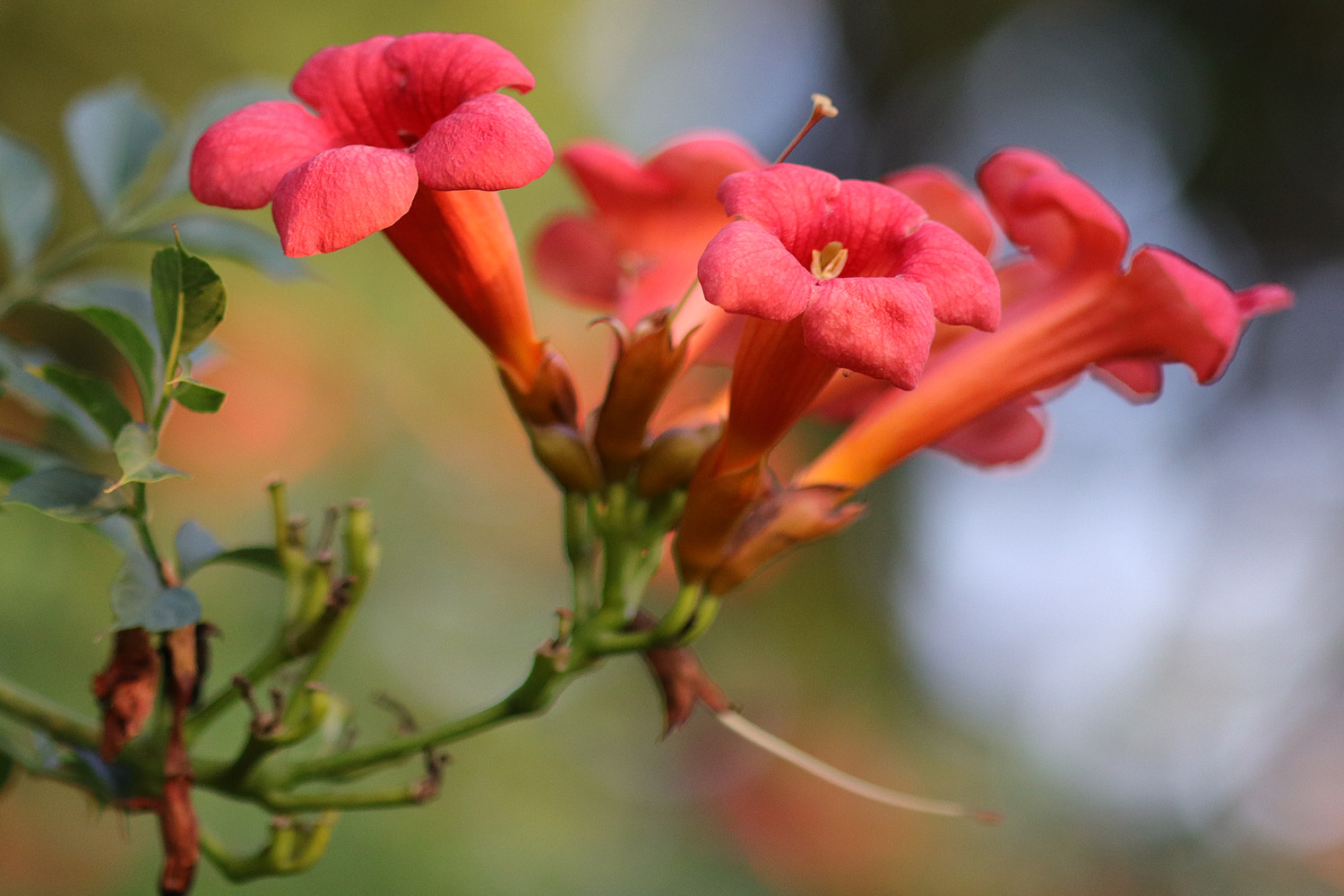
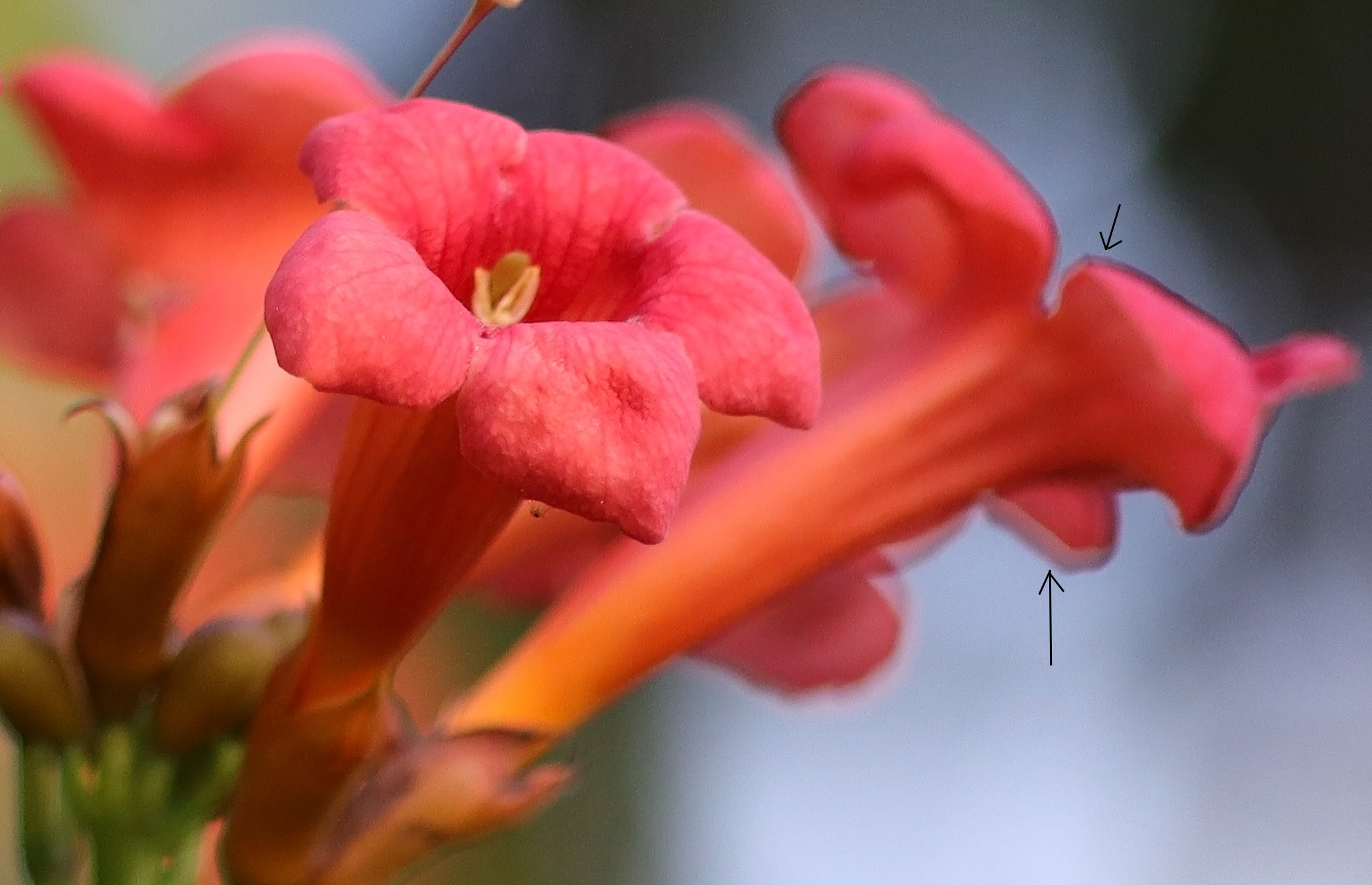
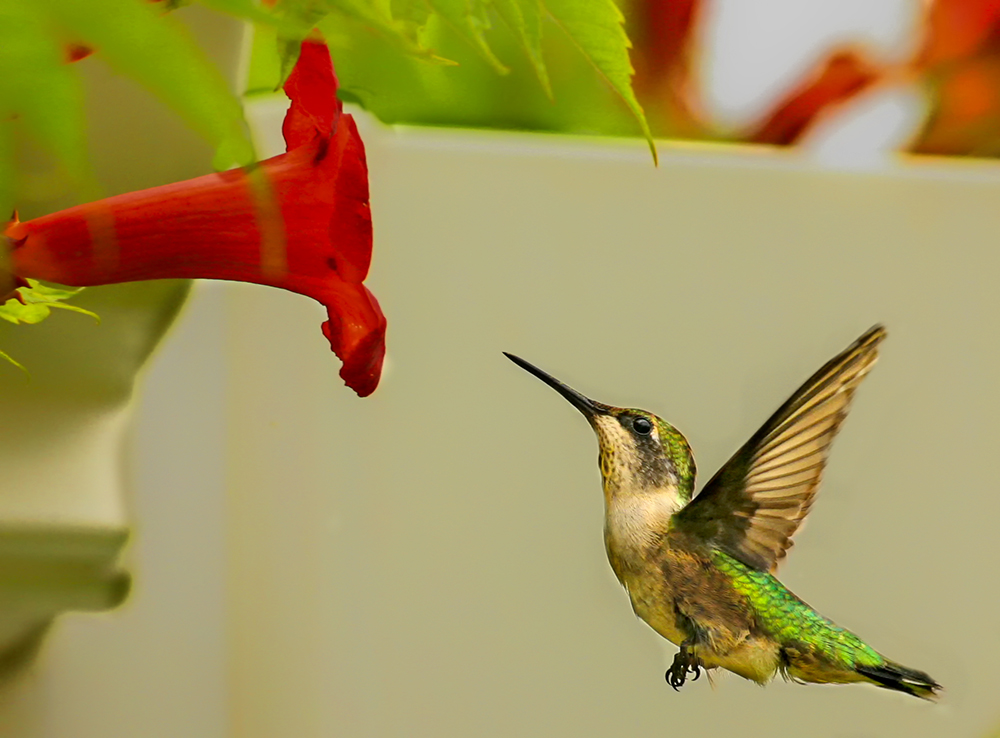
I was outside earlier with my R100 & RF 85 2.0. While reviewing the pictures, I noticed something unusual on the trumpet vine. It was just the 3-trumpet vine pictures, the rest were ok. Does anyone know what this is & what caused it? Thanks
Jim
Canon EOS R100RF85mm F2 MACRO IS STM lens85mmf/2.01/2000s800 ISO0.0 EV
Canon EOS R100RF85mm F2 MACRO IS STM lens85mmf/2.01/2000s800 ISO0.0 EV
That kind of edge effect can happen when you crank up highlight recovery in post. It can create an abrupt, unnatural looking transition.
That said, if these are SOOC files, the effect can also happen with an out of focus specular/point light source behind a somewhat out of focus subject. The edge of the subject (the flowers in this case) is not sharply defined because it's out of the plane of focus, but the light from the background specular highlight acts like collimated light (even though the light source itself is out of focus) and has a hard cutoff (shadow) caused by the object, in this case the flowers.
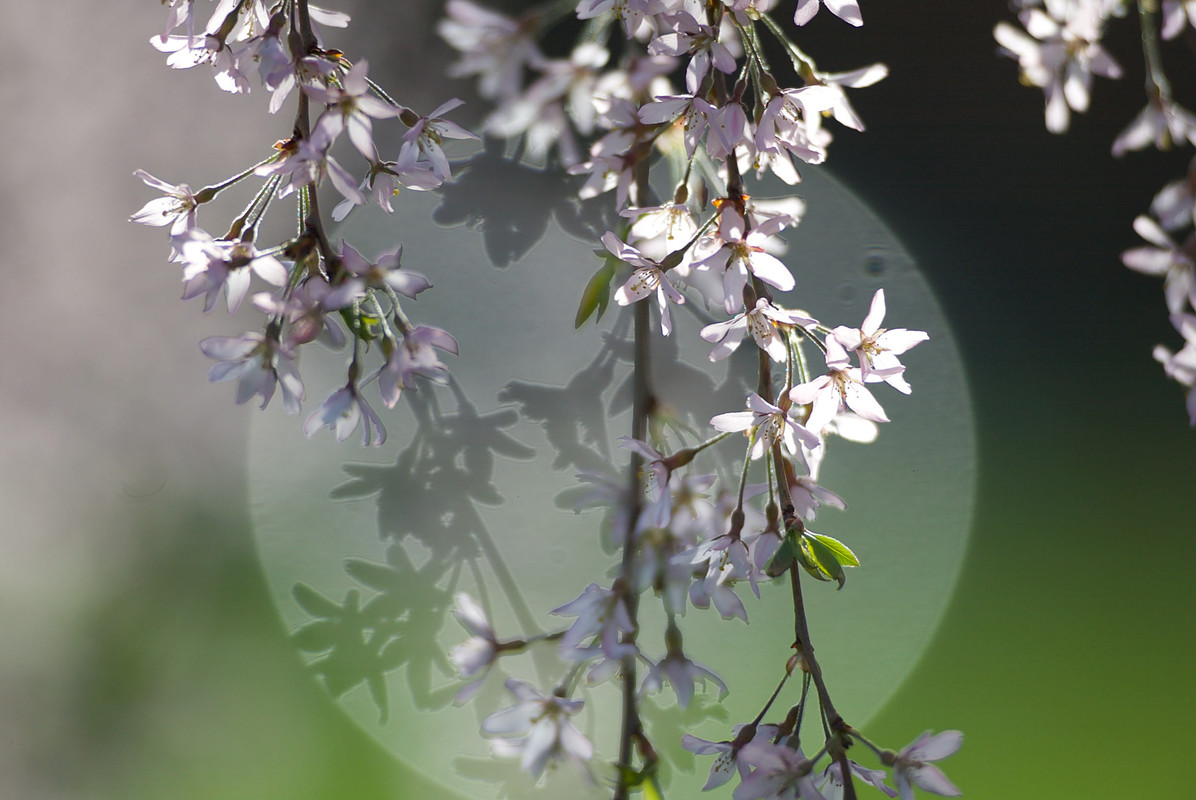
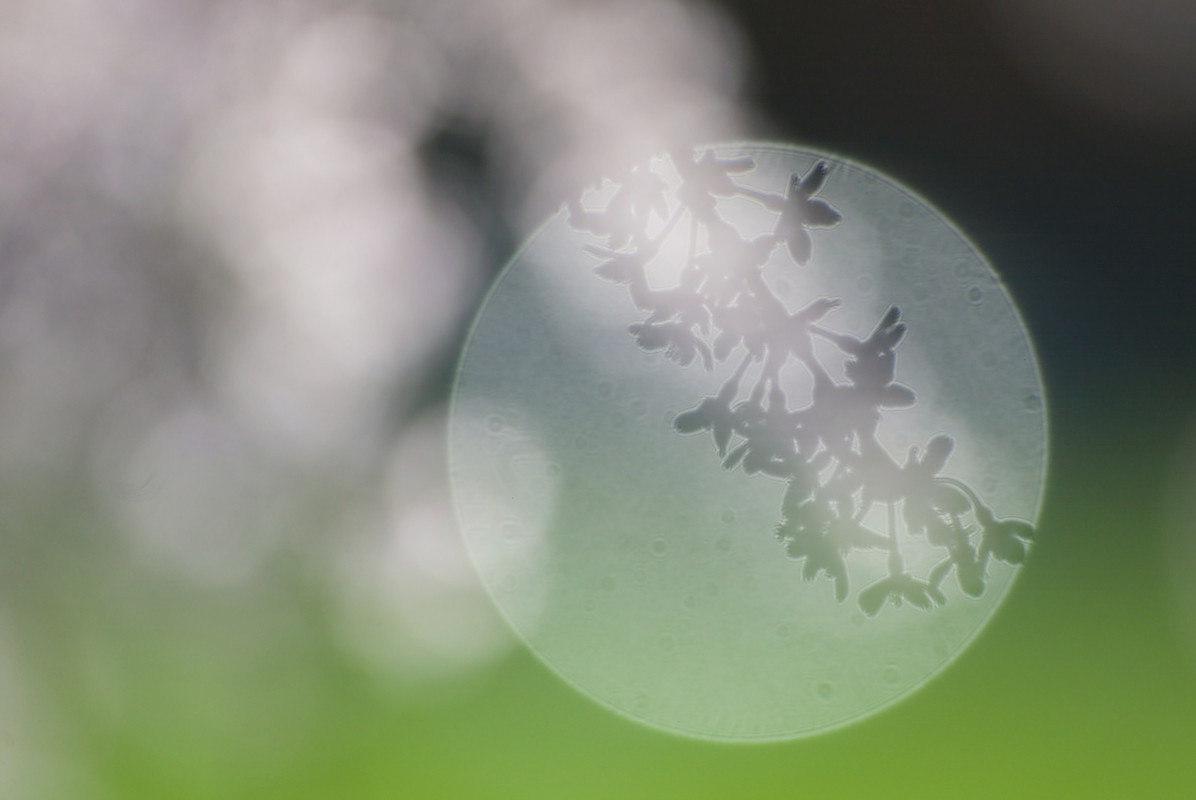
Here's an example of cherry blossoms I photographed wide open with a 400/2.8:
Note in the 10 o'clock position of the central bokeh ball where the blossoms are outside the plane of focus, that their edges have the same effect. And in the middle is a clearly defined 'shadow' of another sprig of blossoms between the point of focus and the point light source. That sprig is totally blurred out of focus by the lens, but because of the virtually collimated light coming from the point light source, the shadow of that sprig is still clearly defined.
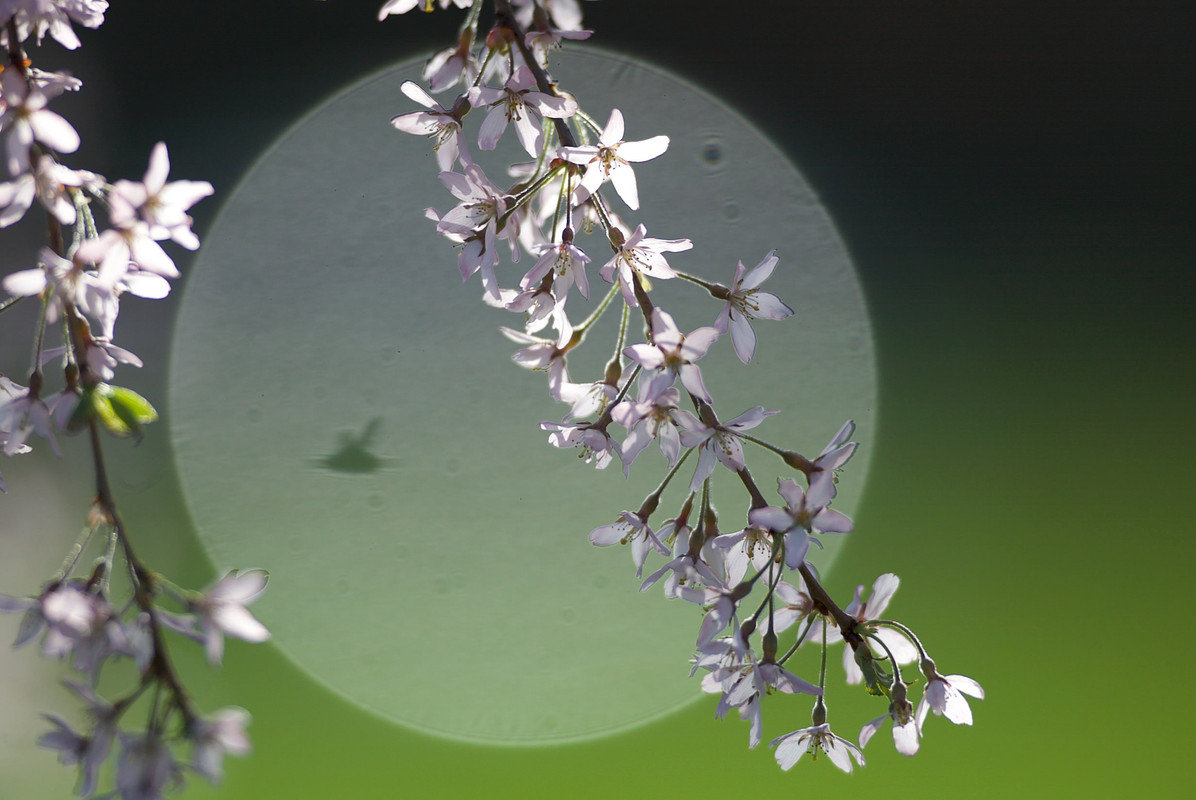
Here's another example when a bug flew across the bokeh ball somewhere outside the point of focus:
And with nothing at the point of focus:
IIRC the specular light source in this case was the sun reflecting off a car far in the background. As you'll have noticed, the point light source was also super effective at revealing dust in the lens (if it was sensor dust, it would be very sharply defined black spots).
Thanks Ron It wasn't SOOC, but their was no highlight recovery. Looks like the OOF/hard cut off reasons are the culprit. I never saw this before, that's why I was curious.
Jim
I think I’m probably as mystified as anyone else by this. Am I correct that there are two issues? One is the small dark edges on the upper right flowers in the background, and the other is the larger “white” areas along the edges of some lower background flowers.
Before I speculate too much… assuming that you shot this in raw mode, what do you see if you look at a full color histogram of the image, especially in the red channel. I wonder if the intense color blew out the red channel even though the overall average exposure was likel OK?
You might be able to see this by investigating the histogram or by looking at a curve layer in Photoshop (or LR).
I’ve seen similar issues in images of subjects that are very strong in the red channel: sunsets/sunrises, flowers, autumn foliage. Sometimes when the image is very strong in one of the color channels, the camera’s exposure system doesn’t “see” this since it averages the channels to determine exposure. I often end up decreasing exposure in order to deal with this.
gdanmitchell wrote:
I think I’m probably as mystified as anyone else by this. Am I correct that there are two issues? One is the small dark edges on the upper right flowers in the background, and the other is the larger “white” areas along the edges of some lower background flowers.
Before I speculate too much… assuming that you shot this in raw mode, what do you see if you look at a full color histogram of the image, especially in the red channel. I wonder if the intense color blew out the red channel even though the overall average exposure was likel OK?
You might be able to see this by investigating the histogram or by looking at a curve layer in Photoshop (or LR).
I’ve seen similar issues in images of subjects that are very strong in the red channel: sunsets/sunrises, flowers, autumn foliage. Sometimes when the image is very strong in one of the color channels, the camera’s exposure system doesn’t “see” this since it averages the channels to determine exposure. I often end up decreasing exposure in order to deal with this....Show more →
No raw, just jpg. Could be a red channel issue as well.
Jim
If I have time tonight, I will reshoot the trumpet vine, under exposing them this time and see what develops. The background was brighter on the right side so that may also contribute to this phenomenon.
Jim
I see this all of the time when photographing brightly colored flowers, especially orange flowers, when the edge is out of focus and you try to decrease the luminosity of the color. You can still see it in the sharper edges, but the dark outline is very thin. If you look at the histogram, the color isn't blown, but it becomes tricky/impossible trying to darken the color without increasing the width of the dark outline.
I did NOT read all the responses Jim but it is the "Trumpet vine". Extremely invasive! My hummers LOVED it but my flower beds did not. I had to remove it as it choked out all living plants.
Hope all is well.
I had a project In Balto with Elaine Eff @Painted Screens of Baltimore but I was unable to accomodate Elaine's wishes due to being a "caregiver" and her time constraints.
Dan
IIRC the specular light source in this case was the sun reflecting off a car far in the background. As you'll have noticed, the point light source was also super effective at revealing dust in the lens (if it was sensor dust, it would be very sharply defined black spots).
Which makes clear, that the often claimed sentence „There is some dust in the lens, but it does not have any effect on the images whatsoever“, especially when people sell lenses, is just wrong. In the right (or better wrong) circumstances this dust will show up!
Knut. wrote:
Which makes clear, that the often claimed sentence „There is some dust in the lens, but it does not have any effect on the images whatsoever“, especially when people sell lenses, is just wrong. In the right (or better wrong) circumstances this dust will show up!
Actually, if we’re looking at the later photo without the bright red colors, that looks like sensor dust to me.