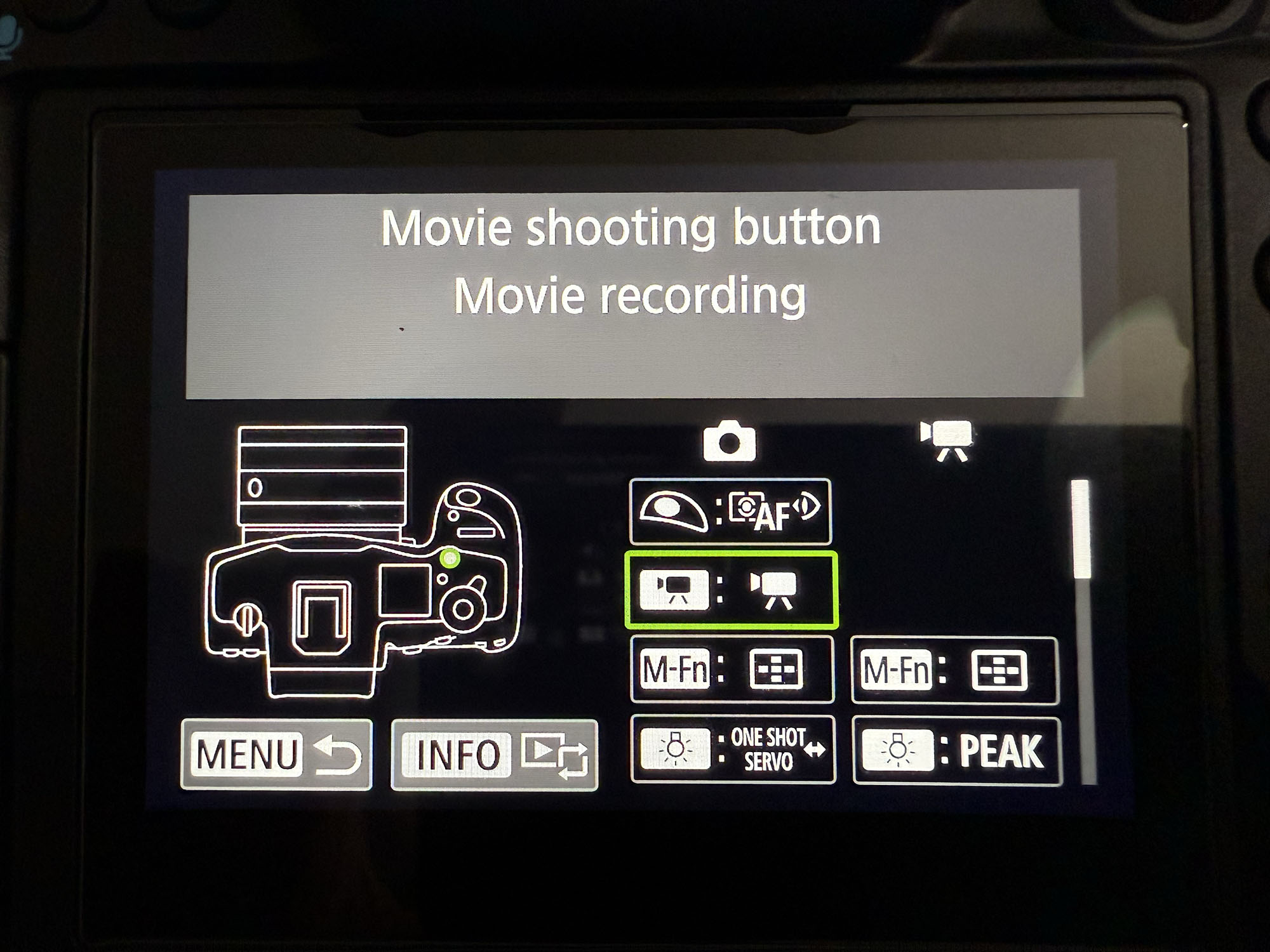
I'd appreciate some help with the camera set up:
1. I can't change the function of the Movie shooting button or to turn it OFF. It always starts and stops movie recording. Must be some interdependency with other menu item, but the UM is of no help.
2. How to assign the Movie cropping to a button or it is possible at all?
The movie button function can be changed with the same Customization menu as all the other buttons are set up. As a matter of fact it's the 2nd button to be listed right after the shutter button.
yeah the R5 II has a few annoying limitations when it comes to custom controls. That dedicated red movie record button is locked in, Canon doesn’t give you the option to disable it or remap it to something else. It’s always going to start and stop video recording, even if you’re in a stills shooting mode. Kinda frustrating, especially if you’re trying to streamline your controls or avoid accidental presses, but it’s hardcoded into the system.
As for assigning the movie crop mode to a button, that one’s not directly possible either. Canon hasn’t made that setting assignable like ISO or white balance. The best workaround is to set up custom shooting modes (C1, C2, C3) with crop mode either enabled or disabled, and then just switch between those as needed. It’s not super slick, but it does the job once you’ve got them dialed in.
Thank you very much FotoMayron. I have already found this painful reality.
I contacted Canon support and was told I should be able to assign any listed function to the Movie button. Their first question was which lenses I use. Next they requested my camera settings file. It was after escalation of the query to their local “expert”.
After hours of fiddling with the insane menu system and than doing a factory reset and attempt to assign the “OFF” function, which didn’t work, I concluded that either the button is defective or not assignable.
The most confusing is the fact that the selected function is confirmed on the LCD, but the button only works as Movie start/stop and cannot be disabled. Canon people have no clue about it even after so long since the product release. Not to mention the UM which doesn’t state the limitation.
Canon confirmed the movie cropping is not assignable to a button despite many years since my first inquiry/request. Using one of the C1-C3 functions would be a work around, but unfortunately these are already taken for other tasks.
I also find not tilting LCD panel on the high end camera, which interferes with the left hand/neck strap/cables, a horrible design boo-boo.
VX4321 wrote:
Thank you very much FotoMayron. I have already found this painful reality.
I contacted Canon support and was told I should be able to assign any listed function to the Movie button. Their first question was which lenses I use. Next they requested my camera settings file. It was after escalation of the query to their local “expert”.
After hours of fiddling with the insane menu system and than doing a factory reset and attempt to assign the “OFF” function, which didn’t work, I concluded that either the button is defective or not assignable.
The most confusing is the fact that the selected function is confirmed on the LCD, but the button only works as Movie start/stop and cannot be disabled. Canon people have no clue about it even after so long since the product release. Not to mention the UM which doesn’t state the limitation.
Canon confirmed the movie cropping is not assignable to a button despite many years since my first inquiry/request. Using one of the C1-C3 functions would be a work around, but unfortunately these are already taken for other tasks.
I also find not tilting LCD panel on the high end camera, which interferes with the left hand/neck strap/cables, a horrible design boo-boo....Show more →
I think they'll fix the LCD on the next generation as it's really needed but I can actually live with it for now. I'm more interested in being able to over ride the photo/video switch for true hybrid shooters, and hopefully add 3 more custom functions for different video settings. We need at least 3 more custom function slots to cover the various needs of video. I can't imagine it would take much to add 3 more slots on top of C1-C3. I'm already two slots short with 4K 24, 4K 60, 4k 120, 2K 240, & 8k 60 so I use M for one of the remaining two. An extra 6th slot for crop mode or whatever the preference of the user along with M for a 7th slot and that would cover most everything for now.
FotoMayron wrote:
yeah the R5 II has a few annoying limitations when it comes to custom controls. That dedicated red movie record button is locked in, Canon doesn’t give you the option to disable it or remap it to something else..
not sure what you are talking about, I tried it just yesterday on my camera and there is plenty of options and I was able to re-map the record button to other functions.
stanj about the FotoMayron post: “not sure what you are talking about”
He’s talking about the problem I had. Did you confirm that after re-mapping the button actually worked or just assumed it will because the LCD shows a new function?
I’m getting another unit soon, so I’ll verify what the problem is.
VX4321 wrote:
stanj about the FotoMayron post: “not sure what you are talking about”
He’s talking about the problem I had. Did you confirm that after re-mapping the button actually worked or just assumed it will because the LCD shows a new function?
I’m getting another unit soon, so I’ll verify what the problem is.
Yes it works. Are you sure you aren't accidentally programming the M-fn button? I can remap mine, just verified it on firmware 1.0.2.
VX4321 wrote:
stanj about the FotoMayron post: “not sure what you are talking about”
He’s talking about the problem I had. Did you confirm that after re-mapping the button actually worked or just assumed it will because the LCD shows a new function?
I’m getting another unit soon, so I’ll verify what the problem is.
Yes I have verified that the Rec button actually does what I programmed it to do.
artsupreme wrote:
Yes it works. Are you sure you aren't accidentally programming the M-fn button? I can remap mine, just verified it on firmware 1.0.2.
+1
R5II on fw 1.0.2 and I have the video recording button programmed to manually switch between the EVF and rear display. Same with my R6II.