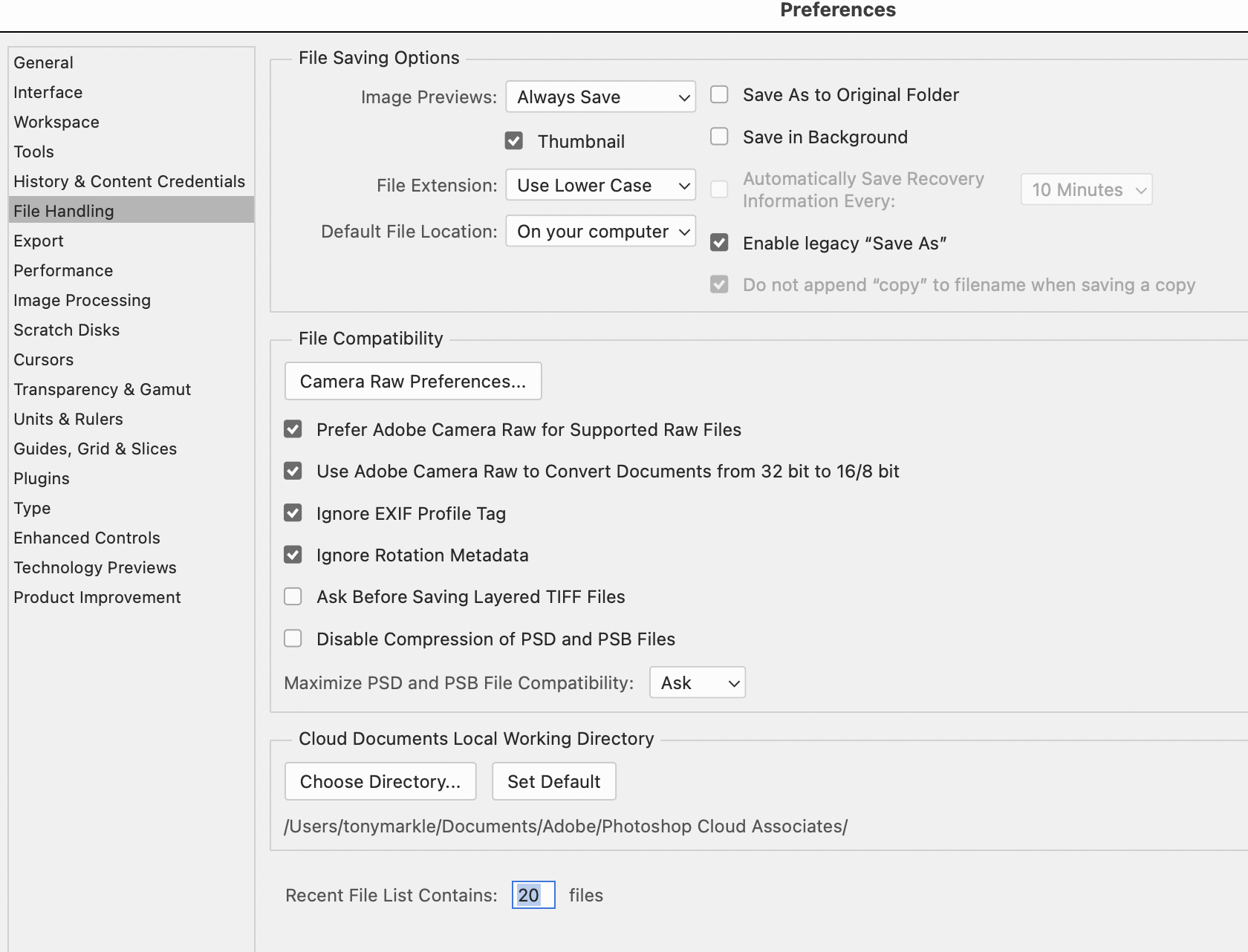
I've been using Ps since before it had a version number. Don't think I'm an expert, but it is a critical tool in the development of my photographic work. The durn thing keeps changing behaviour without notification. Here's 3 that currently make me whacko. (Oh, I've mucked about in the settings but haven't found any answers.
1) 'Save as' doesn't allow JPEG as a choice. It used to be when doing a save as there was a extensive list of options. Now there is only PSD and 3 other obscure formats. One must take the next step, click on yet another 'save as copy' button before being allowed to select from an extensive list of protocols including JPEG. Note, it forces the word copy into the file name. Is there away around this?
2) The Ps window will not become active unless I specifically click in the image window. Doesn't matter what I try to do.
Examples: Standard procedure when a new file is called up is to duplicate a 'work' layer. The naming window pops up as normal, but unless I move the mouse over and click in it, I'm not allowed to do anything. Just that irritating beep. I get this same sort of behaviors on all sorts of things including some times coming back from a Save As. In other words, it can be random except when the program is first called. Always happens then.
3) How do I kill those dang brightly colored "help" popups. So enticing. I really don't need breathless lectures on all the wonderful things I can do with Ps. As noted, have been around awhile. Here's an even queerer one. Used to be if you ran your mouse down the right hand tool bar, each icon would name itself. Sometimes I can't remember which of the 4 bandaids I want. Now you only get the notation if 1) you right click on it, and then only if there are options for that tool. Is this crazy?
I freely admit that there's nothing life threatening about these behaviors, but when I've been using a tool for 40 years, I develop movements and modes of operation. Somehow, I don't seem to be able to change these. I'll be in the groove, working away, then BEEP! I won't repeat my verbal responses. (When you've got 800 HS BB shots and the paper's deadline it a few hours away. Grrr.
Anyway, thanks for your time and I'd really love it if the experts would help me out.
I don't know why you don't get the jpg option when you Save As. I get about 16 options in the list including I think 4-5 jpg options (including the regular one.
This is from opening a raw file into PS from Lightroom as a Smart Object then just doing Save As (no edits),
All current PS and LRC (except I just rolled back LRC because of Denoise). Win 10.
On a Mac, Shift->Command->S is the SaveAs command and I see 24 file options. Even from the Menu and choosing SaveAs there are 24 file options. Not sure why yours aren't there.
#1. a Legacy thing? I remember having that problem in SA, asked in a forum, got the answer, promptly forgot.
#2. Not getting what you're saying, sorry!
#3. Settings/Preferences>Tools>Show Rich Tooltips: uncheck.
The latest PS update added the annoying tool pop-up fly-outs, and eliminated the old save as options and does now require an extra click for the full list and jpeg options, so I understood those OP complaints. I am on Mac.
OntheRez wrote:
I've been using Ps since before it had a version number. Don't think I'm an expert, but it is a critical tool in the development of my photographic work. The durn thing keeps changing behaviour without notification. Here's 3 that currently make me whacko. (Oh, I've mucked about in the settings but haven't found any answers.
2) The Ps window will not become active unless I specifically click in the image window. Doesn't matter what I try to do.
Examples: Standard procedure when a new file is called up is to duplicate a 'work' layer. The naming window pops up as normal, but unless I move the mouse over and click in it, I'm not allowed to do anything. Just that irritating beep. I get this same sort of behaviors on all sorts of things including some times coming back from a Save As. In other words, it can be random except when the program is first called. Always happens then.
As for this, if I add a new layer and the New Layer window opens, the Layer 1 in the Name box is highlighted and I can start typing and replace it with a new name. Perhaps there is some mouse or window setting that is preventing that on your system.
I find it annoying that when I open a .dng file, work on it, then want to 'Save As', it always wants to save as 'Photoshop', which I always have to change to 'jpeg'.
Imagemaster wrote:
I find it annoying that when I open a .dng file, work on it, then want to 'Save As', it always wants to save as 'Photoshop', which I always have to change to 'jpeg'.
Sequoia 15.3.2
Photoshop 25.12.0
I was pretty sure mine defaults to .psb (large file format) when doing Save As after edits. I checked with a couple of DNG files and confirmed it. One I added a new layer to, the other just a slider tweak.
This is what I prefer though as I almost always go into PS from LRC with the intent to output a complex file (many layers) that will be saved (as psb) but then flattened for print and saved as a TIF. I'll also save a smaller dimension jpg to send to the web, but after the .psb and .tif are saved.
Win 10
PS 26.8 (though it's been doing this for as long as I can remember)
mcbroomf wrote:
This is what I prefer though as I almost always go into PS from LRC with the intent to output a complex file (many layers) that will be saved (as psb) but then flattened for print and saved as a TIF. I'll also save a smaller dimension jpg to send to the web, but after the .psb and .tif are saved.
Win 10
PS 26.8 (though it's been doing this for as long as I can remember)
Yes, but you would think you could have the option of choosing the file format you prefer as the default.
Guys, it depends on what the original file format, bit depth and colorspace of the image you're trying to save is.
If it's an 8-bit srgb jpeg, you will multiple options with save as. However if it's a 16-bit Image P3 PSD, save as opens up about 8 options, non of which are regular jpeg, so you have to open up save as, then additionally click save as a copy to get to regular jpeg. But ideally one should flatten and convert that image to an 8-bit srgb BEFOE trying to save it, and this is a reminder to do that. Regardless, it's precisely why I have several JPEG save actions that flatten and convert per above, and then have various sizes and options for with or without borders.
Jack Flesher wrote:
Guys, it depends on what the original file format, bit depth and colorspace of the image you're trying to save is.
If it's an 8-bit srgb jpeg, you will multiple options with save as. However if it's a 16-bit Image P3 PSD, save as opens up about 8 options, non of which are regular jpeg, so you have to open up save as, then additionally click save as a copy to get to regular jpeg. But ideally one should flatten and convert that image to an 8-bit srgb BEFOE trying to save it, and this is a reminder to do that. Regardless, it's precisely why I have several JPEG save actions that flatten and convert per above, and then have various sizes and options for with or without borders. ...Show more →
I don't edit jpgs per se, only final save to send to the web, I also have an action for my full files that flattens, converts to srgb and resizes, then I save that result as a jpg leaving the full size .psb or tiff.
So I was pointing out that even with a 16 bit, Prophoto file, with layers (and as a Smart object), when I Save As, I do in fact get 4 jpg version options included in the 18 options. No idea why we are all so different.
EB-1 wrote:
The main annoyance of Adobe is changing things and making them more of a hassle for no good reaason. But that is rampant in consumer software.
EBH
Man, you got that right! It's like the Detroit car makers in the '50s and '60s, had to have a new model every September so the Xmas buyers could get one.
And the lack of documentation. I've spent a significant amount of time searching for answers to various problems. Adobe 'help' almost never have anything. What info I find always comes from 3rd party sources.
…and let's not even get started on operating systems.
Thanks. Forgot the technical details. MacOS 15.5. Ps 26.7. (Well equipped Mac Studio). I believe these are current.
My basic pattern is to import RAW (Generally 5DIV raw) into Lr (also current version.) No edits done in Lr. CMD-e opens file in Ps. My first step is to always create a working layer. When the name window pops up, if I don 't click directly in it, there's the beep. No way around it as I've tried various other things. Once I click, can proceed. I find this same behaviour coming back from a plugins like Nik. Even from some actions completely inside Having to stop and reselect the open window is for some reason a real hick up in the creative flow. As noted, have develop a system over 40 years.
Key point. No matter how I come to are return from the extra click is required. Maybe I need to such up and just deal with it.
When I've finished editing the photo and have saved it as a PSD, I then resave as JPEG. I've not bothered pursuing any of the other format options and just select the standard JPEG protocol which Ps offers. In other words, the whole process is as vanilla as possible. (I have to - of course - in Lr re-import the JPEG copy as for whatever reason, Lr doesn't acknowledge it.
So thanks for the suggestions, but am not seeing a way thru either of these problems.