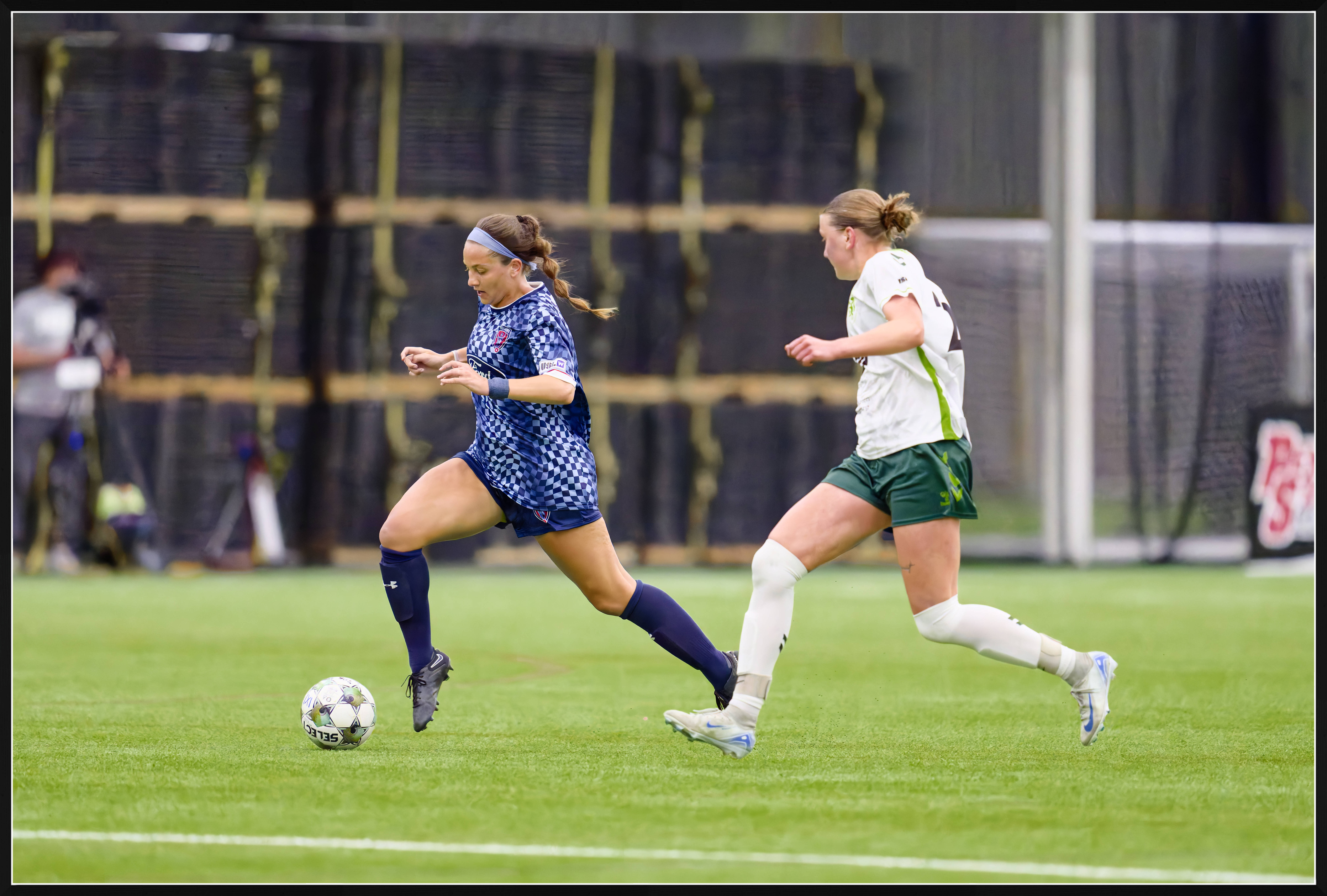
Jack Flesher wrote:
Ah, now makes total sense why the need for the heavy lifting on ISO noise. Not that this will help, but when I run heavy NR on my system via C1, the output/process time for full-sized 16-bit PSD is still in the 2-3 second range, meaning I can't see any difference with or without. Unfortunately I don't use LR or Topaz, but I also suspect NR is NR across these platforms. Perhaps if you made one of your raw files available with proposed adjustments somebody with an M4 could process it for you.
Good idea, I can make one available for anyone that wants one.
Well, so much for the DxO trial. It only uses the raw file and will not take a cropped portion. My workflow is: shoot, tag potentials in Sony camera, ingest only tagged files into PhotoMechanic, select a subset of those ingests to be used, crop selected photos, then import these selected photos into LR. It's at this point the denoise and sharpening need to take place. DxO plug-in uses the uncropped version which would force me to re-crop them after DxO processing. No time for that. Was hoping DxO would have done something like Topaz does by first creating a tiff version of the cropped raw. Sadly it doesn't. Rats....
schlotz wrote:
Good idea, I can make one available for anyone that wants one.
Upload one to a Drop Box public folder with an outline of what you want done and post the link here. I'll run it through C1 on my M4 Max MBP and share time for whatever that's worth to you. I have LR but don't use it, but can do my best there too.
Here is a link to one Sony A1 file and its associated xmp file that has its crop etc. Looking to clean up the noice while still leaving detail that can be successfully sharpened. Guess the time it takes LR to run denoiseAI set to 50 and return a dng might be useful info if from a MBP M4 MAX machine. Would link to know that machine's other specs, ie ram and number of cores cpu & gpu. Processing in C1 not really much help as I don't use C1
Processed in DxO Photolab 8.
This is an unresized (50MP) image. You may want to download this for a close examination.
The ISO is too high for DeepPRIME 3, and in this case it is better to use DeepPRIME XD/XD2s denoising which is slower but is more aggrresive .
On my 64GB 16 inch MacBook Pro M2 Max, DeepPRIME XD/XD2s denoising takes 13s for a single image. This will be faster when doing batch processing.
The image is sligthly cropped as a result of the auto Horizon correction (I thought that the original image was not perfectly levelled horizontally)
One of the difficulties in this case is the WB. You may want to use a "color passport" in the light of the place for creating a custom color profile (trivial in PL8).
I can provide the full details of processing in PL8 if this is of interest.
ILCE-1FE 400mm F2.8 GM OSS lens400mmf/3.21/1600s40000 ISO+0.3 EV
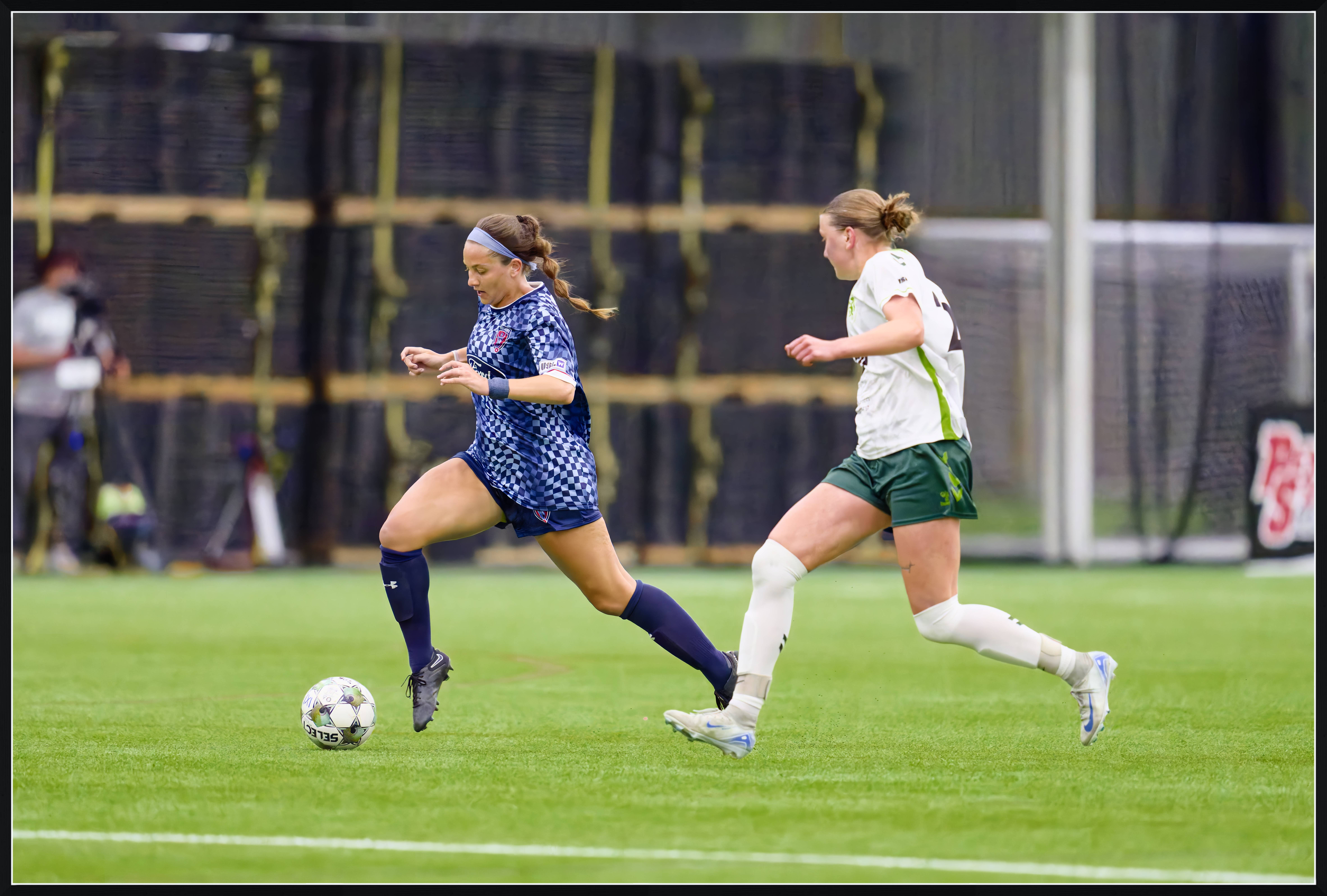
Out of interest - this is the same image as above, exported as tif to Topaz Photo AI where the color was corrected in the background. The image was upscaled to 60MP and this resulted in a reduced(!) disk size (from 3.6 for the jpg straight from PL8 to 2.4MB exported from Topaz) as a result of further denoising during the upscale.
ILCE-1FE 400mm F2.8 GM OSS lens400mmf/3.21/1600s40000 ISO+0.3 EV
Both look quite good Ron. Regarding PL8, does it have a plug-in for LR or was this done all within PL8? I'm pretty embedded with the workflow described above for game time processing but when there is more time back home PL8 might be worth some effort given the result you show here. Oh, yes this photo was roughly leveled but definitely needed some more attention. Not certain I'm following the process regarding the Topaz one.
schlotz wrote:
Both look quite good Ron. Regarding PL8, does it have a plug-in for LR or was this done all within PL8? I'm pretty embedded with the workflow described above for game time processing but when there is more time back home PL8 might be worth some effort given the result you show here. Oh, yes this photo was roughly leveled but definitely needed some more attention. Not certain I'm following the process regarding the Topaz one.
DxO denoising and sharpening are available in Photolab 8 and in PureRAW 5.
Both require raw files.
PureRAW is intended to be used as a plugin.
Photolab is a standalone program that can be used instead of LR (although PL does not create or use a catalogue).
I do not use LR; thus, I cannot I provide any meaningful advice on linking LR and DxO. I believe that Photolab can be used with LR like PureRAW, and if I am not mistaken the way this works is by exporting dng from the DxO apps.
One can try Photolab and PureRAW for 30 days at no cost, and this is a good way of exploring the available options.
There is no single app for processing from raw that is "the best." DxO Photolab is a professional program that has several useful features. Denoising and sharpening are of top quality; all lens corrections are claimed to be calibrated by DxO. All of the abovementioned can be enabled in full auto that saves time (sometimes I disable the vignetting correction and reduce the amount of sharpening from the default +1 to 0).
I believe that all major professional processing apps (LR, DxO, C1, etc.) are capable of producing good quality jpegs from typical reasonable quality raw files. I don't think one of these has a magic touch that makes it special. Basically, you may want to try Photolab and see if it does everything you need. If not, then explore PureRAW with LR.
The reason to add the jpeg from Topaz was to highlight the usefulness of the Upscale tool. Although the immediate reason for upscaling is to increase the pixel size, there is some useful image refining that happens in Upscale: some good-quality sharpening and denoising. In some critical cases (as Upscale is a bit time-consuming), one may want to run a tif through Topaz Upscale, especially when working with small crops that genuinely may benefit from upscaling. Topaz Gigapixel does the same as Upscale in Photo AI, in my experience of comparing the two some 4-5 months ago.
Dmitri
One small additional comment: I realized that what I said "DeepPRIME XD/XD2s denoising takes 13s for a single image" might be potentially confusing or misleading.
Enabling denoising in DxO itself does not entail waiting for 13s or any perceptible length of time.
Some denoising is applied at this moment but not the full-fledged DeepPRIME XD/XD2s. The latter happens on export. Thus, 13s is the time it takes for DxO Photolab to export a DeepPRIME XD/XD2s - denoised jpeg, tif, or dng (I have not noticed a difference for the different formats). Understandably most of this time is spent on the denoising. There is a caveat however. When exporting a batch, DxO PL is processing 7 raw files simultaneously, and this (in my experience) makes the export time per file slightly shorter. If I am not mistaken, on my laptop, I would expect something like an average of 10s per file when exporting a batch instead of 13s when exporting a single file.
p.2 #10 · M4 MBP Max and Topaz PhotoAI performance
I don't know about the Apples, but the Windows PL 8 allows you to decide how many files are processed concurrently. The default is 2. Making it higher is not really helping much. I run timed tests using a batch of at least 20 files, preferrably 50+ for accuracy. There is a slight delay for the first file, so I would not use that time as the best measurement.
p.2 #11 · M4 MBP Max and Topaz PhotoAI performance
EB-1 wrote:
I don't know about the Apples, but the Windows PL 8 allows you to decide how many files are processed concurrently. The default is 2. Making it higher is not really helping much. I run timed tests using a batch of at least 20 files, preferrably 50+ for accuracy. There is a slight delay for the first file, so I would not use that time as the best measurement.
EBH
Exactly, the time for a single export is slightly longer than the average for a batch.
The number of raw files processed concurrently in a batch (seven, on my 64GB 16 inch MacBook Pro M2 Max) was decided and set by Photolab. When I saw that, I was surprised and checked whether reducing the number could make the export work faster, and it didn't; thus, I left the number unchanged. I agree, however, that "making it higher is not really helping much." This is one of those things that Photolab might have had a reason to set to seven, and the setting does no harm, so I let it be at seven.
p.2 #12 · M4 MBP Max and Topaz PhotoAI performance
I ended up ordering a refurbished Studio M4 Max 16 core CPU, 40 core GPU in part based on Art is Right's comparison videos. Just to reiterate, I'm coming from a 14" MBP M1 Pro 10/16 cores CPU/GPU. In Art's graphs the M1P processes a 36MP RAW file through Lightroom Denoise in 40 seconds. The M4 Max 16/40 16" MBP does it in 16 seconds. The M4 Max Studio shaves that time a little more, likely due to better thermal control.
A 16" MBP M1 Max 10/32 cores processes the same file in 22 seconds.
As you can see, at least with LR being very GPU dependent for Denoise processing, there isn't a huge time savings jumping from M1 Max to M4 Max.
I still think, considering the workflow, that running Denoise in Lightroom is probably what I would do. But I also don't know how many images you submit at deadline and can understand that adding even 20 seconds per image will add up to minutes of lost time.
An advantage of your PM/LRC workflow is that LRC recognizes the crops you applied in PM and those will carry through to the Denoise DNGs it generates.
p.2 #13 · M4 MBP Max and Topaz PhotoAI performance
rscheffler wrote:
I ended up ordering a refurbished Studio M4 Max 16 core CPU, 40 core GPU in part based on Art is Right's comparison videos. Just to reiterate, I'm coming from a 14" MBP M1 Pro 10/16 cores CPU/GPU. In Art's graphs the M1P processes a 36MP RAW file through Lightroom Denoise in 40 seconds. The M4 Max 16/40 16" MBP does it in 16 seconds. The M4 Max Studio shaves that time a little more, likely due to better thermal control.
A 16" MBP M1 Max 10/32 cores processes the same file in 22 seconds.
As you can see, at least with LR being very GPU dependent for Denoise processing, there isn't a huge time savings jumping from M1 Max to M4 Max.
I still think, considering the workflow, that running Denoise in Lightroom is probably what I would do. But I also don't know how many images you submit at deadline and can understand that adding even 20 seconds per image will add up to minutes of lost time.
An advantage of your PM/LRC workflow is that LRC recognizes the crops you applied in PM and those will carry through to the Denoise DNGs it generates....Show more →
Yup that it does. You hit the nail on the head regarding 20 sec per image that can add up quickly and depending on what size of a crop I feed Denoise the time quickly grows to 30 sec. Files are from a Sony A1.
Interesting side note: I described my workflow details to the folks at DxO Labs pointing out their software ignores any crop and suggesting they could add a step to create a tiff (that contains the crop) prior to passing along to DxO PureRaw. Their reply showed interest in resolving this issue by either incorporating my suggestion or possibly reading the crop info embedded in the xmp. Not holding my breath but at least they are sending it to their engineers to see what they can do.
p.2 #14 · M4 MBP Max and Topaz PhotoAI performance
Re: cropping. That is the way it works between PM and LRC. LRC reads the crop info applied by PM to file's the XMP.
I just received a Studio M4 Max 16/40 cores and in LRC 13.3 it's running Canon R5II 45MP files through Denoise in 12 seconds. My understanding is LRC 14 might be slightly slower because Adobe dropped using Apple's Neural Engines again. But according to jhapeman in one of his benchmark threads, apparently ANE has little effect once GPU core count increases significantly.
The same 45MP images at 100% fly through PM as fast as I can hit the arrow key (without just holding it down). I have PM set up to render previews from the embedded jpeg files, which with Canon are full resolution. Meaning it's not rendering directly from RAW, which would slow things down a bit.
I still think if the budget allows, buy an M4 Max configuration and try it for 2 weeks. It will be faster and snappier. Also check Apple's refurbished store. I believe you get the same return period and can save ~15%. Nearly everything I've bought from Apple over the last 15+ years has been refurbished and so far, so good (finger's crossed).
p.2 #15 · M4 MBP Max and Topaz PhotoAI performance
Appreciate the info Ron. All of this interest is a preliminary effort to get comfortable upgrading my MBP M1 MAX. I run this machine in clamshell mode with a Studio Display which replaced my iMac late 2015. Not certain how I feel about going to a Studio setup given how much I utilize my MBP home & away. Hadn't thought about the 2 week trial, very tempting.
p.2 #16 · M4 MBP Max and Topaz PhotoAI performance
NP, just wanted to include some of the numbers I am seeing with the Max in that particular configuration, to give you some general ideas, which the 16" MBP Max should approximate very closely. I went with the Studio because my 14" MBP M1 Pro still works well enough for my location work, better fit my budget and maximizes performance through optimized thermal control. For me, going to a 16" MBP is too large and M4 Max in a 14" MBP would likely introduce performance throttling that would somewhat slow down bulk image processing that I predominantly do in my home office environment.
p.2 #17 · M4 MBP Max and Topaz PhotoAI performance
I know I'm a little late to the party... I downloaded the provided RAW and applied WB, minimal crop, exposure +0.3EV, profile color rendering, DeepPrimeXD noise reduction, profile sharpening, and profile CA.
I'm using a Mac mini with M4Pro, Photolab 7. The export took me 13.7 seconds, resizing to 4000px on the long edge, Display P3 color space.
I cannot speak to the M4 Max or Topaz, as I own neither of those, so I won't be offended if this information is limited in its usefulness. That said, DXO uses the Neural Engine for DeepPrime noise reduction. Adobe is stuck with the GPU for AI Denoise, so you might have a skewed comparison here. If Topaz doesn't work out, are you going to bring the entire post-photomechanic workflow back into LR?
EDIT: I did it again, without resizing. 14.0 seconds.
p.2 #18 · M4 MBP Max and Topaz PhotoAI performance
Oscarsmadness wrote:
I know I'm a little late to the party... I downloaded the provided RAW and applied WB, minimal crop, exposure +0.3EV, profile color rendering, DeepPrimeXD noise reduction, profile sharpening, and profile CA.
I'm using a Mac mini with M4Pro, Photolab 7. The export took me 13.7 seconds, resizing to 4000px on the long edge, Display P3 color space.
I cannot speak to the M4 Max or Topaz, as I own neither of those, so I won't be offended if this information is limited in its usefulness. That said, DXO uses the Neural Engine for DeepPrime noise reduction. Adobe is stuck with the GPU for AI Denoise, so you might have a skewed comparison here. If Topaz doesn't work out, are you going to bring the entire post-photomechanic workflow back into LR?
EDIT: I did it again, without resizing. 14.0 seconds. ...Show more →
Appreciate the input Oscar. I shoot in Raw, use PM to select those to be sent to client and to crop them appropriately, selected files are then copied to a specific folder, I use LR to import those photos. Unfortunately, DxO will not use any crop data therefore it is of no use to me until the day it does. So, it's at this point I need a solution that utilizes the crop info and affectively applies denoise and sharpening before creating jpgs to be sent to the client. The new LR denoise Ai does a very good job BUT, the time it takes for 50mp files is usually 30sec per photo on my MBP M1 MAX which is way too slow when shooting on a deadline.
p.2 #19 · M4 MBP Max and Topaz PhotoAI performance
Not sure why I didn't think to download the photo and run it on my Studio. Just did so and LR Denoise processed it in 12 seconds (time between clicking Enhance and when the thumbnail appears). The progress bar was gone by ~17 seconds. I'm guessing the MBP M4 Max will be 2-3ish seconds slower if also the 16/40 cores configuration.
I tried Denoise settings ranging from 50 to 100 and it didn't appear to make any perceptible difference.
Just to restate, I'm running LRC 13.3 because on my MBP M1 Pro, it used ANE and cut Denoise time roughly in half compared to previous versions that didn't use ANE. But my M1 Pro only has 16 GPU cores, a relatively low number where ANE apparently makes more of a difference. I have not yet installed LRC 14.x because I'm in the middle of a couple projects that were started on 13.3 and don't want to mess with updating the catalogs halfway through, etc.
p.2 #20 · M4 MBP Max and Topaz PhotoAI performance
schlotz wrote:
Appreciate the input Oscar. I shoot in Raw, use PM to select those to be sent to client and to crop them appropriately, selected files are then copied to a specific folder, I use LR to import those photos. Unfortunately, DxO will not use any crop data therefore it is of no use to me until the day it does. So, it's at this point I need a solution that utilizes the crop info and affectively applies denoise and sharpening before creating jpgs to be sent to the client. The new LR denoise Ai does a very good job BUT, the time it takes for 50mp files is usually 30sec per photo on my MBP M1 MAX which is way too slow when shooting on a deadline. ...Show more →
What is the reason for cropping to happen in PM?