p.1 #1 · TB4/5 external SSD enclosures which actually work with M4 mini or studio
Has anyone found a reliable TB 4/5 external SSD enclosure which works reliably with their M4 mini or studio? I have a pair of Hyperdrive USB 4 enclosures which they claim are compatible, yet they are not dependable. The SSD’s spontaneously disconnect randomly under load after a few minutes or hours of use, at idle, or wake-up. A search on Apple forums suggests it’s a common problem with a variety of enclosures and is attributable to USB C management, Apple power management, cables, etc. though no clear solution is offered. Ironically, the two enclosures work fine on a M1 MBP.
p.1 #4 · TB4/5 external SSD enclosures which actually work with M4 mini or studio
I use Acasis enclosures too and find them reliable and fast on my old 2017 iMac using a TB4 hub(none of the heating issues I had with other enclosures). They also work fine on my M1 MacBook Pro. I just got an M3 Studio and will transfer the discs to that once it is set-up and running. No info about the enclosure on an M3/4 until then.
p.1 #6 · TB4/5 external SSD enclosures which actually work with M4 mini or studio
Since January I’ve had an OWC 1M2 + Samsung 990 connected directly to an M4 Mac Mini Pro rear TB5 port, and two Samsung T7’s connected via a studio display, and they have never disconnected.
I use a 28” OWC TB4 cable for the 1M2, the T7’s are connected with the short USB-C cable they came with.
p.1 #7 · TB4/5 external SSD enclosures which actually work with M4 mini or studio
So, no spontaneous disconnects or failure to wake up after system goes into sleep mode? Hyper is not responding to my inquiries and I wouldn’t endorse them. While their enclosures work on my M1 MBP, they’re quirky with the M4 mini.
p.1 #8 · TB4/5 external SSD enclosures which actually work with M4 mini or studio
I have had zero disconnect, errors, or failures of any kind with my drives - through sleep sessions and total shutdowns.
The OWC 1M2 + Samsung 990 4TB is my main working drive - all my photographs, etc are there
Samsung T7 #1 is a time-machine backup of the limited data I keep on the Mac Mini
Samsung T7 #2 is a warm-backup of the OWC 1M2
I’ll occasionally plug in other Samsung T7’s on the front ports, they function as offsite backup disks. Even then, disks on the front ports haven’t every had failures of any kind.
p.1 #9 · TB4/5 external SSD enclosures which actually work with M4 mini or studio
armd wrote:
So, no spontaneous disconnects or failure to wake up after system goes into sleep mode? Hyper is not responding to my inquiries and I wouldn’t endorse them. While their enclosures work on my M1 MBP, they’re quirky with the M4 mini.
I do recall seeing a reddit post mentioning that the new studios seem to have an output wall related to power and would boot a connected device at random......I would assume the Mini has the same scheme.....
p.1 #11 · TB4/5 external SSD enclosures which actually work with M4 mini or studio
armd wrote:
Do the enclosures appear to be listed under either the TB/USB4 or USB system settings tabs when connected? If so what does it say? Thanks.
The OWC 1M2 that’s connected to the rear TB5 port is reported as being connected to a TB-USB4 port
The two Samsung T7’s report that they are connected to the USB-C ports of a studio display
All drives are formatted APFS
There’s a lot of info there - what specifically are you looking for?
p.1 #12 · TB4/5 external SSD enclosures which actually work with M4 mini or studio
mike_the_kraken wrote:
The OWC 1M2 that’s connected to the rear TB5 port is reported as being connected to a TB-USB4 port
The two Samsung T7’s report that they are connected to the USB-C ports of a studio display
All drives are formatted APFS
There’s a lot of info there - what specifically are you looking for?
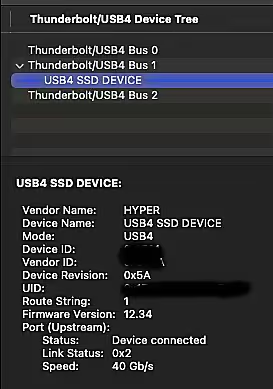
Hi Mike, thanks for replying and I hope this thread will help out those who are experiencing difficulties with their TB SSD's (it seems to be a common problem according to searches). The reason I asked this question is I was stumped when the drive appeared to be "mounted" and was visible/accessible on the desktop, appeared in the "storage" tab under "system information" and yet it did not appear in either the USB or TB/USB4 tabs. When this occurred, the drive would randomly disconnect either at idle or during operation and the disk failing to eject properly error would appear. That's why I asked if other SSD enclosures appeared in either the USB or TB/USB4 tabs.
The only thing I did with the set up was to re-route the cable/enclosure which had been crossing the video USB cable in the back towards the left, over the other way to the right of the mini. For whatever reason, the drive is now appearing in the TB/USB4 list and has remained "mounted" for two days without incident. I have two identical drives and these are swapped back and forth between a MBP and the mini and have worked fine with a M1 MBP. The absence of seeing the drive in the list and the fact that the drives work on the other Mac lead me to suspect that the problem was with the mini rather than the drives/cables. Perhaps there is a problem with the Mac mini TB ports or some RF interference which was causing the failure? We'll have to see how this works out.
Here is how the drive now appears on the device under the TB/USB4 tab:
Here are some troubleshooting tips generated by Google's generative AI:
If an external SSD isn't appearing in either the Thunderbolt (TB) or USB tabs on your Mac, it could be due to several reasons, including connection issues, driver problems, or even the way your Finder is configured. Here's a breakdown of how to troubleshoot and potentially resolve the issue:
1. Check Connections and Ports:
Ensure Secure Connections: Make sure the USB cable or Thunderbolt cable is properly connected to both the Mac and the SSD.
Try a Different Port: Sometimes a port might be faulty, so try connecting the SSD to a different USB or Thunderbolt port on your Mac.
Check for Damage: Inspect the cable and the ports for any visible damage.
Use a Different Cable: If possible, try using a different cable to rule out a faulty cable.
2. Verify Drive Power and Functionality:
Check for Power:
If the SSD is powered by a dedicated power adapter, ensure it's connected and powered on.
Test on Another Mac:
If possible, try connecting the SSD to another Mac to see if it's recognized there. This can help determine if the issue is with the drive itself or your Mac.
Boot into Safe Mode:
Boot into Safe Mode (hold Shift during startup) to see if the SSD is recognized. This can help determine if a third-party program is interfering with the drive's recognition.
3. Disk Utility and Formatting:
Open Disk Utility:
Open Disk Utility (found in the Utilities folder) and see if the SSD is listed there.
Mount the Drive:
If the drive is listed in Disk Utility, select it and click the "Mount" button.
Run First Aid:
If the drive is not listed or you suspect it might have issues, click the "First Aid" button to run a repair on the disk.
Check File System Compatibility:
Ensure the SSD is formatted with a file system compatible with macOS (e.g., exFAT, APFS).
4. Finder Settings and Preferences:
Check Finder Settings:
Open Finder and go to Finder > Settings > General. Ensure that "External disks" is checked.
Relaunch Finder:
Sometimes, the Finder can have temporary issues. Try relaunching the Finder (Option + right-click on the Finder icon in the Dock and choose "Relaunch").
5. System Report and Other Troubleshooting:
Check System Report:
Go to Apple menu > About This Mac > System Report > USB (or Thunderbolt) to see if the SSD is listed there.
Reset NVRAM and SMC:
Resetting NVRAM and SMC can sometimes resolve connectivity issues. Look up specific instructions for your Mac model online.
Check for Driver Updates:
Check the SSD manufacturer's website for any driver updates for your Mac OS version.
6. Consider External Factors:
USB Hubs:
If the SSD is connected through a USB hub, ensure the hub is compatible with the SSD's speed.
Other Connected Devices:
Disconnect all other USB devices except for the SSD, your keyboard, and your mouse to rule out any conflicts.
Daise Chain:
Avoid daisy-chaining devices, especially when troubleshooting. Connect the SSD directly to your Mac.
If none of these steps resolve the issue, it's possible the SSD itself has a hardware problem or is incompatible with your Mac. You might need to consult with the SSD manufacturer or a qualified technician.
p.1 #13 · TB4/5 external SSD enclosures which actually work with M4 mini or studio
I don't have Apple gear anymore, but something else to consider is that thunderbolt connects directly to the PCIe system of your computer. Some software may get upset with changes to that system caused by connecting or disconnecting thunderbolt devices. On my PCs it has mostly resulted in licensing issues because the software thinks a different computer is being used when in fact the only change is the attachment or removal of a thunderbolt device.
This may or may not be affecting the "dependability" of your external drives, though sometimes I think thunderbolt is stretching the capabilities of the computer, particularly in terms of timing and stability.
Adobe allows two "computers" per licence. That's with and without one thunderbolt device or set of devices. Add something different like a thunderbolt drive and you'll have to register your "new" computer and deregister your old computer.
With an all new system you'd be better off with very speedy USB but that does not help with expensive existing thunderbolt accessories.
It would be so much easier if they based licences on relatively fixed components such m/b, CPU, RAM, sound card, graphics card, etc., and totally ignored storage devices if thunderbolt is active.
p.1 #14 · TB4/5 external SSD enclosures which actually work with M4 mini or studio
armd wrote:
Has anyone found a reliable TB 4/5 external SSD enclosure which works reliably with their M4 mini or studio? I have a pair of Hyperdrive USB 4 enclosures which they claim are compatible, yet they are not dependable. The SSD’s spontaneously disconnect randomly under load after a few minutes or hours of use, at idle, or wake-up. A search on Apple forums suggests it’s a common problem with a variety of enclosures and is attributable to USB C management, Apple power management, cables, etc. though no clear solution is offered. Ironically, the two enclosures work fine on a M1 MBP.
I might have taken the plunge but my Mac is an old M1 Max MBP and my desktop is Windows with TB4, so no reason to upgrade yet and I think by the time I do next gen will be out.
p.1 #15 · TB4/5 external SSD enclosures which actually work with M4 mini or studio
armd wrote:
Anyone? Is this an outrageous request or don’t people use SSD enclosures with their MAC’s?
Hard to judge from your one report, but this sounds a little like the old experience with spontaneously disconnecting USB drives on Apple systems. I hope it isn’t.
I’m interested in such SSD enclosures but only those that can hold multiple “drives,” and the last time I looked there weren’t yet any that were TB5 compatible.
p.1 #16 · TB4/5 external SSD enclosures which actually work with M4 mini or studio
OP's problem sounds reminiscent of the sudden problem I had with USB-C NVMe drives randomly disconnecting from my MacBook Pro M1 Pro a year or so ago after it was updated from macOS 13 to 14. These inexpensive Sabrent USB-C enclosures had worked fine up until then, and other Sabrent devices, such as a 5-bay USB-C HDD enclosure continued to work without such disconnections. After a lengthy thread here I ended up swapping all NVMe drives to Acasis TBU405 enclosures and haven't had a problem since.
p.1 #17 · TB4/5 external SSD enclosures which actually work with M4 mini or studio
A quick update, we're now 5 days without a disconnect and the only thing I've done is move the drive some distance away from the Mini on the right (rather than the left) side. Also, this location is away from the monitor. This suggests some sort of electrical interference which has been obviated by this simple maneuver. I've been reading quite a few articles on issues with shielding on the Mini and in particular challenges with WiFi reception. Perhaps the location of the drive was a factor?
p.1 #18 · TB4/5 external SSD enclosures which actually work with M4 mini or studio
It's been two weeks without any disconnects. I'm convinced that this has something to do with the MAC Mini's shielding/RF interference. Interestingly, I've been following various discussions on how the docks and other peripherals affect the Mini's wifi signal, and it's quite interesting. One fascinating feature worth exploring is holding the "option" key and clicking on the wifi bars at the top of the display. This opens up a dialogue box with a whole host of information regarding the RSSI, noise, etc. which a user can observe in real time moving the mini/peripherals around. For example, I didn't realize the amount of noise that my monitor or speakers created or how that affected my wifi signal. Having moved the SSD away from the machine, all of the problems have gone away.
p.1 #19 · TB4/5 external SSD enclosures which actually work with M4 mini or studio
We're at week three of this experiment and the SSD no longer spontaneously disconnects though it is interesting that I can't plug in two, self contained SSD's to the back TB5 ports along with a monitor connected via a display port and have the system function. Either the TB5 array can't provide enough power - which seems counterintuitive - or it produces some conflict. The same two drives work fine if I plug one in the back TB5 and the other in the 10 gbps USB-C in the front. Ahh, the joys of MAC ownership!
p.1 #20 · TB4/5 external SSD enclosures which actually work with M4 mini or studio
I just got an M4 Studio and am looking at a combo on Amazon -- a Sabrent Rocket 5 NVME in the ANYOYO TB5 enclosure. This ANYOYO box looks to be a clone of the ACASIS TB5 at $65 less cost. Anybody tried it?
I am currently using a 4 year old Sabrent TB3 enclosure with Sabrent Rocket (2?) NVME and get sustained Read and Write at around 1300 mb/s now, while when new it was around 1700. I suspect the SSD is wear-leveling. That said, this combo has worked reliably and still is; and if I'm completely honest with myself, it's plenty fast for my current uses which is primarily my current year of still images for processing. Of course it's backed up to a spinning array.
Point here is do I wait to see if some breakthrough TB5 enclosure shows up, or just go with what's available now?