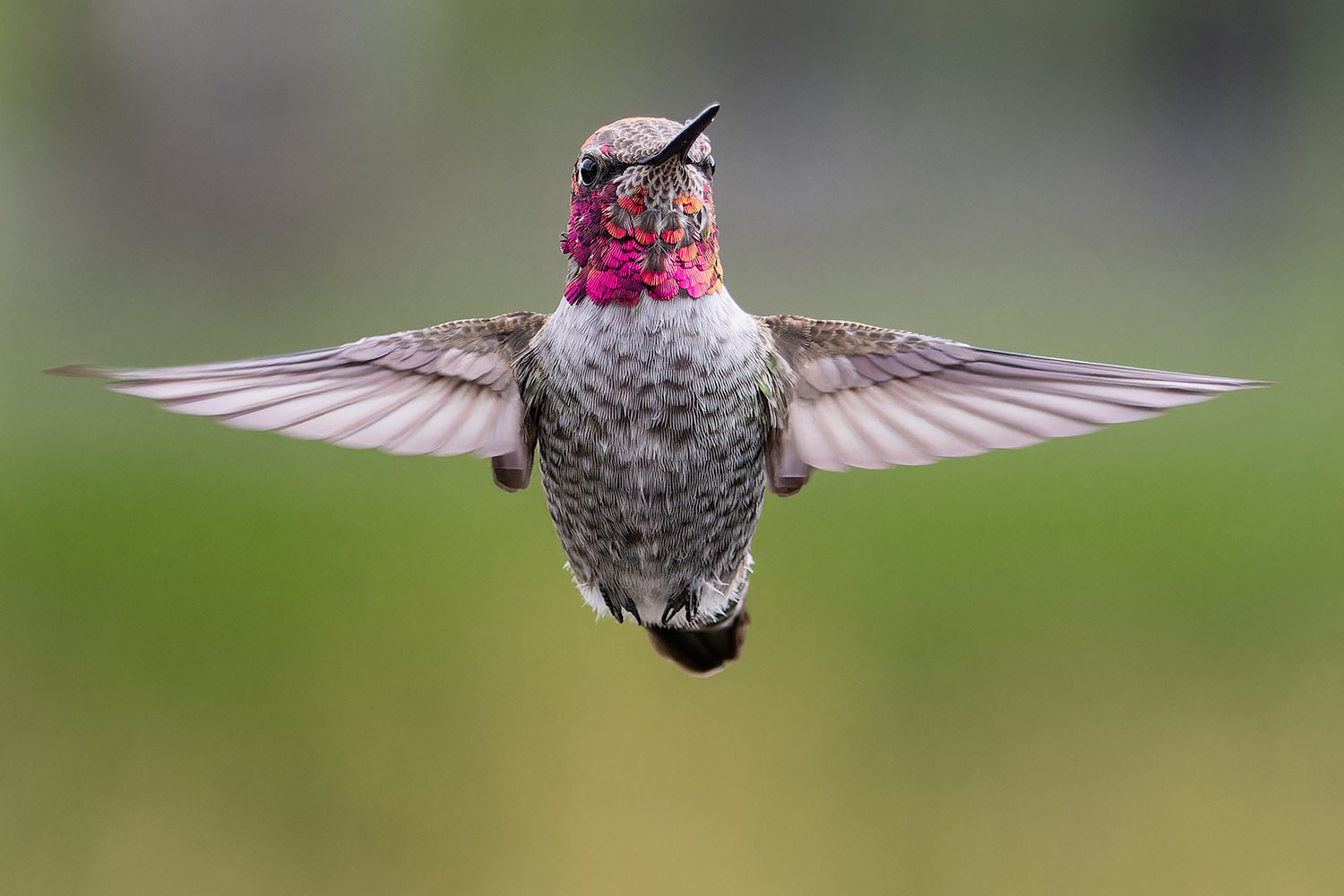
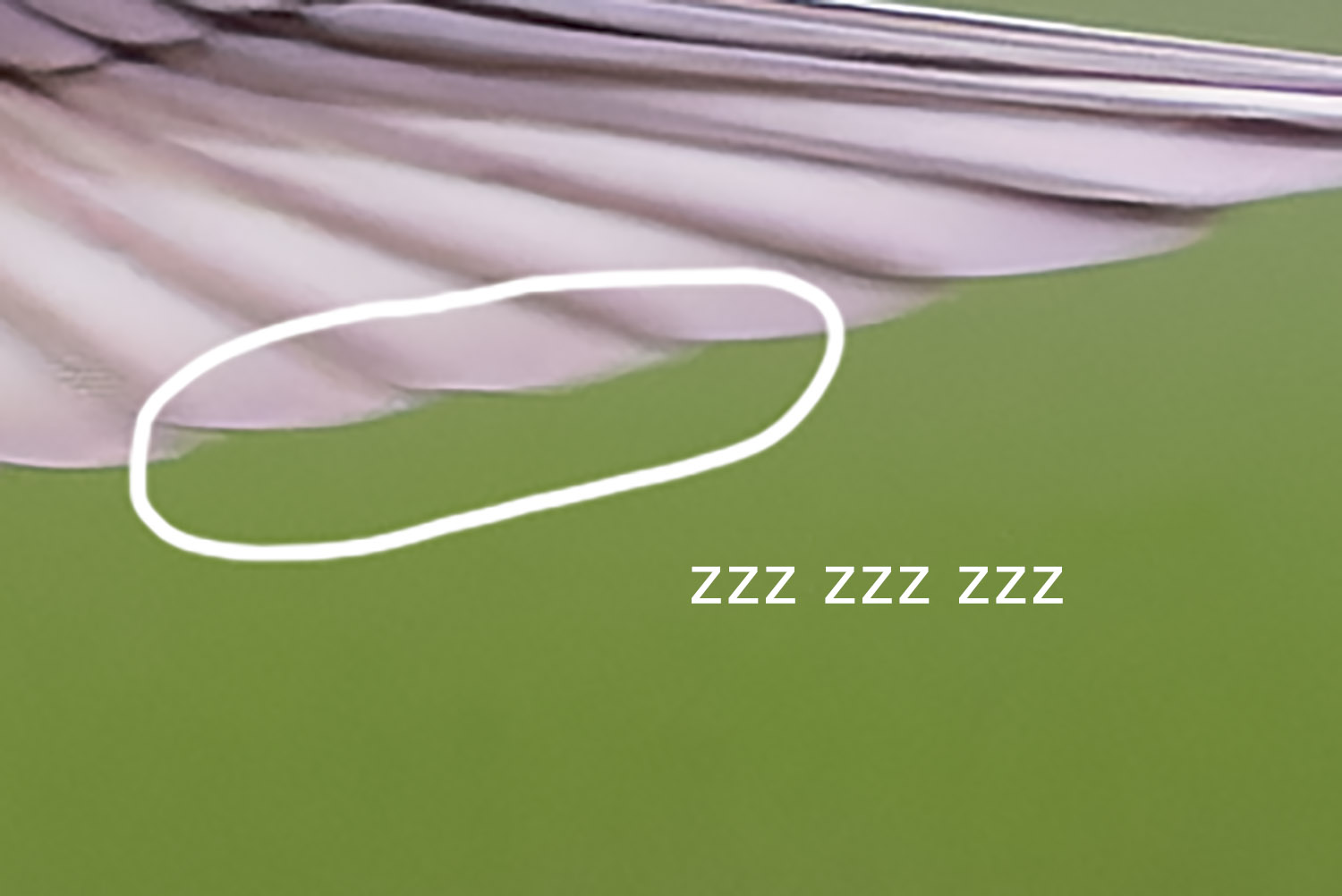
I was out trying to capture photos of small birds in flight and was very disappointed to see the following artifacts on what would have been an otherwise good capture.
Is this rolling shutter?
More importantly, what can I do to prevent this?
Camera: R5MkII
Lens: EF600mm f/4 with EF-EOS R Control Ring Adapter
Shutter: 1/5000 second (Electronic)
Aperture: f4
ISO: 800
The original full frame reduced to fit so you can see where in the frame these crops are from. Even reduced like this something seems "off" about the wings, which is what prompted me to zoom to 100% when I first reviewed the photo in Lightroom. https://www.tjasher.com/sharing/2025-02-13-AJ1A6930_Copyright_2025_TJ_Asher.jpg
Any advice on how to deal with this is appreciated.
They are artifacts of parallel readout from an electronic shutter. Electronic shutter readout happens in bands of a few pixels across the sensor simultaneously. It is not out of focus issues. Look it up.
Yes! I know with Sony it's rows of 16 pixels read.
It looks like it's about the same with Canon.
It looks very similar to a video artifact related to interlacing: Combing, AKA mouse teeth.
RobAmy wrote:
They are artifacts of parallel readout from an electronic shutter. Electronic shutter readout happens in bands of a few pixels across the sensor simultaneously. It is not out of focus issues. Look it up.
Yes it is rolling shutter. On an R5II you would need to shoot in MS to prevent it.
Cameras with faster read speeds will minimize it like R1, Z9/8, A1(II). Camera like A9III will 100% eliminate it.
It must be nice to be able to identify artifacts caused by rolling-shutter effect just by looking at two cropped images from one bird. Not being a 'artifacts expert', I would not know what type of artifacts those are. There are a few types of artifacts and more than one cause for them.
I am sure there are some, either than just myself, that would like to see side-by-side comparisons of the different kinds and how one can differentiate between them. Uncropped images of birds with blurred wingtips are hardly helpful for showing artifacts, let alone what type they are. Plenty of images had artifacts before mirrorless cameras with rolling shutter effect came along.
The most common artifacts problem is excessive noise, which causes the image to look grainy. Artifacts are often caused by a high ISO setting for images captured in low-light situations. Get to know the limitations of your camera. Most cameras are excessively noisy at ISO 1600, and some at lower settings.
I would not worry too much. Within just a few years we can create whatever situation with whichever species in whatever environment with the preferred bokeh. We can even add aberrations, distortions, vignetting, the effect of post correction of corners, noice and/or rolling shutter effects to enhance the authenticity of our images. This will be huge compared to the images of yesteryears that were limited by the optics and the low dynamic range of the global shutters. When AI rules the World!
At present, wingtip blur does not bother me in the least, regardless of the cause. There is not a single photographer that can freeze that blur with the naked eye. On top of that, bird feathers are soft and 'feathery' , not hard and 'spikey-looking'.
If someone thinks the only cause of those artifacts is from rolling-shutter effect', let them prove that by posting comparison images of the different kinds of artifacts and how one distinguishes the differences? So far, the images posted (including mine) show no such evidence.
And someone could do a side-by-side comparison of 'advise' and 'advice'. Maybe they were using faulty AI. 'Artifact Intelligence'
They look like typical bands from sensors that utilize multiple parallel row readouts.
To achieve faster readouts, some sensors readout rows in groups of 4, 8, 12, etc... Each row within the group has the same timing. The boundary from one group to the next creates subtle bands for high-speed edges due to the timing difference between groups. I'm able to recreate them at will using carefully-controlled high-speed LED lighting.
Rob: You stated above that the R1 can show this same issue but to a lesser extent than the R5M2. Why is that so since the R1's sensor readout speed is slightly faster than a mechanical shutter's readout speed? Then would a mechanical shutter also show this issue but to a slightly greater extent than the R1? I'd appreciate your insight. Thanks.
Sage11 wrote:
Rob: You stated above that the R1 can show this same issue but to a lesser extent than the R5M2. Why is that so since the R1's sensor readout speed is slightly faster than a mechanical shutter's readout speed? Then would a mechanical shutter also show this issue but to a slightly greater extent than the R1? I'd appreciate your insight. Thanks.
I could be wrong my basic understanding is that Electronic Shutters actually stitch the image together from scans lines and the Mechanical uses the entire sensor at once when the curtain opens. Global shutter would solve that.
I get it very rarely on the R1. I am sure you could still get artifacts with mechanical shutter also depending on the scenario but again very rarely.