p.2 #1 · MacMini vs MacStudio for photography: worth the pain?
Alan4color wrote:
I upgraded the memory to 48GB when I purchased my Mini M4 Pro. When I'm running PS and have a few other miscellaneous programs open like safari and music the activity monitor shows 39GB used. I keep the base SSD storage at 500 GB and look to add a TB5 external.
As a data point, my M4 Mini Pro with 48GB running PS and safari with around 8-10 tabs idles at 3% GPU and around 25 GB of memory utilization. Compared to my M1 Pro MBP with 16 GB, the Mini is faster. Is it 25-50+% faster? With rendering thumbnails it could be more, though for application with NR from Topaz I would say it's towards the lower end. As I stare at this marvel of a system (compared to my old, full sized i7 (gen 8) + 3060 Ti 12GB card), I'm still amazed.
For those considering, spend the money on the memory. All of the testing demonstrates that's the best value and the SSD's will be upgradable reasonably cost effectively with 3rd party solutions soon.
An interesting question for those running external SSD's, do you leave them plugged in all of the time? Even when the system enters "sleep mode" the SSD's are active and run hot. I'm suspecting that it will shorten their life if the system is running them in the background. Thoughts?
p.2 #2 · MacMini vs MacStudio for photography: worth the pain?
OntheRez wrote: Absolutely. If you do any sort of intense PP, then the Mini simply isn't up to the task. I speak from experience. I tried to upgrade from my iMac Pro (great machine) to a fully speced Mini. Simply didn't/couldn't do the job. So lost quite a bit $$ replacing it with a Studio. Also, tried to work with a 4k monitor. Again not acceptable. Bought the Studio display. Excellent.
Bottom line. Fine tools are always more expensive that 'value' items but in the long from they do a better job, last longer, and provide the ability to give greater satisfaction with your work....Show more →
Can you define how it's not up to task either currently or in the future? I've post processed huge images for focus stacking, HDR, complex masking, layers, etc. without a hiccup. So far, it's been superb for video up to 4k 30" (I haven't done any larger projects). So please, enlighten us? Yes, if video was my thing, A M2 Max Studio with a ton of memory would look attractive, though the $4k+ price tag would not and I suspect it wouldn't be oodles faster. For the $ the M4 mini pro with enough memory rocks!
p.2 #3 · MacMini vs MacStudio for photography: worth the pain?
armd wrote:
with enough memory rocks!
Imo, nothing less than 32GB ... no matter which processor / form factor you choose.
Part of the reason for this is that it isn't just the amount of memory, but the memory bandwidth configuration that comes along for the ride between the Base, Pro, Max, Ultra modular configurations. You don't want to be in the Base configuration.
Think of traveling along a one lane, two lane, four lane or eight lane highway. When things are slow, any will do. When things get busy, the fewer lanes start to jam up a bit (i.e. bottleneck's). As long as you have lanes that aren't bottlenecked, you can put the pedal to the metal as hard as your engine can go. Bottled up, and you're into Sammy Hagar territory.
Having 2X, 4X or 8X memory operations processing speeds can offset / complement whatever engine (CPU) you're using. Bear in mind also ... it is SHARED memory between your CPU / GPU. Now, if you're doing operations that are trying to share the road (memory pipelines), it isn't only the shared amount of memory, but also the memory pipeline. Think about two trucks trying to use the same one lane bridge, or a passing on narrow two lane country road ... vs. the interstate.
Memory is where the rubber meets the road, as operations go to & fro.
p.2 #4 · MacMini vs MacStudio for photography: worth the pain?
I got 48GB in my mini M4 Pro, along with 2TB SSD. I’d recommend the same for others who will do serious photo work, especially if you run multiple applications at once. (You can probably get by, at least for now, with 1TB SSD if you don’t load a lot of applications or store a lot of files directly on the SSD, and instead plan to store on connected external volumes.)
One observation: I think Photoshop may have a memory management problem with the M4 Pro machines. When I launch it things go fine, but a week or so later (yes, I leave everything running) the memory use balloons to 40GB and more… and on one occasion I ran out of memory and the machine hung.
There was another recent Photoshop update, and I have not seen the problem again since I did that, but it is too soon to know for sure.
Back to the main discussion, the mini M4 Pro with 48GB runs Photoshop and ACR just fine.
Also, when discussing tech issues/specs of computer (or cameras, for that material) it is always critical to leaven the observations about The Very Best Specifications with discussion of how much difference it makes in actual us. I don’t care if the thing’s Framulation score is 110 instead of 100 unless framulation actually affects my work…
p.2 #5 · MacMini vs MacStudio for photography: worth the pain?
Again, I would ask…
those running external SSD's, do you leave them plugged in all of the time? Even when the system enters "sleep mode" the SSD's are active and run hot. I'm suspecting that it will shorten their life if the system is running them in the background. Thoughts?
p.2 #6 · MacMini vs MacStudio for photography: worth the pain?
armd wrote:
Again, I would ask…
those running external SSD's, do you leave them plugged in all of the time? Even when the system enters "sleep mode" the SSD's are active and run hot. I'm suspecting that it will shorten their life if the system is running them in the background. Thoughts?
My external ssd is always connected to my studio. Touching the drive…it is not hot.
p.2 #8 · MacMini vs MacStudio for photography: worth the pain?
The research that I've done on NVME enclosures, seems to suggest that they run "hot" even in idle mode. So, apart from purchasing one with active cooling, heat is simply part of the equation. I'm still waiting for an "attractive" and "useful" NVME enclosure/port expansion for the M4 pro mini. The Satechi and other brands fail to leverage the TB5 speed or provide useful ports.
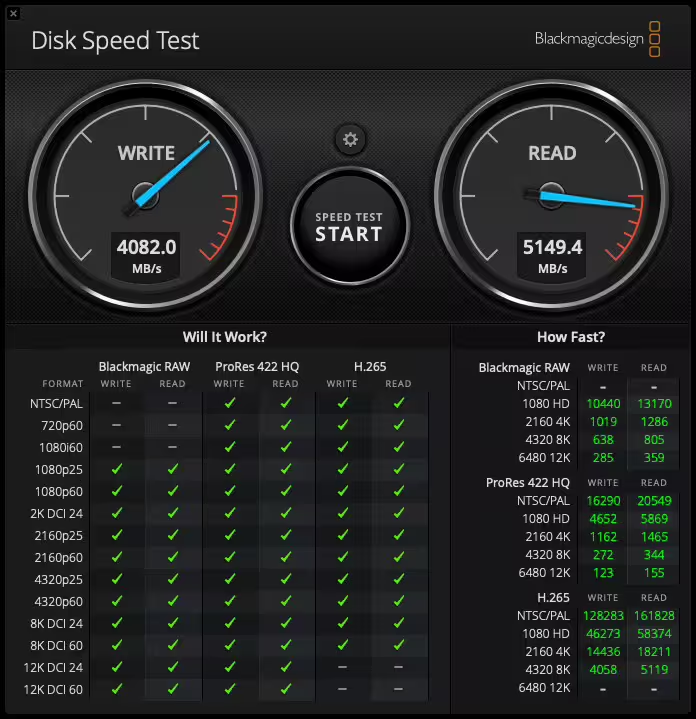
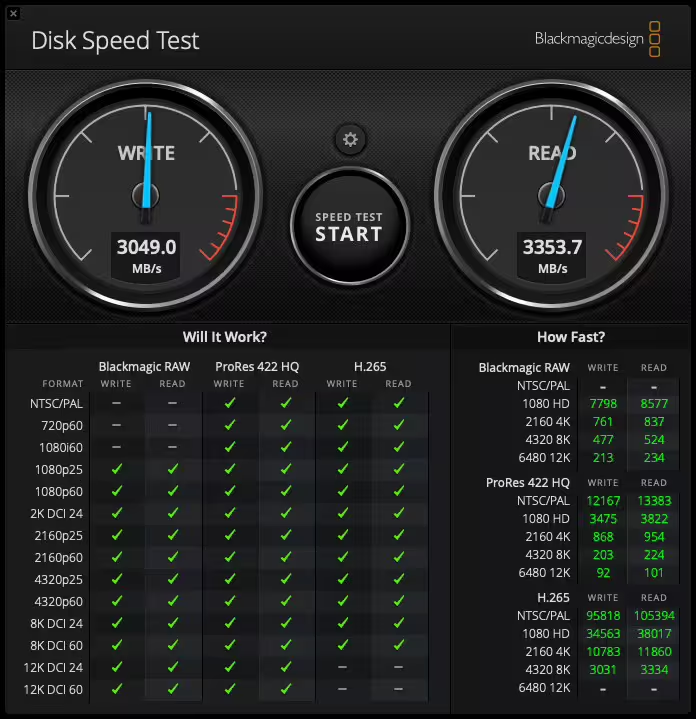
Using the 40Gbps Hyperdrive SSD, I am able to achieve speeds ~ 24-27Gbps (was hoping for better, but it is still more than adequate for photo/video storage and manipulation). Comparatively, the internal SSD delivers around 33 Gbps. Overall, I am having so much fun with this little machine and continue to be "wow'ed" by its speed and capabilities in such a compact package.
p.2 #9 · MacMini vs MacStudio for photography: worth the pain?
armd wrote:
Can you define how it's not up to task either currently or in the future? I've post processed huge images for focus stacking, HDR, complex masking, layers, etc. without a hiccup. So far, it's been superb for video up to 4k 30" (I haven't done any larger projects). So please, enlighten us? Yes, if video was my thing, A M2 Max Studio with a ton of memory would look attractive, though the $4k+ price tag would not and I suspect it wouldn't be oodles faster. For the $ the M4 mini pro with enough memory rocks!
Of course perceived performance will vary widely because benchmarks are not an indicator of how our mind/eyes are working. Having been involved since back in the day when these devices were called Micro-computers and having had one of the first 50k Macintoshes, I've seen performance grow beyond any fantasy I might have had back then. However, from those days forward the old aphorism remains, You can never have too much memory nor too fast of a processor.
I was running a M4 with max memory and a 2Tb SSD. It was okay. I suspect part of my problem was that I was moving from a 2017(?) iMac Pro with maximum processor, video, and SSD. Honestly I didn't realize how powerful that thing was. I also didn't realize just how good the screen was.
Yes, the fully loaded M4 is an excellent device, and I'm sure it will do most people quite well. I do agree that you should ante up for the full RAM. While others have noted that they do complex and intense development, I also do a bit of over the top work. Recent example: building large panoramas. I'm merging 4x12 images. Each individual original photo is a 3 shot HDR. That comes out to 4x3x12 images. These get printed on 24x60 canvas. That's quite a load. If you aren't doing stupid crazy things like this, then don't spend the money. You'll be fine.
p.2 #10 · MacMini vs MacStudio for photography: worth the pain?
Oscarsmadness wrote:
24, for the OP's use case. OP's use case is similar to mine, and I have 24 and the only time I got it to stutter was when I loaded a 2GB tiff into Affinity and threw layers on it. And I had web browsers, a lot of MS Office, all that going at the same time.
For my normal use, the thing flies with just 24. If your normal use is like the OP and mine, I'd say save your money.
Do NOT get the 24gb
I made that mistake and (luckily) was within the return period when I realized my mistake.
I *hate* how apple jacks you on overpriced memory, but ONLY running LR, PS, browser and email, I was using 18+ gb
p.2 #11 · MacMini vs MacStudio for photography: worth the pain?
OntheRez wrote:
Of course perceived performance will vary widely because benchmarks are not an indicator of how our mind/eyes are working. Having been involved since back in the day when these devices were called Micro-computers and having had one of the first 50k Macintoshes, I've seen performance grow beyond any fantasy I might have had back then. However, from those days forward the old aphorism remains, You can never have too much memory nor too fast of a processor.
I was running a M4 with max memory and a 2Tb SSD. It was okay. I suspect part of my problem was that I was moving from a 2017(?) iMac Pro with maximum processor, video, and SSD. Honestly I didn't realize how powerful that thing was. I also didn't realize just how good the screen was.
Yes, the fully loaded M4 is an excellent device, and I'm sure it will do most people quite well. I do agree that you should ante up for the full RAM. While others have noted that they do complex and intense development, I also do a bit of over the top work. Recent example: building large panoramas. I'm merging 4x12 images. Each individual original photo is a 3 shot HDR. That comes out to 4x3x12 images. These get printed on 24x60 canvas. That's quite a load. If you aren't doing stupid crazy things like this, then don't spend the money. You'll be fine....Show more →
Perspective is important and compared to my intel MBP, my M1 MBP ran circles around the intel and compared to my M1 MBP, the M4 pro mini, is all that much better for the video, NR, PS layers, masking, loading thumbnails, etc. I’m not certain the value of recalling early computers as we can talk about the Altair 8800, Commodore, 300 baud dial ups, and everything else until we’re blue in our faces and it won’t make an iota of a difference. Yes, this little 5x5 box with a 3 nM chip and which uses the energy of an old style incandescent light bulb is nothing short of jaw dropping compared to full sized towers of just a couple years ago.
p.2 #12 · MacMini vs MacStudio for photography: worth the pain?
OntheRez wrote:
However, from those days forward the old aphorism remains, You can never have too much memory nor too fast of a processor..
However, you can — and too many do — waste money on memory and speed that buys no significant real world performance increase.
While it won’t hurt, in performance terms, to get to use an over-spec’ed computer, it also is not a very cost effective approach to just buy the most powerful thing out there just because the specs are “better.”
I’ve also been using these machines for a long time, too. (The first computer I used was — wait for it! — a PDP-11 at SAIL in the Bay Area in 1972, when I was introduced to the use of computers to make music. For a short time I used the original IBM PC, then got my first Mac in 1985.)
Back in those early days we really did sometimes need to get the big, high end machines if we were doing work that pushed the capabilities of the technology. That was definitely tru with early computer audio, and it held true when people started using early versions of Photoshop. But today’s computers have progressed so far that some pretty basic models now have far more power than we need to such tasks.
I do believe in marginally overspec’ing your computer if you aren’t exactly sure how long you’ll keep it or how it will hold up, but that usually means determining what current machine will do the work you will actually do… and then perhaps getting a bit more memory and maybe a somewhat more capable processor. (I’d go for 48GB memory and at least a TB SSD for photography, and probably the M4 Pro unless you really won’t push things much.) But just buying the thing with the highest specs is usually unnecessary and not the best approach.
That little M4 mini Pro is a really powerful little image processing machine.
p.2 #13 · MacMini vs MacStudio for photography: worth the pain?
gdanmitchell wrote:
However, you can — and too many do — waste money on memory and speed that buys no significant real world performance increase.
I do believe in marginally overspec’ing your computer if you aren’t exactly sure how long you’ll keep it or how it will hold up, but that usually means determining what current machine will do the work you will actually do… and then perhaps getting a bit more memory and maybe a somewhat more capable processor. (I’d go for 48GB memory and at least a TB SSD for photography, and probably the M4 Pro unless you really won’t push things much.) But just buying the thing with the highest specs is usually unnecessary and not the best approach.
That little M4 mini Pro is a really powerful little image processing machine....Show more →
That's the truth right there.
If you're going for upgrades, you need to articulate your reasoning to yourself. Is your work going to benefit from the upgrade in a meaningful way? For some folks here, the answer is yes. For my use, the answer is no, even with my pro workflow. No one who's shopping for the mini with M4Pro should rule out the base model. It has a lot to offer.
p.2 #14 · MacMini vs MacStudio for photography: worth the pain?
Oscarsmadness wrote:
That's the truth right there.
If you're going for upgrades, you need to articulate your reasoning to yourself. Is your work going to benefit from the upgrade in a meaningful way? For some folks here, the answer is yes. For my use, the answer is no, even with my pro workflow. No one who's shopping for the mini with M4Pro should rule out the base model. It has a lot to offer.
One should not R/O the base model - and it's a tremendous value - however it's not ideal for everyone. One fantastic aspect about Apple is their return policy, so if a user purchases a base model and finds it lacking, the computer can always be returned.
There are plenty of YT and other videos characterizing the performance characteristics of the various options and it is up to the user to decide relative value. Will a base model with 16GB/256GB SSD/TB4 ports run LR/PS, Davinci, etc. with an external SSD? Absolutely! Bottom line is buy what you can afford and what you need.
&t=833s
And of course for a real detailed analysis watch Art...
&t=1033s
One other consideration is that replacement internal SSD's exist for the M4 but not the M4 Pro yet.
p.2 #15 · MacMini vs MacStudio for photography: worth the pain?
armd wrote:
One should not R/O the base model - and it's a tremendous value - however it's not ideal for everyone. One fantastic aspect about Apple is their return policy, so if a user purchases a base model and finds it lacking, the computer can always be returned.
I agree. Lots of folks are doing relatively light post-processing (or maybe even just working with camera jpg files) and a base mini with enough memory will be fine.
You still have to ask yourself the same questions: Is the mini sufficiently powerful for my particular photographic use and/or does spending the additional money on the higher-spec Studio return any actual improvement in my use of the computer for my photography.
Think of it as you might regarding a car. Car A can go 300mph. Car B can "only" go 150mph. But you never drive faster than 75mph. OK, 85mph when passing.
You would never get any meaningful value from the additional speed potential of Car A since Car B already exceeds your needs by a large factor.
p.2 #18 · MacMini vs MacStudio for photography: worth the pain?
@PIOK IMO if you're doing stuff like Adobe AI Denoise batches, or anything else GPU intensive, the additional GPU cores of the Max chip will be beneficial. If/when Apple Neural Engine support returns for Denoise (if it hasn't already - I haven't checked recently), then some of the raw GPU core count advantage will be displaced by the ANE cores.
I'm still using the same MBP M1 Pro configuration @armd had and am avoiding upgrading from a version of LRC 13 that supports ANE because it basically halved Denoise processing time compared to when it only used the GPUs. For me to retain that Denoise processing speed/time with newer LRC versions without ANE support, I'd probably need a Max chip with 2x the core count.
At least for me, the M4 Max Studio has some appeal because it's significantly newer than the M1 Pro I'm using now, and the Studio is the most affordable Max configuration. I'll probably still wait until it becomes available on Apple's refurb site.
p.2 #19 · MacMini vs MacStudio for photography: worth the pain?
rscheffler wrote:
@PIOK@ IMO if you're doing stuff like Adobe AI Denoise batches, or anything else GPU intensive, the additional GPU cores of the Max chip will be beneficial.
And the Max configuration provides for double the memory bandwidth (vs. Pro configurations) to facilitate, not just more memory capacity, but faster transfer rates, that bottleneck less for doing shared operations between GPU / CPU ... four lane highway, instead of a two lane highway.
p.2 #20 · MacMini vs MacStudio for photography: worth the pain?
RustyBug wrote:
And the Max configuration provides for double the memory bandwidth (vs. Pro configurations) to facilitate, not just more memory capacity, but faster transfer rates, that bottleneck less for doing shared operations between GPU / CPU ... four lane highway, instead of a two lane highway.
There’s no question that the spec measures higher speeds. But, again, the question is “how much faster, doing what, and will I actually notice the difference?”
For typical photography use, the answer to the last of those is, “almost certainly not.”
Those batch processing thousands of images or doing high end video work may see some benefits. But those doing LR post processing on files one at a time aren’t like to notice any meaningful difference.