Is anyone else having issues transferring images from the X-T5 directly to a Mac using the supplied USB-C cable?
For me, the USB card symbol only appears when connecting the cable directly to my MacBook Pro, meaning it can't be through a USB-C hub. That's fine, but even when the USB icon shows on the camera, I can't import images directly into Lightroom, and no drive appears on my Mac.
Fred, I highly recommend the Prograde CFxB + SDHC reader in USB-c. It is very fast and reliable, way better than wireless or wired from camera IME. (Historically, the XT5 has had txfr issues, supposed to have been fixed a couple FW revisions ago, but apparently not as of yet...)
Per the manual, the files on a Mac have to be imported via software, the camera won't show up as a drive. I've never had a Fuji show up as a drive on a Mac.
Jack Flesher wrote:
Fred, I highly recommend the Prograde CFxB + SDHC reader in USB-c. It is very fast and reliable, way better than wireless or wired from camera IME. (Historically, the XT5 has had txfr issues, supposed to have been fixed a couple FW revisions ago, but apparently not as of yet...)
RoamingScott wrote:
Per the manual, the files on a Mac have to be imported via software, the camera won't show up as a drive. I've never had a Fuji show up as a drive on a Mac.
Yes, I initially thought they were just promoting their software, but it seems to be true.
What I just learned is that the supplied USB-C to USB-C cable does not seem to support data transfer. I used an “ANKER USB-C to USB-C” cable, and now the X-T5 shows up in Lightroom! The Fuji cable went back to the box.
RoamingScott wrote:
It's called "USB Card Reader" on the newer cameras.
The "USB Card Reader" option is located within Connection Mode.
The setting he was referring to is under USB Power Supply/Comm Settings. It offers the options: AUTO, Power Supply On/COMM Off, or Power Supply Off/COMM On.
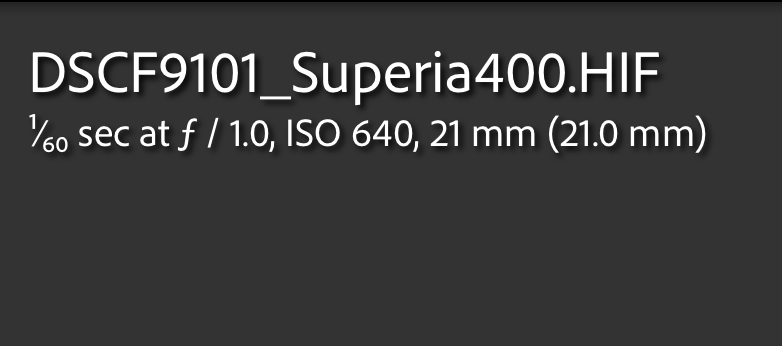
Since Fuji doesn't show a drive when importing via USB, I plan to remove the SD card from the camera to transfer images. I prefer the SD card to appear on my Mac so I can rename the files directly on the card before importing them into Lightroom. This way, I can run a script that tags the files with my recipe names or the Fuji simulation I used. Currently, I'm only shooting HEIF with my Fuji cameras.
Here is how a file looks when imported into Lightroom:
maly149 wrote:
Some users on the Fuji forum reported changing that setting caused it to show up on their Macs, but I haven't been able to verify myself.
Basically works the same as AUTO. The issue I had was the Fuji supplied cable. Once I used a cable that supports data, the X-T5 showed up in Lightroom.
Fred Miranda wrote:
Thanks for the link Jack. I was thinking that if I have to remove the card from the camera, I just insert into the Macbook Pro SD slot.
, of course. I forgot the XT5 is only SD cards. My XH2 uses both CFx and SD, hence the reader.
mdude85 wrote:
Yes, if you go to menu > connection settings > connection mode and select "USB card reader" then it will show up as a drive.
More instructions can be found at pgs. 255-256 of the XT5 manual
Perhaps this is the behavior on PCs, not Macs.
If you use a Mac and set your camera to USB card reader mode, does it show up as a drive when plugged in? I don't see it appearing on mine. I've tried with several cables.
Update: I just read the manual, and on a Mac, the camera does not show up as a drive. Instead, you need to use a Mac app called "Image Capture" (this is my first time using this app ).
But yes, the camera appears in Image Capture the same way it does in Lightroom, as long as you use a data-compatible cable.
Fred Miranda wrote:
Update: I just read the manual, and on a Mac, the camera does not show up as a drive. Instead, you need to use a Mac app called "Image Capture" (this is my first time using this app ).
But yes, the camera appears in Image Capture the same way it does in Lightroom, as long as you use a data-compatible cable.
When looking at my Fuji earlier, I tried Image Capture since that's what the manual calls out. Didn't work for me, though I use that same USB-C cable for all sorts of things, Nikon data included.
I assume Fuji X Raw Studio would work too, though only a guess.
RoamingScott wrote:
When looking at my Fuji earlier, I tried Image Capture since that's what the manual calls out. Didn't work for me, though I use that same USB-C cable for all sorts of things, Nikon data included.
I assume Fuji X Raw Studio would work too, though only a guess.
Image Capture worked for me when connecting the X100VI or X-T5 via a USB-C cable that supports data transfer. The included Fuji cable does not work for me, so I assume it’s for charging only.
I prefer importing directly to Lightroom if I use the cable, but for now, I will just use the SD card.


 , of course. I forgot the XT5 is only SD cards. My XH2 uses both CFx and SD, hence the reader.
 ).
).