p.1 #1 · MBP M4 Pro 48GB RAM vs M4 Max 36GB RAM for LR advice
Any opinions on the relative performance of 14inch MBPs with Nano-texture display for editing Fuji GFX 100S RAW files in LR classic on location (tethered shooting, card ingestion, importing, applying custom profiles and develop presets, masking, exporting):
I was hoping to spend $3500 or less, as I will wait for M4 or M5 Mac Studio for my main desktop processing in 2025 which I bet will be over $4500. I currently have an M1 Ultra Mac Studio which I'm quite happy with, though it can be slowish when i have big composite layered files in PS (3GB +). Right now I use a M1Pro MBP 16inch with 32GB RAM, which is okay, but quite slow to get full previews quickly to check focus.
p.1 #2 · MBP M4 Pro 48GB RAM vs M4 Max 36GB RAM for LR advice
Easy ... get the Max.
Even though the memory is 36GB vs. 48GB, the bandwidth of the memory on the Max is 2X the Pro. So, that's 36 *2 =72 (relative) vs. 48 *1 = 48.
Also, the 14" will run warmer than your 16". The extra lanes of pipeline will distribute heat better in the Max vs. the Pro. You'll also finish quicker, and be less prone to throttling.
I ran through this back when I was comparing 14 vs. 16 configs and Pro vs. Max configs before I got my MBP Max (M2) 64GB. Yeah, the $$$ is taller, but (imo) it's worth it.
If $$$ is "that" tight ... drop the SSD to 1TB, and augment with external. Use the 1TB savings $$$ to put toward the Max (vs. Pro), and or more memory.
p.1 #3 · MBP M4 Pro 48GB RAM vs M4 Max 36GB RAM for LR advice
Thanks for your advice, @RustyBug.
That’s a pretty compelling argument for the Max. I’m hoping there will be some benchmarks to prove it. I’ll have to think how easily I can shift storage to external new T5 enclosures—at least the speed difference between internal and external will be less than before.
RustyBug wrote:
Easy ... get the Max.
Even though the memory is 36GB vs. 48GB, the bandwidth of the memory on the Max is 2X the Pro. So, that's 36 *2 =72 (relative) vs. 48 *1 = 48.
Also, the 14" will run warmer than your 16". The extra lanes of pipeline will distribute heat better in the Max vs. the Pro. You'll also finish quicker, and be less prone to throttling.
I ran through this back when I was comparing 14 vs. 16 configs and Pro vs. Max configs before I got my MBP Max (M2) 64GB. Yeah, the $$$ is taller, but (imo) it's worth it.
If $$$ is "that" tight ... drop the SSD to 1TB, and augment with external. Use the 1TB savings $$$ to put toward the Max (vs. Pro), and or more memory....Show more →
p.1 #4 · MBP M4 Pro 48GB RAM vs M4 Max 36GB RAM for LR advice
ptakeuchi wrote:
Thanks for your advice, @RustyBug.
That’s a pretty compelling argument for the Max. I’m hoping there will be some benchmarks to prove it. I’ll have to think how easily I can shift storage to external new T5 enclosures—at least the speed difference between internal and external will be less than before.
See the Pano diff's at 32GB between Pro vs. 32GB Max from Art in the other threads. The Pro takes 2X as long to process as the Max.
p.1 #5 · MBP M4 Pro 48GB RAM vs M4 Max 36GB RAM for LR advice
@RustyBug, and what do you think about multitasking with other apps, Safari, Nikon Camera Control, email, etc, when I have 48GB vs 36GB RAM?
I can see the benefit of Max finishing tasks quicker so the other apps can be more responsive if I'm hitting memory full walls, but then I can see not having enough storage (1TB vs 2TB) for giant onboard scratch for VM swapping and then slowing down. It is so much more convenient to shoot tethered and only worry about USB-C cable disconnecting, rather than both TB5 disk and camera. Tradeoffs. The MBP is primarily for travel and location shoots, won't be doing that much giant compositing in PS which definitely benefits from having 64GB or more of RAM.
p.1 #6 · MBP M4 Pro 48GB RAM vs M4 Max 36GB RAM for LR advice
ptakeuchi wrote:
@RustyBug@, and what do you think about multitasking with other apps, Safari, Nikon Camera Control, email, etc, when I have 48GB vs 36GB RAM?
I can see the benefit of Max finishing tasks quicker so the other apps can be more responsive if I'm hitting memory full walls, but then I can see not having enough storage (1TB vs 2TB) for giant onboard scratch for VM swapping and then slowing down. It is so much more convenient to shoot tethered and only worry about USB-C cable disconnecting, rather than both TB5 disk and camera. Tradeoffs. The MBP is primarily for travel and location shoots, won't be doing that much giant compositing in PS which definitely benefits from having 64GB or more of RAM....Show more →
For multi-tasking, anything north of 24GB is fine, imo. It isn't till you start doing some "heavy lifting" that the Max vs. Pro reveals itself. If folks never do (or rarely) that kind of heavy lifting, then the Max and more memory are a luxury, rather than a need.
If you do some heavy lifting with any sense of regularity (e.g. let's say I pano stitch once or twice a month), then you'll appreciate having it when you go there. And, of course if you are a regular heavy lifter ... well, then it's not even a question to be asked. Then, the question moves to Max vs. Ultra.
p.1 #7 · MBP M4 Pro 48GB RAM vs M4 Max 36GB RAM for LR advice
ptakeuchi wrote:
@RustyBug@, and what do you think about multitasking with other apps, Safari, Nikon Camera Control, email, etc, when I have 48GB vs 36GB RAM?
I can see the benefit of Max finishing tasks quicker so the other apps can be more responsive if I'm hitting memory full walls, but then I can see not having enough storage (1TB vs 2TB) for giant onboard scratch for VM swapping and then slowing down. It is so much more convenient to shoot tethered and only worry about USB-C cable disconnecting, rather than both TB5 disk and camera. Tradeoffs. The MBP is primarily for travel and location shoots, won't be doing that much giant compositing in PS which definitely benefits from having 64GB or more of RAM....Show more →
I typically have 10+ apps open in the background and a TON of tabs perpetually open in Safari. And my M1 Pro is only 16GB. My main 'heavy lifting' apps are LRC and Photo Mechanic. Sometimes those can bit a little laggy but maybe I have high tolerance for this and am able to get by OK. But I am surprised at how well everything functions with minimal RAM. Activity Monitor indicates a fair amount of swap used, but memory pressure even under high loads rarely rises beyond yellow.
I agree about going with Max over Pro. While CPU intensive tasks likely won't see much difference, anything that relies on GPUs will benefit from the 2x higher core count. For example Adobe Enhance/Denoise. I have 1TB in my MBP and I find that tight, and I'm only processing 24MP files. But I typically shoot high volume at events. With TB3/4 Acasis NVMe enclosures I'm finding that the SSDs hit the max TB3/4 throughput as long as there is enough fast cache available during sustained writes. TBH, approaching 3GB/s read/write and I can't say I notice any lagginess that can be traced to that transfer speed.
For travel/location work, I strongly prefer the 14" option (actually wish it could be even smaller) even if thermal management isn't as good, or battery capacity as high, as the 16".
p.1 #8 · MBP M4 Pro 48GB RAM vs M4 Max 36GB RAM for LR advice
Whichever you choose, I wouldn't get the nano-texture display. With a laptop you can easily move to a location where there is no direct light source behind you.
p.1 #9 · MBP M4 Pro 48GB RAM vs M4 Max 36GB RAM for LR advice
Thanks, @RustyBug. I can see that pano stitching and other compositing does benefit with Max chips.
This will be the first time I consider 14-inch for a laptop. Looking forward to the lighter load, though I hope I will get over the loss of bigger display and more often fan noise . Will wait a couple of weeks to see actual user reviews of Max and Pro versions, keeping in mind your advice.
My main performance requirements are for shooting tethered and getting fast previews in LR classic with develop and calibration presets to know if got the shot asap. Shooting both Nikon Z8 and Fuji GFX 100s. I'm leaning towards the Max, but my budget is telling me Pro. Will be definitely getting an Ultra Studio next year for all my heavy lifting with 3 displays, and TB storage.
RustyBug wrote:
For multi-tasking, anything north of 24GB is fine, imo. It isn't till you start doing some "heavy lifting" that the Max vs. Pro reveals itself. If folks never do (or rarely) that kind of heavy lifting, then the Max and more memory are a luxury, rather than a need.
If you do some heavy lifting with any sense of regularity (e.g. let's say I pano stitch once or twice a month), then you'll appreciate having it when you go there. And, of course if you are a regular heavy lifter ... well, then it's not even a question to be asked. Then, the question moves to Max vs. Ultra. ...Show more →
p.1 #10 · MBP M4 Pro 48GB RAM vs M4 Max 36GB RAM for LR advice
Thanks for your comment, @rscheffler.
My current capture laptop is an M1 Pro 32GB 16" 1TB which does pretty well, but it is heavy transporting and I'm constantly juggling files for space. My RAW files are bigger: 45 and 100MP, so probably why it's a bit more laggy. I have the same Acasis enclosures with NVMEs, which I totally love. Not sure if there will be affordable TB5 versions anytime soon. I don't really use them for anything but storage and transfer. Are you shooting tethered to them and storing images and LR catalogs on them during shoots? That makes me nervous with cable management issues when shooting handheld and moving around. Not sure how robust LR catalogs are if there is sudden USB C cable disconnect.
rscheffler wrote:
I typically have 10+ apps open in the background and a TON of tabs perpetually open in Safari. And my M1 Pro is only 16GB. My main 'heavy lifting' apps are LRC and Photo Mechanic. Sometimes those can bit a little laggy but maybe I have high tolerance for this and am able to get by OK. But I am surprised at how well everything functions with minimal RAM. Activity Monitor indicates a fair amount of swap used, but memory pressure even under high loads rarely rises beyond yellow.
I agree about going with Max over Pro. While CPU intensive tasks likely won't see much difference, anything that relies on GPUs will benefit from the 2x higher core count. For example Adobe Enhance/Denoise. I have 1TB in my MBP and I find that tight, and I'm only processing 24MP files. But I typically shoot high volume at events. With TB3/4 Acasis NVMe enclosures I'm finding that the SSDs hit the max TB3/4 throughput as long as there is enough fast cache available during sustained writes. TBH, approaching 3GB/s read/write and I can't say I notice any lagginess that can be traced to that transfer speed.
For travel/location work, I strongly prefer the 14" option (actually wish it could be even smaller) even if thermal management isn't as good, or battery capacity as high, as the 16"....Show more →
p.1 #11 · MBP M4 Pro 48GB RAM vs M4 Max 36GB RAM for LR advice
@b]jj1804, is that mostly about cost-saving, or do you find that the nano-texture changes color balance or creates other problems. I know that it will not solve the direct light glare on the screen, but it would be nice when it's less sever and annoying not to have to use a scrim or t-shirt when ambient is raking the screen.
jj1804 wrote:
Whichever you choose, I wouldn't get the nano-texture display. With a laptop you can easily move to a location where there is no direct light source behind you.
p.1 #12 · MBP M4 Pro 48GB RAM vs M4 Max 36GB RAM for LR advice
In another thread @jhapeman just received a MBP with the nano texture screen and was raving about it... Problem with location work is that sometimes you don't have as much freedom of movement as you might expect and simultaneously can't control the ambient conditions to sufficiently eliminate screen reflections.
ptakeuchi wrote:
Thanks for your comment, @rscheffler.
My current capture laptop is an M1 Pro 32GB 16" 1TB which does pretty well, but it is heavy transporting and I'm constantly juggling files for space. My RAW files are bigger: 45 and 100MP, so probably why it's a bit more laggy. I have the same Acasis enclosures with NVMEs, which I totally love. Not sure if there will be affordable TB5 versions anytime soon. I don't really use them for anything but storage and transfer. Are you shooting tethered to them and storing images and LR catalogs on them during shoots? That makes me nervous with cable management issues when shooting handheld and moving around. Not sure how robust LR catalogs are if there is sudden USB C cable disconnect. ...Show more →
My configuration would definitely be better with 2TB internal, but budget at the time I purchased was somewhat constrained and I figured I could just use external SSD. That generally works well but I never do tethering. I have several of the Acasis enclosures and use one with 4TB as the primary 'work in progress' drive and regularly back up using CCC to the other enclosures, which is nice and fast over TB. Once projects are done they're migrated to HDD storage. LR catalog is on internal storage but I typically make a new catalog for each project and save it with the image files once the project is done.
I came from a ~2010 iMac that surprisingly still did OK with 18-24MP files, but was useless for anything GPU intensive. The M1 Pro was a massive speed bump, but I didn't anticipate the impact the new "AI" tools would have on workflow and processing times. I find I now use AI masks and Enhance/Denoise a lot in LR, and the latter definitely benefits from GPU core quantity. In fact I now run everything through Denoise because of how effectively it 'tightens up' fine detail sharpness. Had I known this, I probably would have stretched for an M1 Max. IMO that's the gray zone - not knowing how future software features will utilize CPU and GPU cores. I'd hedge my bets by maximizing GPU core count based on budget. Then RAM and finally internal storage as the lowest priority because of fast external TB3/4/5 options.
p.1 #13 · MBP M4 Pro 48GB RAM vs M4 Max 36GB RAM for LR advice
I saw that @jhapeman@ quote about nano texture. Leaning that way, but have survived without it, so will think if the $150 is better spent elsewhere.
I am leaning toward 2TB now, just very convenient not to shoot with external drives, and do all my tethered shoot and basic LR work on the MBP then copy to external Acacias TB4 drive and load onto my M1 Ultra Studio for the final edits and PS work if necessary.
I use LR similarly for freelance work, save my LR projects with the job folder of RAW files and processed Tiffs and jpegs and then move to HD archives.
I just watched the latest ArtIsRight video about M4 Max:
I really like his content and fairly unbiased, though I wish he'd add percentage differences to the results. And while I know I can't complain about free benchmarks, I wish the RAM was similar in the tests to truly see the processor differences. Apple perhaps purposely does this so it is very hard to compare apples to apples-pun intended. And I do wonder how much Apple leans on Adobe and other software developers to optimize code for the latest and premium machines over consumer and legacy models. Makes me wonder if as few as two brilliant programmers could optimize certain LR/PS processes on multicore CPU and GPUs 10% in as little as 2 days.
At this point, I'm probably going to stick with an M4 Pro and get 48GB RAM and 2TB internal. The LRC import test only revealed a 2% speed advantage with Max and that was with more RAM. Exporting jpegs from LRC was 21% faster on Max compared with Pro, though with that 50% more RAM. And the denoise and large panorama merge tests did show about 20+% advantage on Max. I don't do that much video at this point which clearly favors the Max. The AI masking synching test didn't reveal much difference either and I do that a lot. So while denoise, export, and panorama favor the Max, those are operations, I'm more likely to queue up and step away from the laptop for a break so don't effect my flow that much. Speed of preview creation and AI masking I'm doing all during a shoot and I need to see the results on the fly and it seems the M4P is only slightly slower than M4M. The better results by M4P mini was a bit surprising on the longer tests and this will be where a 14vs 16 inch MBP is limited by thermal issues, but when you need a laptop, you need a laptop.
Anyway, the most important comparison was how an M4P MBP would perform next to my current M1P MBP and that seems to be 25-50% faster which will be a noticeable performance benefit in my shoots.
rscheffler wrote:
In another thread @jhapeman@@ just received a MBP with the nano texture screen and was raving about it... Problem with location work is that sometimes you don't have as much freedom of movement as you might expect and simultaneously can't control the ambient conditions to sufficiently eliminate screen reflections.
My configuration would definitely be better with 2TB internal, but budget at the time I purchased was somewhat constrained and I figured I could just use external SSD. That generally works well but I never do tethering. I have several of the Acasis enclosures and use one with 4TB as the primary 'work in progress' drive and regularly back up using CCC to the other enclosures, which is nice and fast over TB. Once projects are done they're migrated to HDD storage. LR catalog is on internal storage but I typically make a new catalog for each project and save it with the image files once the project is done.
I came from a ~2010 iMac that surprisingly still did OK with 18-24MP files, but was useless for anything GPU intensive. The M1 Pro was a massive speed bump, but I didn't anticipate the impact the new "AI" tools would have on workflow and processing times. I find I now use AI masks and Enhance/Denoise a lot in LR, and the latter definitely benefits from GPU core quantity. In fact I now run everything through Denoise because of how effectively it 'tightens up' fine detail sharpness. Had I known this, I probably would have stretched for an M1 Max. IMO that's the gray zone - not knowing how future software features will utilize CPU and GPU cores. I'd hedge my bets by maximizing GPU core count based on budget. Then RAM and finally internal storage as the lowest priority because of fast external TB3/4/5 options. ...Show more →
p.1 #14 · MBP M4 Pro 48GB RAM vs M4 Max 36GB RAM for LR advice
When I was looking into which model Studio Display to choose most people recommended not to get the nano texture display because it's so fragile, scratches easily and everything is less sharp and lower contrast. I get why people want to get a matte display - I wanted to want it too but the downsides were just so glaring (haha) that I just got the standard display. I have a window on my left side facing east, so in the morning I roll down the blinds but during the day it's fine.
I'd check online reviews whether the nano texture display on a MBP is now better than it was before and if it is really necessary. It'd be even better if you can check your local store to see them side by side.
p.1 #15 · MBP M4 Pro 48GB RAM vs M4 Max 36GB RAM for LR advice
ptakeuchi wrote:
Anyway, the most important comparison was how an M4P MBP would perform next to my current M1P MBP and that seems to be 25-50% faster which will be a noticeable performance benefit in my shoots.
Personally, for my kind of workflow I disagree. Yes, the relative gains look phenomenal 25-50% faster, wow. But I don't do 1000 file raw exports on the daily and what I looked at in this review is at absolute time gained when stitching panos, ai-denoise, masking and there the difference in absolute terms (seconds) isn't that impressive.
I'm a happy camper with my M1M and will be for a long time. The jump in performance for my workflow seems more incremental than substantial. Coming from an Intel based Mac machine the performance boost will be much more noticeable than upgrading in the M-chip family, IMHO. YMMV of course.
p.1 #16 · MBP M4 Pro 48GB RAM vs M4 Max 36GB RAM for LR advice
I went to the Apple store last night to examine the MBP M14 Pro and Max with and without nano texture screens. I looked at the same desktop image on both and was surprised to find that the nano matte texture displayed lower contrast than the regular glossy. Was almost like the difference between sRGB and Adobe 1998 RGB. I should have checked the calibration profile for the display on each to see if they were different. So perhaps the nano-texture is closer to what my Mac Studio displays are like--NEC Multisync PA302Ws. But when I picked up the laptops and angled the screens around to catch the overhead lights in the store, I found that the nano screens actually had more annoying glare, a kind of dull overall glow, vs the hotspots on the regular glossy screen. Not sure if outside sunlight would behave differently. Anyway, while there is some benefit from minor side light glare on the nano screen, it wasn't that compelling and I think I will pass to save $150.
So now I'm leaning towards the Pro version with 48GB RAM and 2TB drive vs the Max with 36GB and 2TB drive for $400 more. I'm not in a big hurry to purchase--just by year end for tax write off--so perhaps there will be LR benchmarks that explore what the RAM difference between the machines makes. I'm sure the Max version will be faster for everything, but running multiple apps simultaneously and working in PS with layered big files may favor the Pro with more RAM.
p.1 #17 · MBP M4 Pro 48GB RAM vs M4 Max 36GB RAM for LR advice
ptakeuchi wrote:
I went to the Apple store last night to examine the MBP M14 Pro and Max with and without nano texture screens. I looked at the same desktop image on both and was surprised to find that the nano matte texture displayed lower contrast than the regular glossy. Was almost like the difference between sRGB and Adobe 1998 RGB. I should have checked the calibration profile for the display on each to see if they were different. So perhaps the nano-texture is closer to what my Mac Studio displays are like--NEC Multisync PA302Ws. But when I picked up the laptops and angled the screens around to catch the overhead lights in the store, I found that the nano screens actually had more annoying glare, a kind of dull overall glow, vs the hotspots on the regular glossy screen. Not sure if outside sunlight would behave differently. Anyway, while there is some benefit from minor side light glare on the nano screen, it wasn't that compelling and I think I will pass to save $150.
So now I'm leaning towards the Pro version with 48GB RAM and 2TB drive vs the Max with 36GB and 2TB drive for $400 more. I'm not in a big hurry to purchase--just by year end for tax write off--so perhaps there will be LR benchmarks that explore what the RAM difference between the machines makes. I'm sure the Max version will be faster for everything, but running multiple apps simultaneously and working in PS with layered big files may favor the Pro with more RAM....Show more →
The nano/matte thing is very personal IMO. In a laptop I love it because I just can't stand glare in any way and with a laptop you frequently have no control over the nearby light. I do think the Apple Store is probably one of the worse places to judge it however, because the lighting there is pretty odd and not at all like the usual situations in which a laptop will be used. What I like about the nano is it just kills all of the odd off-axis glares that on the glossy screen reduce contrast or cause eye strain. Direct light right on the screen like you did is a bit of a red herring though--none of us will work with a bright light shining right on any screen; you move to get rid of that. One final thing I'd say about the nano is it looks best in dark mode, but I also always prefer using dark mode anyway. Those are the kinds of personal things that can affect how you feel about nano/matte vs. glossy.
As for your use case, if you are creating previews at import, etc. then honestly the Max will be superior for your use cases than the Pro with more RAM. Many of the tasks you listed are going to lean heavily on GPU cores as well and that's a big difference between the Pro and Max. As @RustyBug pointed out the memory bandwidth is also much higher in the Max vs. Pro and that will absolutely impact performance on tasks like masking, etc.
FWIW, I have a new OWC TB5 drive and honestly for day to day use you'll never notice the gain from TB4 to TB5. The real benefits in TB5 will be seen when doing mass migrations of large amounts of data or driving higher refresh rates on high-resolution external monitors.
p.1 #19 · MBP M4 Pro 48GB RAM vs M4 Max 36GB RAM for LR advice
EB-1 wrote:
I really prefer a matte display even if the contrast is a bit lower. I have struggled in some hotel rooms with horrible glares on a glossy display.
EBH
+1 preference toward a matte display.
That said, when I went from my Thinkpad Extreme to the MBP ... it was a bump in gloss for sure that I had to give up my TP's nice matte.
BUT, I kinda learned to get used to it, with minor angle adjustments. Still, if they had offered the matte display in the MBP when I got mine ... I probably would have went for it (sucked up the $$$ diff) back then.
p.1 #20 · MBP M4 Pro 48GB RAM vs M4 Max 36GB RAM for LR advice
EB-1 wrote:
I really prefer a matte display even if the contrast is a bit lower. I have struggled in some hotel rooms with horrible glares on a glossy display.
EBH
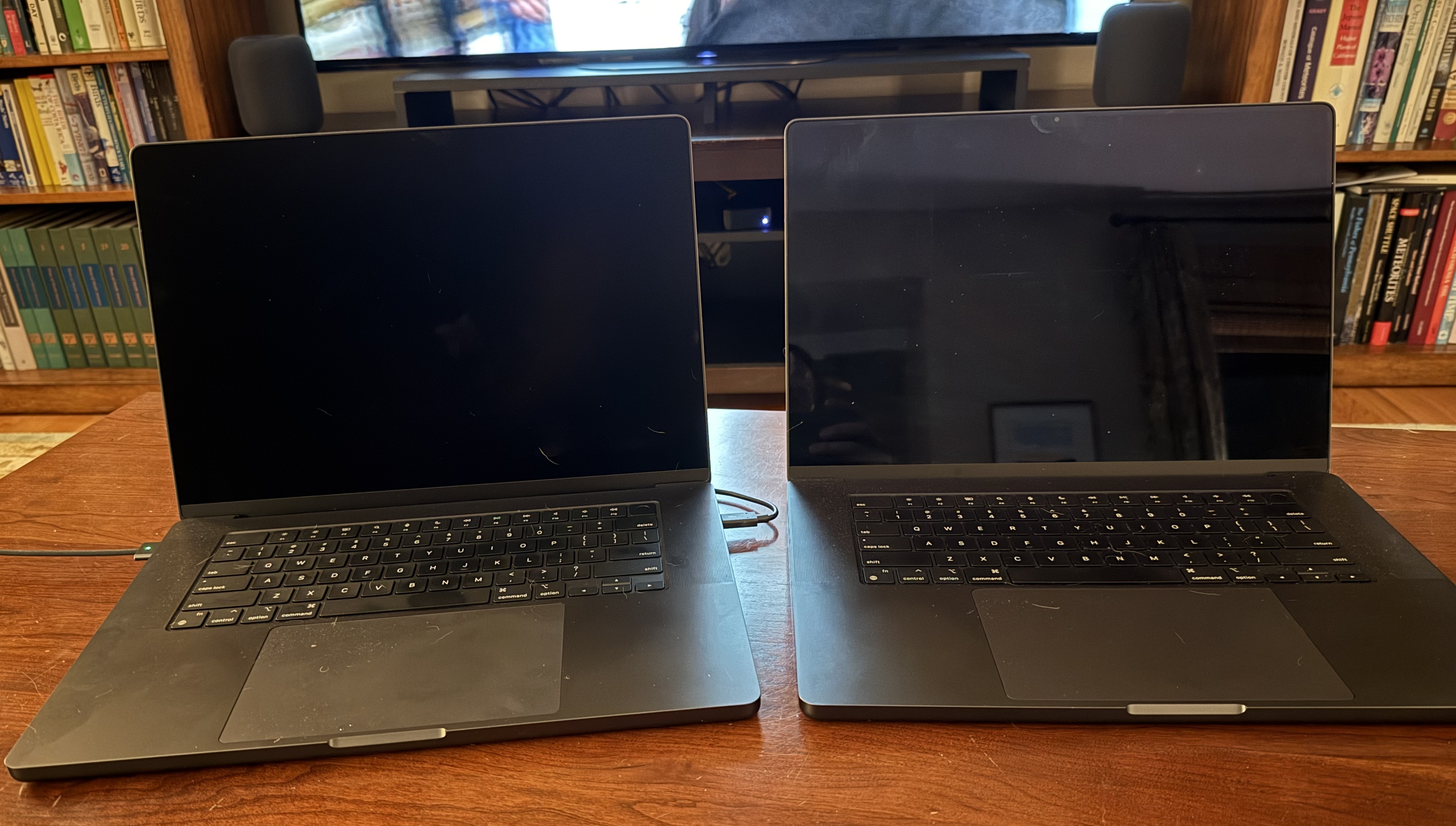
IMO the difference is negligible because what most people don't realize is that glare *also* reduces your contrast. I just took this picture a moment ago in my living room. Both screens are at the same angle to try and catch just the background reflection of the wall and ceiling. Note that the nano on the left shows virtually no reflection at all, while the M3 Max on the right reflects the entire wall and ceiling. This isn't a direct light on the screen; this is the type of reflections you get all of the time, even in a relatively low-light room (only two 60W lights on in the entire room). Again, some people may just not like the matte look of the nano and that's fine...but I do think that at the end of the day you lose a lot more real contrast with glossy than you might realize.