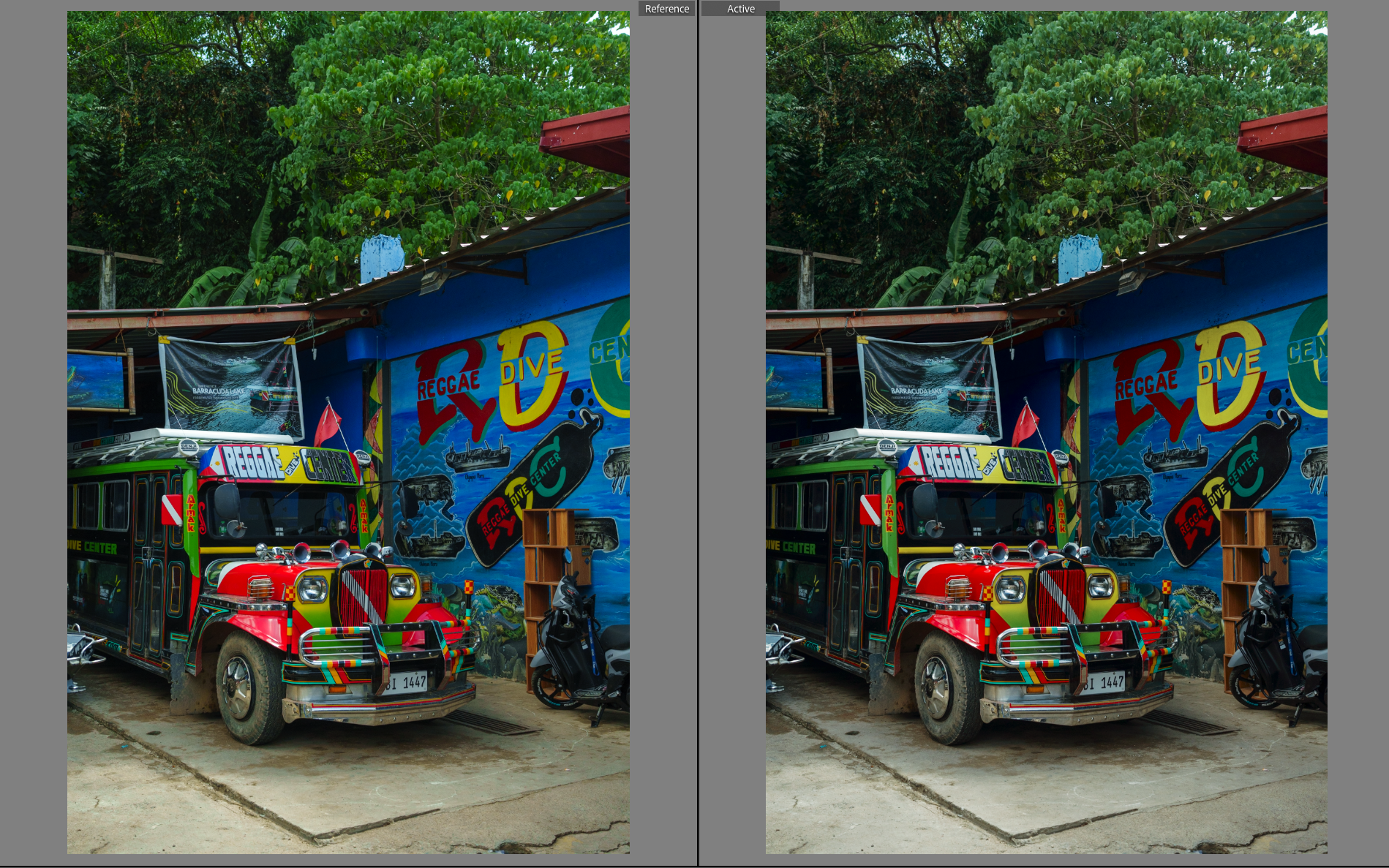
p.1 #1 · Cobalt image Fuji digital emulation and film negative
I own A7R5 and am interested in learning more about fuji colors. I also use Cobalt Image profiles.
I found fuji profiles are available in two packages. Film negatives and digital simulations. I don’t know which one to pick as I don’t want to spend over $100 for both.
Can someone with the experience using either profiles help me decide?
p.1 #2 · Cobalt image Fuji digital emulation and film negative
Are you interested in emulating Fuji film or digital cameras? That’s the decision.
Younjulius wrote:
I own A7R5 and am interested in learning more about fuji colors. I also use Cobalt Image profiles.
I found fuji profiles are available in two packages. Film negatives and digital simulations. I don’t know which one to pick as I don’t want to spend over $100 for both.
Can someone with the experience using either profiles help me decide?
p.1 #4 · Cobalt image Fuji digital emulation and film negative
In principle, Fuji digital cameras have color profiles intended to render scenes similar to how various of their film types would have. Many people who own Fuji cameras indicate happiness with the fidelity of that, yet different Fuji cameras (think price point and how recent they were released) differ slightly in what Velvia or others look like.
Cobalt digital profiles were built mapping different cameras to a common profile (Cobalt Standard), from which any camera could be mapped to any other camera or camera profile. So you could shoot with a Sony a7iii and have the output profile look like Nostalgic Negative from a Fuji GFX 100 (one of my most commonly used Cobalt profiles).
For the film profiles, Cobalt tried to do essentially what Fuji tried to do in the first place: map a film response to a digital profile.
If everything was done perfectly, and you wanted to faithfully reproduce Velvia 50 film, in theory, you should use the Cobalt Elite Fuji Film set. I find that to be less over saturated than when using Velvia digital emulation from Cobalt. I have never owned a Fuji digital camera, so I can’t say whether their emulation of Velvia is better than Cobalt’s. I can say that Cobalt’s digital Velvia looks different when using their GFX 100 vs their lower tier Fuji body (XT100??). That would seem to mirror reviews of those cameras, saying the colors on the GFX are superior.
Not sure if this helps or not. YMMV, but I have found the Elite film versions less often used than the digital emulations for what I shoot. As mentioned, for most things I shoot, the GFX 100 Nostalgic Negative or the Fuji S5 Pro ae my most frequently used. I believe the latter is in their CCD fever set.
p.1 #5 · Cobalt image Fuji digital emulation and film negative
Grenache wrote:
In principle, Fuji digital cameras have color profiles intended to render scenes similar to how various of their film types would have. Many people who own Fuji cameras indicate happiness with the fidelity of that, yet different Fuji cameras (think price point and how recent they were released) differ slightly in what Velvia or others look like.
Cobalt digital profiles were built mapping different cameras to a common profile (Cobalt Standard), from which any camera could be mapped to any other camera or camera profile. So you could shoot with a Sony a7iii and have the output profile look like Nostalgic Negative from a Fuji GFX 100 (one of my most commonly used Cobalt profiles).
For the film profiles, Cobalt tried to do essentially what Fuji tried to do in the first place: map a film response to a digital profile.
If everything was done perfectly, and you wanted to faithfully reproduce Velvia 50 film, in theory, you should use the Cobalt Elite Fuji Film set. I find that to be less over saturated than when using Velvia digital emulation from Cobalt. I have never owned a Fuji digital camera, so I can’t say whether their emulation of Velvia is better than Cobalt’s. I can say that Cobalt’s digital Velvia looks different when using their GFX 100 vs their lower tier Fuji body (XT100??). That would seem to mirror reviews of those cameras, saying the colors on the GFX are superior.
Not sure if this helps or not. YMMV, but I have found the Elite film versions less often used than the digital emulations for what I shoot. As mentioned, for most things I shoot, the GFX 100 Nostalgic Negative or the Fuji S5 Pro ae my most frequently used. I believe the latter is in their CCD fever set.
Jim...Show more →
Thank you for the kind explanation, Jim. I am curious of GFX100 as well since the camera is well ou of what I can afford.
With my limited exposure to Fuji look, my understanding/expectation is greens and oranges pop more in smooth look.
I’ll be using it for landscape photos with occasional people photos of my friends and family members.
p.1 #6 · Cobalt image Fuji digital emulation and film negative
There is no digital emulation from Fuji that accurately replicates actual Fujifilm's distinctive green tint IMO, so if you're interested in that, you're better of chasing actual film profiles, not Cobalt's copies of what ships on Fuji digicams.
Reala Ace is as close as Fuji has gotten yet and it's still not close.
p.1 #8 · Cobalt image Fuji digital emulation and film negative
I personally think film emulation is a waste of time and money
You simply cannot replicate the look of say Fuji Velvia 50 as viewed through a slide projector with film emulation
The resolution is going to be much better with the slide film for one, because digital projectors are still stuck at 4k / 8MP.
Digital projectors also have a hard time replicating the color volume and saturation from a slide film projector.
What "film emulation" is really doing is emulating what a digital scan of a slide film looks like, and IMO too much is lost between the image shown on a slide projector and the digital scan of that slide.
p.1 #10 · Cobalt image Fuji digital emulation and film negative
I have both. I’m very happy with the current release of the Fuji Digital package. I also like much the discontinued Fuji Digital X-Pro2 profiles - less “loud”.
I can’t find application for the Fuji Negative package, however. The Negative package lacks the options of pulled film, which was essential for the film look.
This is with the Sony A7R3, Sony RX1R2 and Canon R5. With my new Canon R8 I like the LrC Faithful colors most. Skintones are soo pleasant.
p.1 #11 · Cobalt image Fuji digital emulation and film negative
Have the Ricoh profiles and the base pack for my gfx, a7r4, and A7cII. I really really like them, the colors look way more pleasing to me. I wish there was a hassleblad color pack but cobalt image said it was really hard. I will probably buy the Leica one next. Happy to post some before after if you are interested.
p.1 #12 · Cobalt image Fuji digital emulation and film negative
If anyone can post some before and after images I’d love to see them. I still have a bunch of the old VSCO films from back in the day but there are no modern camera profiles so it’s now just a bunch of presets. A few of them still look really good though. TIA.
p.1 #14 · Cobalt image Fuji digital emulation and film negative
Interesting thread. I own the base profiles for all of my Sony, Canon, and Nikon digital cameras. I’ve considered buying the Fuji packages but honestly found it very difficult to get an actual list of what simulations are included in each Cobalt package. I guess to me Cobalts website doesn’t appear to have list. Maybe I’m not looking the right place. If anyone can provide a link to a web page they recommend please help me out. Thank you in advance.
p.1 #15 · Cobalt image Fuji digital emulation and film negative
swldstn wrote:
Interesting thread. I own the base profiles for all of my Sony, Canon, and Nikon digital cameras. I’ve considered buying the Fuji packages but honestly found it very difficult to get an actual list of what simulations are included in each Cobalt package. I guess to me Cobalts website doesn’t appear to have list. Maybe I’m not looking the right place. If anyone can provide a link to a web page they recommend please help me out. Thank you in advance.
-Classic Neg
-Nostalgic Neg
-Eterna
-Bleach Bypass
-Reala Ace
-Astia
-Provia
-Classic Chrome
-Velvia
-Pro Neg Hi
-Pro Neg Std
-Sepia
-Acros G
-Acros R
-Acros Ye
-Acros


 ??). That would seem to mirror reviews of those cameras, saying the colors on the GFX are superior.