0
This topic is in the 2023 archive. You can read it and like its posts here. It is read only.
Archive 2023Recent Film Shots -- How are You Digitizing?
p.1 #1Recent Film Shots -- How are You Digitizing?
I'm loving the thread where people are posting their recent film shots.
Post your recent film shots!
As someone who is thinking about getting back into film I have to ask -- How are you digitizing your recent film images?
Post your recent film shots!
As someone who is thinking about getting back into film I have to ask -- How are you digitizing your recent film images?
Dec 13, 2023 at 11:21 PM


p.1 #3Recent Film Shots -- How are You Digitizing?
Canon 5DSr with EF 100mm f2.8 Macro USM on a copy stand
Essential Film Holder
Inexpensive high CRI LED panel
Negative Lab Pro
Essential Film Holder
Inexpensive high CRI LED panel
Negative Lab Pro
Dec 14, 2023 at 01:59 AM

p.1 #5Recent Film Shots -- How are You Digitizing?
I don't develop my own film anymore, so my lab does it all including scans. I don't own any macro lenses and since my lab charges only $5 Canadian per roll for scans I'd have to shoot a lot of film to make my own scanning setup worth the expense. I did buy a Plustek since I plan to do some home developing next year, but the lab scans are just as good if not better (they use a Noritsu and also have a Fuji scanner for those who prefer it). A camera scanning setup would have been a bit more expensive but would give me the option of scanning 120 film as well if I ever get a medium-format film camera.
Dec 14, 2023 at 06:38 AM
p.1 #6Recent Film Shots -- How are You Digitizing?
Two kind of scanners. Plustek 8200 Ai for 35 mm preferably, for larger negatives Epson V850 scanner. Since the Plustek only allows manual movement between negative frames to scan, I also use the V850 for bulk 35 mm negative scanning since it is faster in very similar if not the same quality at 3200 to 3600 ppi. Scanner software is SilverFast 8 with both scanners. The software has it quirks especially for color negatives with IMO bad color profiles for films provided, but it works very well for B&W including decent dust removal after the scan.
Dec 14, 2023 at 07:07 AM
p.1 #7Recent Film Shots -- How are You Digitizing?
I just pay the lab to do it. They send me a link to download the scans.
Dec 14, 2023 at 03:51 PM
p.1 #8Recent Film Shots -- How are You Digitizing?
I'll take a picture showing my setup later but it's quite simple:
I use a Fuji X-E4 (26MP APS-C) with a Laowa 65/2.8 2:1 Macro lens which is a superb combo. Achieving high resolution from center to edge kicks in at f/4, but I typically stop down to f/5.6 to minimize vignettingg.
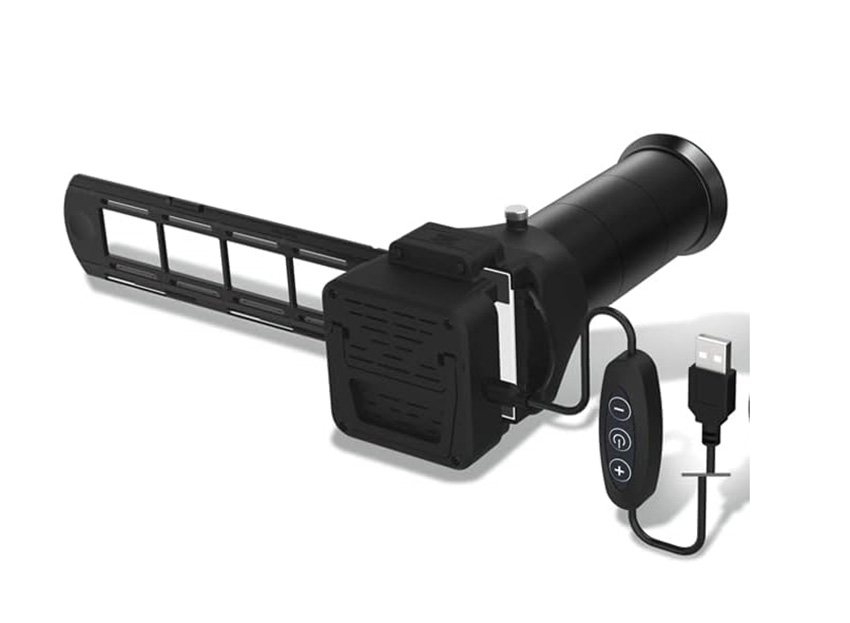
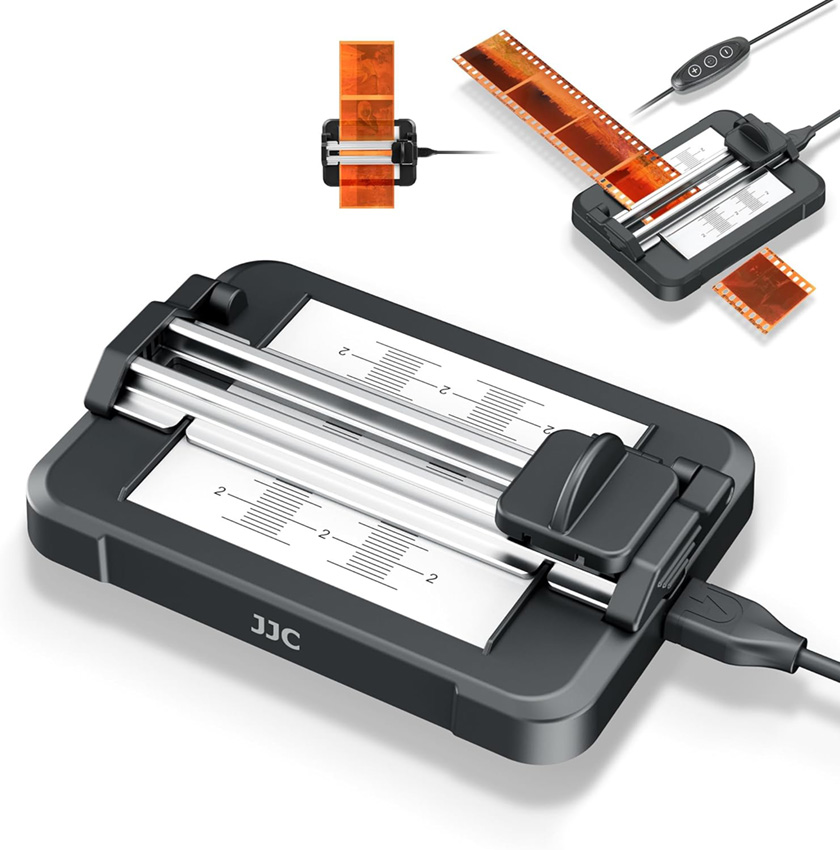
I select 6 exposures from the developed roll of film and use a film cutter for precise cutting. Afterward, I load the cut film into a photo slide with a LED backlight for scanning.
(see images of both cutter and photo slider with LED below)
To control lighting, I crafted a box with the entire interior lined with black felt. I position the photo slider inside this box to eliminate light from the top and sides. The back LED ensures uniform illumination and usually my shutter speeds are around 1/200s. I make sure to use manual exposure with daylight WB.
It's a very straightforward and budget setup. I've compared results with higher-megapixel cameras, but I only got larger files, not higher resolution for 35mm film.
photo slide with a LED backlight
film cutter
I use a Fuji X-E4 (26MP APS-C) with a Laowa 65/2.8 2:1 Macro lens which is a superb combo. Achieving high resolution from center to edge kicks in at f/4, but I typically stop down to f/5.6 to minimize vignettingg.
I select 6 exposures from the developed roll of film and use a film cutter for precise cutting. Afterward, I load the cut film into a photo slide with a LED backlight for scanning.
(see images of both cutter and photo slider with LED below)
To control lighting, I crafted a box with the entire interior lined with black felt. I position the photo slider inside this box to eliminate light from the top and sides. The back LED ensures uniform illumination and usually my shutter speeds are around 1/200s. I make sure to use manual exposure with daylight WB.
It's a very straightforward and budget setup. I've compared results with higher-megapixel cameras, but I only got larger files, not higher resolution for 35mm film.
 |
||
 |
||
|
photo slide with a LED backlight
|
||
 |
||
|
film cutter
Dec 14, 2023 at 04:02 PM
p.1 #9Recent Film Shots -- How are You Digitizing?
Fred Miranda wrote:
film cutter for precise cutting.
Somehow I never knew you could get mini rotary trimmers for film! This seriously eliminates like half of my reasons for not wanting to develop my film myself.
film cutter for precise cutting.
Somehow I never knew you could get mini rotary trimmers for film! This seriously eliminates like half of my reasons for not wanting to develop my film myself.
Dec 14, 2023 at 05:36 PM
p.1 #10Recent Film Shots -- How are You Digitizing?
Lee Saxon wrote:
Somehow I never knew you could get mini rotary trimmers for film! This seriously eliminates like half of my reasons for not wanting to develop my film myself.
That blade is so sharp. I highly recommend this as these little devices just makes the whole process fun.
Fred Miranda wrote
film cutter for precise cutting.That blade is so sharp. I highly recommend this as these little devices just makes the whole process fun.
Dec 14, 2023 at 06:15 PM
p.1 #11Recent Film Shots -- How are You Digitizing?
Epson V850. It is ok for 35mm, but not great. Better for 120. Considering looking into a Nikon Coolscan 9000 or giving camera scanning another try.
Dec 14, 2023 at 09:09 PM
p.1 #12Recent Film Shots -- How are You Digitizing?
Lee Saxon wrote:
Somehow I never knew you could get mini rotary trimmers for film! This seriously eliminates like half of my reasons for not wanting to develop my film myself.
I find that scissors work too. You were thinking you just had to tear the film?
Fred Miranda wrote
film cutter for precise cutting.I find that scissors work too. You were thinking you just had to tear the film?
Dec 14, 2023 at 10:25 PM
p.1 #13Recent Film Shots -- How are You Digitizing?
Desmolicious wrote:
I find that scissors work too. You were thinking you just had to tear the film?
Hahaha no I'm just very clutsy and it's dicey for me to do it freehand with scissors or an x-acto without cutting in the wrong place and messing up a frame, or hurting myself.
I find that scissors work too. You were thinking you just had to tear the film?
Hahaha no I'm just very clutsy and it's dicey for me to do it freehand with scissors or an x-acto without cutting in the wrong place and messing up a frame, or hurting myself.
Dec 14, 2023 at 10:42 PM
p.1 #14Recent Film Shots -- How are You Digitizing?
Lee Saxon wrote:
Hahaha no I'm just very clutsy and it's dicey for me to do it freehand with scissors or an x-acto without cutting in the wrong place and messing up a frame, or hurting myself.

I have a much bigger slicer thingy - I had no idea they made small ones for film! That does look worth getting.
Edit - and I just ordered one.
Desmolicious wrote
I find that scissors work too. You were thinking you just had to tear the film?I have a much bigger slicer thingy - I had no idea they made small ones for film! That does look worth getting.
Edit - and I just ordered one.
Dec 14, 2023 at 10:46 PM
p.1 #15Recent Film Shots -- How are You Digitizing?
I'm really amazed that everyone seems to prefer the use of low output lights and long exposures. I must be thinking about this backwards, because that's the last way that I would try to solve the problem. Am I wrong about that?
My experience with the Nikon ES-1 slide copier was that it worked well enough with a strobe (ok maybe not -- contrast in the image captured was higher than I really wanted it to be), but a lightpad just wasn't bright enough to use a low ISO with an "optimum" aperture and a "safe" shutter speed.
I'm guessing that those of you who are using lightpads, ipads, etc for light sources must be using exceptionally bright light pads or very long exposures. Looking at Desmo's pics I see a shutter speed of 1/2.5 sec (!) at f/11, ISO 64.
You're not running into problems with such low shutter speeds?
What about those of you who are using copy stands and LED lamps? Are you using long shutter speeds too?
I'm thinking that if I were to use long shutter speeds, I'd just end up messing things up. I expect that while my shutter is sitting open I'm going to run into problems with vibration from a passing train, passing trucks, the HVAC fan running (right below my workspace) or some other mode of interference. I've always tried to manage these kinds of lighting situations with a dark environment, a fast shutter speed, and a very brief flash pulse. That controls the problem of stray ambient light, vibration, and all sorts of other problems.
Is my thinking about this wrong?
I understand that when you mount the film carrier directly on the camera that tends to minimize vibration problems b/c the subject moves with the camera, but you don't get as much protection from harmonic motion when you're using a copy stand type of setup that puts the camera on a cantilever mount while it's pointed at the film carrier. On a mount like that the camera could be subject to vibrations that would plague long exposures.
Then there's the need to lock the mirror up, but if you're focusing using live-view then I guess that's not really a problem.
FWIW I tried out the new NS light box that's claimed to be "several stops brighter" than the unit that it replaces. It was definitely not bright enough for short exposures and now I'm thinking about going back to the idea of building a table that transilluminates the film carrier from below using a studio strobe and a diffusion panel.
The community's apparent preference for low power LED lights and long exposures has really got me scratching my head. It seems that everyone's doing the exact opposite of how I think I should approach the problem.
?
Edited on Dec 15, 2023 at 04:42 AM · View previous versions
My experience with the Nikon ES-1 slide copier was that it worked well enough with a strobe (ok maybe not -- contrast in the image captured was higher than I really wanted it to be), but a lightpad just wasn't bright enough to use a low ISO with an "optimum" aperture and a "safe" shutter speed.
I'm guessing that those of you who are using lightpads, ipads, etc for light sources must be using exceptionally bright light pads or very long exposures. Looking at Desmo's pics I see a shutter speed of 1/2.5 sec (!) at f/11, ISO 64.
You're not running into problems with such low shutter speeds?
What about those of you who are using copy stands and LED lamps? Are you using long shutter speeds too?
I'm thinking that if I were to use long shutter speeds, I'd just end up messing things up. I expect that while my shutter is sitting open I'm going to run into problems with vibration from a passing train, passing trucks, the HVAC fan running (right below my workspace) or some other mode of interference. I've always tried to manage these kinds of lighting situations with a dark environment, a fast shutter speed, and a very brief flash pulse. That controls the problem of stray ambient light, vibration, and all sorts of other problems.
Is my thinking about this wrong?
I understand that when you mount the film carrier directly on the camera that tends to minimize vibration problems b/c the subject moves with the camera, but you don't get as much protection from harmonic motion when you're using a copy stand type of setup that puts the camera on a cantilever mount while it's pointed at the film carrier. On a mount like that the camera could be subject to vibrations that would plague long exposures.
Then there's the need to lock the mirror up, but if you're focusing using live-view then I guess that's not really a problem.
FWIW I tried out the new NS light box that's claimed to be "several stops brighter" than the unit that it replaces. It was definitely not bright enough for short exposures and now I'm thinking about going back to the idea of building a table that transilluminates the film carrier from below using a studio strobe and a diffusion panel.
The community's apparent preference for low power LED lights and long exposures has really got me scratching my head. It seems that everyone's doing the exact opposite of how I think I should approach the problem.
?
Edited on Dec 15, 2023 at 04:42 AM · View previous versions
Dec 15, 2023 at 04:34 AM
p.1 #16Recent Film Shots -- How are You Digitizing?
Desmolicious wrote:
Somehow I never knew you could get mini rotary trimmers for film! This seriously eliminates like half of my reasons for not wanting to develop my film myself.I find that scissors work too. You were thinking you just had to tear the film?
you could tear it with your teeth.
Lee Saxon wrote
Fred Miranda wrote
film cutter for precise cutting.you could tear it with your teeth.
Dec 15, 2023 at 04:39 AM
p.1 #17Recent Film Shots -- How are You Digitizing?
coralnut wrote:
…
I'm guessing that those of you who are using lightpads, ipads, etc for light sources must be using exceptionally bright light pads or very long exposures. Looking at Desmo's pics I see a shutter speed of 1/2.5 sec (!) at f/11, ISO 64.
You're not running into problems with such low shutter speeds?
What about those of you who are using copy stands and LED lamps? Are you using long shutter speeds too?
Zero problems. Images are as sharp as they can be pixel peeping. If they weren’t, I wouldn’t be doing it this way.
A fun example doing it the way I do w the Es-2, hand held, iso 64 f10 and the low shutter speed:
Taken w what is arguably the greatest 35mm half frame camera ever made, the Kodak Ektar H35:

And a 100% crop from the image above:

…
I'm guessing that those of you who are using lightpads, ipads, etc for light sources must be using exceptionally bright light pads or very long exposures. Looking at Desmo's pics I see a shutter speed of 1/2.5 sec (!) at f/11, ISO 64.
You're not running into problems with such low shutter speeds?
What about those of you who are using copy stands and LED lamps? Are you using long shutter speeds too?
Zero problems. Images are as sharp as they can be pixel peeping. If they weren’t, I wouldn’t be doing it this way.
A fun example doing it the way I do w the Es-2, hand held, iso 64 f10 and the low shutter speed:
Taken w what is arguably the greatest 35mm half frame camera ever made, the Kodak Ektar H35:
And a 100% crop from the image above:
Dec 15, 2023 at 09:24 AM
p.1 #18Recent Film Shots -- How are You Digitizing?
coralnut wrote:
I'm really amazed that everyone seems to prefer the use of low output lights and long exposures. I must be thinking about this backwards, because that's the last way that I would try to solve the problem. Am I wrong about that?
My experience with the Nikon ES-1 slide copier was that it worked well enough with a strobe (ok maybe not -- contrast in the image captured was higher than I really wanted it to be), but a lightpad just wasn't bright enough to use a low ISO with an "optimum" aperture and a "safe" shutter speed.
I'm guessing that those...Show more →
I've also never had issues using the shutter speeds necessary with an LED panel (1/2 to 1/30). My copy stand is far from top end, but I do use an IR remote and Live View, which eliminates any movement from pushing the shutter button or from mirror slap in my DSLR. Can't really speak to vibrations from HVAC, etc. My set up is on a sturdy counter in the basement on a concrete slab.
I'm really amazed that everyone seems to prefer the use of low output lights and long exposures. I must be thinking about this backwards, because that's the last way that I would try to solve the problem. Am I wrong about that?
My experience with the Nikon ES-1 slide copier was that it worked well enough with a strobe (ok maybe not -- contrast in the image captured was higher than I really wanted it to be), but a lightpad just wasn't bright enough to use a low ISO with an "optimum" aperture and a "safe" shutter speed.
I'm guessing that those...Show more →
I've also never had issues using the shutter speeds necessary with an LED panel (1/2 to 1/30). My copy stand is far from top end, but I do use an IR remote and Live View, which eliminates any movement from pushing the shutter button or from mirror slap in my DSLR. Can't really speak to vibrations from HVAC, etc. My set up is on a sturdy counter in the basement on a concrete slab.
Dec 15, 2023 at 10:21 AM
p.1 #19Recent Film Shots -- How are You Digitizing?
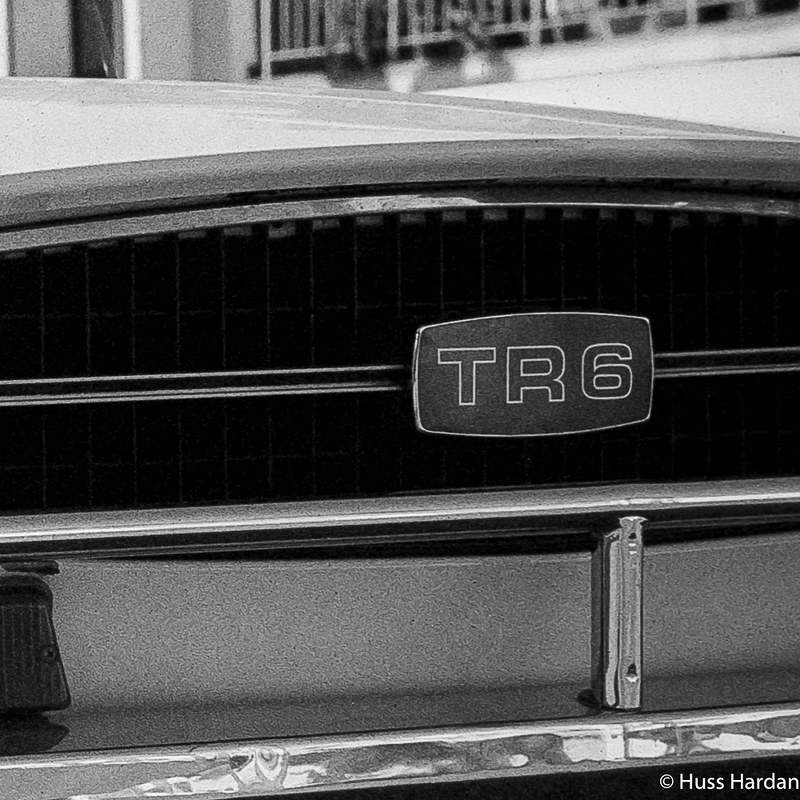
Using a copy stand, f10, low shutter speed. No vibes, as sharp as it can be.
What I do do... is use the three second shutter delay action when I use the copy stand. And my copy stand cost $120 on ebay, new.
Rolleiflex GX

100% crop:

Edited on Dec 15, 2023 at 11:15 AM · View previous versions
What I do do... is use the three second shutter delay action when I use the copy stand. And my copy stand cost $120 on ebay, new.
Rolleiflex GX
100% crop:
Edited on Dec 15, 2023 at 11:15 AM · View previous versions
Dec 15, 2023 at 11:11 AM
p.1 #20Recent Film Shots -- How are You Digitizing?
I used a Plustek Opticfilm 120. Easily the best scanner that was available when I shot film. Maybe not as good as the Nikon Coolscans but very very close and far more reliable.
Extremely easy to use, You can be scanning in seconds once you have the negatives. The film holders are spectacular and hold the film ultra flat. Absolutely effortless. Results equal or exceed anything you can get from a DSLR set up.
Here's a frame of 35mm film scanned. Shot on a Nikon FM2n, likely the 20mm f/2.8 Ais lens.

Extremely easy to use, You can be scanning in seconds once you have the negatives. The film holders are spectacular and hold the film ultra flat. Absolutely effortless. Results equal or exceed anything you can get from a DSLR set up.
Here's a frame of 35mm film scanned. Shot on a Nikon FM2n, likely the 20mm f/2.8 Ais lens.
Dec 15, 2023 at 11:14 AM